
1. Introduction
Thank you for choosing the Lepulse Smart Scale F3. This smart scale is designed to provide comprehensive body composition analysis, helping you track your health and fitness journey. It measures 13 essential body metrics and syncs with the Vihealth app for detailed data management and progress tracking.

Figure 1.1: Lepulse Smart Scale F3 displaying weight and BMI, with companion app on smartphone and smartwatch.
2. Safety Information
- Do not use if you have a pacemaker or other internal medical device.
- Do not use if you are pregnant.
- Place the scale on a hard, flat surface for accurate measurements. Avoid carpets or uneven floors.
- Keep the scale dry. Do not immerse in water or use harsh chemical cleaners.
- The scale surface can be slippery when wet. Step on and off carefully.
- This scale is for household use only and should not be used for medical diagnosis or treatment.
- Keep out of reach of children.
3. Package Contents
Verify that all items are present in the package:
- Lepulse Smart Scale F3
- User Manual
4. Product Features
The Lepulse Smart Scale F3 offers advanced features for comprehensive health monitoring:
- Large Display: Sequentially displays 7 key metrics directly on the scale: weight, body fat, body water, BMI, muscle mass, bone mass, and body type.
- High-Precision Sensors: Equipped with large X-shaped stainless steel electrodes and high-precision gravity sensors for accurate readings.
- Offline Data Storage: Stores data for up to 8 users and 24 measurements even when not connected to the app. Data syncs automatically upon next connection.
- 13 Essential Metrics: Measures weight, BMI, body fat, muscle mass, body water, BMR, protein ratio, fat mass, bone mass, visceral fat, subcutaneous fat, skeletal muscle mass, and body age.
- Multi-User Support: The Vihealth app supports up to 10 users with individual data management and unlimited data storage.
- Special Modes: Includes Athlete Mode for workout enthusiasts and Baby Mode for weighing infants or pets.
- App Integration: Seamlessly syncs with Apple Health, Google Fit, and other health platforms via the Vihealth app.
- Durable Design: 6mm tempered glass platform with a 400lb/180kg/28st capacity and rounded corners for enhanced safety.
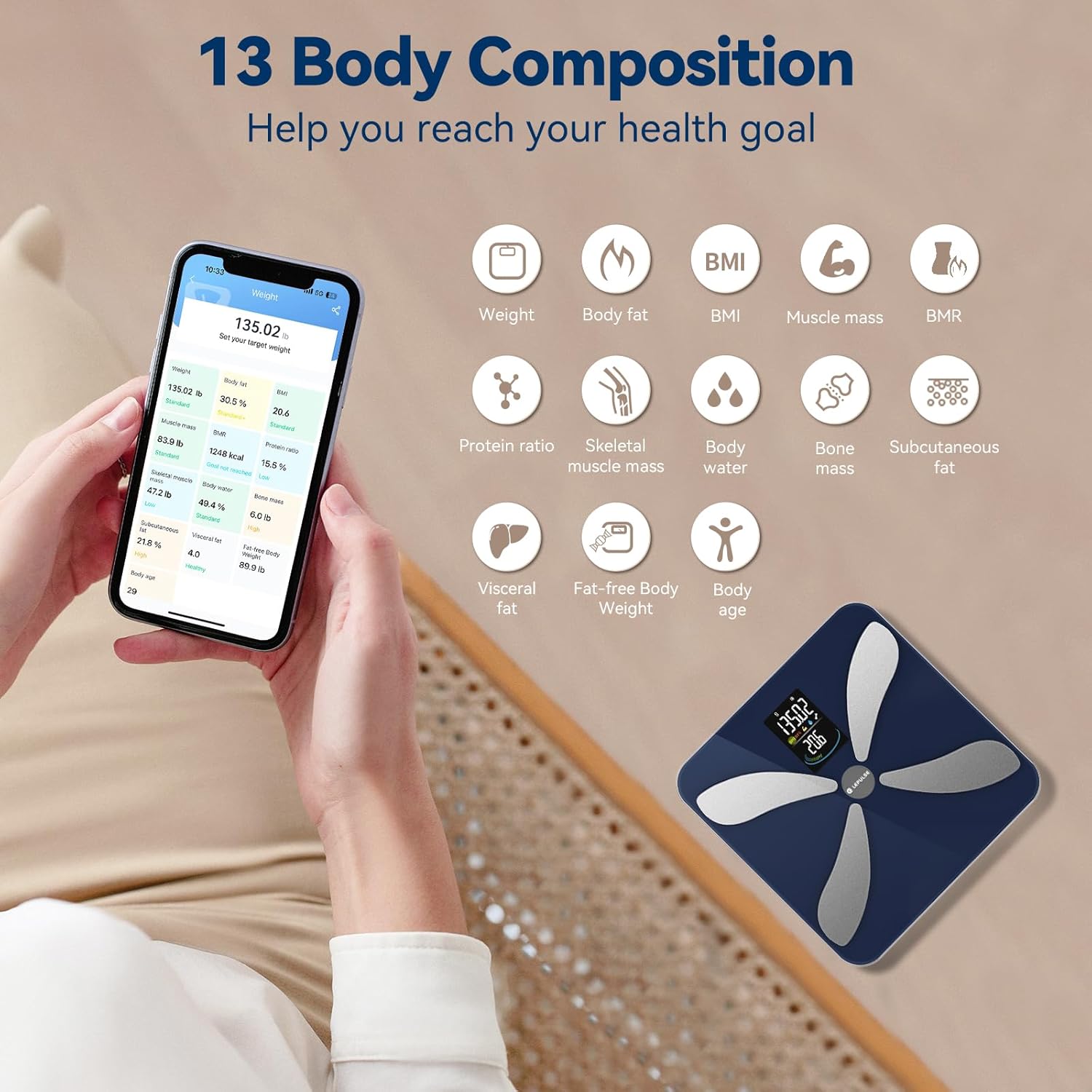
Figure 4.1: The 13 body composition metrics measured by the Lepulse Smart Scale F3.
5. Setup
5.1 Battery Installation
The Lepulse Smart Scale F3 typically uses AAA batteries (not always included). Locate the battery compartment on the underside of the scale. Insert the batteries according to the polarity indicators (+/-).
5.2 App Download and Pairing
- Download the Vihealth app from the App Store (for iOS) or Google Play Store (for Android).
- Enable Bluetooth on your smartphone.
- Open the Vihealth app and create an account or log in.
- Follow the in-app instructions to pair your scale. This usually involves stepping on the scale to activate it while the app is open and searching for devices.

Figure 5.1: Connecting the Lepulse Smart Scale F3 to the Vihealth app and other health platforms.
6. Operating Instructions
6.1 Taking a Measurement
- Place the scale on a hard, flat, and stable surface.
- Step onto the scale barefoot and stand still. Ensure your feet are positioned on the stainless steel electrodes for accurate body composition analysis.
- The scale display will show your weight first, followed by other metrics sequentially.
- If the Vihealth app is open and connected, your data will automatically sync. If not, the scale will store the data for later synchronization.

Figure 6.1: Accurate weight measurement on the Lepulse Smart Scale F3.
6.2 Understanding Display Metrics
The scale's large VA screen sequentially displays 7 key metrics:
- Weight: Your current body weight.
- Body Fat: Percentage of body fat.
- Body Water: Percentage of water in your body.
- BMI: Body Mass Index.
- Muscle Mass: Percentage of muscle in your body.
- Bone Mass: Weight of bone mineral in your body.
- Body Type: An assessment of your body composition.

Figure 6.2: Sequential display of metrics on the Lepulse Smart Scale F3.
6.3 Multi-User Functionality
The Lepulse Smart Scale F3 can automatically recognize up to 8 users based on their weight data. For more detailed user management and individual tracking, use the Vihealth app.
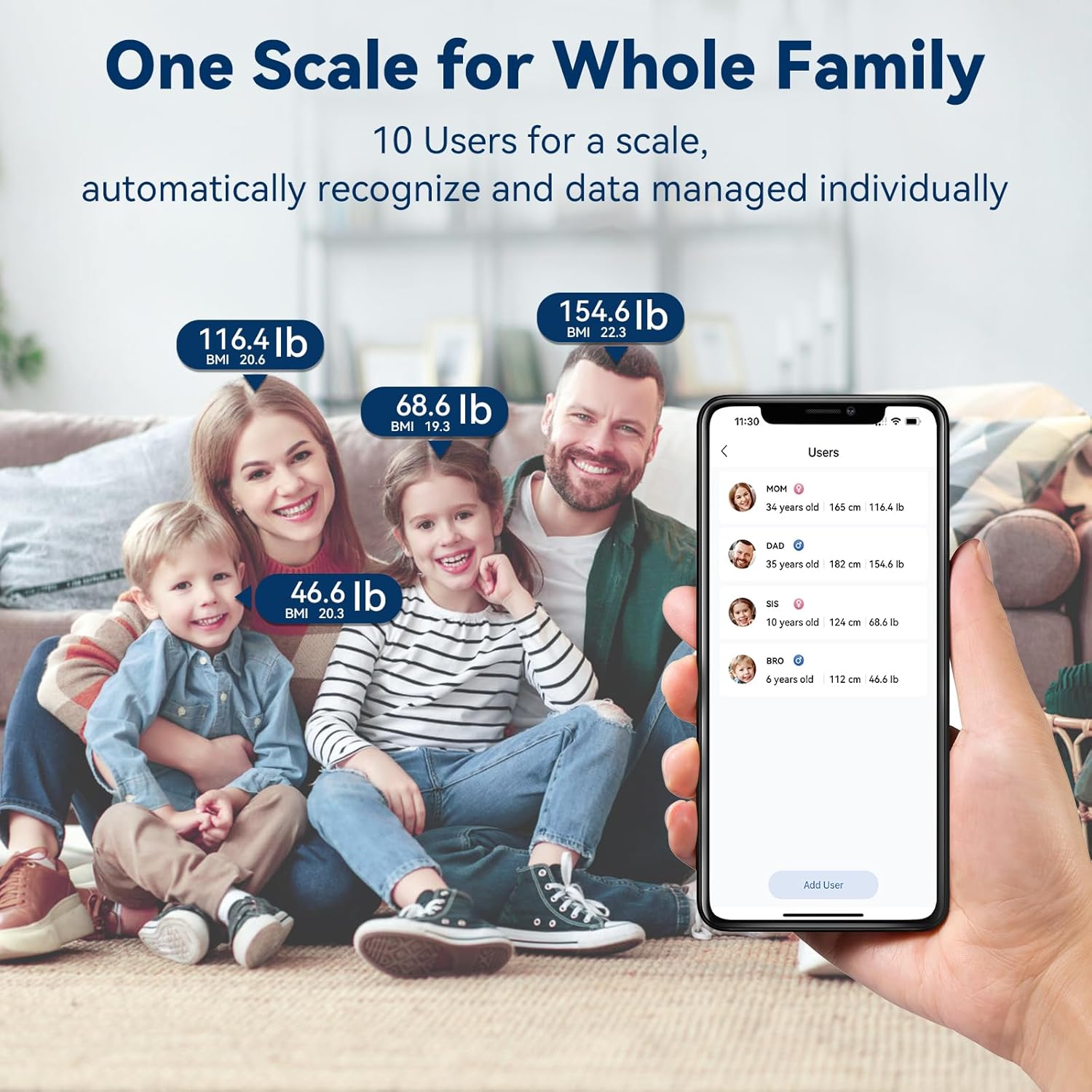
Figure 6.3: The Lepulse Smart Scale F3 supports multiple users for family health tracking.
6.4 Special Modes (Vihealth App)
The Vihealth app offers specialized modes for tailored tracking:
- Athlete Mode: Recommended for individuals aged 18+ who exercise 3 or more times weekly. This mode adjusts the algorithm for more accurate body composition readings for athletes.
- Baby Mode / Pet Mode: Allows you to weigh a baby or pet by first weighing yourself, then holding the baby/pet and stepping on the scale again. The app will calculate the baby's/pet's weight.

Figure 6.4: Athlete Mode in the Vihealth app for specialized tracking.

Figure 6.5: Baby Mode/Pet Mode for weighing infants or pets.
7. Vihealth App Usage
The Vihealth app is central to utilizing all features of your Lepulse Smart Scale F3.
7.1 Viewing All 13 Metrics
After syncing, open the Vihealth app to view all 13 body composition metrics, including those not displayed directly on the scale. The app provides detailed insights and historical data.
7.2 Goal Setting and Progress Tracking
The app allows you to set health goals and track your progress over time with detailed graphs (weekly, monthly, yearly). This visual representation helps in monitoring your fitness journey effectively.

Figure 7.1: Tracking progress and setting goals within the Vihealth app.
7.3 Data Sharing and Integration
The Vihealth app supports seamless synchronization with popular health platforms such as Apple Health, Google Fit, and Fitbit. You can also easily share your data on various social platforms directly from the app.
8. Maintenance and Care
- Clean the scale surface with a soft, damp cloth. Do not use abrasive cleaners or immerse the scale in water.
- Store the scale in a cool, dry place.
- If the scale will not be used for an extended period, remove the batteries to prevent leakage.
- Avoid dropping the scale or subjecting it to strong impacts, as this may damage the sensors.
9. Troubleshooting
| Problem | Possible Cause | Solution |
|---|---|---|
| Inaccurate or inconsistent readings | Scale is on an uneven surface; Batteries are low; Scale moved between measurements; User not standing still. | Ensure scale is on a hard, flat, stable surface. Replace batteries. Avoid moving the scale. Stand still during measurement. For best accuracy, weigh yourself at the same time each day under similar conditions. |
| Scale only shows weight, no other metrics | Not standing barefoot; Feet not making proper contact with electrodes; App not connected or profile not set up correctly. | Ensure you are standing barefoot with feet centered on the electrodes. Verify the Vihealth app is open, connected via Bluetooth, and your user profile (age, height, gender) is correctly entered. Full body composition analysis requires electrical impedance measurement through bare feet. |
| Bluetooth pairing issues or frequent disconnection | Bluetooth interference; App or phone issue; Scale battery low. | Ensure Bluetooth is enabled on your phone and the app is open. Try restarting your phone and the app. Replace scale batteries. Move closer to the scale. If issues persist, try unpairing and re-pairing the scale in the app's settings. |
| Scale unit (KG/LB) keeps changing | Unit setting reset. | Check the unit switch in the battery compartment (if available) and ensure it's set to your preferred unit. If the issue persists, ensure the app's unit setting matches and is stable. |
10. Specifications
| Feature | Detail |
|---|---|
| Product Dimensions | 11 x 11 x 1.06 inches |
| Product Weight | 3.66 Pounds |
| Brand | Lepulse |
| Color | Black |
| Recommended Uses | 13 Body Composition Metrics, Babies & Pets (Baby Mode), Bathroom Scales for Weight, Body Fat Scale, Fitness Tracking, Humans & Adults (Universal Mode), Measure Heart Rate, Scale for Body Weight, Smart Digital Scale, Weight Loss Progress Tracking, Workout Enthusiasts (Athlete Mode) |
| Special Features | Auto Shut Off, Backlit Display, Body Fat, Bodyweight, Large Display |
| Display Type | LCD |
| Capacity | 400lb / 180kg / 28st |
| Division | 0.05kg / 0.1lb |
11. Warranty and Support
Lepulse offers a 30-day return policy for this product. For any inquiries or assistance, please contact our customer service. We aim to provide responsive 24-hour customer support.
Please refer to your purchase documentation for specific warranty terms and contact information.


