
1. Introduction
This manual provides detailed instructions for the Cermant 3S 40A 18650 Li-ion Battery Protection Board, model Celent_CL461. This board is designed to protect 3-series (3S) 18650 Li-ion battery packs, ensuring safe operation, balanced charging, and extended battery life. It is suitable for various applications including massager battery packs, LED light backup power supplies, 12V electronic products, solar street light battery packs, and monitoring backup power supplies.
2. Product Features
- Balanced Charging: Activates and charges the battery to balance the characteristics of each cell in the battery pack, compensating for individual differences and temperature variations, thereby prolonging battery life.
- Comprehensive Protection: Supports overcharge protection, overdischarge protection, overcurrent protection, and short circuit protection.
- High Current Capacity: Continuous discharge current up to 40A (adjust load if heat dissipation is poor); continuous charging current up to 20A.
- Wide Compatibility: Suitable for lithium-ion batteries, including ternary batteries, manganese acid batteries, and cobalt acid batteries.
- Optimal Charging Voltage: Designed for a charging voltage range of DC 12.6V to 13.6V.
3. Specifications
| Parameter | Value |
|---|---|
| Model Number | Celent_CL461 |
| Overcharge Voltage Range | 4.25V - 4.35V ± 0.05V |
| Overdischarge Voltage Range | 2.3V - 3.0V ± 0.05V |
| Continuous Discharge Current | Max 40A |
| Continuous Charging Current | Max 20A |
| Working Current | 0A - 25A |
| Instantaneous Current | 35A - 40A |
| Charging Voltage | DC 12.6V - 13.6V |
| Working Temperature | -40℃ to +50℃ |
| Storage Conditions | -40℃ to +80℃ |
| Static Current | Less than 30µA |
| Effective Life | Greater than 30,000 hours |
| Internal Resistance | Less than 100mΩ |
| Short Circuit Protection | Protectable, delayed self-recovery |
| Dimensions (L x W x H) | 60.5mm x 41.1mm x 4.0mm (approx. 2.39in x 1.62in x 0.16in) |
4. Setup and Installation
Proper wiring is critical for the safe and effective operation of the protection board. Refer to the diagram below for correct connection points.
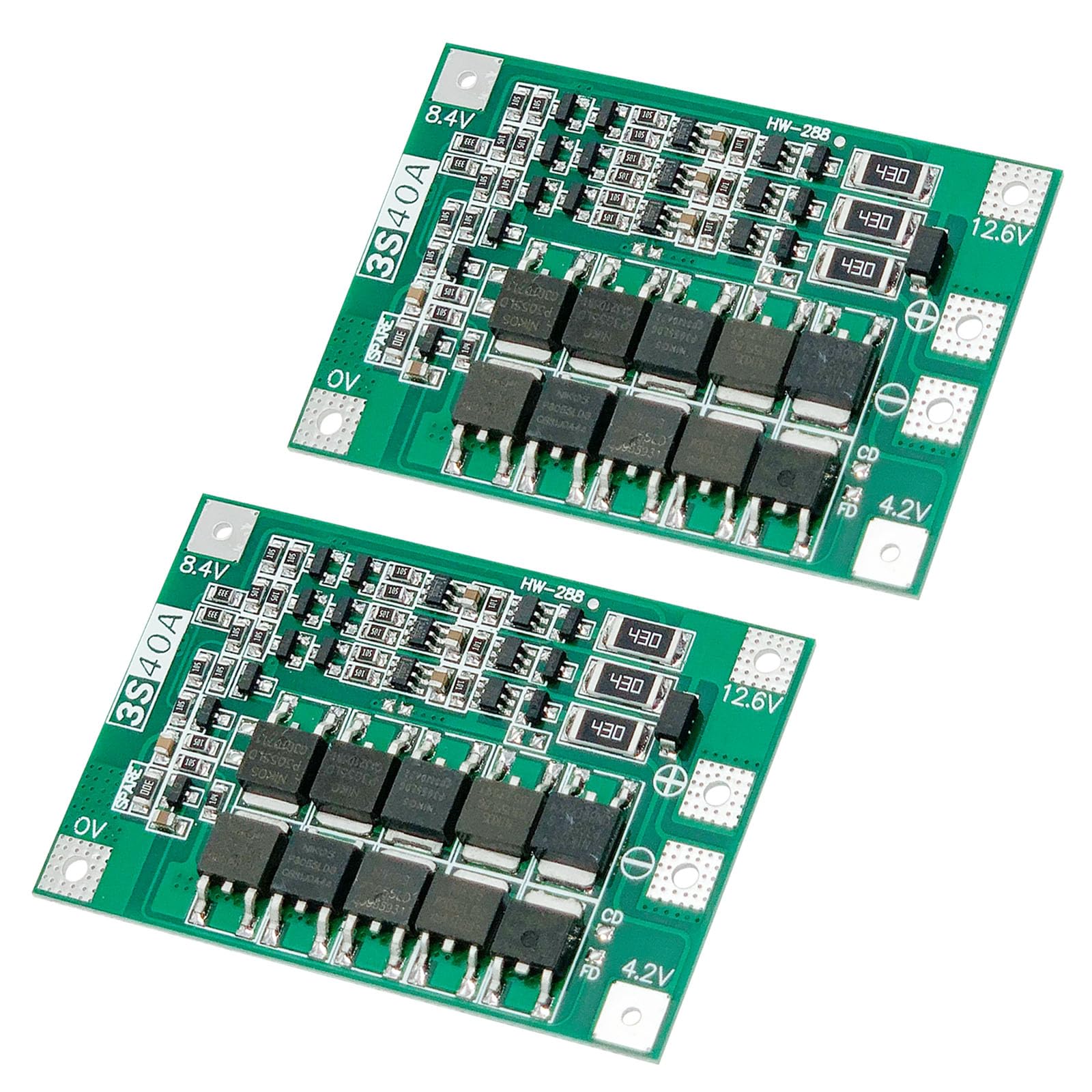
Image 1: Cermant 3S 40A Li-ion Battery Protection Board showing dimensions and wiring points. The board measures approximately 60.5mm by 41.1mm. Key connection points are labeled 0V, 4.2V, 8.4V, and 12.6V.
- Wiring Sequence: Strictly follow the diagram to connect the battery pack. Connect 0V (B-), then 3.7V (B1), 7.4V (B2), and finally 11.1V (B+).
- Initial Charge: After completing all wiring, it is essential to charge the battery pack first before any output can be drawn from the board.
- Series Battery Matching: When connecting three sets of batteries in series, ensure that the voltage of each individual battery set is identical. If voltages differ, fully charge each battery set separately before connecting them in series. The performance of the protection board is optimized when the capacity and internal resistance of all three battery sets are closely matched. Avoid mixing batteries with significantly different capacities or internal resistances.
5. Operation
To ensure optimal performance and longevity of your battery pack and protection board, observe the following operational guidelines:
- Discharge Rate: For applications requiring a discharge current of 3A or higher, the connected battery cells must have a discharge rate above 3C.
- Discharge Rate Calculation: To determine the working current capacity of a battery based on its C-rate: For a 1C rate battery with 2000mAh (2AH) capacity, the working current is 2AH * 1 = 2A. For a 3C rate battery with 2000mAh (2AH) capacity, the working current is 2AH * 3 = 6A.
6. Important Safety Notes and Precautions
Adhering to these safety guidelines is crucial for preventing damage to the battery pack, the protection board, and ensuring user safety.
- Avoid Short Circuits: Never intentionally short circuit the wiring points. This can cause severe damage to the board and batteries.
- Overheating Batteries: If the battery pack becomes hot during use, it indicates that the battery's discharge rate is insufficient for the current load. Continued use in this condition will rapidly damage the batteries. Reduce the load or use batteries with a higher C-rate.
- Battery Matching: Do not mix batteries of different conditions (e.g., good and poor quality, or varying capacities/internal resistances) within the same series pack. This can lead to unbalanced charging/discharging and premature failure of the entire pack.
- Professional Knowledge: Users should possess professional knowledge regarding battery management systems and electronics before installing and operating this module.
7. Troubleshooting
| Problem | Possible Cause | Solution |
|---|---|---|
| Battery pack heats up during use | Battery discharge rate is too low for the load. | Reduce the load current or replace batteries with a higher C-rate (e.g., >3C for loads >3A). |
| No output after wiring | Battery pack has not been charged after initial connection. | Charge the battery pack fully after completing all wiring connections. |
| Uneven discharge or poor performance in series connection | Batteries in series have different voltages, capacities, or internal resistances. | Ensure all batteries in the series are matched in voltage, capacity, and internal resistance. Fully charge individual batteries separately before connecting them in series if voltages differ. Avoid mixing good and poor batteries. |
8. Maintenance
The Cermant 3S 40A Battery Protection Board is designed for durability and requires minimal maintenance. To ensure its longevity:
- Keep the board clean and free from dust and moisture.
- Store the board within the specified storage temperature range of -40℃ to +80℃ when not in use.
- Regularly inspect connections for any signs of corrosion or loosening.
9. Warranty and Support
This product does not come with a manufacturer's warranty as per the provided specifications. For any technical inquiries or support, please contact your retailer or the manufacturer directly.