
TCL 55V6B
TCL 55V6B Series 4K Ultra HD Smart LED Google TV
User Manual
1. Introduction
This user manual provides essential information for the proper installation, operation, and maintenance of your TCL 55V6B Series 4K Ultra HD Smart LED Google TV. Please read this manual thoroughly before using the television and retain it for future reference. Your new TCL TV offers a stunning 4K Ultra HD display, integrated Google TV features, and a metallic bezel-less design for an immersive viewing experience.

Image: Front view of the TCL 55V6B Series 4K Ultra HD Smart LED Google TV, highlighting its 55-inch screen, 4K UHD V6B branding, 4K HDR, AiPQ Processor, T-Screen, and Dolby Audio features.
2. Safety Information
Always adhere to the following safety precautions to prevent fire, electric shock, or injury:
- Do not expose the TV to rain or moisture.
- Do not block ventilation openings.
- Ensure proper grounding of the power plug.
- Protect the power cord from being walked on or pinched.
- Only use attachments/accessories specified by the manufacturer.
- Refer all servicing to qualified service personnel.
3. What's in the Box
Upon unpacking, please verify that all the following items are included:
- 1N LED TV
- 1N Audio Cable
- 1N Stand
- 1N Power cord
- 1N Remote Control
- 2N Batteries (AAA)
4. Setup
4.1 Physical Installation
Your TCL 55V6B TV can be installed on a tabletop using the included stand or wall-mounted (wall mount kit sold separately).
Stand Installation
Carefully place the TV screen-down on a soft, flat surface. Attach the provided stand legs to the designated slots at the bottom of the TV using the screws. Ensure they are securely fastened.
Wall Mounting
If wall-mounting, refer to the instructions provided with your wall mount kit. Ensure the wall can support the TV's weight (approximately 9.2 kg with stand, 9 kg without stand). The TV dimensions are 122.6 cm (width) x 75 cm (height with stand) x 25.5 cm (depth with stand).

Image: Diagram showing the dimensions of the TCL 55V6B TV, including width, height with and without stand, and depth with stand, along with weight specifications.
4.2 Connecting Peripherals
Connect your external devices to the appropriate ports on the TV. The TCL 55V6B features multiple connectivity options:

Image: Detailed diagram of the TCL 55V6B TV's rear connectivity panel, labeling ports such as HDMI 1, HDMI 2 (Service), Antenna/Cable In, Satellite In, HDMI 3 (eARC/ARC), Common Interface, USB 2.0, AV In adapter, Headphone, Digital Audio Out (Optical), and LAN.
- HDMI Ports (3): Connect set-top boxes, Blu-ray players, gaming consoles. HDMI 3 supports eARC/ARC for enhanced audio return.
- USB Port (1): Connect hard drives or other USB devices for media playback.
- Ethernet (LAN): For wired network connection.
- Wi-Fi: Supports 2.4GHz/5GHz dual-band for wireless internet.
- Bluetooth: For connecting wireless accessories like headphones or soundbars.
- Headphone Output: For private listening.
- Digital Audio Out (Optical): For connecting to external audio systems.
- Antenna/Cable In: For connecting an antenna or cable TV signal.
4.3 Initial Power On
After connecting all necessary cables, plug the power cord into a wall outlet. The TV will power on and guide you through the initial setup process, including network connection, Google account sign-in, and channel scanning.
5. Operating Your TV
5.1 Remote Control Overview
The smart remote control provides easy access to all TV functions and smart features. It includes dedicated hotkeys for popular streaming services.

Image: The TCL 55V6B smart remote control, showing buttons for power, settings, navigation, volume, channel, and dedicated quick access buttons for Netflix, Prime Video, SonyLIV, Web, YouTube, and TCL Channel. It also highlights the Google Assistant button.
5.2 Google TV Features
Your TCL 55V6B TV runs on Google TV, offering a personalized and intuitive user experience. Access a vast library of content, apps, and services.
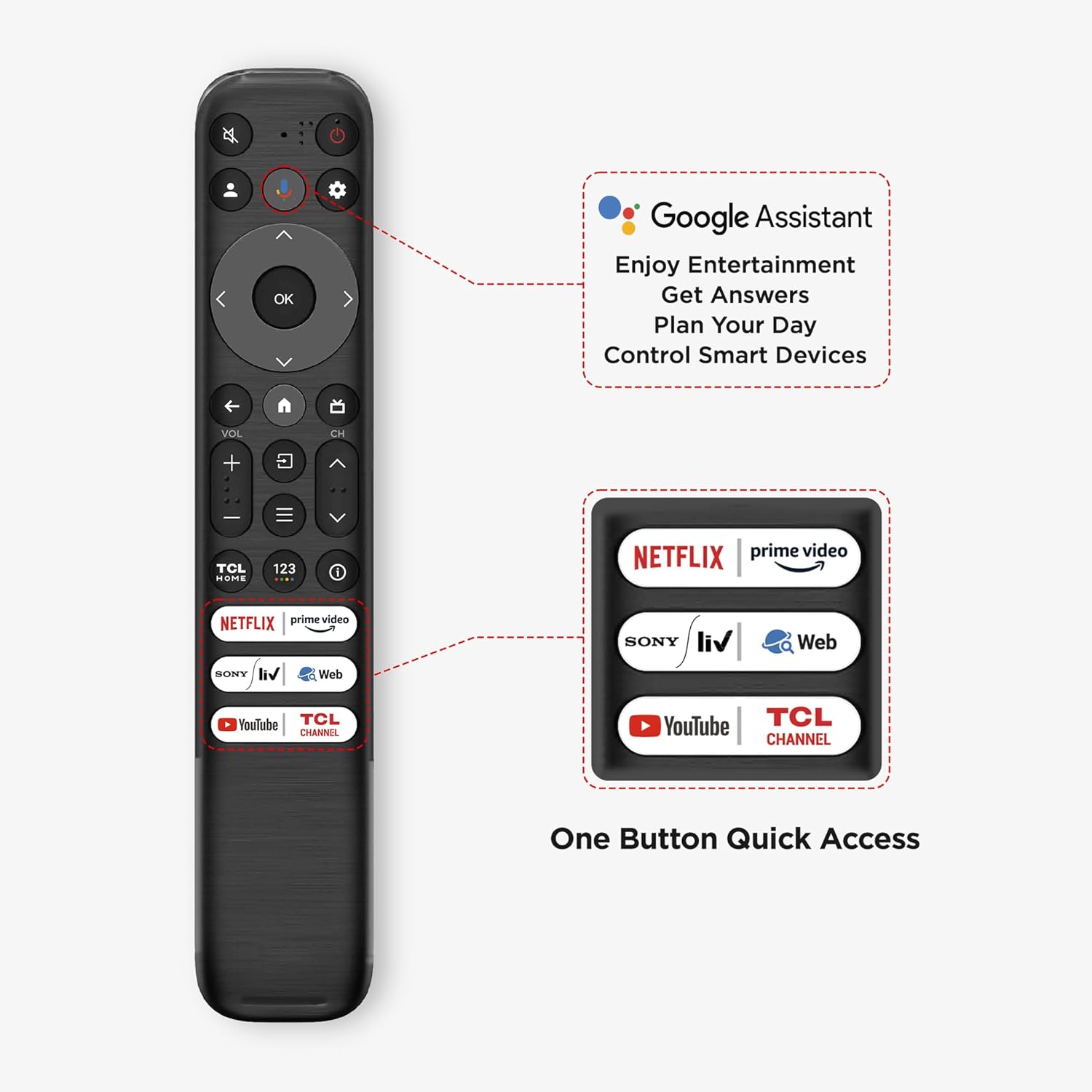
Image: Screenshot of the Google TV interface on the TCL 55V6B, displaying recommended content, various streaming app icons (YouTube, Prime Video, Disney+ Hotstar, SonyLIV, Netflix, Zee5, ALTBalaji, Voot Select, Google Play, JioCinema), and the search bar.
- Google Assistant: Use voice commands to search for content, control smart home devices, get answers, and plan your day.
- Built-in Chromecast: Easily cast content from your smartphone, tablet, or computer directly to your TV.
- App Access: Download and enjoy apps from the Google Play Store, including Prime Video, Netflix, Hotstar, Zee5, and many more.
- Google Kids: A dedicated profile for children with curated content and parental controls.
- Google Duo: Make video calls directly from your TV (requires compatible webcam, sold separately).
5.3 Display and Audio Features
Experience stunning visuals and immersive sound with the following technologies:
- 4K Ultra HD (3840 x 2160): Delivers incredible detail and clarity.
- HDR 10: Enhances contrast and color accuracy for a more lifelike picture.
- Dynamic Color Enhancement: Optimizes color vibrancy and saturation.
- AiPQ Processor: Intelligently optimizes picture and sound in real-time.
- T-Screen: Improves contrast and reduces energy consumption.
- Dolby Audio MS12Y: Provides rich, clear, and powerful sound with 24 Watts output.
- Metallic Bezel-Less Design: Maximizes screen space for a more immersive viewing experience.

Image: A vibrant landscape displayed on the TCL 55V6B TV, illustrating the clarity and color depth of 4K HDR technology.

Image: An abstract image with a wide range of colors displayed on the TCL 55V6B TV, demonstrating the effect of Dynamic Color Enhancement.

Image: A person playing a guitar, with sound waves emanating from the TCL 55V6B TV, illustrating the 24 Watts Dolby Audio output.
6. Maintenance
To ensure the longevity and optimal performance of your TV, follow these maintenance guidelines:
- Cleaning the Screen: Gently wipe the screen with a soft, lint-free cloth. For stubborn marks, use a specialized screen cleaner applied to the cloth, not directly to the screen.
- Cleaning the Cabinet: Use a soft, dry cloth to wipe the TV cabinet. Do not use abrasive cleaners or solvents.
- Ventilation: Ensure the ventilation openings on the back of the TV are not blocked to prevent overheating.
- Power Cord: Regularly check the power cord for any damage. If damaged, replace it immediately with an authorized part.
7. Troubleshooting
If you encounter issues with your TV, refer to the following common problems and solutions:
| Problem | Possible Cause / Solution |
|---|---|
| No Power | Check if the power cord is securely plugged into the TV and the wall outlet. Ensure the power outlet is active. |
| No Picture, But Sound | Check the input source. Ensure external devices are properly connected and powered on. |
| No Sound, But Picture | Check volume settings. Ensure Mute is off. Check audio cable connections to external sound systems. |
| Remote Control Not Working | Replace batteries. Ensure no obstructions between remote and TV. Point remote directly at the TV's IR sensor. |
| Poor Picture Quality | Check antenna/cable connection. Adjust picture settings (brightness, contrast, sharpness). Try a different input source. |
| Cannot Connect to Wi-Fi | Ensure Wi-Fi is enabled on the TV. Check router status and signal strength. Restart router and TV. |
For more complex issues, please contact TCL customer support.
8. Specifications
Key technical specifications for the TCL 55V6B Series 4K Ultra HD Smart LED Google TV:
| Feature | Specification |
|---|---|
| Brand | TCL |
| Model | 55V6B |
| Screen Size | 55 Inches (139 cm) |
| Resolution | 4K Ultra HD (3840 x 2160) |
| Refresh Rate | 60 Hertz |
| Operating System | Google TV |
| RAM | 2 GB |
| Storage (ROM) | 16 GB |
| Processor | 64-bit Quad Core Processor |
| Connectivity | 3 HDMI Ports, 1 USB Port, Ethernet, Wi-Fi (2.4GHz/5GHz), Bluetooth |
| Sound Output | 24 Watts |
| Audio Technology | Dolby Audio MS12Y |
| Viewing Angle | 178 Degrees |
| Power Consumption (On-mode) | 125 Watts |
| Item Weight | 9.2 kg (with stand) |
| Product Dimensions (LxWxH) | 25.5 x 122.6 x 75 cm |
9. Warranty and Support
Your TCL 55V6B TV comes with a manufacturer's warranty and dedicated support services.
9.1 Warranty Information
This product is covered by a 2-year warranty provided by the manufacturer from the date of purchase. Warranty claims can be processed using your Amazon e-invoice. Please retain your purchase invoice for warranty purposes.
9.2 Customer Support
For any technical assistance, service requests, or inquiries not covered in this manual, please contact TCL customer support. Refer to the official TCL website for the most up-to-date contact information and support resources.
Related documents55V6B


Ask a question about this manual
Ask about setup, troubleshooting, compatibility, parts, safety, or missing instructions. Manuals+ will review the question and use this page’s manual context to help answer it.