Introduction
Thank you for choosing the KESIEME YYK-Q16 Open Ear Bluetooth 5.4 Headphones. This manual provides essential information for setting up, operating, and maintaining your new headphones. Please read it carefully before use.
Product Overview
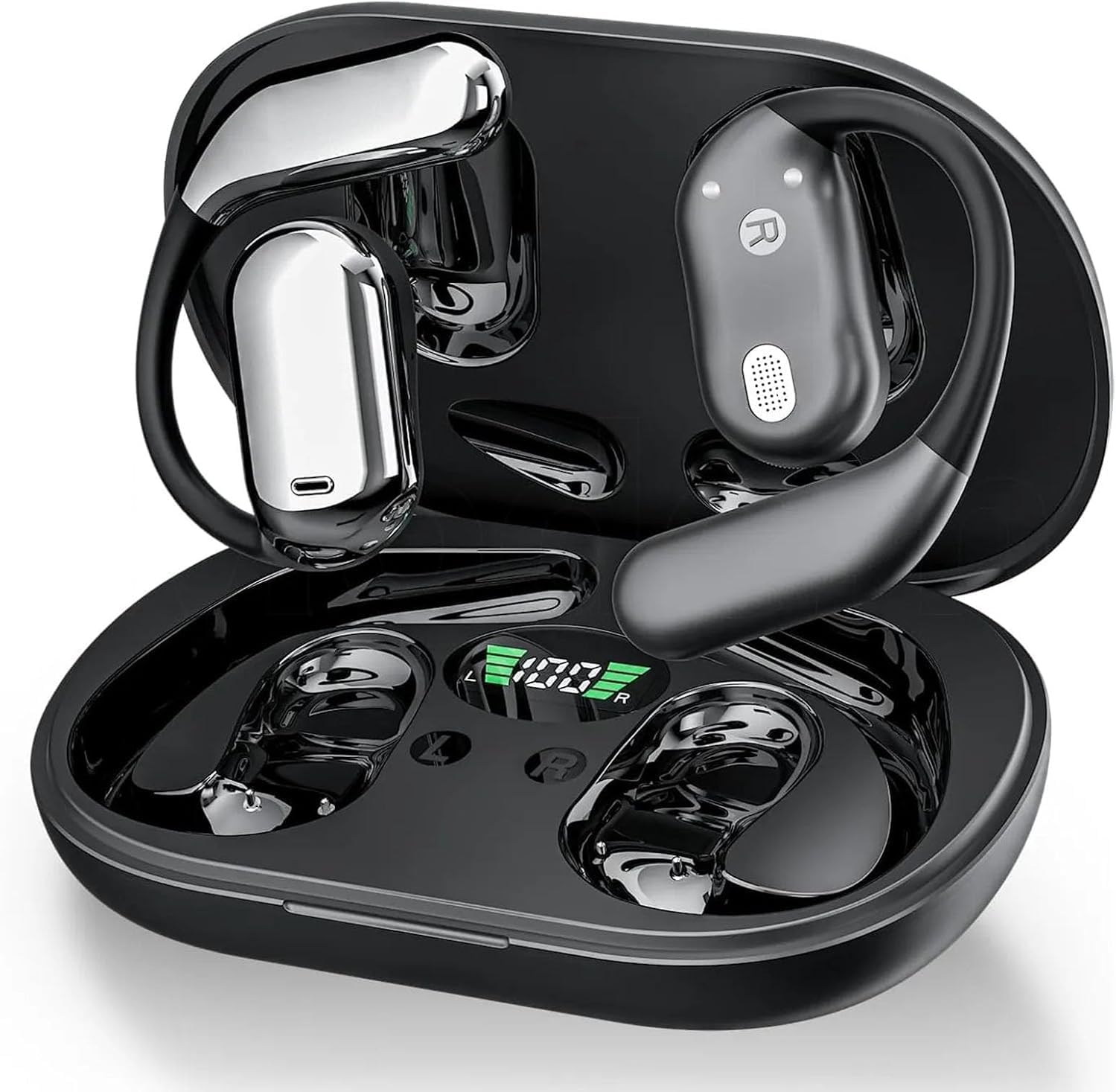
This image displays the KESIEME YYK-Q16 Open Ear Bluetooth Headphones, showing both earbuds securely placed within their charging case. The case features an LED display indicating battery status.
The headphones feature an open-ear design, resting gently and securely on the ear. This design promotes comfort and breathability, suitable for extended wear. They utilize Bluetooth 5.4 technology for wireless connectivity, ensuring a stable signal and a connection range of up to 33 feet (10 meters), compatible with various Bluetooth-enabled devices such as mobile phones and computers.
The headphones are designed to minimize sound leakage, providing a clear audio experience. They feature dual 14.2mm air conduction dynamic drivers, delivering stereo sound with distinct highs and lows. A single charge provides up to 20 hours of playback for the earbuds, and the charging case extends the total playtime to 48 hours. The charging case includes an LED display that indicates the remaining battery level. The earbuds are designed for automatic pairing upon removal from the charging case. Their open-ear design allows for situational awareness, enabling users to hear ambient sounds while listening to audio, which can be beneficial during outdoor activities.
What's in the Box
- Open Air Conduction Earphones
- Charging Case
- User Manual
- Type-C Charging Cable

This image illustrates the complete package contents, including the open-ear earphones, charging case, user manual, and a Type-C charging cable.
Setup
Initial Charging
- Before first use, place both earbuds into the charging case.
- Connect the provided Type-C charging cable to the charging port on the case and a suitable USB power source.
- The LED display on the charging case will show the battery percentage. Allow approximately 2 hours for a full charge.
Pairing Instructions
- Ensure the earbuds are charged.
- Open the charging case. The earbuds will automatically power on and enter pairing mode.
- On your device (smartphone, tablet, computer), enable Bluetooth.
- Search for available Bluetooth devices and select "YYK-Q16" from the list.
- Once connected, a voice prompt will confirm successful pairing.
- The earbuds will automatically reconnect to the last paired device when removed from the case, if Bluetooth is enabled on the device.
Wearing Instructions
Proper wearing ensures optimal sound and comfort. Follow these steps:

This diagram illustrates the four steps for correctly positioning the open-ear headphones on your ear for a secure and comfortable fit.
- Step 1: Take out the earphones from the charging case.
- Step 2: Hang the end of the earphone on the ear bone, positioning it over the ear.
- Step 3: Turn the earphones and slide them behind the ear, adjusting the main body to sit comfortably.
- Step 4: Adjust the ear hook and gently pull down for a secure fit that rests comfortably without entering the ear canal.
Operating Instructions
Touch Controls
The KESIEME YYK-Q16 headphones feature touch-sensitive controls on each earbud. Refer to the diagram below for specific functions:

This image provides a visual guide to the touch controls on the earbuds, detailing single clicks, double clicks, and long presses for various functions.
- Volume + (Right Earbud): Double-click (x2)
- Volume - (Left Earbud): Double-click (x2)
- Play/Pause (Either Earbud): Single-click (x1)
- Answer Call (Either Earbud): Single-click (x1)
- Reset Earbuds (Both Earbuds): Long press (x2+2s)
- Previous Song (Left Earbud): Long press (x1s)
- Next Song (Right Earbud): Long press (x1s)
- Reject Call/Hang Up (Either Earbud): Long press (x1s)
- Activate Voice Assistant (Siri) (Either Earbud): Triple-click (x3)
Resetting Earbuds: To reset the earbuds, disconnect them from your phone, then quickly press the left button 5 times and the right button 5 times simultaneously.
Charging
The earbuds provide up to 20 hours of playback on a single charge. The charging case can provide additional charges, extending the total listening time to approximately 48 hours.

This image shows the charging case with its LED display, indicating the overall battery percentage of the case and individual charge levels for the left (L) and right (R) earbuds.
- Charging the Earbuds: Place the earbuds into the charging case. They will begin charging automatically.
- Charging the Case: Connect the Type-C cable to the charging case and a power adapter. The LED display will show the charging progress.
- Battery Indicator: The LED display on the charging case shows the remaining battery percentage of the case and the charging status of each earbud.
Maintenance
To ensure the longevity and optimal performance of your KESIEME YYK-Q16 headphones, follow these maintenance guidelines:
- Cleaning: Use a soft, dry, lint-free cloth to clean the earbuds and charging case. Do not use abrasive cleaners, alcohol, or chemical solvents.
- Water Resistance: The headphones are IPX7 waterproof, meaning they can withstand immersion in water up to 1 meter for 30 minutes. However, avoid prolonged exposure to water and ensure they are dry before placing them back in the charging case. The charging case is not waterproof.
- Storage: When not in use, store the earbuds in their charging case to protect them from dust and damage. Store in a cool, dry place away from extreme temperatures.
- Avoid Impact: Do not drop or subject the headphones to strong impacts.
Troubleshooting
If you encounter issues with your headphones, refer to the following common solutions:
- Earbuds not pairing with device:
- Ensure Bluetooth is enabled on your device.
- Make sure the earbuds are charged and removed from the case.
- Forget "YYK-Q16" from your device's Bluetooth list and attempt to pair again.
- Try resetting the earbuds as described in the Operating Instructions section.
- Only one earbud working:
- Place both earbuds back into the charging case, close the lid, then open it again and remove them.
- Ensure both earbuds are charged.
- Perform a factory reset of the earbuds.
- No sound:
- Check the volume level on both your device and the earbuds.
- Ensure the earbuds are properly connected to your device.
- Try playing audio from a different application or source.
- Charging case not charging:
- Verify the Type-C cable is securely connected to both the case and the power source.
- Try a different charging cable or power adapter.
- Ensure the charging port on the case is clean and free of debris.
Specifications
| Feature | Specification |
|---|---|
| Brand | KESIEME |
| Model Name | YYK-Q16 |
| Connectivity Technology | Wireless (Bluetooth) |
| Bluetooth Version | 5.4 |
| Bluetooth Range | 33 Feet (10 meters) |
| Ear Placement | Open Ear |
| Form Factor | Over Ear |
| Audio Driver Type | Dynamic Driver |
| Audio Driver Size | 14.2 Millimeters |
| Frequency Range | 20 Hz - 20,000 Hz |
| Impedance | 32 Ohm |
| Control Type | Touch Control |
| Water Resistance Level | IPX7 (Earbuds only) |
| Earbud Battery Life (Single Charge) | Up to 20 Hours |
| Total Playtime with Charging Case | Up to 48 Hours |
| Charging Time | Approximately 2 Hours |
| Charging Case Battery Average Life | 40 Hours (Case capacity, not playtime) |
| Included Components | Cable, Charging Station, User Manual |
| Item Weight | 5 ounces |
| Material | Plastic |
Compatibility

This image displays icons for various devices, indicating wide compatibility with laptops, desktops, smartwatches, TVs, smartphones, and tablets.
The KESIEME YYK-Q16 headphones are compatible with most Bluetooth-enabled devices, including smartphones (iPhone, Samsung Galaxy, Xiaomi, Huawei, OnePlus, LG), tablets (iPad), computers (laptops, desktops), and smartwatches.
Warranty and Support
Specific warranty details are not provided within this manual. For warranty information, technical support, or customer service inquiries, please refer to the product packaging, the official KESIEME website, or contact the retailer where the product was purchased.


