
1. Introduction and Product Overview
The EDMI HD18 is a Prepaid Power Meter Interface Unit designed to provide full STS (Standard Transfer Specification) prepayment functionality. This unit enables users to manage their energy consumption remotely and efficiently. It features an 8-character seven-segment display and a silicon keypad for user interaction.
The HD18 supports various communication options, including radio frequency (RF) for open-air communication, and is compatible with EDMI Abacus MK32, MK32H/MK7M, and Atlas MK10D, MK10E, MK10M meter types.
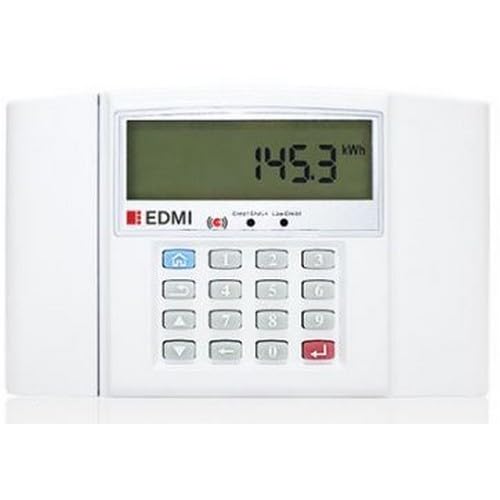
Figure 1: Front view of the EDMI HD18 Prepaid Power Meter Interface Unit. The unit is white with a digital display showing numerical values and a keypad below it.
2. Safety Information
- Always ensure the device is installed and serviced by qualified personnel.
- Do not open the casing of the unit. There are no user-serviceable parts inside.
- Keep the device away from water and excessive humidity. The unit has an IP51 ingress protection rating, meaning it is protected from limited dust ingress and from vertically falling water drops.
- Use only the specified power supply (3.3V or 5V DC) and battery types (AA batteries) to prevent damage.
- Dispose of batteries according to local regulations.
3. Setup and Installation
3.1 Power Supply
The HD18 can be powered by:
- Two (2) AA batteries (3.3V operating voltage).
- An external 5V DC power source.
Ensure correct polarity when inserting batteries or connecting the DC power supply.
3.2 Communication Options
The HD18 supports Radio Frequency (RF) communication. The unit can be configured for:
- Frequency Bands: 433 MHz and 915 MHz.
- Open-air communication distance: Up to 100 meters.
- Transmit Power: 17dBm (50mW).
Refer to the specific installation guide for pairing the HD18 with your compatible meter.
3.3 Meter Compatibility
The HD18 is compatible with the following EDMI meter types:
- Abacus: MK32, MK32H/MK7M
- Atlas: MK10D, MK10E, MK10M
4. Operating Instructions
4.1 Display Overview
The HD18 features an 8-character seven-segment display, which may include an optional backlight for improved visibility. The display shows various information such as credit balance, token entry feedback, and error codes.
4.2 Keypad Functionality
The silicon keypad allows users to interact with the unit. Common functions include:
- Entering STS Tokens: Use the numeric keys to input the 20-digit STS token.
- Confirming Entry: Press the 'Enter' or 'OK' key (specific key label may vary) after entering a token.
- Clearing Entry: Use the 'Clear' or 'Back' key to correct mistakes.
- Checking Balance: Specific key combinations or a dedicated button may be available to display the current credit balance. Refer to the meter's specific operating instructions for exact key sequences.
4.3 STS Prepayment Functionality
The HD18 facilitates the secure transfer of credit to your compatible electricity meter using STS tokens. Upon successful token entry, the credit is transferred, and your meter's balance is updated.
5. Maintenance
5.1 Battery Replacement
If the unit is powered by AA batteries, replace them when the low battery indicator appears on the display or when the unit fails to power on. Ensure to use two new AA batteries of the same type and insert them with correct polarity.
5.2 Cleaning
Clean the exterior of the unit with a soft, dry cloth. Do not use abrasive cleaners, solvents, or spray liquids directly onto the device.
5.3 Environmental Conditions
The HD18 is designed to operate in environments with up to 95% non-condensing humidity. Avoid exposing the unit to extreme temperatures or direct sunlight for prolonged periods.
6. Troubleshooting
| Problem | Possible Cause | Solution |
|---|---|---|
| Unit does not power on | Dead batteries; No external power; Incorrect power connection | Replace AA batteries; Connect 5V DC power; Check power connections and polarity. |
| Token not accepted | Incorrect token entered; Token already used; Communication issue with meter | Re-enter token carefully; Verify token validity; Check RF communication link. |
| No display or partial display | Low battery; Device fault | Replace batteries; If problem persists, contact support. |
| Communication errors | Interference; Distance from meter; Meter not powered | Reduce distance to meter; Check for sources of interference; Ensure meter is powered. |
7. Specifications
- Model: HD18
- Operating Voltage: 3.3V (2 AA battery) / 5V (DC)
- Operating Current: 24 mA (RX), 60 mA (TX)
- Standby Current: 120 uA
- Communication: Radio Frequency (RF)
- Frequency Bands: 433 MHz, 915 MHz
- Communication Distance: 100m (open air)
- Transmit Power: 17dBm (50mW)
- Display: 8-character seven-segment display, optional backlight
- Keypad: Silicon keypad
- Ingress Protection: IP51
- Humidity: Up to 95% non-condensing
- Compatible Meter Types: Abacus MK32, MK32H/MK7M; Atlas MK10D, MK10E, MK10M
- Color: White
- Battery Cell Composition: Lithium (Note: Refers to general battery chemistry, actual AA batteries may vary)
8. Warranty and Support
8.1 Manufacturer's Warranty
The EDMI HD18 Prepaid Power Meter Interface Unit comes with a 1 Year Manufacturer's Warranty. This warranty covers defects in materials and workmanship under normal use. Please retain your proof of purchase for warranty claims.
8.2 Technical Support
For technical assistance, troubleshooting beyond this manual, or warranty inquiries, please contact your authorized EDMI distributor or the point of purchase. Provide your product model number (HD18) and a detailed description of the issue when seeking support.
