
Introduction
This manual provides essential information for the safe installation, operation, and maintenance of your ACDC Dynamics 85-265VAC 20W LED Ceiling Light, Model ASL-005. Please read these instructions thoroughly before installation and retain them for future reference.
Safety Instructions
- WARNING: Always disconnect power at the circuit breaker before installation or servicing.
- Installation should be performed by a qualified electrician in accordance with local electrical codes.
- Do not modify the light fixture. Any modifications may void the warranty and create safety hazards.
- Ensure the mounting surface can support the weight of the fixture.
- Do not look directly into the LED light source when illuminated.
- This fixture is designed for indoor use only.
Package Contents
Verify that all components are present before beginning installation:
- 1 x ACDC Dynamics 85-265VAC 20W LED Ceiling Light (Model ASL-005)
- Mounting hardware (screws, wall anchors)
- Instruction Manual (this document)
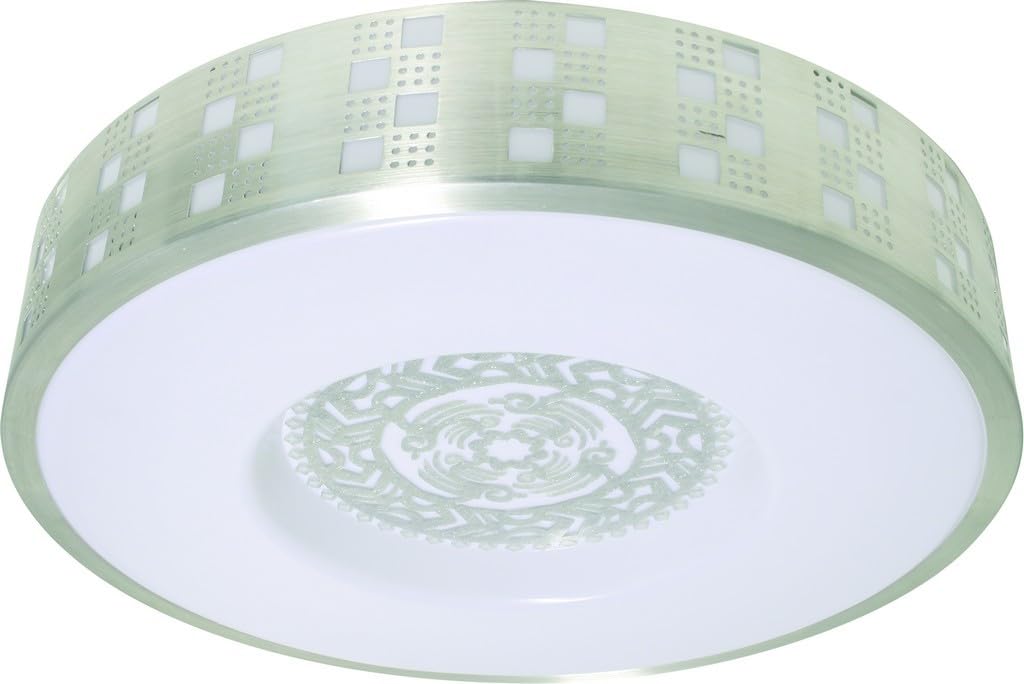
Image: The ACDC Dynamics 85-265VAC 20W LED Ceiling Light, Model ASL-005. This image displays the complete ceiling light fixture, highlighting its sleek, circular design and white/silver finish. The light has a diameter of 350 mm and a height of 120 mm.
Setup and Installation
- Prepare for Installation:
- Turn off power at the main circuit breaker to the junction box where the light will be installed.
- Ensure the power is off using a voltage tester.
- Mounting Bracket Installation:
- Attach the mounting bracket to the ceiling junction box using the provided screws. Ensure it is securely fastened.
- Wiring Connections:
- Connect the live (L) wire from the ceiling to the live wire of the fixture.
- Connect the neutral (N) wire from the ceiling to the neutral wire of the fixture.
- Connect the ground (E) wire from the ceiling to the ground wire of the fixture.
- Use appropriate wire connectors and ensure all connections are tight and secure.
- This fixture is compatible with 85-265VAC input voltage.
- Attach the Fixture:
- Carefully tuck the wires into the junction box.
- Align the fixture with the mounting bracket and secure it using the provided screws or twist-lock mechanism, depending on the design.
- Ensure the fixture is flush against the ceiling and firmly attached.
- Restore Power:
- Turn the power back on at the main circuit breaker.
- Test the light to ensure it functions correctly.
Operating Instructions
The ACDC Dynamics LED Ceiling Light operates via a standard wall switch connected to its power supply. Simply toggle the wall switch to turn the light ON or OFF.
- Power ON: Flip the wall switch to the 'ON' position. The LED light will illuminate instantly.
- Power OFF: Flip the wall switch to the 'OFF' position. The LED light will turn off.
Maintenance
- Cleaning: Disconnect power before cleaning. Use a soft, dry or slightly damp cloth to wipe the surface of the fixture. Do not use abrasive cleaners, solvents, or polishes as they may damage the finish or electrical components.
- LEDs: The LED light source is integrated and not user-replaceable. Do not attempt to open the fixture to replace LEDs.
- Inspection: Periodically inspect the fixture for any signs of damage or loose connections. If any issues are found, disconnect power and consult a qualified electrician.
Troubleshooting
| Problem | Possible Cause | Solution |
|---|---|---|
| Light does not turn on. | No power to the fixture. Loose wiring connection. Faulty wall switch. | Check circuit breaker. Ensure all wire connections are secure (with power off). Test or replace the wall switch. |
| Light flickers. | Loose wiring connection. Incompatible dimmer switch (this fixture is not specified as dimmable). Voltage fluctuations. | Check all wire connections (with power off). Ensure a standard ON/OFF switch is used. Consult an electrician if voltage issues are suspected. |
| Light is dim or inconsistent. | Low voltage supply. Internal component issue. | Verify input voltage is within 85-265VAC range. Contact customer support if problem persists. |
Specifications
| Brand | ACDC Dynamics |
| Model Number | ASL-005 |
| Input Voltage | 85-265VAC |
| Wattage | 20W |
| Light Type | LED |
| Light Color | Daylight |
| Diameter | 350 mm |
| Height | 120 mm |
| Color/Finish | White/Silver |
| Item Weight | 700 g |
| Manufacturer | ACDC Dynamics (PTY) Ltd |
Warranty and Support
For warranty information or technical support, please contact ACDC Dynamics customer service. Refer to your purchase documentation for specific warranty terms and conditions.
Contact Information: Please visit the official ACDC Dynamics website or refer to your product packaging for the most current contact details.


