
Blindsmart Zigbee Version-Motor with Solar Panel
Blindsmart Motorized Plantation Shutters Opener User Manual
Model: Zigbee Version-Motor with Solar Panel
Brand: Blindsmart
1. Product Overview
The Blindsmart Motorized Plantation Shutters Opener provides an automated solution for controlling your window shutters. This model, the Zigbee Version-Motor with Solar Panel, offers advanced features including smart app control, voice control compatibility, and a built-in rechargeable battery with an optional solar panel for continuous charging. It is designed to seamlessly integrate into your smart home ecosystem, requiring a Tuya Zigbee Hub for smart functionalities.

Image: Blindsmart Motorized Plantation Shutters Opener with Solar Panel.

Image: User controlling plantation shutters with a smartphone app, demonstrating app control functionality.
Key Features:
- Dual Control Options: Choose between Zigbee for smart home integration or a remote control version for direct operation.
- Built-in Battery & Optional Solar Panel: Features a 3200 mAh battery, with an optional solar panel for sustainable charging.
- Smart App Control: Seamless control via the Tuya Smart App (Zigbee version requires a Tuya Zigbee Hub).
- Voice Control Compatibility: Works with Alexa and Google Assistant for convenient voice commands (requires a Tuya Zigbee Hub).
- Louver Brackets: Includes 2.5", 3.5", and 4.5" louver brackets for versatile installation.
2. Setup and Installation
2.1. Package Contents:
Before beginning installation, ensure all components are present:
- 1 x Plantation Shutter Opener (Zigbee version)
- 1 x User Manual (this document)
- 2.5", 3.5", 4.5" Louver Brackets (3 sizes)
- 1 x Solar Panel (included with this model)

Image: Components of the Blindsmart Motorized Plantation Shutters Opener, showing the motor, solar panel, and three sizes of louver brackets.
2.2. Physical Installation:
Attach the motor to your plantation shutters using the appropriate louver bracket size (2.5", 3.5", or 4.5") that matches your shutter's louver width. Ensure the motor is securely fastened and does not obstruct the shutter's movement. The solar panel can be affixed to a window surface using its suction cups for optimal sunlight exposure.
2.3. Connecting to the Tuya Smart App (Zigbee Version):
To enable smart control features, connect your shutter opener to the Tuya Smart App. A Tuya Zigbee Hub is required for this step.
- Ensure your Tuya Zigbee Hub is powered on and connected to your home network.
- Long press the "Setting" button on the motor for 7 seconds. The motor indicator will flash 3 times, then flash 3 more times. After 3 seconds, release the button, and the motor will continue blinking, indicating it's in pairing mode.
- Open the Tuya Smart App on your smartphone.
- Follow the in-app instructions to add a new device. Select the Zigbee Shutter Opener from the device list.
- The app will search for and connect to the motor. Once connected, the motor's indicator light will stop blinking.

Image: Step-by-step diagram illustrating how to connect the Blindsmart shutter opener to the Tuya Smart App, emphasizing the need for a Zigbee Hub.
2.4. Connecting the Remote Control (if applicable):
If you have the 16-channel remote control, follow these steps to pair it with the motor:
- Press and hold the Setup button on the motor for 3 seconds. The motor indicator will flash.
- Press the [Channel] button on the remote control.
- Press the [Up] button on the remote control.
- The motor will respond, indicating successful pairing.
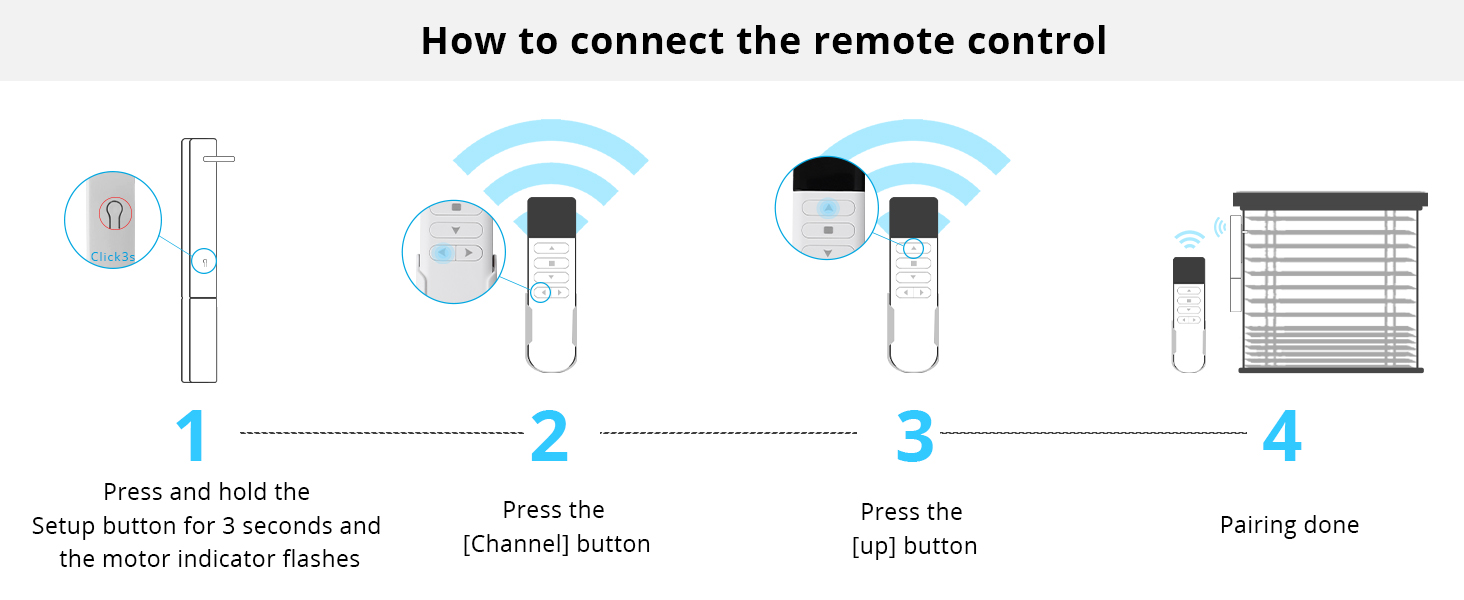
Image: Step-by-step diagram illustrating how to connect the remote control to the Blindsmart shutter opener.
3. Operating Instructions
3.1. App Control:
Once connected to the Tuya Smart App, you can control your shutters from your smartphone:
- Open/Close: Use the intuitive controls within the app to open or close your shutters.
- Scheduling: Set schedules for automatic opening and closing at specific times of the day.
- Automation: Create smart scenes and automations based on conditions like weather, sunrise/sunset, or other smart devices.

Image: Smartphone app interface demonstrating control over smart shutters, including open/close functionality.
3.2. Voice Control:
Integrate your shutter opener with Amazon Alexa or Google Assistant for hands-free control. A Tuya Zigbee Hub is required.
- Ensure your Tuya Smart App is linked to your Alexa or Google Home account.
- Use commands such as:
- "Alexa, open the shutters."
- "Hey Google, close the living room shutters."
- "Alexa, set shutters to 50%."

Image: Smart speakers (Amazon Alexa and Google Home) positioned near plantation shutters, demonstrating the voice control capability of the system.
3.3. Remote Control (if applicable):
For direct control without a smartphone or voice assistant, use the 16-channel remote control.
- Use the Up/Down buttons to open and close the shutters.
- The Stop button can halt movement at any desired position.
- The Channel button allows you to select and control multiple shutter openers if you have them paired to different channels.

Image: A hand holding the 16-channel remote control, demonstrating its use for long-distance control of the plantation shutters.
3.4. Setting Limits:
You can set specific upper, middle, and lower limits for your shutters' movement to customize their open and closed positions.
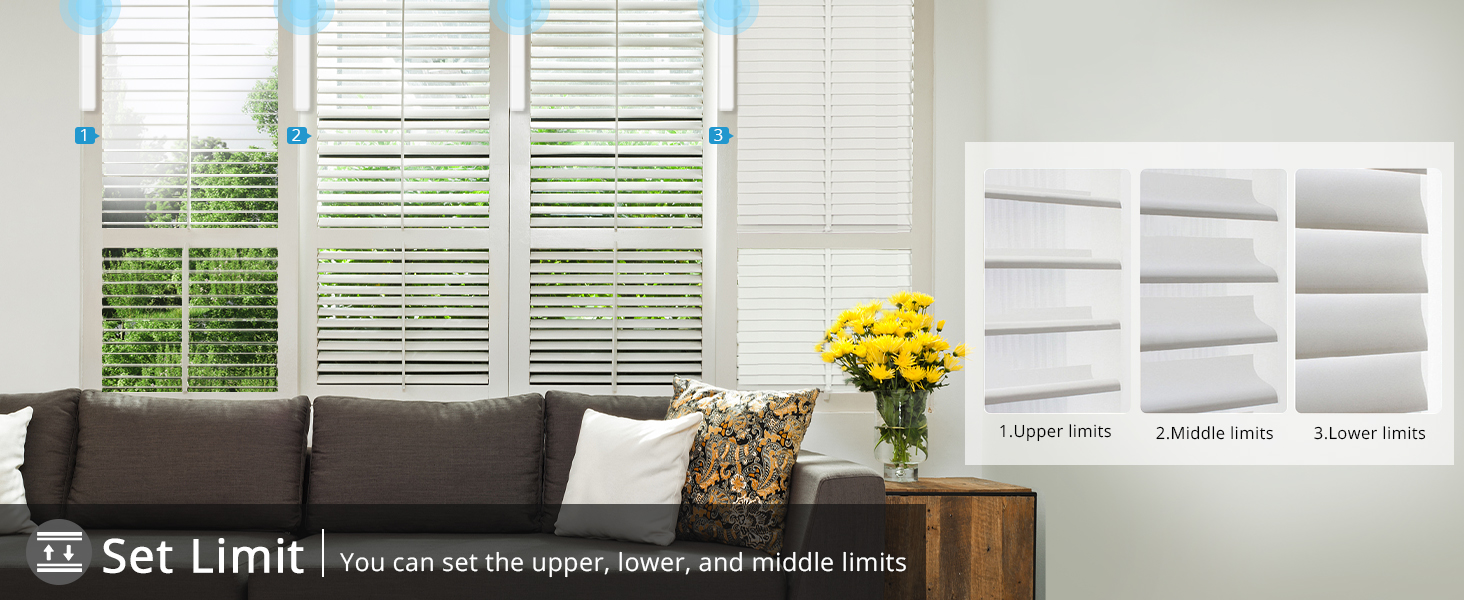
Image: Diagram showing how to set upper, middle, and lower limits for the shutter movement, allowing for precise control of open and closed positions.
4. Maintenance
4.1. Battery Charging:
The shutter opener features a built-in 3200 mAh lithium battery. It can be charged via the USB interface or continuously charged using the included solar panel.
- USB Charging: Connect a standard USB cable to the motor's USB charging port and a power adapter.
- Solar Panel Charging: Ensure the solar panel is positioned in an area with ample direct sunlight for optimal charging efficiency. The solar panel connects directly to the motor.

Image: Diagram detailing the location of the USB charging port and the internal rechargeable lithium battery within the shutter opener.
4.2. General Care:
- Keep the motor and solar panel clean and free from dust. Use a soft, dry cloth for cleaning.
- Avoid exposing the device to extreme temperatures or direct water contact.
- Ensure the shutter mechanism remains unobstructed for smooth operation.
5. Troubleshooting
If you encounter issues with your Blindsmart Motorized Plantation Shutters Opener, refer to the following common problems and solutions:
| Problem | Possible Cause | Solution |
|---|---|---|
| Motor not responding to app/remote. | Low battery; Not paired; Zigbee Hub offline (for app control); Remote battery low. | Charge the motor battery. Re-pair the device with the app/remote. Check Zigbee Hub connection and power. Replace remote battery. |
| Shutters not moving smoothly or stopping prematurely. | Obstruction; Incorrect limit settings; Motor misalignment. | Check for any physical obstructions. Re-calibrate or reset limit settings. Ensure motor is securely and correctly installed. |
| Voice control not working. | Zigbee Hub offline; App not linked to voice assistant; Incorrect voice commands. | Verify Zigbee Hub status. Ensure Tuya Smart App is correctly linked to Alexa/Google Assistant. Use precise commands as listed in section 3.2. |
| Solar panel not charging battery. | Insufficient sunlight; Panel obstructed; Panel not connected properly. | Relocate solar panel to an area with more direct sunlight. Clear any obstructions. Ensure the solar panel cable is securely plugged into the motor. |
6. Specifications
Detailed technical specifications for the Blindsmart Motorized Plantation Shutters Opener (Zigbee Version-Motor with Solar Panel):
| Parameter | Value |
|---|---|
| Product Model | JM36 |
| Item Model Number | Zigbee Version-Motor with Solar Panel |
| Part Number | BSDJ-JM36-TYZB-JC601 |
| Voltage | 3.7V (3200mAh) or 6V |
| Rated Power | 4.2W |
| Rated Current | ≤150µA |
| RF Frequency | 433.92MHz |
| Control Distance | 80m |
| Solar Panel Parameter | 11V 180mA |
| Work Temperature | -20°C ~ +65°C |
| Storage Temperature | -40°C ~ +85°C |
| Item Weight | 1.1 pounds (approx. 0.5 kg) |
| Package Dimensions | 15.98 x 6.8 x 1.18 inches (approx. 40.6 x 17.3 x 3 cm) |
| Battery Type | Nonstandard Lithium Battery (included) |
| Material | Copper (internal components) |

Image: Detailed product dimensions for the motor, louver brackets, solar panel, and remote control.
7. Warranty and Support
For information regarding product warranty, please refer to the warranty card included with your purchase or visit the official Blindsmart website. Warranty terms and conditions may vary.
For technical support, troubleshooting assistance beyond this manual, or to inquire about replacement parts, please contact Blindsmart customer service through their official channels. You can often find contact information on the product packaging or the brand's official website.
Blindsmart Official Store: Visit Blindsmart Store on Amazon
Ask a question about this manual
Ask about setup, troubleshooting, compatibility, parts, safety, or missing instructions. Manuals+ will review the question and use this page’s manual context to help answer it.