
1. Introduction
This manual provides essential information for the safe and effective operation of your Eapmic 150W Double Pipe CO2 Jet Cannon. Please read all instructions carefully before setup and use to ensure proper function and prevent injury.

Figure 1: Eapmic 150W Double Pipe CO2 Jet Cannon, front view.
2. Safety Information
WARNING: Improper use can lead to serious injury or property damage. Always follow safety guidelines.
- Ensure adequate ventilation in the operating area to prevent CO2 accumulation.
- Do not aim the CO2 jet directly at people or animals. The cold gas can cause frostbite.
- Use only liquid carbon dioxide (CO2) as the medium.
- Connect the device to a CO2 tank with a US thread 19mm (0.75inch) joint size. CO2 tank is not included.
- Verify all connections are secure before operating.
- Keep children and unauthorized personnel away from the device during operation.
- Do not modify the device. Use only original parts and accessories.
- Always switch the control method to "POWER" before disconnecting the high-pressure pipe.
3. Package Contents
Verify that all items are present in the package:
- 1x Eapmic CO2 Fog Machine
- 1x DMX Cord
- 1x High-Pressure Hose (6m / 19.7ft)
- 1x Power Cord

Figure 2: Included components: CO2 machine, DMX cord, high-pressure hose, and power cord.
4. Setup
- Placement: Position the CO2 machine on a stable, level surface. Ensure adequate clearance around the nozzles for the CO2 jet. The unit features non-slip foot pads for stability.
- CO2 Tank Connection: Connect the provided high-pressure hose to the CO2 machine and to a liquid CO2 tank (not included). Ensure the CO2 tank has a US thread 19mm (0.75inch) joint size. Tighten all connections securely to prevent leaks.
- Power Connection: Connect the power cord to the CO2 machine and a compatible 110V/60Hz power outlet.
- DMX Connection (Optional): If using DMX512 control, connect the DMX cord from your DMX controller to the DMX IN port on the CO2 machine. If linking multiple units, connect from DMX OUT of the first unit to DMX IN of the next.

Figure 3: Product dimensions for proper placement and setup.

Figure 4: The 6-meter high-pressure hose, designed for CO2 resistance.
5. Operating Instructions
The Eapmic CO2 Jet Cannon offers two control methods: DMX512 and direct power supply control.
5.1 Control Panel Overview
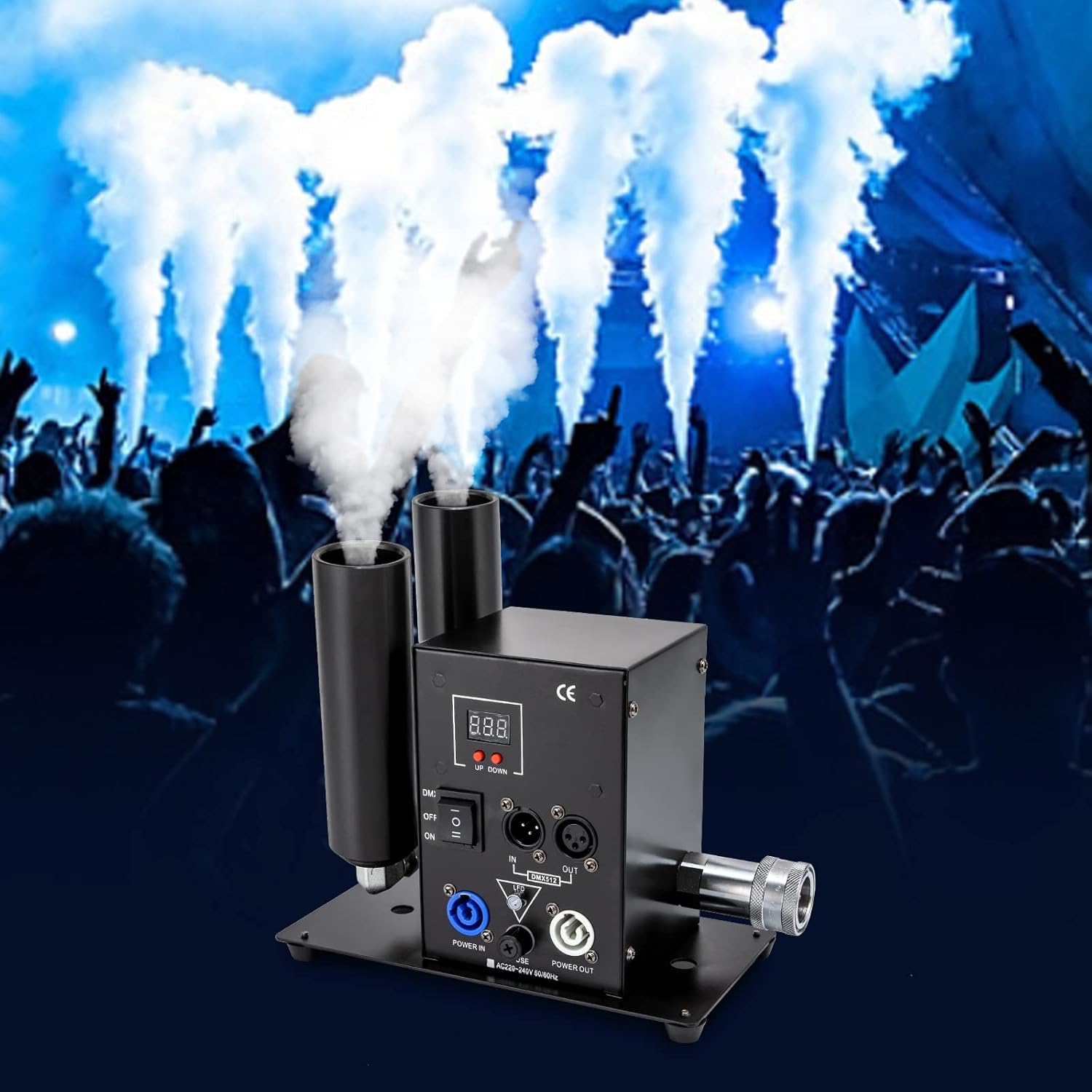
Figure 5: Detailed view of the control panel with DMX/Power switch, LED display, and DMX ports.
- DMX/POWER Switch: Selects the control mode.
- LED Power Light: Illuminates blue when power is on.
- Display: Shows the DMX address code when in DMX mode.
- UP/DOWN Buttons: Used to adjust DMX address.
5.2 DMX512 Control
- Ensure the DMX cord is connected from your DMX controller to the machine.
- Set the DMX/POWER switch to "DMX".
- Use the UP/DOWN buttons on the control panel to set the desired DMX address for the unit.
- Operate the CO2 jet and any integrated LED effects via your DMX controller.
5.3 Power Supply Control
- Set the DMX/POWER switch to "POWER".
- The machine will activate the CO2 jet when power is supplied to the unit. This mode is typically used with an external power switch or relay for on/off control.
- Important: Always switch to "POWER" mode before disconnecting the high-pressure pipe to prevent accidental CO2 release.
5.4 Adjustable Angle
The nozzle angle can be manually adjusted to direct the CO2 jet for wider coverage or specific effects. Gently tilt the nozzle assembly to the desired position.

Figure 6: The CO2 jet cannon in operation, demonstrating the adjustable nozzle angle.
6. Maintenance
- Cleaning: Regularly wipe down the exterior of the machine with a soft, dry cloth. Do not use abrasive cleaners or solvents.
- Hose Inspection: Periodically inspect the high-pressure hose for any signs of wear, cracks, or damage. Replace immediately if any damage is found.
- Storage: When not in use, disconnect the CO2 tank and power supply. Store the machine in a cool, dry place away from direct sunlight and extreme temperatures.
7. Troubleshooting
| Problem | Possible Cause | Solution |
|---|---|---|
| No CO2 jet output |
|
|
| Weak CO2 jet |
|
|
| LED display not working |
|
|
8. Specifications
- Material: Iron
- Hose Material: Premium Material
- Process: Baking Paint
- Color: Black
- Plug: US Standard
- Voltage: 110V/60HZ
- Power: 150W
- Air Pressure: 6MPa
- Use Medium: Liquid Carbon Dioxide
- Control Method: DMX512 and Power Supply
- Spray Height: 5-6M (16.4-19.7ft)
- Hose Length: 6m (19.7ft)
- Item Size: 24x13x23cm (9.4x5.1x9.1 inch)
- Gross Weight: 5.9kg (13lb)
9. Official Product Videos
CO2 Jet Machine Demonstration
Video 1: A demonstration of the CO2 jet machine in action, showcasing its fog output and effects.
Hanging CO2 Cannon Operation
Video 2: This video illustrates the operation of a hanging CO2 cannon, similar to the Eapmic unit, demonstrating its effect in a stage setting.
CO2 Jet Machine Effects
Video 3: A short video showcasing the visual effects produced by a CO2 jet machine, highlighting its use in dynamic environments.
10. Warranty and Support
For warranty information or technical support, please refer to the contact details provided by your retailer or visit the official Eapmic website. Keep your purchase receipt as proof of purchase.