
Introduction
The IMILAB EC6 3K Outdoor Security Camera is designed to provide comprehensive surveillance for your home's exterior. Featuring 3K Ultra-HD resolution, 360° pan and tilt capabilities, and advanced AI detection, this camera offers reliable monitoring day and night. It includes a smart spotlight for color night vision, two-way audio communication, and flexible storage options without mandatory monthly fees. The EC6 3K is built to withstand various weather conditions and integrates seamlessly with smart home ecosystems.

Image: The IMILAB EC6 3K Outdoor Security Camera, showcasing its design and primary features.
What's in the Box
Verify that all components are present in the package:
- EC6 Plug-in Spotlight Camera x 1
- Mounting Kit x 1
- Power Cable 10ft & Adapter x 1
- User Manual & Warranty Card x 1

Image: A visual representation of all items included in the IMILAB EC6 3K product package.
Setup
1. Download the Mi Home App
Before physical installation, download the Mi Home app from your device's app store. This app is essential for camera configuration and operation.
2. Physical Installation
The EC6 3K camera offers versatile mounting options. Choose a suitable location on a wall, ceiling, or column that provides the desired viewing angle and is within reach of a power outlet. Use the provided mounting kit to securely attach the camera.
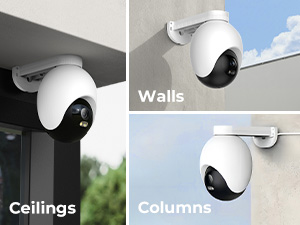
Image: The camera can be installed on walls, ceilings, or columns for optimal placement.
3. Power Connection & Initial Pairing
Connect the camera to power using the 10ft power cable and adapter. Follow the in-app instructions to complete the setup process. Ensure your device is connected to a 2.4GHz Wi-Fi network, as the camera does not support 5GHz Wi-Fi.

Image: A visual guide illustrating the three simple steps to connect your EC6 3K camera.
Operating Instructions
1. 3K Video and 360° Surveillance
The EC6 3K provides crystal-clear 3K Ultra-HD video resolution. Utilize the 360° pan and tilt functionality via the Mi Home app to monitor your entire outdoor area without blind spots. The camera's auto-tracking feature ensures that any detected movement is followed and recorded.

Image: The EC6 3K camera offers 360° surveillance with motion-triggered people tracking.
Video: A demonstration of the IMILAB EC6 3K camera's real-time live view capabilities, showcasing its clarity and tracking features.
2. Night Vision Modes
The camera features advanced night vision capabilities, including:
- Black/White Night Vision: Standard infrared night vision for clear black and white footage in low light.
- Full Color Night Vision: Utilizes integrated spotlights to provide full-color video even in complete darkness.
- Smart Full Color: Automatically switches from black and white to full color upon detection of human movement, optimizing power usage.

Image: Smart Color Night Vision provides clear night views with power saving by switching to color upon detection.
Video: An introduction to the IMILAB EC6 Floodlight Camera, highlighting its night vision and spotlight features.
3. Motion Detection and Smart Deterrence
The camera's smart sensors detect body heat and can differentiate between people and vehicles, reducing false alarms from environmental factors. When motion is detected, the camera can activate its spotlight, sound a 100dB siren, or play a custom voice alarm to deter intruders. You can set custom detection areas within the Mi Home app to focus on specific zones.

Image: The camera's smart deterrence features include motion-triggered siren, flash, and custom voice alarms.

Image: Customize motion zones to receive alerts only when people or vehicles move within the defined area.
4. Two-Way Audio
Engage in real-time conversations with visitors or deter unwanted guests using the camera's built-in microphone and speaker. This feature allows for direct communication through the Mi Home app.

Image: The camera supports 3K live view and two-way audio for real-time communication.
5. App Control and Notifications
The Mi Home app provides full control over your EC6 3K camera. You can view live footage, access playback of recorded events, customize settings, and receive immediate push notifications on your smartphone in case of any detected activity.

Image: The Mi Home app provides real-time notifications and customization options for the camera.
Storage Options
The IMILAB EC6 3K offers flexible storage solutions:
- Local Storage: Record footage 24/7 directly onto a MicroSD card (up to 256GB, not included). This option requires no monthly fees.
- Cloud Storage: An optional subscription-based cloud service is available for storing motion-triggered events. New users may receive a free trial period.

Image: Flexible footage storage options include cloud storage and local storage via a MicroSD card.
Smart Home Integration
The EC6 3K camera is compatible with popular smart home platforms, allowing for voice control and integration into your existing smart home setup:
- Amazon Alexa
- Google Assistant

Image: The camera works with Amazon Alexa and Google Assistant for hands-free operation.
Maintenance
The IMILAB EC6 3K camera is designed for outdoor use with an IP66 weatherproof rating, ensuring protection against dust and water. To maintain optimal performance:
- Regularly check the camera lens for dirt or obstructions and clean gently with a soft cloth.
- Ensure the power cable connection remains secure and free from damage.
- Verify that the mounting is stable, especially after severe weather conditions.
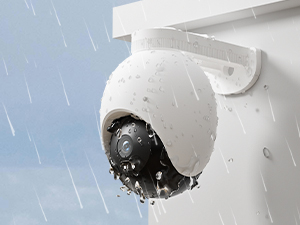
Image: The camera is IP66 weather-resistant, providing protection against various outdoor elements.
Troubleshooting
If you encounter issues with your IMILAB EC6 3K camera, consider the following:
- Connectivity Issues: Ensure your Wi-Fi network is 2.4GHz and the signal strength is adequate at the camera's location. Restart your router and the camera.
- App Not Responding: Close and reopen the Mi Home app. Ensure the app is updated to the latest version.
- Poor Image Quality: Check the lens for dirt or condensation. Verify that the camera's resolution settings in the app are set to 3K/5MP.
- False Alarms: Adjust motion detection sensitivity and customize activity zones within the app to reduce unwanted notifications.
- Resetting the Camera: If persistent issues occur, locate the reset button on the camera (refer to the physical device for exact location) and follow the reset procedure outlined in the Mi Home app.
Specifications
| Feature | Specification |
|---|---|
| Indoor/Outdoor Usage | Outdoor |
| Video Capture Resolution | 3K/5MP |
| Connectivity Protocol | Wi-Fi (2.4Ghz WiFi) |
| Controller Type | Amazon Alexa, Google Assistant |
| Mounting Type | Ceiling Mount (also Wall, Column) |
| Viewing Angle | 360 Degrees |
| Night Vision Range | 98 Feet |
| Water Resistance Level | Waterproof (IP66) |
| Flash Memory Type | Micro SD (up to 256 GB) |
| Alert Type | Audio and Motion |
| Special Features | 3K/5MP Ultra-HD Resolution, 24/7 Recording, 2.4Ghz WiFi 6, Color Night Vision, Smart Spotlight, 360 View Coverage, PTZ Technology, Auto-Tracking, AI-Surveillance, Brightness Control, 2 Way Audio, IP66 Weatherproof, Work with Alexa & Google Assistant, No Monthly Fee, No Subscription |
Warranty and Support
The IMILAB EC6 3K camera comes with a 24-month warranty. For technical assistance, troubleshooting, or warranty claims, please contact IMILAB support:
- Phone: 866 363-8885
- Email: help@imilab.com


