
A Dece Oasis Air 28
ADO Air28 Pro Electric Bicycle User Manual
Model: Air 28 | Brand: A Dece Oasis
1. Safety Information
Before operating your ADO Air28 Pro Electric Bicycle, please read this manual thoroughly and retain it for future reference. Adherence to safety guidelines is crucial for preventing accidents and ensuring optimal performance.
1.1 General Safety Precautions
- Always wear a helmet that meets safety standards.
- Obey all local traffic laws and regulations.
- Perform pre-ride checks before each use (brakes, tires, battery, lights).
- Do not ride under the influence of alcohol or drugs.
- Avoid riding in adverse weather conditions (heavy rain, snow, ice).
- Ensure proper lighting is used when riding at night or in low-light conditions.
1.2 Battery Safety
- Use only the charger provided by A Dece Oasis.
- Do not expose the battery to extreme temperatures or direct sunlight.
- Avoid puncturing, dropping, or disassembling the battery pack.
- Charge the battery in a well-ventilated area, away from flammable materials.
- If the battery shows signs of damage or overheating, discontinue use immediately and contact support.
2. Product Overview
The ADO Air28 Pro is an advanced electric city bicycle designed for comfortable and efficient urban commuting. It features a robust aluminum frame, a powerful Bafang rear motor, and an innovative belt drive system for a smooth and quiet ride.
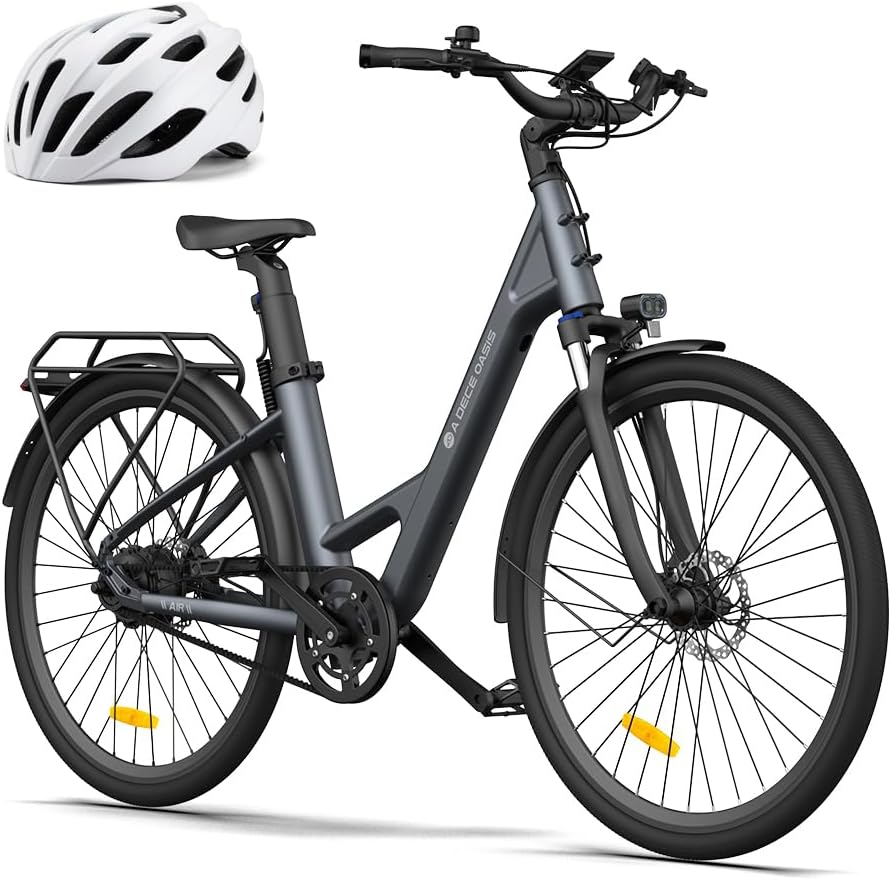
Figure 2.1: The ADO Air28 Pro Electric Bicycle, showcasing its sleek design and included helmet.
2.1 Key Features
- 250W Bafang Rear Motor: Equipped with an integrated transmission system, providing 40 Nm of torque. The motor automatically shifts to the 2nd gear to maintain optimal speed, eliminating the need for manual gear changes.
- Belt Drive System: Offers a lightweight (36% lighter than traditional chains), smoother, and maintenance-free transmission with up to 98% efficiency. It is quiet, rust/grease-free, and environmentally friendly.
- Dual Mode Switching: The upgraded display features ECO mode for energy efficiency and Sport mode for 30% more power, allowing riders to adapt to different road conditions.
- ADO Smart APP: Track real-time mileage, record ride sequences, change modes, find routes, and monitor CO2 emissions for an eco-friendly cycling experience.
- 3.5-inch IPS Display: A waterproof M5 connector display (320x480 pixels) provides crystal-clear details. It is waterproof, oil-resistant, fingerprint-resistant, and rated LPX7 for stable performance. Features Bluetooth connectivity and intelligent light adjustment.
- Torque Sensor: Utilizes sensitive, non-contact bilateral torque sensors with minimal delay and high output linearity, ensuring a smoother, more economical, and comfortable riding experience compared to traditional speed sensors.

Figure 2.2: Diagram illustrating the Bafang 250W motor with 40 Nm torque, super power, and IPX7 rating.

Figure 2.3: Close-up of the belt drive system, highlighting its quiet, maintenance-free, rust/grease-free, and long-life benefits.

Figure 2.4: Illustration of the internal lithium battery (36V/9.6Ah) providing a super long range of over 100km and speeds up to 30km/h.
3. Setup
3.1 Unpacking and Initial Assembly
Your ADO Air28 Pro Electric Bicycle comes partially assembled. Carefully remove all packaging materials and inspect the bicycle for any shipping damage.
- Remove the bicycle from the box.
- Attach the front wheel, handlebars, pedals, and seat post according to the included assembly guide (refer to the separate quick start guide for detailed steps).
- Ensure all bolts and quick releases are securely tightened before riding.
3.2 Battery Charging
For optimal battery life and performance, fully charge the battery before its first use.
- Locate the charging port on the bicycle frame.
- Connect the charger to the charging port, then plug the charger into a standard wall outlet.
- The indicator light on the charger will change (e.g., from red to green) when charging is complete.
- Unplug the charger once the battery is fully charged.
3.3 Pre-Ride Checks
Always perform these checks before each ride:
- Tires: Check tire pressure and ensure tires are free from damage.
- Brakes: Test both front and rear brakes to ensure they are functioning correctly.
- Lights: Verify that the front and rear lights are working.
- Battery: Ensure the battery is securely seated and sufficiently charged.
- Handlebars & Seat: Confirm handlebars and seat are properly aligned and tightened.
4. Operating Instructions
4.1 Powering On/Off
To power on the bicycle, press and hold the power button on the IPS display until the screen illuminates. To power off, press and hold the same button until the display turns off.
4.2 Using the 3.5-inch IPS Display
The IPS display provides real-time riding data and allows you to control various functions of your e-bike.

Figure 4.1: The ADO Smart APP interface and the 3.5-inch IPS display, showing cycling data and e-bike management options.
- Information Display: The screen shows current speed, battery level, assist level, trip distance, and total mileage (ODO).
- Mode Switching: Use the designated buttons on the display to switch between ECO mode (energy-efficient) and Sport mode (higher power output).
- Light Control: The display allows for intelligent light adjustment. Refer to the display's specific manual for detailed light control functions.
4.3 ADO Smart APP Integration
Enhance your riding experience by connecting your ADO Air28 Pro to the ADO Smart APP via Bluetooth.
- Download the ADO Smart APP from your device's app store.
- Enable Bluetooth on your smartphone and open the ADO APP.
- Follow the in-app instructions to pair your bicycle.
- The app provides detailed cycling data, route tracking, and remote control over certain bike functions.
4.4 Riding Tips
- Start in ECO mode for a gentle assist and extended range.
- Switch to Sport mode for uphill climbs or when you need more power.
- Utilize the torque sensor for a natural and responsive pedal assist.
- Brake smoothly and anticipate stops, especially at higher speeds.
5. Maintenance
Regular maintenance ensures the longevity and safe operation of your ADO Air28 Pro.
5.1 Belt Drive Maintenance
One of the key advantages of the belt drive system is its minimal maintenance requirements.
- The belt drive is designed to be maintenance-free, requiring no lubrication or rust prevention.
- Periodically inspect the belt for any signs of wear, cracks, or damage.
- Keep the belt and sprockets clean from excessive dirt or debris.
5.2 Battery Care
- Charge the battery regularly, even if the bike is not in use, to maintain its health.
- Avoid completely draining the battery before recharging.
- Store the battery in a cool, dry place when not in use, ideally between 20% and 80% charge.
5.3 General Cleaning and Inspection
- Clean the bicycle regularly with a damp cloth and mild soap. Avoid high-pressure washing directly on electrical components.
- Check brake pads for wear and replace them if necessary.
- Inspect all cables and wires for fraying or damage.
- Ensure all fasteners (bolts, nuts) are tight.
- Check the suspension fork for proper function and cleanliness.

Figure 5.1: Detail of the integrated rear light, which should be regularly checked for functionality and cleanliness.
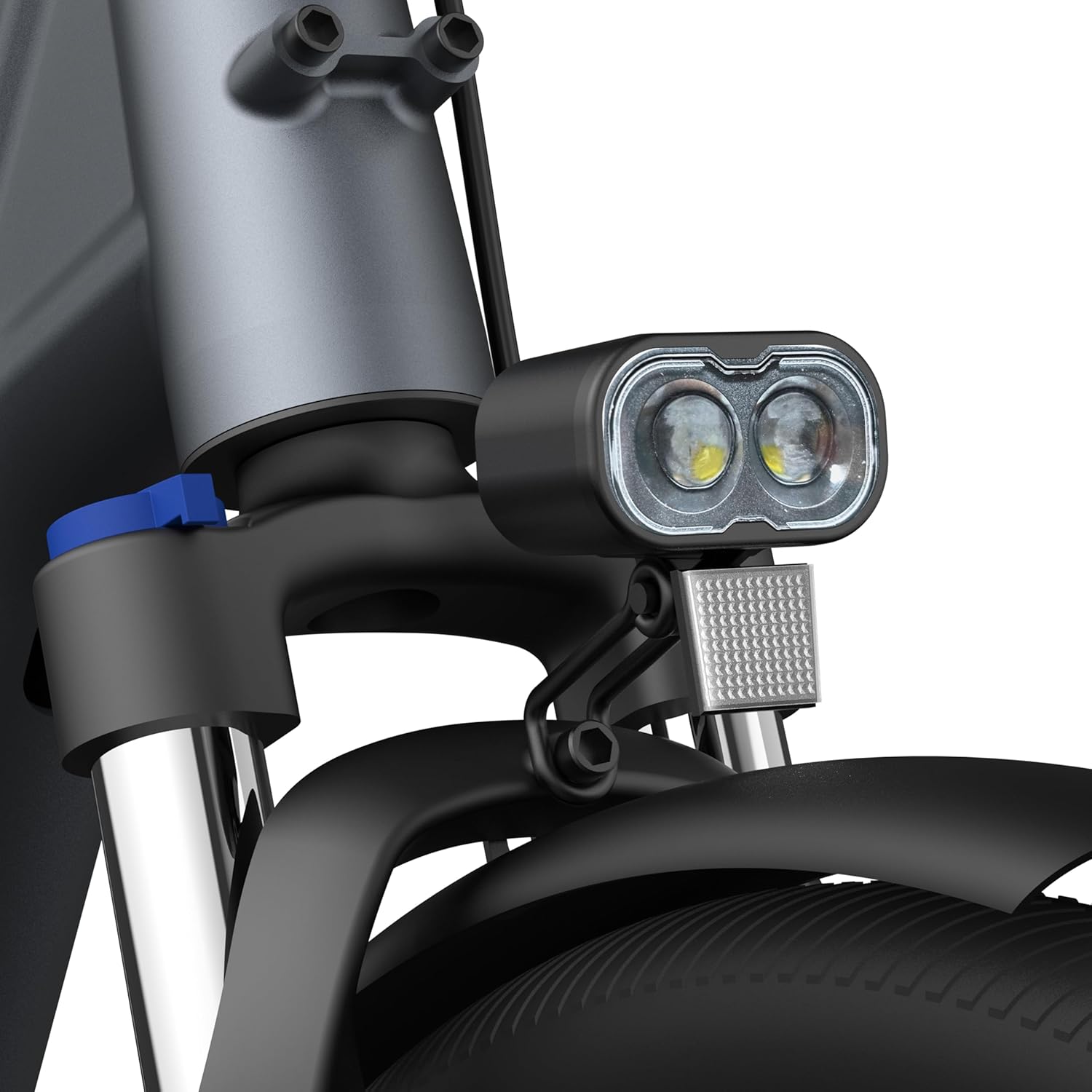
Figure 5.2: Detail of the front light, essential for visibility and safety, requiring periodic inspection.
6. Troubleshooting
This section addresses common issues you might encounter with your ADO Air28 Pro Electric Bicycle.
| Problem | Possible Cause | Solution |
|---|---|---|
| Bike does not power on. | Battery is low or not properly connected. | Charge the battery fully. Ensure the battery is securely seated in its compartment. |
| Motor not assisting. | Low battery, assist level set to zero, or sensor issue. | Check battery level. Increase assist level on the display. Ensure pedals are rotating. |
| Display not working. | Loose connection or power issue. | Check all cable connections to the display. Ensure the main power is on. |
| Brakes feel weak. | Worn brake pads or cable adjustment needed. | Inspect brake pads and replace if worn. Adjust brake cable tension or hydraulic fluid if applicable. Consult a bike mechanic if unsure. |
| Unusual noises from belt drive. | Debris caught in belt or sprockets. | Inspect the belt and sprockets for any foreign objects and remove them. The belt drive is designed to be quiet. |
For issues not listed here or if solutions do not resolve the problem, please contact A Dece Oasis customer support.
7. Specifications
| Feature | Detail |
|---|---|
| Model | ADO Air 28 Pro |
| Brand | A Dece Oasis |
| Motor | 250W Bafang Rear Hub Motor, 40 Nm Torque |
| Battery | 36V / 9.6Ah Lithium Battery |
| Max Range | 100+ km (62+ miles) |
| Max Speed | Up to 30 km/h (18.6 mph) |
| Drive System | Belt Drive |
| Gears | 1 Speed (Automatic Derailleur) |
| Display | 3.5-inch IPS Display (320x480 pixels, LPX7 waterproof) |
| Sensor | Bilateral Non-Contact Torque Sensor |
| Frame Material | Aluminum |
| Wheel Size | 28 Inches |
| Brakes | Disc Brakes |
| Suspension | Suspension Fork |
| Dimensions (L x W x H) | 192 x 65 x 115 cm (75.6 x 25.6 x 45.3 inches) |
| Weight | 22 kg (48.5 lbs) |
| Included Components | Horn, Luggage Rack |

Figure 7.1: Dimensional overview of the ADO Air28 Pro, showing height, length, and handlebar width relative to human figures.
8. Warranty and Support
A Dece Oasis provides a limited warranty for the ADO Air28 Pro Electric Bicycle. Please refer to the warranty card included with your purchase for specific terms and conditions, including coverage duration and exclusions.
8.1 Customer Support
For technical assistance, warranty claims, or general inquiries, please contact A Dece Oasis customer support through their official website or the contact information provided in your product packaging.
- Official Website: www.adoebike.com (Example, actual link not provided in input, but common for brands)
- Email Support: support@adoebike.com (Example)
When contacting support, please have your model number (Air 28) and purchase details ready.