
1. Introduction
This manual provides instructions for the Kqcibz 100W x 2 IRF240 FET Class A Power Amplifier Board, Model 500105721. It covers setup, operation, maintenance, and troubleshooting to ensure optimal performance and longevity of your amplifier board. Please read this manual thoroughly before installation and use.

Image 1.1: A pair of Kqcibz 100W Class A Power Amplifier Boards.
2. Product Features
- Utilizes IRF240 MOS tubes for robust performance.
- Features high-quality input coupling capacitors (50V / 3.3UF) imported from Germany.
- Main circuit employs five-ring metal film resistors with 1% accuracy, contributing to an excellent signal-to-noise ratio.
- Constructed with a 1.6mm thick double-sided PCB, 2.0 oz copper thickness, and tin-sprayed finish for superior current passing performance.
- The PCB design incorporates a rigorous and reasonable wiring layout with a single-point grounding scheme.
- Ensures stable and reliable operation with high output power.
- Delivers a beautiful, round sound with a wide sound field and strong three-dimensional presence.
- Provides stable and solid low-frequency response, excellent signal-to-noise ratio, and wide dynamic range.
- Offers clear audio details and excellent transient response, suitable for various music genres.
3. Package Contents
The package includes:
- 1 Pair (2 units) of Kqcibz Power Amplifier Boards
4. Safety Information
- Always disconnect power before making any connections or adjustments to the amplifier board.
- Ensure proper ventilation around the amplifier board to prevent overheating during operation.
- Handle electronic components with care to avoid damage from static electricity.
- Do not expose the board to moisture, liquids, or extreme temperatures.
- If you are unsure about any installation or connection steps, consult a qualified electronics technician.
5. Setup
Follow these steps for proper installation and connection of the amplifier board:
- Power Supply Connection: Connect a DC power supply within the range of +35V to +45V and -35V to -45V to the designated power input terminals. Ensure correct polarity.
- Audio Input Connection: Connect your audio source (e.g., preamplifier, DAC) to the audio input terminals (IN, GND).
- Speaker Output Connection: Connect your speaker(s) to the speaker output terminals (SPK OUT +, SPK OUT -). Ensure the speaker impedance is compatible with the amplifier (typically 4 ohms for 100W output).
- Ground Connection: Ensure all ground connections (GND) are properly established to prevent hum and noise.
- Quiescent Current Adjustment: The board includes a quiescent current adjustment point. This should ideally be set by an experienced technician to optimize performance and thermal characteristics.
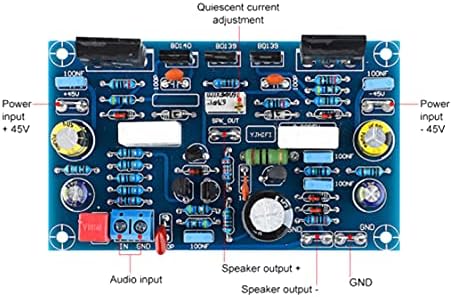
Image 5.1: Diagram illustrating connection points for power input, audio input, speaker output, and quiescent current adjustment.

Image 5.2: Top view of one amplifier board, showing component layout.
6. Operating Instructions
- After all connections are securely made and verified, apply power to the amplifier board.
- Start with the volume level of your audio source set to minimum.
- Gradually increase the volume to your desired listening level.
- Monitor the amplifier board for any unusual heat, smoke, or distorted sounds during initial operation. If any abnormalities occur, immediately disconnect power and review your connections.
7. Maintenance
- Keep the amplifier board clean and free from dust and debris. Use a soft, dry brush or compressed air for cleaning.
- Avoid exposing the board to direct sunlight, high humidity, or corrosive environments.
- Periodically inspect all connections to ensure they remain tight and secure.
- Do not attempt to modify the circuit unless you are a qualified technician, as this may void any warranty and could cause damage.
8. Troubleshooting
If you encounter issues with your amplifier board, refer to the following common problems and solutions:
- No Sound Output:
- Check if the power supply is correctly connected and providing the specified voltage.
- Verify that the audio input source is active and properly connected.
- Ensure speaker connections are secure and speakers are functional.
- Distorted Sound:
- Reduce the input signal level from your audio source.
- Check the power supply for stability and adequate current delivery.
- Ensure speaker impedance matches the amplifier's requirements.
- Excessive Heat:
- Ensure adequate ventilation around the amplifier board.
- Verify that the speaker load impedance is not too low.
- Check the quiescent current setting (if adjustable).
- Hum or Noise:
- Ensure all ground connections are properly made, especially a single-point ground.
- Check for proper shielding of audio input cables.
- Verify the power supply is clean and free of ripple.
9. Specifications
| Feature | Specification |
|---|---|
| Brand | Kqcibz |
| Model | 500105721 |
| Power Supply | ±35V to ±45V DC |
| Output Power | 100W (into 4ohm load at ±45V) per channel |
| Distortion (THD) | 0.012% (at 1kHz, full power) 0.015% (at 10kHz, full power) |
| Quiescent Current | 20mV |
| Number of Channels | 1 per board (product is a pair for 2 channels total) |
| Dimensions (L x W x H) | 90.6mm x 54.5mm x 35mm (approx. 3.57 x 2.15 x 1.38 inches) |
| Material | ABS |
| PCB Thickness | 1.6mm |
| Copper Thickness | 2.0 oz |
| Item Weight | 186 Grams (for the pair) |

Image 9.1: Side view of the amplifier board with approximate dimensions.
10. Warranty and Support
For warranty information, technical assistance, or customer support, please refer to the documentation provided with your purchase or contact your retailer directly. Keep your proof of purchase for any warranty claims.