Introduction
This user manual provides comprehensive instructions for the safe and effective operation, assembly, maintenance, and troubleshooting of your SKRT Mobility Scooter, Model R100. Please read this manual thoroughly before using the scooter to ensure proper function and your safety.
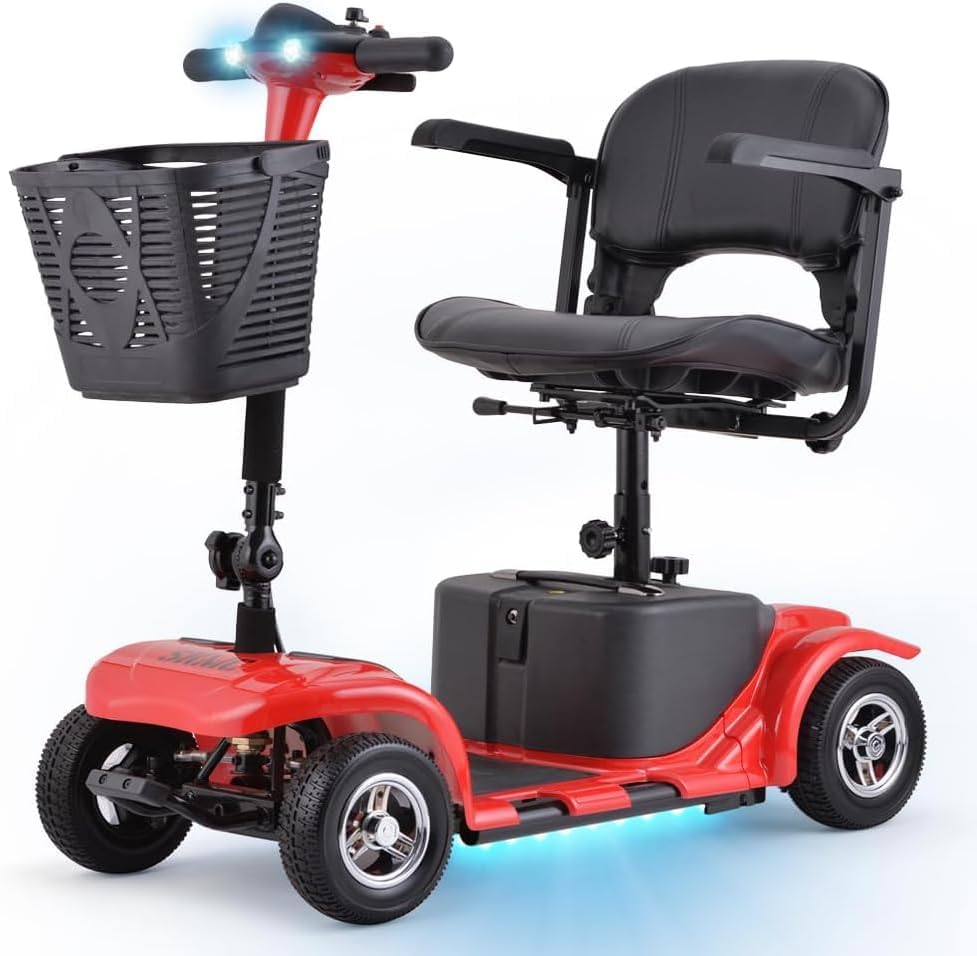
Image: The SKRT Mobility Scooter, Model R100, featuring a vibrant red finish, bright LED headlights, and a convenient front storage basket.
Safety Information
Your safety is paramount. Always adhere to the following guidelines:
- Always wear appropriate safety gear, such as a helmet, when operating the scooter.
- Ensure the battery is fully charged before extended use to avoid unexpected power loss.
- Do not exceed the maximum weight capacity of 300 lbs (136 kg).
- Operate the scooter on stable, level surfaces. While designed for various terrains, exercise caution on uneven ground.
- Utilize the bright front headlight for visibility, especially in low-light conditions.
- Be aware of your surroundings and other pedestrians or vehicles.
- The scooter is equipped with anti-roll technology for stability; however, avoid sharp turns at high speeds.
- Do not operate the scooter under the influence of alcohol or medication that impairs judgment.
Product Overview
The SKRT Mobility Scooter R100 is designed for convenience and portability, featuring a compact design and robust construction.
Key Features:
- Compact and convenient design, supporting up to 300 lbs.
- Maximum speed of 4.5 MPH with a driving range of up to 15 miles per charge.
- 24-volt 12AH battery, chargeable on or off the scooter.
- Adjustable armrests for comfortable fit.
- Bright front LED headlight for enhanced safety and visibility.
- Four solid, puncture-proof tires for reliable outdoor use.
- Equipped with anti-roll technology for stability.
- Includes an unbreakable, lightweight storage basket.
- Quickly disassembles into five lightweight pieces for easy transport.

Image: Overall dimensions of the scooter, highlighting its compact size and 300 lbs weight capacity.

Image: Key performance specifications of the SKRT Mobility Scooter, including motor power, speed, charging time, range, and weight capacity.
Setup and Initial Assembly
Your SKRT Mobility Scooter is designed for quick and easy assembly. Follow these steps for initial setup:
- Unpack Components: Carefully remove all parts from the packaging. Ensure all components listed in the packing list are present.
- Connect Halves: Assemble the scooter by connecting the front and back halves. Align the connection points and secure them firmly.
- Install Seat: Place the seat onto the seat post and ensure it is securely locked in position.
- Attach Basket: Secure the storage basket to the front of the scooter.
- Adjust Armrests and Seat: Adjust the armrests and seat to a comfortable height and position for your body.

Image: A visual guide demonstrating the 5-step quick disassembly and assembly process of the scooter.
Charging the Battery
Before first use, fully charge the scooter's 24-volt 12AH battery. The battery can be charged while installed in the scooter or removed.
- Connect Charger: Plug the charger into a standard electrical outlet.
- Connect to Scooter/Battery: Connect the other end of the charger to the charging port on the scooter or directly to the battery pack if removed.
- Monitor Charging: The charging indicator light on the charger will show the charging status. A full charge typically takes 6-7 hours.
- Disconnect: Once fully charged, disconnect the charger from the battery/scooter and then from the wall outlet.
Note: For optimal battery life, avoid completely draining the battery before recharging. Store the scooter with a charged battery if not in use for extended periods.

Image: Illustration of the two available methods for charging the scooter's battery: directly from the battery pack or while installed in the scooter.
Operating Instructions
Familiarize yourself with the controls before operating the scooter.
Controls Overview:

Image: Overview of the scooter's control panel and safety features like anti-tilt wheels and anti-collision bar.
- Throttle Control: Use the throttle lever to control forward and reverse motion. Push forward for forward movement, pull back for reverse.
- Speed Adjustment: Adjust the speed dial to set your desired maximum speed, up to 4.5 MPH.
- Headlight Switch: Activate the bright front LED headlight for improved visibility.
- Horn Button: Use the horn to alert others of your presence.
- Battery Indicator: Monitor the battery level on the control panel.
Driving the Scooter:
- Power On: Turn the key to the 'ON' position.
- Start Moving: Gently press the throttle control to begin moving. Start at a low speed until you are comfortable.
- Steering: Use the handlebars to steer the scooter.
- Braking: Release the throttle control to engage the automatic electromagnetic brake.
- Navigating Terrain: The scooter is equipped with four solid tires suitable for various outdoor surfaces. Exercise caution on sandy land, speed bumps, flagstone paths, and plank paths.

Image: A user operating the scooter on a paved path, showcasing its ease of use in outdoor environments.
Video: A demonstration of the SKRT Mobility Scooter in use, highlighting its maneuverability and smooth operation.

Image: Visual representation of the scooter's adaptability to different terrains, including sandy areas and uneven paths.
Disassembly and Portability
The SKRT Mobility Scooter is designed to quickly disassemble into five lightweight pieces, making it highly portable and easy to transport in a car trunk or back seat.
- Remove Seat: Detach the seat from its post.
- Separate Halves: Disconnect the front and rear sections of the scooter.
- Remove Battery: Take out the battery pack.
- Remove Basket: Detach the front storage basket.
- Fold Tiller: Fold down the tiller (handlebar assembly).
These pieces are designed to be lightweight for convenient lifting and storage.

Image: The scooter broken down into its five lightweight components, illustrating its portability.
Maintenance
Regular maintenance ensures the longevity and optimal performance of your SKRT Mobility Scooter.
- Cleaning: Wipe down the scooter regularly with a damp cloth. Avoid using harsh chemicals or abrasive cleaners.
- Battery Care: Keep the battery charged, especially during periods of non-use. Store the battery in a cool, dry place.
- Tires: The scooter is equipped with solid, puncture-proof tires, requiring no inflation. Periodically check them for wear and tear.
- Connections: Ensure all electrical connections and assembly points are secure and free from debris.
- Storage: When storing for extended periods, disassemble the scooter and store components in a dry, protected area.
Troubleshooting
If you encounter issues with your scooter, refer to the common problems and solutions below. If the problem persists, contact customer support.
| Problem | Possible Cause | Solution |
|---|---|---|
| Scooter does not power on. | Battery is not charged or not connected properly. Key is not fully inserted or turned. | Ensure battery is fully charged. Check battery connections. Ensure key is fully inserted and turned to 'ON'. |
| Scooter moves slowly or has reduced range. | Low battery charge. Overloaded scooter. Terrain too challenging. | Recharge the battery fully. Reduce load on the scooter. Operate on smoother terrain. |
| Unusual noises during operation. | Loose components or debris. | Inspect the scooter for any loose parts or foreign objects. Contact support if noise persists. |
| Battery not holding charge. | Faulty battery or charger. | Ensure charger is working correctly. If issue persists, battery may need replacement. Refer to warranty information. |
Specifications
| Feature | Detail |
|---|---|
| Model Number | R100 |
| Brand | SKRT |
| Product Dimensions (L x W x H) | 39 x 20 x 33 inches (99 x 51 x 84 cm) |
| Weight Capacity | 300 lbs (136 kg) |
| Maximum Speed | 4.5 MPH (7.2 km/h) |
| Drive Mileage (Per Charge) | Up to 15 miles (24 km) |
| Motor | 180W Brushless Motor |
| Battery | 24-volt 12AH |
| Charging Time | 6-7 hours |
| Tires | Four solid, puncture-proof tires |
| Manufacturer | DOUBLE GLOBAL INC |
| Color Options | Red, Blue, Purple, Silver/Black (depending on variant) |
Warranty and Support
SKRT is committed to providing excellent customer service and support for your mobility scooter.
Warranty Information:
- 1-30 Days: Free returns and exchanges. Please ensure the original packaging is retained.
- 31-90 Days: Free replacement or replacement of accessories, depending on the status of the vehicle. Note that payments are non-refundable during this period.
- 90 Days to 3 Years: Limited Maintenance and technical team support are provided. Accessories will be shipped from our California warehouse.
Contact Support:
For any questions or technical assistance, please contact our support team:
- Service Hours: Monday to Friday, 10:00 AM to 6:00 PM Pacific Standard Time.
- Technical Hotline: 909-278-0155
- Please mention your model number (R100) when contacting support for faster service.

Image: SKRT's customer service team ready to assist with after-sale inquiries and technical support.


