
Introduction
Thank you for choosing the Qcwwy Portable Bladeless Desk Fan. This compact and elegantly designed fan provides efficient and quiet cooling with three adjustable speeds, making it ideal for various environments such as offices, dorms, bedrooms, or for travel and camping. This manual provides essential information for the safe and effective use of your new fan.
Safety Information
Please read all safety instructions carefully before using the fan and retain this manual for future reference.
- Do not insert fingers or any objects into the fan's air inlets or outlets.
- Keep the fan away from water or other liquids to prevent electric shock.
- Do not use the fan in excessively humid or dusty environments.
- Ensure the power source matches the fan's voltage requirements (5V DC).
- Unplug the fan before cleaning or performing any maintenance.
- Do not attempt to disassemble or repair the fan yourself. Contact qualified service personnel for assistance.
- Keep out of reach of children and pets.
Package Contents
Verify that all items are present in the package:
- 1 x Qcwwy Portable Bladeless Desk Fan
- 1 x USB Cable
- 1 x User Manual
Product Overview
The Qcwwy Portable Bladeless Desk Fan features a sleek, compact design with intuitive controls. Its bladeless technology ensures safety and ease of cleaning.

Figure 1: Front view of the Qcwwy Portable Bladeless Desk Fan, showing the main air outlet and control panel.
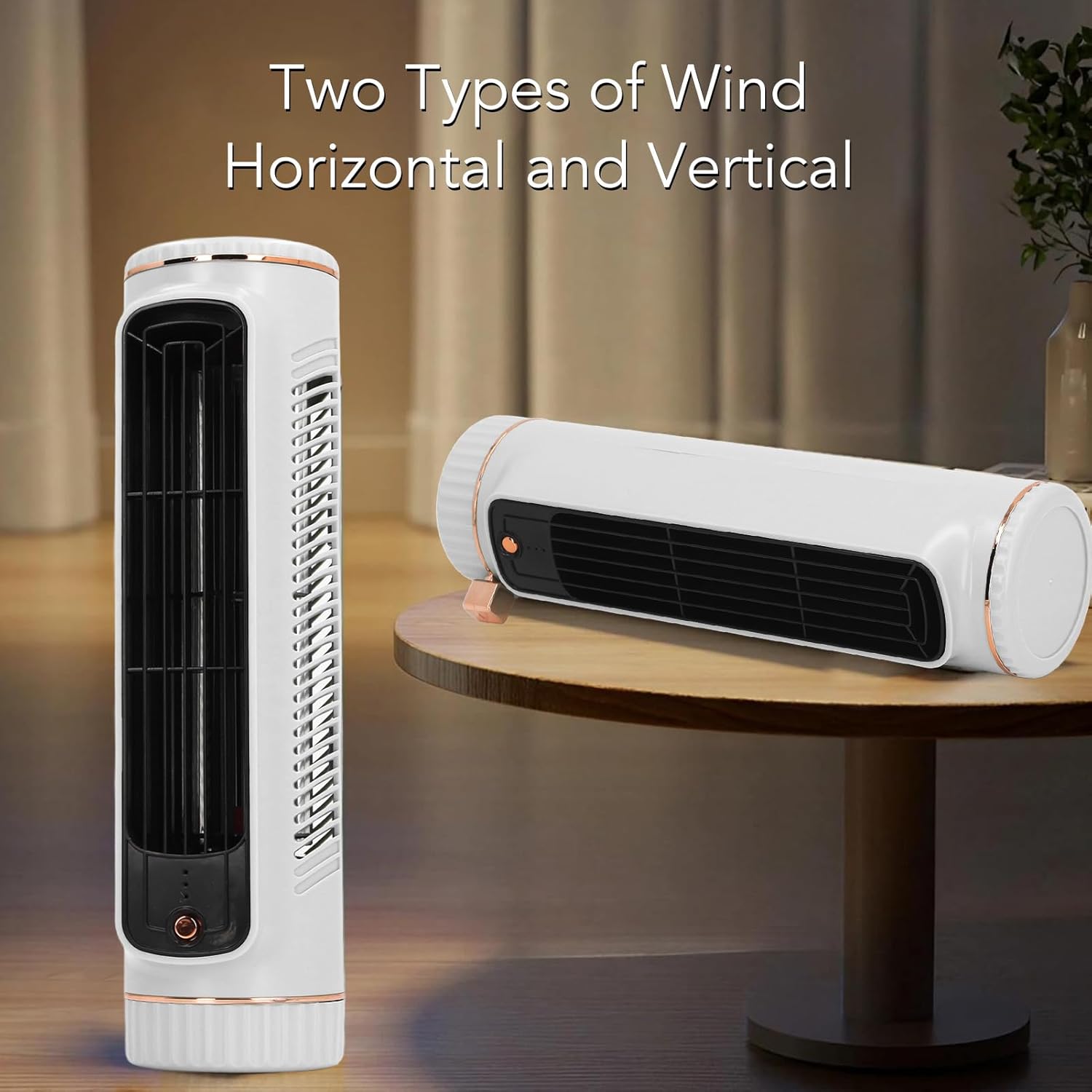
Figure 2: The fan can be used in both vertical (tower) and horizontal (lying flat) orientations for versatile cooling.

Figure 3: Rear view of the fan, highlighting the USB-C charging port located at the bottom.
Key Components:
- Control Button: Located on the front, used for power and speed adjustment.
- Air Outlet: Front grille for airflow.
- Air Inlet: Side vents for air intake.
- USB-C Charging Port: Located at the rear bottom for power input.
- Indicator Lights: Small LEDs near the control button to show speed setting and charging status.
Setup
Follow these steps to set up your Qcwwy Portable Bladeless Desk Fan:
- Unpack: Carefully remove the fan and all accessories from the packaging.
- Initial Charge: Before first use, fully charge the fan. Connect the provided USB cable to the fan's USB-C port (Figure 3) and the other end to a compatible USB power adapter (not included) or a computer USB port. The indicator light will show charging status and turn off or change color when fully charged.
- Placement: Place the fan on a stable, flat surface. Ensure there is adequate space around the air inlets and outlets for optimal airflow. The fan can be positioned vertically or horizontally depending on your preference and space availability.

Figure 4: The fan comes with a USB cable for convenient charging.
Operating Instructions
The fan features a simple touch control for ease of use.
- Power On/Off: Press the control button once to turn the fan on at the lowest speed setting. Press and hold the button for approximately 2 seconds to turn the fan off.
- Adjust Fan Speed: While the fan is on, press the control button repeatedly to cycle through the three available speed settings: Low → Medium → High. The indicator lights will change to reflect the current speed setting.
- Charging: When the battery is low, the indicator light may flash. Connect the fan to a power source using the USB cable to recharge. The fan can be used while charging.
Maintenance
Regular maintenance helps ensure the longevity and optimal performance of your fan.
- Cleaning: Disconnect the fan from the power source before cleaning. Use a soft, dry cloth to wipe the exterior surfaces of the fan. For the air inlets and outlets, a soft brush or compressed air can be used to remove dust. Do not use abrasive cleaners, solvents, or immerse the fan in water.
- Storage: When not in use for extended periods, store the fan in a cool, dry place, away from direct sunlight and extreme temperatures.
Troubleshooting
If you encounter any issues with your fan, refer to the following common problems and solutions:
| Problem | Possible Cause | Solution |
|---|---|---|
| Fan does not turn on. | Battery is depleted. | Connect the fan to a power source using the USB cable and charge it. |
| Power cable is not properly connected. | Ensure the USB cable is securely connected to both the fan and the power adapter. | |
| Weak airflow. | Air inlets/outlets are blocked. | Clear any obstructions from the air inlets and outlets. |
| Fan is on a low speed setting. | Press the control button to increase the fan speed. | |
| Fan makes unusual noise. | Fan is not on a stable surface. | Place the fan on a flat, stable surface. |
| Internal obstruction or damage. | Discontinue use and contact customer support. Do not attempt to open the fan. |
Specifications
| Feature | Specification |
|---|---|
| Model Name | Qcwwy0g3x2u9etw-11 |
| Item Type | Desk Cooler Fan |
| Material | ABS, Electronic Components, Metal |
| Color | White |
| Height (Approx.) | 26.67 cm / 10.5 in |
| Diameter (Approx.) | 6.1 cm / 2.4 in |
| Product Dimensions | 11.02"D x 4.33"W x 3.93"H |
| Item Weight | 1.19 pounds (Approx. 538g) |
| Battery Type | Lithium Battery (Built-in) |
| Battery Capacity | 1200mAh |
| Power Source | AC/DC (USB Rechargeable) |
| Voltage | 5 Volts (DC) |
| Number of Power Levels | 3 |
| Control Method | Touch |
| Special Feature | Adjustable Speeds, Bladeless Design |
| Recommended Use | Indoor/Outdoor (Office, Dorm, Bedroom, Travel, Camping) |
Warranty and Support
For any questions, concerns, or technical support regarding your Qcwwy Portable Bladeless Desk Fan, please contact the seller or manufacturer through the platform where the product was purchased. Please have your model number (Qcwwy0g3x2u9etw-11) and purchase details ready when contacting support.