
Introduction
Thank you for choosing the ODK L-Shaped Gaming Desk. This manual provides essential information for the safe assembly, operation, and maintenance of your new desk. Please read these instructions carefully before beginning assembly and retain them for future reference.

Image: The ODK L-Shaped Gaming Desk, showcasing its carbon fiber texture, integrated LED strip, and power outlets, set up with gaming equipment.
Safety Information
- Ensure all components are present and undamaged before assembly. Do not use damaged parts.
- Assemble the desk on a soft, clean surface to prevent scratches.
- Keep small parts and packaging materials away from children.
- Do not overtighten screws during initial assembly; tighten fully only when instructed.
- For electrical components (LEDs, power outlets), ensure proper connection to a suitable power source. Do not overload the power outlets.
- Avoid placing liquids directly on the desk surface, especially near electrical components.
- Do not stand or sit on the desk.
Package Contents
Please verify that all parts listed below are included in your package. All components are typically labeled for easy identification during assembly.
- L-Shaped Desktop Panels (Carbon Fiber Texture)
- Metal Frame Components (Legs, Support Beams)
- Integrated LED Strip with Controller
- Power Outlet Unit (2 AC, 2 USB) with Power Cord
- Headphone Hook
- Adjustable Foot Pads
- Assembly Hardware (Screws, bolts, washers, etc.)
- Assembly Tools (Hex key, screwdriver, etc.)
- Instruction Manual
Assembly Instructions
Assembly is designed to be straightforward. Follow the numbered steps and diagrams provided in the included physical instruction manual. Ensure all parts are correctly oriented before tightening screws.
- Unpack and Identify: Carefully unpack all components and lay them out on a protected surface. Identify each part using the labels and the parts list.
- Assemble Frame: Attach the T-shaped leg frames to the main support beams. Do not fully tighten screws at this stage.
- Attach Desktop Panels: Secure the L-shaped desktop panels to the assembled frame. Ensure proper alignment.
- Install LED Strip: The integrated LED strip is designed for easy installation. Follow the specific instructions for connecting and securing it to the desk.
- Mount Power Outlet Unit: Install the power outlet unit into its designated slot on the desktop.
- Attach Headphone Hook: Secure the metal headphone hook to the underside of the desk as desired.
- Final Tightening: Once all components are in place and aligned, systematically tighten all screws and bolts.
- Adjust Foot Pads: Adjust the foot pads at the base of the legs to ensure the desk is level and stable on uneven surfaces.
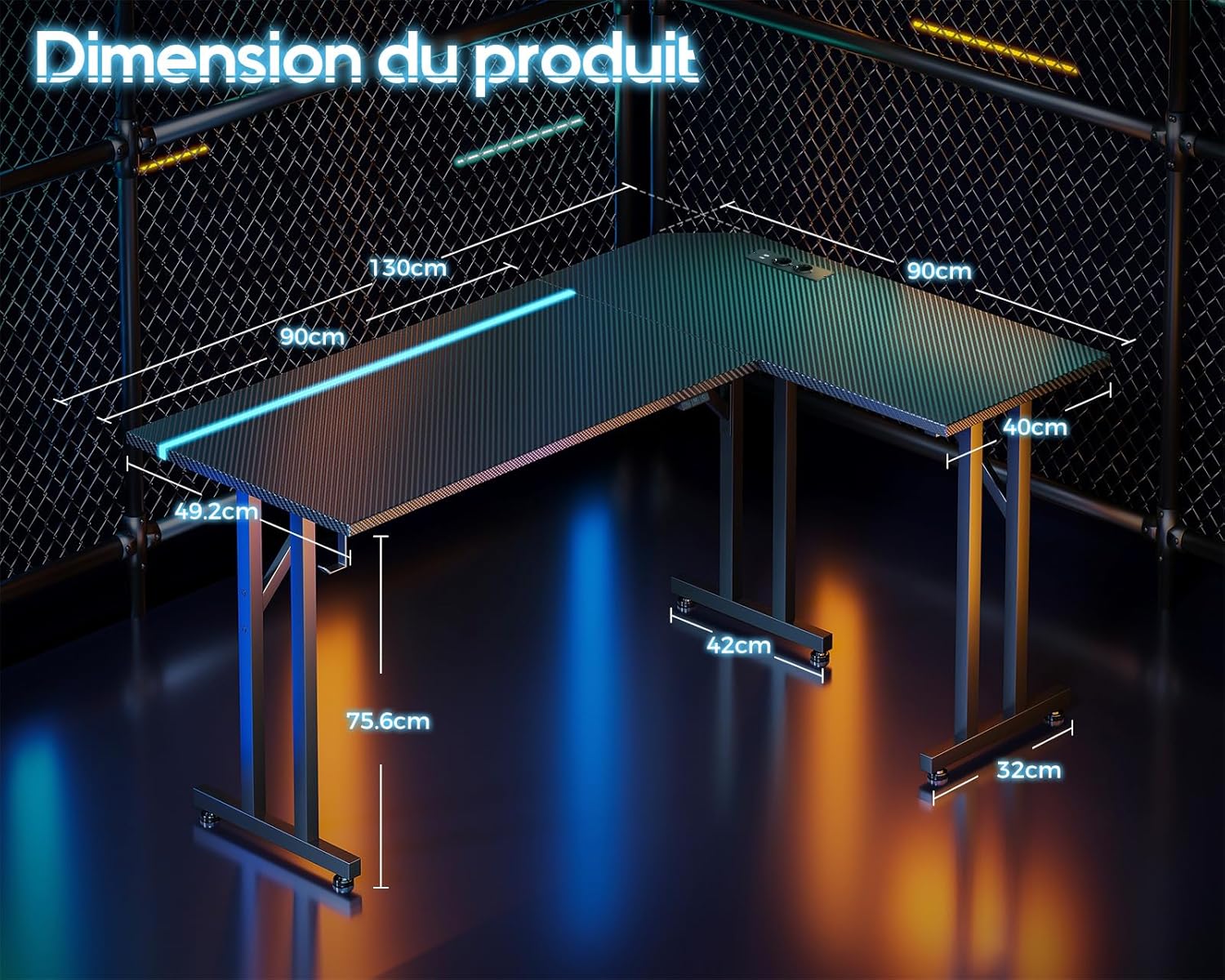
Image: A detailed diagram illustrating the dimensions of the L-shaped desk, including length, width, and height measurements.

Image: A close-up view of the desk's T-shaped leg design, highlighting its robust construction for enhanced stability.
Operating Instructions
Integrated LED Lighting
The desk features an integrated LED strip with various customization options to enhance your environment.
- Power On/Off: Use the designated button on the LED controller to turn the lights on or off.
- Color Selection: Cycle through 10 static light colors using the 'Static Color' button.
- Dynamic Modes: Select from 20 dynamic lighting modes using the 'Dynamic Mode' button.
- Speed/Brightness Adjustment: Adjust the speed of dynamic modes or the brightness of static colors using the 'Speed/Brightness' control.

Image: A detailed view of the integrated LED strip embedded along the edge of the desk, showing the various color options and the control buttons for static color, dynamic modes, and speed/brightness.
Power Outlets and USB Ports
The desk includes a convenient power outlet unit for your electronic devices.
- AC Outlets: Two (2) standard AC power outlets (110-240V/6A) are provided for devices such as monitors, laptops, or other peripherals.
- USB Charging Ports: Two (2) USB charging ports (5V/2A) are available for charging smartphones, tablets, or other USB-powered devices.
- Power Cord: Connect the desk's power cord to a wall outlet to activate the LED lighting and power outlets.

Image: A close-up of the integrated power strip on the desk surface, featuring two AC outlets and two USB ports, with a smartphone connected for charging.
Headphone Hook
A sturdy metal hook is provided for convenient storage of your headphones or other cables, keeping your workspace tidy.
Maintenance
- Cleaning: Wipe the desk surface and frame with a soft, damp cloth. Avoid abrasive cleaners or harsh chemicals that could damage the finish.
- Spills: Immediately wipe up any spills to prevent damage to the carbon fiber texture or electrical components.
- Fasteners: Periodically check all screws and bolts to ensure they remain tight. Retighten if necessary to maintain stability.
- Electrical Components: Ensure the power cord and outlet unit are free from damage. Do not attempt to repair electrical components yourself.
Troubleshooting
- Desk is Unstable: Check that all assembly screws are fully tightened. Adjust the foot pads on the bottom of the legs to level the desk on uneven floors.
- LED Lights Not Working: Ensure the power cord is securely plugged into a wall outlet and the desk's power unit. Check that the LED controller is properly connected and powered on.
- Power Outlets/USB Ports Not Working: Verify the desk's power cord is plugged into a live wall outlet. Check for any tripped circuit breakers in your home. Do not exceed the maximum load capacity of the outlets.
- Missing Parts: If any parts are missing upon unboxing, please contact customer support immediately.
Specifications
| Brand | ODK |
| Model Number | 021001001 |
| Dimensions (L x W x H) | 130 x 90 x 74.5 cm (51.2 x 35.4 x 29.3 inches) |
| Weight | 14.8 Kilograms (32.6 lbs) |
| Material | Metal Frame, Carbon Fiber Texture Desktop |
| Special Features | Integrated LED Strip (10 colors, 20 dynamic modes), 2 AC Power Outlets (110-240V/6A), 2 USB Charging Ports (5V/2A), Headphone Hook, L-Shaped Design, Stable T-shaped Legs |
| Recommended Use | Gaming, Work, Study |
Warranty and Support
ODK is committed to customer satisfaction. If you encounter any issues during assembly or use, or have questions regarding your product, our support team is available to assist you.
- Customer Support: For assistance, please refer to the contact information provided in your product packaging or on the ODK official website. Our team aims to respond to inquiries within 24 hours.
- Warranty Information: Specific warranty details are typically included with your purchase documentation. Please retain your proof of purchase for warranty claims.


