
1. Introduction
The SIRUI KS-5 Ball Head is a versatile and robust accessory designed for photographers and videographers. It provides precise control and stability for various camera setups, including DSLR cameras, camcorders, and other compatible devices. This manual outlines the proper setup, operation, and maintenance of your KS-5 Ball Head to ensure optimal performance and longevity.

Image 1.1: The SIRUI KS-5 Ball Head, quick release plate, and included Allen wrench.
2. Package Contents
Please verify that all items listed below are included in your package:
- 1 x SIRUI KS-5 Ball Head
- 1 x Arca Standard Quick Release Plate
- 1 x Allen Wrench (included with Quick Release Plate)

Image 2.1: Visual representation of the package contents and specifications.
3. Product Overview & Parts Identification
Familiarize yourself with the main components of the KS-5 Ball Head:
- Ball Locking Knob: Controls the movement and locking of the ball joint.
- Panning Locking Knob: Secures the 360° panoramic base.
- 360° Panning Base: Allows for smooth horizontal rotation.
- Arca-Type QR Plate: Quick Release Plate for attaching your camera.
- Release Button: Used to quickly detach the QR plate.
- Locking Wrench: Secures the QR plate to the ball head.
- 1/4"-20 Screw: Standard camera mounting screw on the QR plate.
- Non-slip Pad: Provides secure grip for the camera on the QR plate.
- Anti-Slip Pin: Prevents accidental sliding of the QR plate.
- Safety Bolt: Additional safety mechanism for the QR plate.

Image 3.1: Detailed view of the KS-5 Ball Head components.
4. Specifications
| Feature | Specification |
|---|---|
| Product Model | KS-5 Ball Head |
| Material | Aluminum Alloy |
| Max Load Capacity | 10 kg (22 lbs) |
| Item Weight | 250 g (0.6 lbs) |
| Ball Diameter | 29 mm (1.1 inches) |
| Base Diameter | 42 mm (1.7 inches) |
| Height | 79 mm (3.1 inches) |
| Mounting Thread (Bottom) | 3/8"-16 internal thread (includes 3/8" to 1/4" adapter) |
| Mounting Screw (Top) | 1/4"-20 screw |
| Color | Black |
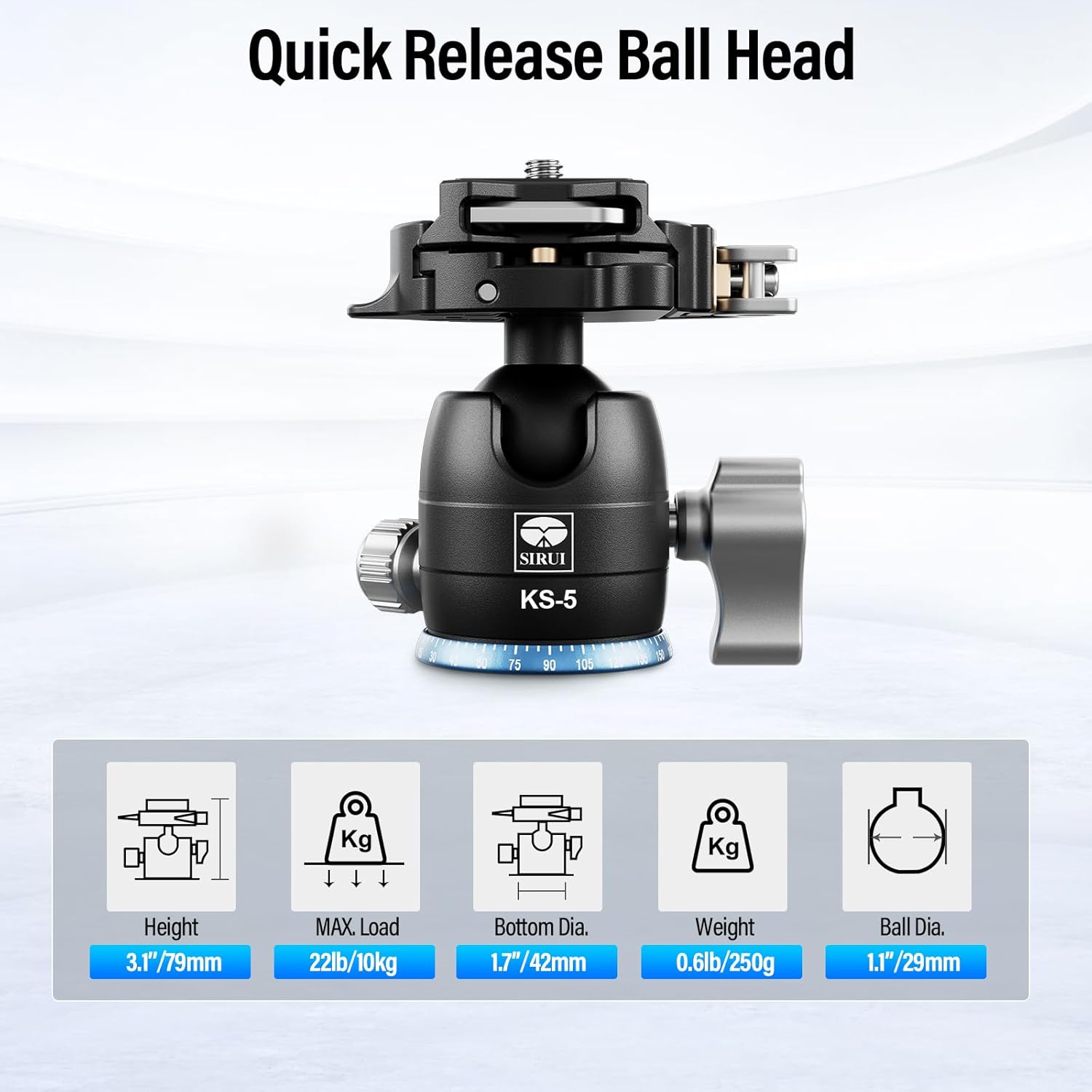
Image 4.1: Key dimensions and load capacity of the KS-5 Ball Head.
5. Setup
5.1 Attaching the Ball Head to a Tripod/Monopod
- Locate the 3/8"-16 internal thread at the base of the KS-5 Ball Head.
- If your tripod or monopod has a 1/4"-20 mounting screw, use the included 3/8" to 1/4" thread adapter.
- Screw the ball head firmly onto the mounting screw of your tripod or monopod until secure.
5.2 Attaching Your Camera to the Quick Release Plate
- Locate the 1/4"-20 screw on the Arca Standard Quick Release Plate.
- Align the screw with the tripod socket on the bottom of your camera.
- Tighten the screw using the provided Allen wrench until the camera is securely attached to the plate. Ensure the non-slip pads are making full contact with the camera base.
5.3 Installing the Quick Release Plate onto the Ball Head
- Ensure the Locking Wrench on the ball head is in the unlocked position.
- Slide the quick release plate (with camera attached) into the clamp from the side. The anti-slip pin will engage.
- Press down gently on the plate to ensure it is fully seated.
- Rotate the Locking Wrench to the locked position to secure the plate. Verify that the plate is firmly held and cannot be easily removed.
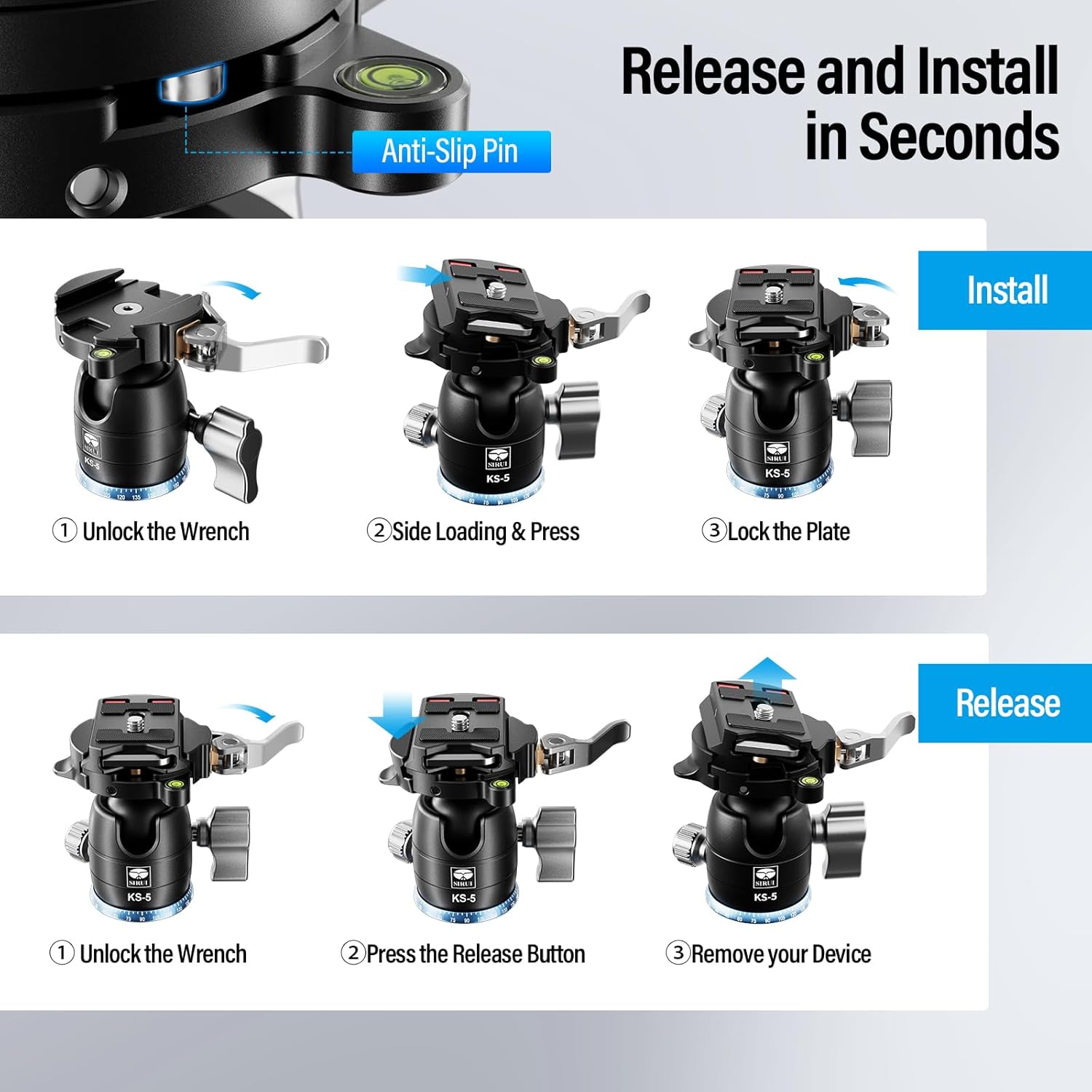
Image 5.1: Visual instructions for quick release plate installation and removal.
6. Operating Instructions
6.1 Ball Head Locking and Adjustment
- To adjust the camera angle, loosen the Ball Locking Knob.
- Position your camera as desired.
- Tighten the Ball Locking Knob firmly to secure the camera in place.
6.2 360° Panning
- To rotate the camera horizontally, ensure the Ball Locking Knob is tightened.
- Loosen the Panning Locking Knob located at the base of the ball head.
- Rotate the camera to the desired panoramic position. The engraved index marks on the base assist with precise alignment.
- Tighten the Panning Locking Knob to lock the panoramic base.

Image 6.1: Illustrates the 360° panoramic function.
6.3 Vertical Shooting
- The KS-5 Ball Head features a U-shaped notch.
- Loosen the Ball Locking Knob.
- Tilt the camera into the U-shaped notch to achieve a vertical shooting orientation.
- Tighten the Ball Locking Knob to secure the camera in the vertical position.
6.4 Damping Control
The ball head includes a damping knob (integrated with the main ball locking knob) to control the friction of the ball joint. This allows for smoother adjustments, especially with heavier equipment. Adjust the damping to match the weight of your camera setup for precise composition and to prevent sudden drops when loosening the ball.
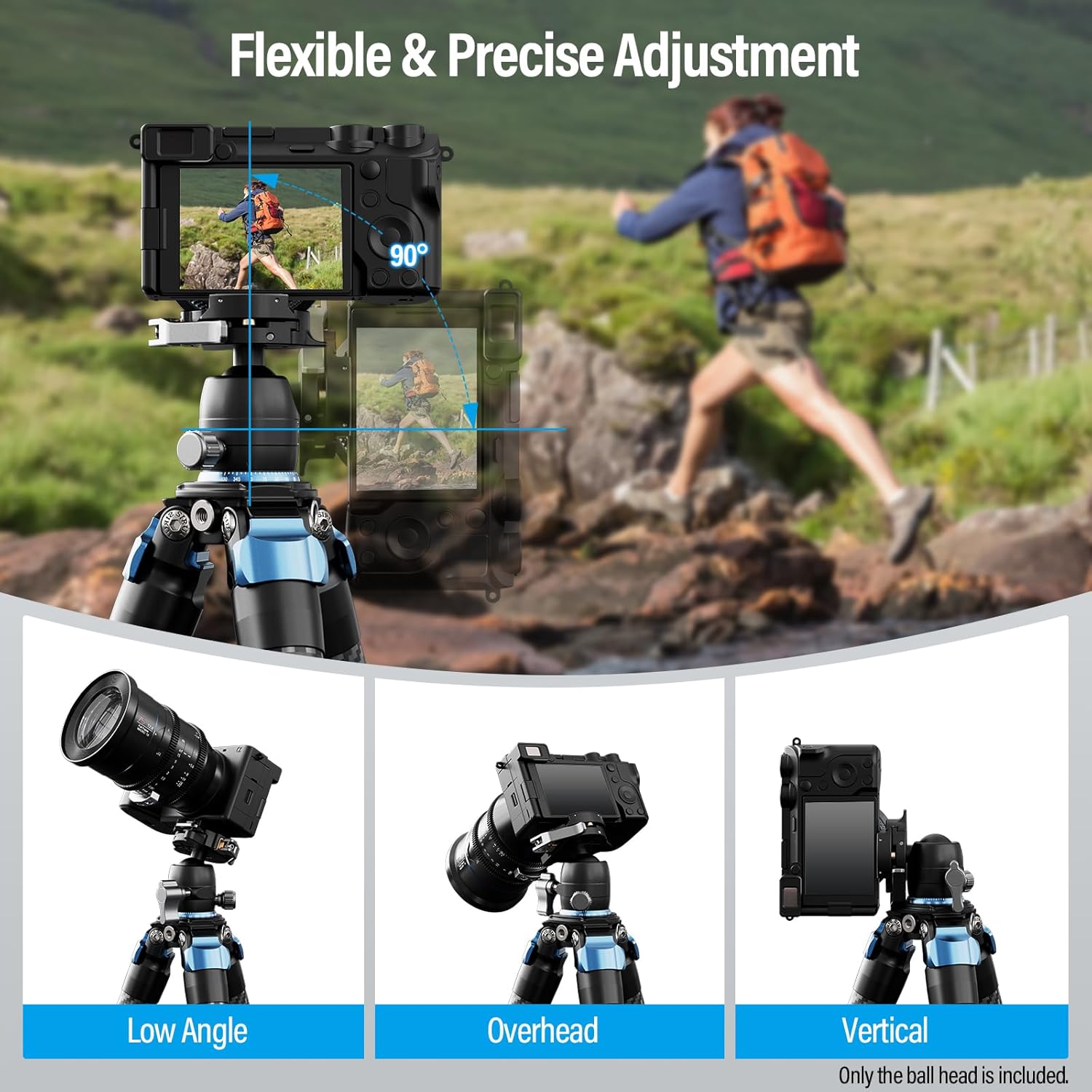
Image 6.2: Examples of flexible and precise camera adjustments.
7. Compatibility
The SIRUI KS-5 Ball Head offers extensive compatibility with various photographic and videographic equipment:
- Cameras: Most DSLR cameras, mirrorless cameras, and camcorders.
- Mounting: Compatible with tripods, monopods, camera sliders, and light stands that feature a 3/8"-16 or 1/4"-20 mounting screw (using the included adapter).
- Accessories: Can be used with phone clips, spotting scopes, and heavy-duty binoculars when mounted on a compatible support system.

Image 7.1: Overview of compatible devices and mounting options.
8. Maintenance
To ensure the longevity and smooth operation of your SIRUI KS-5 Ball Head, follow these maintenance guidelines:
- Cleaning: Wipe the ball head with a soft, dry cloth after each use to remove dust and debris. For stubborn dirt, use a slightly damp cloth and then dry thoroughly.
- Lubrication: The ball joint is factory-lubricated. Avoid applying additional lubricants unless specifically instructed by SIRUI support, as this may attract dust and impair performance.
- Storage: Store the ball head in a clean, dry environment, away from extreme temperatures and humidity.
- Inspection: Periodically check all knobs and screws for tightness. Do not overtighten.
9. Troubleshooting
If you encounter issues with your KS-5 Ball Head, consider the following common solutions:
- Camera not secure on QR plate: Ensure the 1/4"-20 screw is fully tightened and the non-slip pads are clean.
- QR plate not locking into ball head: Check that the Locking Wrench is fully open before inserting the plate. Ensure the plate is correctly aligned and pressed down firmly before locking.
- Ball joint movement is stiff or loose: Adjust the Damping Knob to achieve the desired friction. If still stiff, check for debris around the ball. If too loose, ensure the Ball Locking Knob is fully tightened.
- Panoramic base is stiff or loose: Ensure the Panning Locking Knob is appropriately tightened or loosened for desired movement.
For issues not resolved by these steps, please contact SIRUI customer support.
10. Warranty Information
SIRUI products are manufactured to high-quality standards. This product is covered by a limited warranty against defects in materials and workmanship. Please refer to the official SIRUI website or your purchase documentation for specific warranty terms and conditions, including duration and claim procedures. Keep your proof of purchase for warranty service.
11. Customer Support
For further assistance, technical support, or inquiries regarding your SIRUI KS-5 Ball Head, please visit the official SIRUI website or contact their customer service department. Contact details can typically be found on the product packaging or the official website.
© 2024 Sirui. All rights reserved.


