
1. Product Overview
The VENTION 100W Magnetic Charging Cable Type C is designed for efficient power delivery and data transfer. It features a magnetic connection for ease of use and includes interchangeable tips for Type-C and Micro USB devices.

Image: The VENTION magnetic charging cable with its main USB-A connector, magnetic cable end, and two interchangeable magnetic tips (Type-C and Micro USB).
- PD 100W Fast Charging: Supports Power Delivery up to 100W (20V/5A) for rapid charging of compatible devices.
- 480Mbps Data Transfer: Enables data synchronization at speeds up to 480 Megabits per second.
- Magnetic Connection: Features a strong magnetic connection for easy attachment and detachment.
- Interchangeable Tips: Includes magnetic Type-C and Micro USB tips for broad compatibility.
- Durable Design: Constructed with a nylon-braided cable for enhanced durability and tangle resistance.
- E-Mark Chip: Integrated intelligent E-Mark chip for stable data transmission and protection against overheating and overload.
2. Setup Instructions
2.1 Installing Magnetic Tips
- Identify the correct magnetic tip (Type-C or Micro USB) for your device's charging port.
- Gently insert the chosen magnetic tip into your device's charging port. The tip is designed to remain in the port, acting as a dust plug and facilitating quick magnetic connection.
- Ensure the tip is fully seated in the port to establish a secure connection.

Image: A detailed view of the 7X2-PIN magnetic connector on the cable and the separate Type-C and Micro USB magnetic tips, highlighting their design for secure connection.
2.2 Connecting the Cable
- Connect the USB-A end of the VENTION cable to a compatible power adapter or a USB port on a computer.
- Bring the magnetic end of the VENTION cable close to the magnetic tip installed in your device. The strong N52 level magnets will automatically align and connect.
- A blue indicator light on the cable's magnetic connector will illuminate when a successful connection is made and charging/data transfer is active.
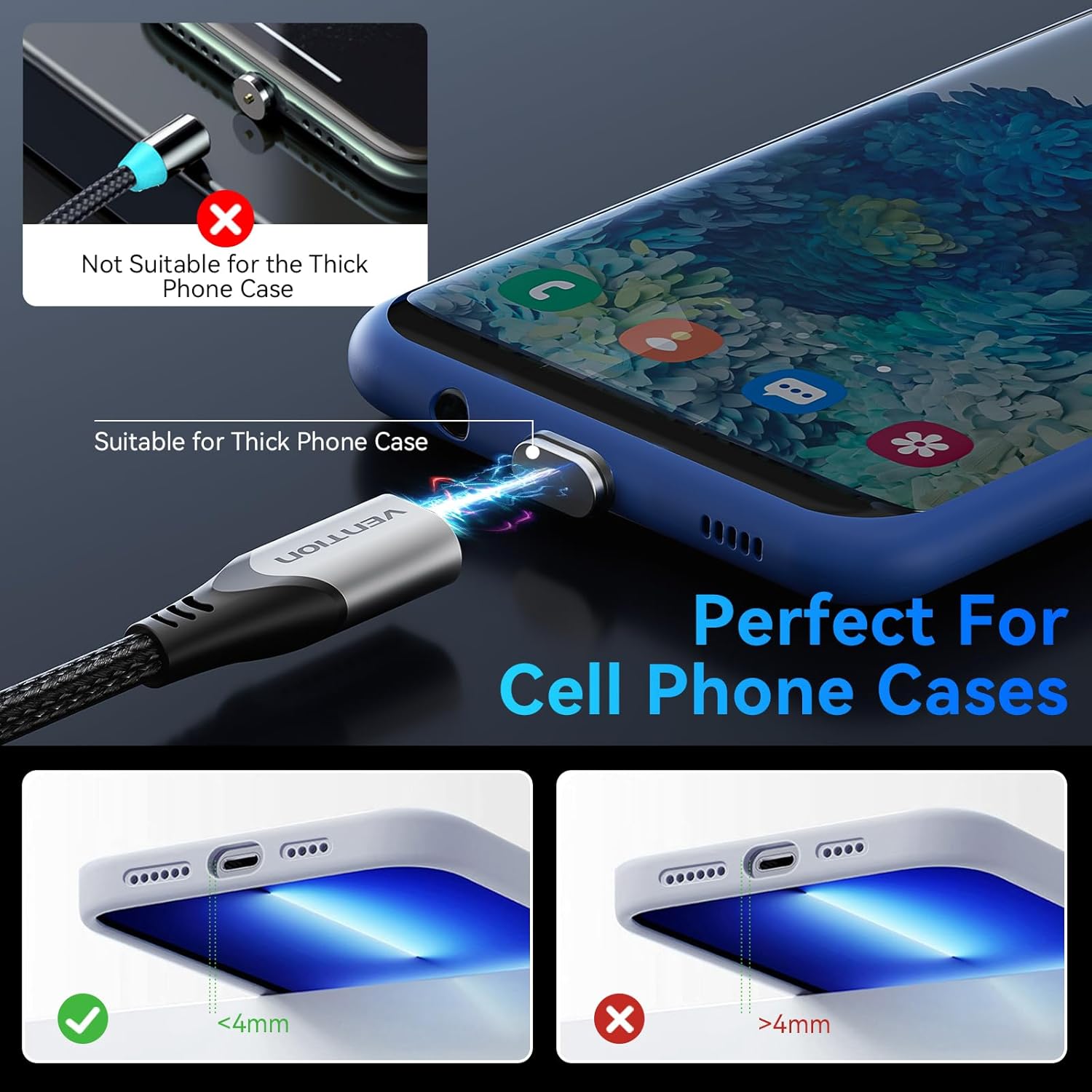
Image: A smartphone with a magnetic tip inserted, showing the magnetic cable end attaching to it. The image also illustrates compatibility with phone cases less than 4mm thick.
3. Operating Instructions
3.1 Charging Your Device
Once the cable is connected to both a power source and your device, charging will begin automatically. This cable supports PD 100W fast charging, significantly reducing charging times for compatible devices. For optimal fast charging, ensure your power adapter also supports PD 100W.

Image: A graphic demonstrating the fast charging capabilities (100W PD3.1) for various devices, including MacBook Pro, Kindles, Samsung Galaxy S24 Ultra, and Phone 15, showing estimated charging times to reach specific battery percentages.
3.2 Data Transfer
To transfer data, connect the USB-A end of the cable to a computer's USB port and the magnetic end to your device. The cable supports data transfer speeds of up to 480Mbps. Please note that this cable does not support video output.

Image: A laptop and a smartphone connected by the VENTION magnetic charging cable, illustrating its 480Mbps data transfer capability.
3.3 Single-Handed Operation
The magnetic design allows for easy, single-handed connection, which is particularly convenient in situations like driving or when multitasking.
Video: A demonstration of the VENTION magnetic charging cable's features, including its strong magnetic connection, ease of use, and compatibility with various devices. The video highlights the convenience of single-handed operation for charging.
4. Maintenance and Care
- Cable Durability: The nylon-braided cable is designed to withstand over 80,000 bending tests. Avoid excessive force or sharp bends to prolong its lifespan.
- Magnetic Tip Protection: The magnetic tips, when inserted into your device, act as a dust plug, protecting the charging port from dust and debris. Periodically clean the magnetic contact points on both the cable and the tips with a dry, soft cloth to ensure optimal connection.
- E-Mark Chip: The built-in E-Mark chip helps regulate temperature and prevent overload. If the cable feels unusually warm during use, disconnect it and allow it to cool before resuming.
- Storage: Store the cable in a clean, dry place away from extreme temperatures and direct sunlight.
5. Troubleshooting
- Device Not Charging:
- Ensure the magnetic tip is fully inserted into your device's charging port.
- Verify that the magnetic connection between the cable and the tip is secure.
- Check if the power adapter is functioning correctly and connected to a live power source.
- Confirm that your device is compatible with the cable (Note: Not compatible with i-products).
- Slow Charging:
- Ensure your power adapter supports PD 100W for fast charging. Lower wattage adapters will result in slower charging.
- Check for any debris on the magnetic contact points that might impede optimal power flow.
- Data Transfer Issues:
- Ensure the cable is securely connected to both the computer and the device.
- Verify that your device's settings allow for data transfer when connected to a computer.
- "Moisture Detected" Error:
- If your device displays a moisture detection warning, disconnect the cable and tip immediately.
- Allow both the device and the magnetic tip to dry completely before attempting to reconnect.
- Ensure the environment is dry when charging.
If you continue to experience issues, please refer to the Warranty & Support section for assistance.
6. Specifications
| Brand | VENTION |
| Model Number | CQNHF |
| Connector Type | USB (Type-A to Magnetic, with Type-C and Micro USB tips) |
| Cable Type | Charging and Data Transfer Cable |
| Power Delivery | Up to 100W (20V/5A) |
| Data Transfer Speed | 480Mbps |
| Cable Length | 3.3 feet (approximately 1 meter) |
| Compatible Devices | Personal Computer, Laptop, Smartphone, Tablet, Type C devices, Micro USB devices, headphones, game consoles, watches (excluding i-products) |
| Special Feature | Shock-resistant, N52 Level Strong Magnet, Built-in E-Mark Chip, Nylon Braided |
| Package Dimensions | 8.15 x 5.67 x 0.43 inches |
| Item Weight | 1.45 ounces |
| Date First Available | March 25, 2024 |
7. Warranty and Support
This VENTION product comes with a 2-year worry-free warranty and lifetime after-sales service, demonstrating our commitment to quality and customer satisfaction.
7.1 Customer Support
If you encounter any quality issues, compatibility concerns, or require assistance with your VENTION 100W Magnetic Charging Cable, please contact our customer support team. We provide 24-hour customer consultation.
To contact support, please visit the Vention Official Store on Amazon and use the contact options available, or refer to the contact information provided with your product packaging.


