
1. Product Overview
The Armytek Wizard C2 Pro Max LR is a versatile, long-range multi-flashlight designed for various applications, including use as a headlamp, everyday carry light, and sports flashlight. It features powerful electronics, a durable aluminum body, and a warm light output of up to 3870 lumens with a beam distance of 180 meters.
Key features include:
- Power Source: Battery Powered
- Material: Aluminum construction
- Light Path Distance: 180 meters
- Light Source Type: LED
- Brightness: Up to 3870 lumens
- Special Feature: Rechargeable

Image: The Armytek Wizard C2 Pro Max LR flashlight shown with its included 5000 mAh battery, USB-C charger, holster, and product packaging. This image provides a comprehensive view of all components included with the product.

Image: An infographic highlighting the key features of the Wizard C2 Pro Max LR, including its maximum light output of 3870 lumens, a beam distance of 180 meters, and a runtime of up to 2 months. It also emphasizes its warm light, rechargeable nature, 3-in-1 versatility, and a 10-year warranty.
2. Setup
2.1. Unpacking and Initial Inspection
Carefully remove all components from the packaging. Verify that the following items are included:
- Armytek Wizard C2 Pro Max LR Flashlight
- Battery (5000 mAh)
- Holster
- Eco-Sensa USB C Charger
Inspect the flashlight and accessories for any visible damage. If any components are missing or damaged, contact customer support.
2.2. Battery Installation and Charging
The flashlight comes with a rechargeable battery. Before first use, ensure the battery is fully charged.
- Unscrew the tailcap of the flashlight.
- Insert the included 5000 mAh battery with the positive (+) terminal facing towards the head of the flashlight.
- Screw the tailcap back on securely.
- Connect the Eco-Sensa USB C Charger to the magnetic charging port on the flashlight's tailcap. Connect the other end of the charger to a USB power source.
- The indicator light on the charger will show charging status. Charge until the indicator shows a full charge.
2.3. Headmount and Clip Installation
The Wizard C2 Pro Max LR can be used as a headlamp or an everyday carry light with its removable clip.

Image: This image illustrates the Armytek Wizard C2 Pro Max LR being worn as a headlamp. It highlights the comfortable headmount with soft elastic bands and adjustable size, the solid body design, and the lightweight composite holder with a quick-release silicone ring for additional fixation. The image also demonstrates the one-motion installation and 180-degree rotation capability for easy adjustment.
Headlamp Use:
- Attach the flashlight to the comfortable headmount. The lightweight holder is made from composite material and includes a quick-release silicone ring for secure fixation.
- Adjust the elastic bands for a snug and comfortable fit on your head.
- The flashlight allows for 180-degree rotation in the mount for optimal light direction.

Image: This image demonstrates the versatility of the Wizard C2 Pro Max LR as an everyday carry light. It shows two options for installing the removable stainless steel clip on the flashlight body. Additionally, it illustrates practical carrying methods, including reliable mounting on clothing, a belt, or a bag, and a deep fit in a pocket.
Everyday Carry (Clip) Use:
- The flashlight comes with a removable stainless steel clip.
- Choose one of the two available slots on the flashlight body to attach the clip, depending on your preferred carrying orientation.
- The clip allows for reliable mounting on clothing, belts, or bags, and provides a deep fit when carried in a pocket.
3. Operating Instructions
The Armytek Wizard C2 Pro Max LR features an enlarged side button for comfortable operation and offers two main types of operation: Simple and Advanced.
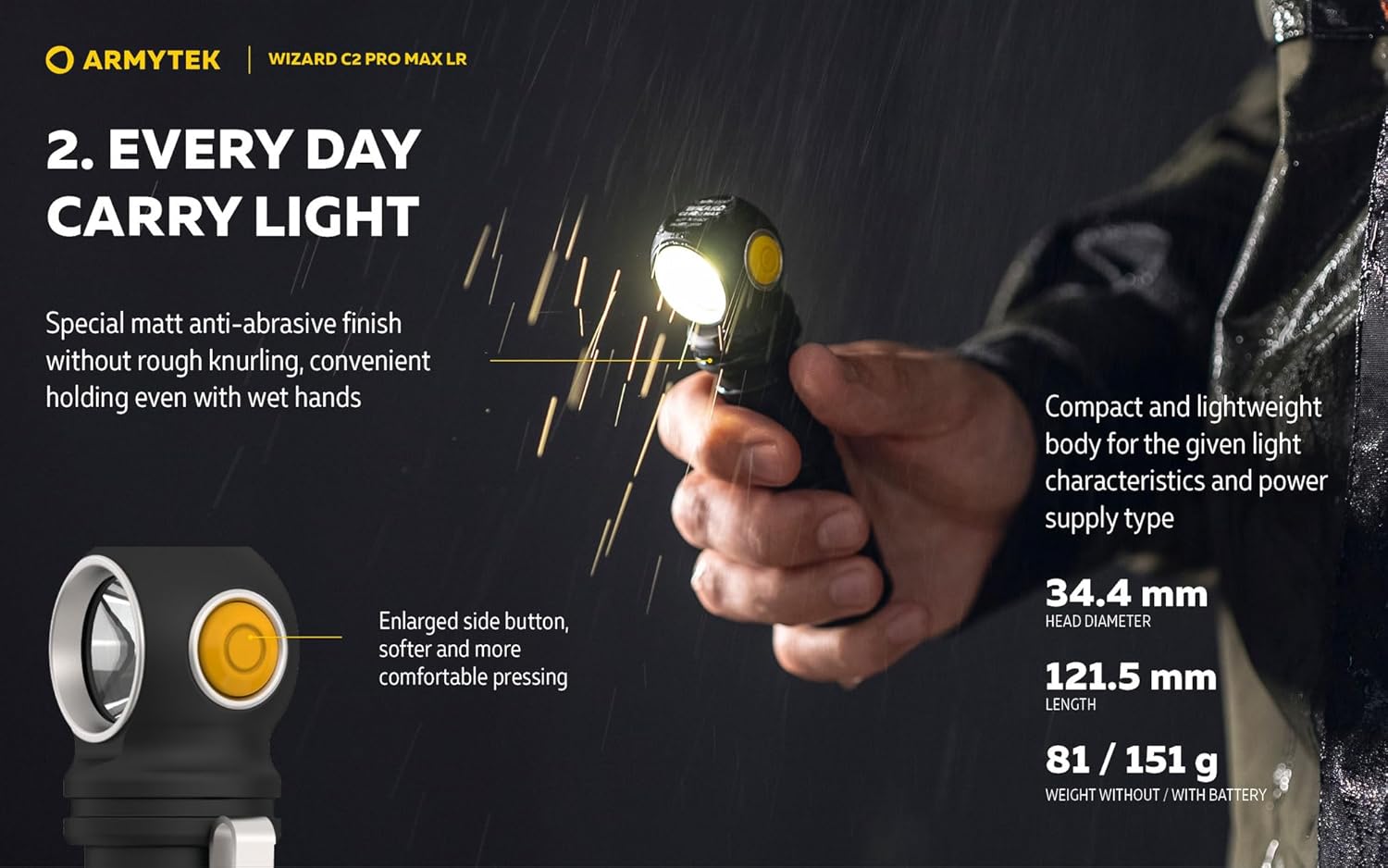
Image: A detailed view of the Armytek Wizard C2 Pro Max LR, highlighting its special matt anti-abrasive finish for comfortable holding even with wet hands. It also shows the enlarged side button designed for softer and more comfortable pressing. The image includes key dimensions: 34.4 mm head diameter, 121.5 mm length, and weight of 81g (without battery) / 151g (with battery).

Image: This diagram explains the two types of operation for the Wizard C2 Pro Max LR: Simple Operation (6 modes by default, easy to use) and Advanced Operation (10 modes for professional application, quick access to required mode). It also details the process for switching between these operation types: unscrew the tailcap 1/4 turn while the flashlight is off, press the button, and then tighten the tailcap while keeping the button pressed. The flashlight features automemorizing, recalling the last used mode upon next activation.
3.1. Switching Between Operation Types (Simple/Advanced)
To switch between Simple (6 modes) and Advanced (10 modes) operation:
- Ensure the flashlight is turned OFF.
- Unscrew the tailcap by approximately 1/4 turn.
- Press and hold the side button.
- While still holding the button, tighten the tailcap completely.
- The flashlight will indicate the change in operation type.
The flashlight features an automemorizing function, recalling the last used mode for quick access upon next activation.
3.2. Basic Operation (Common to both modes)
- Turn ON/OFF: Press the side button once.
- Change Brightness Modes: While ON, press and hold the side button to cycle through available brightness levels. Release the button to select the desired level.
- Instant Access to Max Brightness: (Specific to Advanced mode, or a quick double-click in Simple mode might activate Turbo) Refer to the detailed mode table for your selected operation type.

Image: This image depicts the Armytek Wizard C2 Pro Max LR being used as a sports flashlight, illuminating a path for a runner in a forest at night. It highlights the flashlight's several brightness modes (ranging from 42 to 3870 lumens) suitable for both urban and natural environments, and its 180-meter beam throw. The image also mentions new springs for stable operation during dynamic activities and additional battery and driver protection.

Image: This image showcases the powerful electronics of the Armytek Wizard C2 Pro Max LR, with a man running in a snowy environment at night, illuminated by the flashlight. It emphasizes the impressive light output of 3870 lumens and the flashlight's ability to maintain constant brightness even at low ambient temperatures (from -25°C to +40°C) and with a partially charged battery.
4. Maintenance
Proper maintenance ensures the longevity and optimal performance of your Armytek Wizard C2 Pro Max LR flashlight.
4.1. Cleaning
- Wipe the flashlight body with a soft, damp cloth to remove dirt and debris.
- For the lens, use a lens cleaning cloth and solution to avoid scratches.
- Do not use abrasive cleaners or solvents, as they may damage the finish or internal components.
4.2. O-Ring Lubrication
To maintain water resistance, periodically lubricate the O-rings located at the tailcap and head of the flashlight with silicone grease. This prevents drying and cracking.
4.3. Battery Care
- Always use the recommended battery type (5000 mAh 21700 Li-Ion).
- Store the battery in a cool, dry place when not in use.
- If storing the flashlight for an extended period, remove the battery to prevent potential leakage.
- Avoid overcharging or completely discharging the battery, as this can reduce its lifespan.
5. Troubleshooting
If you encounter issues with your Armytek Wizard C2 Pro Max LR, refer to the following common problems and solutions:
| Problem | Possible Cause | Solution |
|---|---|---|
| Flashlight does not turn on. |
|
|
| Light output is dim or flickers. |
|
|
| Flashlight gets hot quickly. |
|
|
| Low battery level indication. | Battery level is below 25% of rated value. | Recharge the battery immediately. The LED will flash 2 times to indicate low battery. |

Image: This image illustrates the low battery level indication feature of the Armytek Wizard C2 Pro Max LR. When the brightness of the current mode drops below 25% of its rated value, the LED will flash 2 times to alert the user to recharge the battery.
6. Specifications
Detailed technical specifications for the Armytek Wizard C2 Pro Max LR:
| Feature | Detail |
|---|---|
| Model | c2-pro-Max-Lr-Warm |
| Special Feature | Rechargeable |
| Color | Black |
| Power Source | Battery Powered |
| Light Source Type | LED |
| Material | Aluminum |
| White Brightness | 3870 Lumens (Max) |
| Included Components | Battery |
| Battery Cell Composition | Alkaline |
| Water Resistance Level | Water Resistant |
| Brand | Armytek |
| Brightness | 3870 lumens |
| Style | Compact |
| Finish Type | Aluminum |
| Mounting Type | Head Mount |
| Recommended Uses | Outdoor activities, Emergency preparedness, Automotive repairs, Industrial/professional applications |
| Head Diameter | 34.4 mm |
| Length | 121.5 mm |
| Weight (without battery) | 81 g |
| Weight (with battery) | 151 g |
| Operating Temperature Range | -25°C to +40°C |
Note: The product description and images indicate a 5000 mAh battery, which is typically Li-Ion for flashlights of this type and capacity. The "Alkaline" specification might be a general category or an error in the source data. Always use the battery provided or a compatible Li-Ion 21700 battery.
7. Warranty and Support
7.1. Warranty Information
The Armytek Wizard C2 Pro Max LR comes with a 10-year "No Hassle" warranty. This warranty covers manufacturing defects and ensures reliable operation under normal use conditions. For detailed terms and conditions, please refer to the official Armytek website or contact their customer service.
7.2. Customer Support
For any questions, technical assistance, or warranty claims, please contact Armytek customer support. You can typically find contact information on the official Armytek website or through the retailer where you purchased the product.
Visit the Armytek Store on Amazon for more information and support resources.
