
1. Introduction
Thank you for choosing the Zetunlo Wireless Rechargeable Indoor LED Spotlights. These spotlights are designed to provide versatile accent lighting for your home, featuring a powerful rechargeable battery, convenient magnetic mounting, and remote control operation. This manual provides detailed instructions for proper setup, operation, and maintenance to ensure optimal performance and longevity of your product.
The spotlights offer 80 lumens of 3000K warm white light, a 5500mAh battery for extended use, and flexible 270° horizontal and 90° vertical rotation for precise light direction.
2. Package Contents
Please verify that all items are present in your package:
- Wireless Spotlights (2 units)
- Remote Control
- Charging Cable (USB Type-C)
- Magnetic Patches and Screws
- Instruction Manual (this document)
3. Product Specifications
| Feature | Specification |
|---|---|
| Brand | Zetunlo |
| Model Name | IPB974 |
| Light Source Type | LED |
| Brightness | 80 Lumens |
| Color Temperature | 3000 Kelvin (Warm White) |
| Power Source | Battery Powered (5500mAh rechargeable) |
| Voltage | 3.7 Volts (DC) |
| Control Method | Remote Control, Push Button |
| Special Features | Dimmable, Lightweight, Portable, Timer |
| Product Dimensions | 4.1"L x 4.1"W x 0.87"H |
| Material | Acrylonitrile Butadiene Styrene (ABS), Glass |
| Indoor/Outdoor Usage | Indoor |
| Connectivity Protocol | Infrared (for remote) |
4. Safety Information
- Indoor Use Only: This product is designed for indoor use. Do not expose to water or high humidity.
- Charging: Use only the provided USB Type-C charging cable. Do not use damaged cables or chargers.
- Battery Care: Do not attempt to replace the internal battery. Do not expose the product to extreme temperatures or direct sunlight for prolonged periods.
- Mounting: Ensure the mounting surface is clean, dry, and capable of supporting the weight of the spotlight. For permanent or uneven surfaces, use the included screws for secure installation.
- Children and Pets: Keep the product and its accessories out of reach of children and pets to prevent choking hazards or damage.
- Disposal: Dispose of the product according to local regulations for electronic waste. Do not dispose of batteries in household waste.
5. Setup
5.1 Charging the Spotlights
Before first use, fully charge the spotlights. Each spotlight is equipped with a 5500mAh rechargeable battery.
- Locate the USB Type-C charging port on the side of the spotlight.
- Connect the provided USB Type-C cable to the spotlight and plug the other end into a standard USB power adapter (not included) or a computer USB port.
- The charging indicator light will illuminate (color may vary, typically red for charging, green for fully charged).
- Allow approximately 4-6 hours for a full charge. A full charge provides over 55 hours of light at maximum brightness or up to 320 hours at the lowest setting.

Image: Spotlight with Type-C charging port and cable.

Image: Spotlight indicating 5500mAh battery capacity.
5.2 Mounting the Spotlights
The spotlights offer two mounting options: magnetic attachment or screw-fixed for enhanced stability.
- Magnetic Mounting (Temporary/Easy Setup):
- Clean the desired mounting surface thoroughly to ensure it is free of dust and grease.
- Peel the protective film from one side of the adhesive magnetic patch.
- Firmly press the adhesive side of the magnetic patch onto the clean surface (wall, ceiling, etc.).
- Attach the spotlight directly to the magnetic patch. The strong built-in magnet will hold it in place.
- Screw-Fixed Mounting (Permanent/Secure Setup):
- For a more permanent or secure installation, especially on non-ideal surfaces, use the included screws.
- Position the magnetic patch on the desired surface.
- Mark the screw holes through the magnetic patch.
- Drill pilot holes if necessary, then secure the magnetic patch to the surface using the provided screws.
- Attach the spotlight to the now securely fixed magnetic patch.

Image: Magnetic mounting on a ceiling.

Image: Adhesive and screw mounting options for the metal plate.
6. Operation
6.1 Power On/Off
The spotlights can be turned on or off using the remote control or the power button on the spotlight itself.
- Remote Control: Press the ON button to turn on the light, and the OFF button to turn it off.
- Spotlight Button: Press the power button on the side of the spotlight to cycle through on/off states.
6.2 Brightness Adjustment (Dimming)
Adjust the light intensity to suit your needs using the remote control.
- Increase Brightness: Press the + button.
- Decrease Brightness: Press the - button.
- Preset Brightness: Use the 50% or 100% buttons for quick adjustments.

Image: Stepless brightness dimming from 10% to 100%.
6.3 Timer Function
Set the spotlight to automatically turn off after a specified duration using the remote control.
- Press the 1H, 2H, 4H, or 6H button on the remote to activate the corresponding timer. The light will turn off automatically after the selected time.
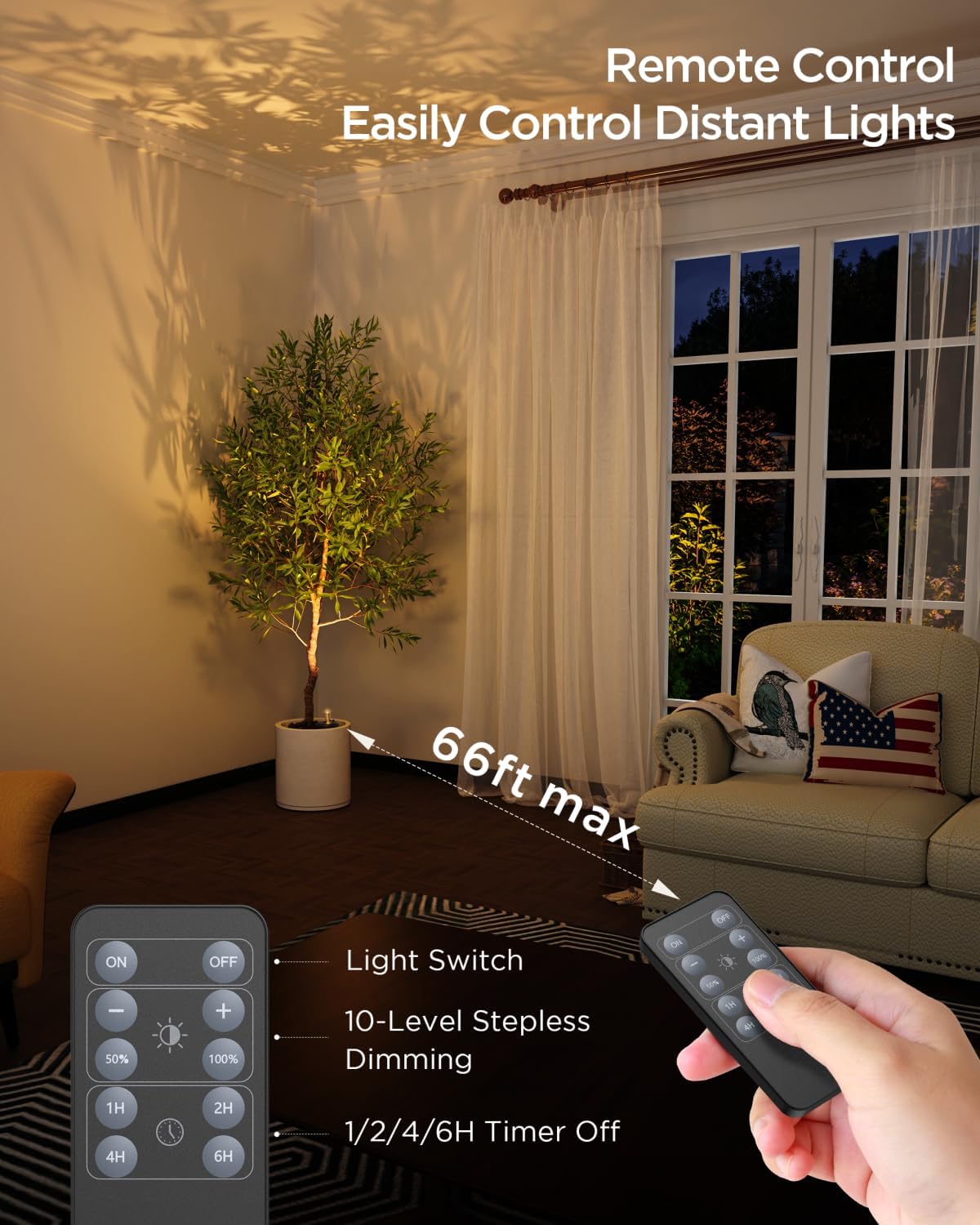
Image: Remote control with power, dimming, and timer functions, showing a 66ft range.
6.4 Adjusting Light Direction
The spotlight head can be adjusted to direct light precisely where needed.
- Horizontal Rotation: The spotlight head can rotate up to 270° horizontally. Gently turn the spotlight head to the desired angle.
- Vertical Tilt: The spotlight head can tilt up to 90° vertically. Adjust the angle to illuminate your target.

Image: Diagrams illustrating 270° horizontal rotation and 90° vertical tilt.
7. Maintenance
- Cleaning: Wipe the spotlight with a soft, dry cloth. Do not use abrasive cleaners or solvents.
- Battery Longevity: To prolong battery life, avoid fully discharging the battery frequently. Recharge the spotlight when the light output noticeably diminishes. If storing for an extended period, charge the battery every 3-6 months.
- Storage: Store the spotlights in a cool, dry place away from direct sunlight and extreme temperatures.
8. Troubleshooting
| Problem | Possible Cause | Solution |
|---|---|---|
| Spotlight does not turn on. | Battery is depleted. | Charge the spotlight fully using the provided USB Type-C cable. |
| Remote control battery is dead. | Replace the remote control battery (CR2025, not included). | |
| Spotlight is too far from the remote. | Ensure the remote is within the 66-foot operating range and pointed towards the spotlight. | |
| Light output is dim or inconsistent. | Battery is low. | Recharge the spotlight. |
| Brightness setting is too low. | Increase brightness using the remote control. | |
| Spotlight falls off mounting surface. | Surface was not clean or smooth enough for adhesive. | Clean surface thoroughly and reapply magnetic patch, or use screw-fixed mounting for greater security. |
| Remote control not responding. | Line of sight obstructed. | Remove any obstructions between the remote and the spotlight. |
| Remote battery is dead. | Replace the remote control battery. |
9. Warranty and Support
This Zetunlo product comes with a Limited Warranty. For specific details regarding warranty coverage and duration, please refer to the warranty information included in your package or contact Zetunlo customer support.
For technical assistance, troubleshooting, or inquiries about your product, please contact Zetunlo customer support through the retailer's platform or the contact information provided with your purchase.