
1. Introduction
The TDLOL X23 Rechargeable Portable Camping Fan is designed to provide personal cooling and illumination in various indoor and outdoor settings. Featuring a powerful yet quiet fan, adjustable LED lighting, and a long-lasting rechargeable battery, this device is suitable for camping, travel, home use, and emergency situations. Its compact design and versatile hanging hook make it an essential accessory for maintaining comfort and visibility.
2. Safety Information
Please read all safety instructions carefully before using the product. Failure to follow these instructions may result in electric shock, fire, or serious injury.
- Do not immerse the fan in water or other liquids.
- Keep the fan away from open flames, heat sources, and direct sunlight to prevent battery damage or overheating.
- Do not insert fingers or any objects into the fan blades or vents.
- Use only the specified charging voltage (5V/2A) and a compatible Type-C USB cable.
- Do not attempt to disassemble, repair, or modify the fan. Contact qualified service personnel for assistance.
- Keep out of reach of children and pets.
- Ensure the fan is placed on a stable, flat surface or securely hung to prevent it from falling.
- Unplug the fan during lightning storms or when unused for extended periods.
3. Package Contents
Verify that all items are present in the package:
- TDLOL X23 Portable Camping Fan (with integrated LED Light)
- USB Cable (Type-C)
- User Manual
4. Product Features
- Rechargeable Battery: Equipped with a long-lasting battery, providing 8-38 hours of continuous operation depending on speed and light settings. Supports charging via Type-C (5V/2A) and can operate while charging.
- Quiet and Powerful Airflow: Utilizes brushless motor technology and ultra-thin fan blades to deliver strong airflow with noise levels below 28 dB, ensuring a peaceful environment.
- Adjustable LED Light: Features 3 brightness levels, offering soft, non-dazzling illumination suitable for various activities from reading to illuminating an entire space.
- 270° Pivot Head: The fan head can be manually rotated up to 270 degrees, allowing for precise airflow direction.
- 360° Rotating Hanging Hook: An integrated hook allows the fan to be easily hung in tents, on branches, or other suitable locations, saving space.
- Compact and Lightweight Design: Portable and easy to carry, making it ideal for outdoor adventures and travel.
- Power Bank Functionality: Can be used to charge other USB-powered devices.
5. Setup
- Unboxing: Carefully remove the fan and all accessories from the packaging.
- Initial Charge: Before first use, fully charge the fan using the provided Type-C USB cable and a 5V/2A power adapter (not included). The battery indicator will show charging progress.
- Placement: Place the fan on a stable, flat surface or utilize the integrated 360° rotating hook to hang it securely.

Image: The TDLOL X23 fan shown in its upright position, charging a smartphone via its USB port, and also depicted hanging from a rope, illustrating its versatility.
6. Operating Instructions
6.1 Fan Operation
The fan features 4 adjustable wind speeds.
- Press the power button once to turn on the fan at Low Speed.
- Press the power button again to cycle through Medium Speed, High Speed, and Super High Speed.
- Press the power button a fifth time to turn off the fan.

Image: The fan demonstrating its four wind speed settings, from Low to Super High, indicating varying levels of airflow.
6.2 LED Light Operation
The integrated LED light has 3 brightness levels.
- Press the light button once to turn on the light at Low Brightness (Mode 1).
- Press the light button again to cycle through Medium Brightness (Mode 2) and High Brightness (Mode 3).
- Press the light button a fourth time to turn off the light.
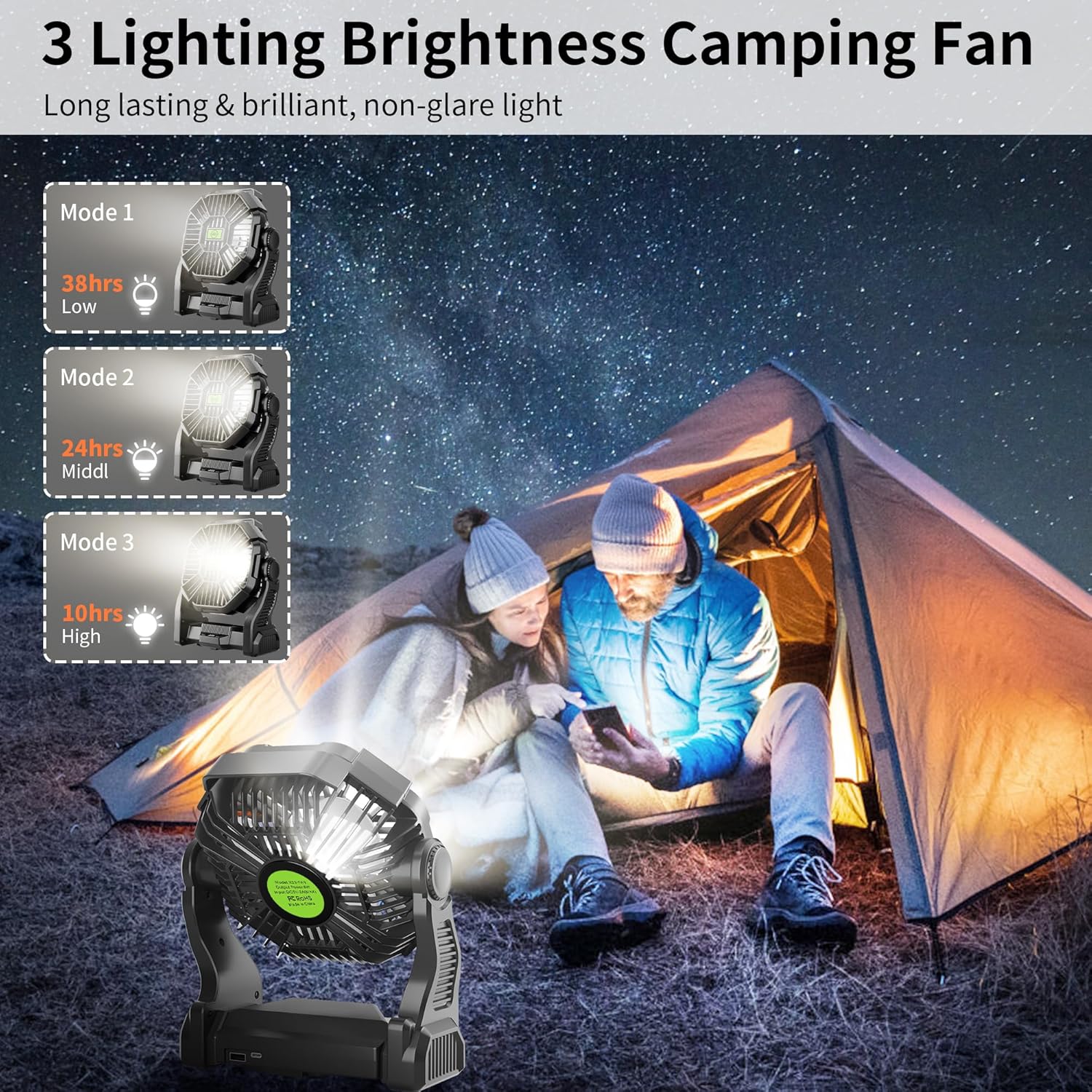
Image: The fan's LED light function illustrated in a camping scenario, highlighting its three brightness settings and corresponding battery life estimates.
6.3 Adjusting Fan Angle
The fan head can be manually tilted up to 270 degrees to direct airflow as needed.

Image: The fan demonstrating its 270-degree rotational capability, allowing users to adjust the airflow direction.
6.4 Using the Hanging Hook
The fan includes a 360° rotatable hook for convenient hanging. Extend the hook from the base and rotate it to the desired position for hanging in tents, on branches, or other suitable fixtures.

Image: The fan suspended inside a tent, showcasing its hanging hook feature and how it provides overhead ventilation.
6.5 Power Bank Function
The fan can serve as a power bank to charge small electronic devices. Connect your device to the USB-A output port on the fan using a compatible USB cable.
7. Charging Instructions
To charge the TDLOL X23 fan:
- Locate the Type-C input port on the fan.
- Connect the provided Type-C USB cable to the fan's input port.
- Connect the other end of the USB cable to a 5V/2A power adapter (e.g., phone charger, power bank, computer USB port).
- The battery indicator lights will illuminate to show the charging status. All lights will be solid when fully charged.
- The fan can be used while charging.
8. Maintenance
- Cleaning: Ensure the fan is turned off and unplugged before cleaning. Use a soft, dry cloth to wipe the exterior. For stubborn dirt, a slightly damp cloth can be used, followed by immediate drying. Do not use abrasive cleaners or solvents.
- Storage: Store the fan in a cool, dry place away from direct sunlight and extreme temperatures when not in use for extended periods.
- Battery Care: To prolong battery life, avoid fully discharging the battery frequently. Recharge the fan regularly, even if not in active use.
9. Troubleshooting
| Problem | Possible Cause | Solution |
|---|---|---|
| Fan does not turn on. | Battery is depleted. Power button not pressed correctly. | Charge the fan fully. Press the power button firmly. |
| LED light does not turn on. | Battery is depleted. Light button not pressed correctly. | Charge the fan fully. Press the light button firmly. |
| Fan not charging. | USB cable is faulty. Power adapter is not 5V/2A or faulty. Charging port is dirty or damaged. | Try a different USB Type-C cable. Use a different 5V/2A power adapter. Gently clean the charging port. If damaged, contact support. |
| Weak airflow. | Fan is on a low speed setting. Obstruction in front or back of fan. Battery is low. | Increase the fan speed. Clear any obstructions. Charge the fan. |
10. Specifications
| Feature | Detail |
|---|---|
| Model Name | X23 Black |
| Brand | TDLOL |
| Power Source | Battery Powered (Lithium Ion, included) |
| Charging Input | Type-C, 5V/2A |
| Fan Speeds | 4 Levels |
| LED Light Brightness | 3 Levels |
| Noise Level | <28 dB |
| Fan Head Rotation | 270° Manual Pivot |
| Hanging Hook | 360° Rotatable |
| Product Dimensions | 1"D x 1"W x 1"H (Note: These dimensions seem generic, using provided data) |
| Item Weight | 1.98 pounds |
| Included Components | Fan, Light Kit, USB Cable, User Manual |
| Indoor/Outdoor Usage | Indoor, Outdoor |
11. Warranty and Support
TDLOL is committed to providing high-quality products. For any questions, concerns, or technical support regarding your X23 Portable Camping Fan, please contact TDLOL customer service. Please refer to your purchase documentation for specific warranty terms and contact information.
You can visit the official TDLOL store for more information: TDLOL Store on Amazon