
PHILIPS CX2050/00
Philips Series 2000 Table Fan Instruction Manual
Model: CX2050/00
1. Introduction
Thank you for choosing the Philips Series 2000 Table Fan. This manual provides essential information for the safe and efficient operation, maintenance, and troubleshooting of your new fan. Please read it thoroughly before first use and keep it for future reference.
The Philips Series 2000 Table Fan is designed to provide powerful yet quiet air circulation, featuring SilentWings Technology for reduced noise levels, a 180-degree adjustable tilt, and multiple operating modes including a 12-hour timer, Quiet Sleep, and Natural Breeze modes.
Important Safety Information
- Always ensure the fan is placed on a stable, flat surface.
- Do not insert fingers or objects into the grille when the fan is operating.
- Keep the fan away from water or other liquids. Do not use in wet environments.
- Unplug the fan from the power outlet before cleaning or maintenance.
- Do not operate the fan with a damaged cord or plug. Contact qualified service personnel for repairs.
- This appliance is not intended for use by persons (including children) with reduced physical, sensory or mental capabilities, or lack of experience and knowledge, unless they have been given supervision or instruction concerning use of the appliance by a person responsible for their safety.
2. Package Contents
Upon unpacking, please verify that all components are present and undamaged:
- Philips Series 2000 Table Fan Unit (Model CX2050/00)
- Power Cable
- Instruction Manual

Image: The Philips Series 2000 Table Fan shown in its retail packaging, indicating the product and its box.
3. Setup
The Philips Series 2000 Table Fan is designed for easy setup. Follow these steps to prepare your fan for use:
- Unpack the Fan: Carefully remove the fan and all accessories from the packaging.
- Position the Fan: Place the fan on a stable, flat, and dry surface. Ensure there is adequate space around the fan for optimal airflow.
- Connect to Power: Insert the power cable into the fan's power port, then plug the other end into a standard electrical outlet (220V).

Image: A front-side view of the Philips Series 2000 Table Fan, white with a grey base, ready for use.

Image: Diagram showing the dimensions of the Philips Series 2000 Table Fan: 25.9 cm width, 25.9 cm depth, and 37.5 cm height.
4. Operating Instructions
Your Philips Series 2000 Table Fan offers various settings for personalized comfort.
Control Panel Overview
The control panel is located on the base of the fan and includes touch-sensitive buttons for power, speed, mode, and timer functions.

Image: Illustrations showing the fan's versatility for direct cooling, heating booster, air circulation, and air ventilation, highlighting its year-round comfort capabilities.
Power On/Off
- Press the Power button (
 ) once to turn the fan on.
 - Press the Power button again to turn the fan off.
Adjusting Fan Speed
The fan features 3 speed settings:
- Press the Speed button () repeatedly to cycle through speeds 1 (low), 2 (medium), and 3 (high).
Operating Modes
The fan offers two special modes for enhanced comfort:
- Natural Breeze Mode: Press the Mode button () to activate this mode. It simulates natural outdoor airflow by varying fan speed.
- Quiet Sleep Mode: Press the Mode button again to activate this mode. The fan speed will gradually decrease over 30 minutes to provide a quiet sleeping environment.

Image: The Philips Series 2000 Table Fan on a bedside table, illustrating its ultra-silent operation at 23 dB(A) due to SilentWings technology.
Timer Function
Set the fan to operate for a specific duration:
- Press the Timer button () repeatedly to set the desired operating time (up to 12 hours). The fan will automatically turn off after the set time.
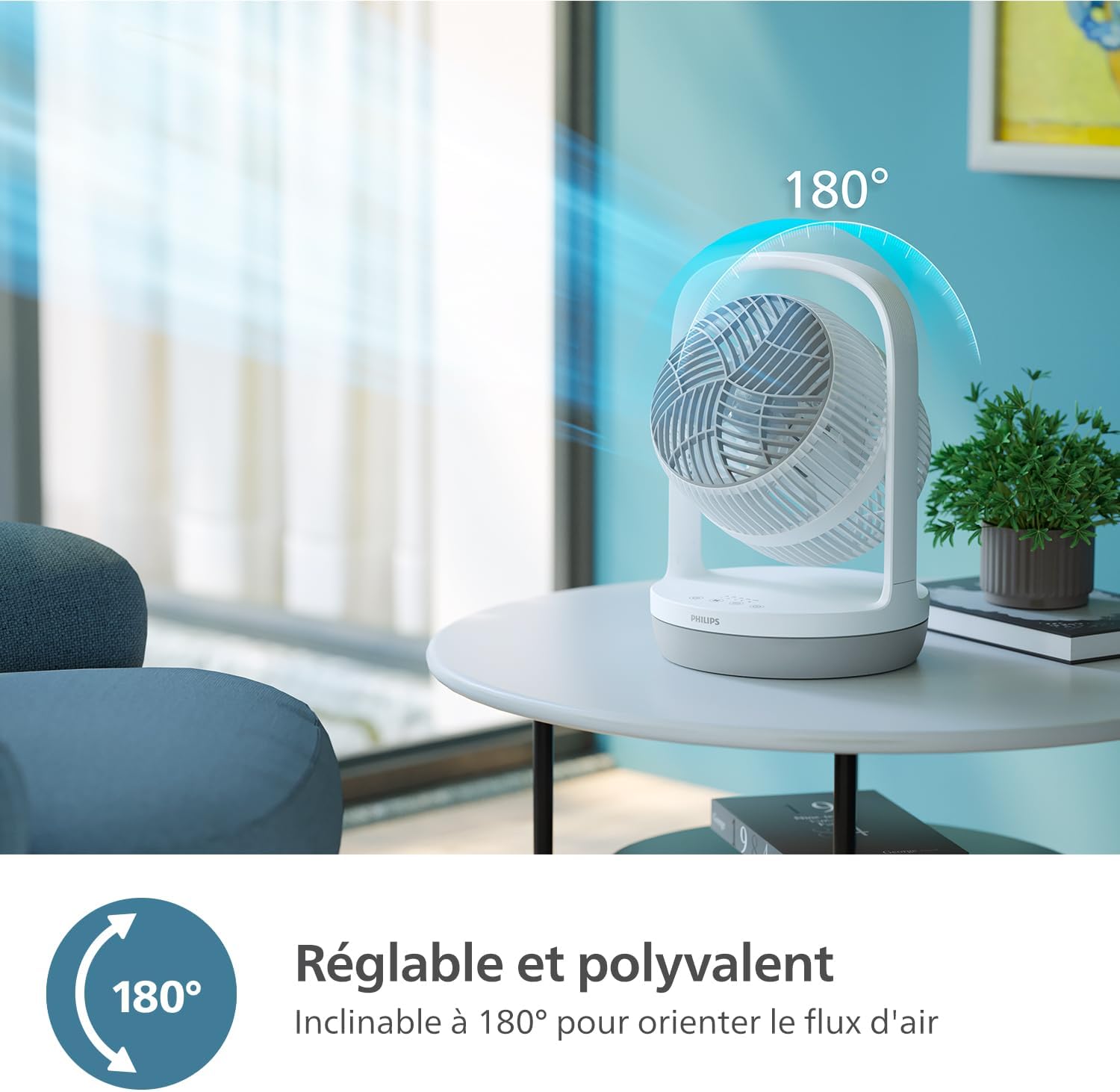
Image: The Philips Series 2000 Table Fan tilted upwards, demonstrating its 180-degree adjustable head for directing airflow.
Adjusting Airflow Direction
The fan head can be manually tilted up to 180 degrees to direct airflow precisely where needed. Gently adjust the fan head to your preferred angle.

Image: An illustration showing a strong, focused stream of air emanating from the Philips Series 2000 Table Fan, highlighting its long-range airflow capability.
5. Maintenance
Regular cleaning and maintenance will ensure optimal performance and longevity of your Philips Series 2000 Table Fan.
Cleaning the Fan
- Disconnect Power: Always unplug the fan from the power outlet before cleaning.
- Clean Exterior: Wipe the exterior surfaces of the fan with a soft, damp cloth. Do not use abrasive cleaners or solvents.
- Clean Grille and Blades: Use a vacuum cleaner with a brush attachment or a soft brush to remove dust from the front and rear grilles and fan blades. The fan grille can be opened for more thorough cleaning of the blades. Refer to the product diagram for grille removal instructions.
- Dry Thoroughly: Ensure all parts are completely dry before plugging the fan back in.

Image: A hand holding the Philips Series 2000 Table Fan by its integrated handle, demonstrating its portability and ease of transport for cleaning or relocation.
6. Troubleshooting
If you encounter any issues with your fan, please refer to the following common problems and solutions:
| Problem | Possible Cause | Solution |
|---|---|---|
| Fan does not turn on. | No power supply. Power button not pressed. | Ensure the power cord is securely plugged into a working outlet. Press the Power button on the control panel. |
| Weak or no airflow. | Fan speed too low. Grille or blades are dusty. | Increase the fan speed setting. Clean the fan grille and blades as described in the Maintenance section. |
| Unusual noise during operation. | Fan not on a stable surface. Obstruction in the fan blades. Loose parts. | Place the fan on a firm, level surface. Disconnect power and check for any obstructions. If noise persists, contact customer support. |
If the problem persists after attempting these solutions, please contact Philips customer support for assistance.
7. Specifications
Technical details for the Philips Series 2000 Table Fan (Model CX2050/00):
- Brand: PHILIPS
- Model Number: CX2050/00
- Color: White
- Product Dimensions (L x W x H): 25.9 x 25.9 x 37.5 cm
- Weight: 2.26 kg
- Power: 24 Watts
- Voltage: 220 Volts
- Number of Speeds: 3
- Noise Level: 23 dB(A) (at lowest speed)
- Special Features: 3 speeds and 2 modes (Natural Breeze, Quiet Sleep), Long-range airflow, Ultra silent operation, 180-degree adjustable tilt, 12-hour timer
- Fan Design: Table fan
- Power Source: Electric cable
- Recommended Uses: Air circulation
8. Warranty and Support
Philips products are manufactured to the highest standards and undergo rigorous testing. This product is covered by a manufacturer's warranty, details of which can be found in the warranty card included with your purchase or on the official Philips website.
Customer Support
For further assistance, product registration, or to find detailed warranty information, please visit the official Philips support website:
When contacting support, please have your product model number (CX2050/00) and purchase date available.
Related Documents - CX2050/00
 |
Philips Table Fan CX2050: User Manual & Operating Guide Discover the features and operating instructions for the Philips Table Fan CX2050. This guide covers setup, usage, safety, troubleshooting, and maintenance for optimal cooling. |
 |
Philips TAV2000DB Portable Radio User Manual - DAB/FM/Bluetooth Comprehensive user manual for the Philips TAV2000DB portable radio. Learn how to set up, operate, and troubleshoot your DAB/FM radio with Bluetooth connectivity, including features like alarms, timers, and menu navigation. |
 |
Philips CX2050 Table Fan User Manual and Safety Guide Comprehensive user manual for the Philips CX2050 table fan, covering setup, operation, safety precautions, maintenance, and troubleshooting. Learn how to use your fan efficiently and safely. |
 |
Philips TAV2000FB Portable Radio User Manual - FM, Bluetooth, Alarm, Clock Comprehensive user manual for the Philips TAV2000FB portable radio. This guide provides detailed instructions on setting up, using FM radio, connecting via Bluetooth, managing alarms and timers, and troubleshooting common issues. |
 |
Philips SmartSleep Medium Headband: Enhance Sleep Quality and Boost Energy Learn about the Philips SmartSleep Medium Headband, a wearable device designed to improve deep sleep quality and increase daily energy. This clinically proven technology, paired with the SleepMapper app, helps users track sleep patterns and benefits those with less than 7 hours of sleep per night. Includes product specifications, package contents, and a 30-day money-back guarantee. |
 |
Philips TAV2000FB Portable Radio User Manual Comprehensive user manual for the Philips TAV2000FB portable radio, detailing setup, FM radio operation, Bluetooth connectivity, alarm and timer functions, specifications, and troubleshooting. |
Ask a question about this manual
Ask about setup, troubleshooting, compatibility, parts, safety, or missing instructions. Manuals+ will review the question and use this page’s manual context to help answer it.