
Baseus A00069201113-00
Baseus AirGo 1 Ring Open-Ear TWS Headphones User Manual
Model: A00069201113-00
Introduction
Thank you for choosing the Baseus AirGo 1 Ring Open-Ear TWS Headphones. This manual provides detailed instructions on how to set up, operate, and maintain your new headphones. Please read this manual carefully before use to ensure optimal performance and longevity of your device.
The Baseus AirGo 1 Ring Open-Ear TWS Earphones offer a unique open-ear design, providing comfort and situational awareness. Enjoy approximately 28 hours of playback time with the charging case, and about 6 hours of music playing time on a single charge (at 70% volume). The frequency response range is 20 Hz to 20 kHz, ensuring clear audio.
What's in the Box
Upon opening the package, please verify that all the following items are included:
- Baseus AirGo 1 Ring Open-Ear TWS Headphones (Left and Right Earbuds)
- Charging Case
- USB Charging Cable
- User Manual (this document)
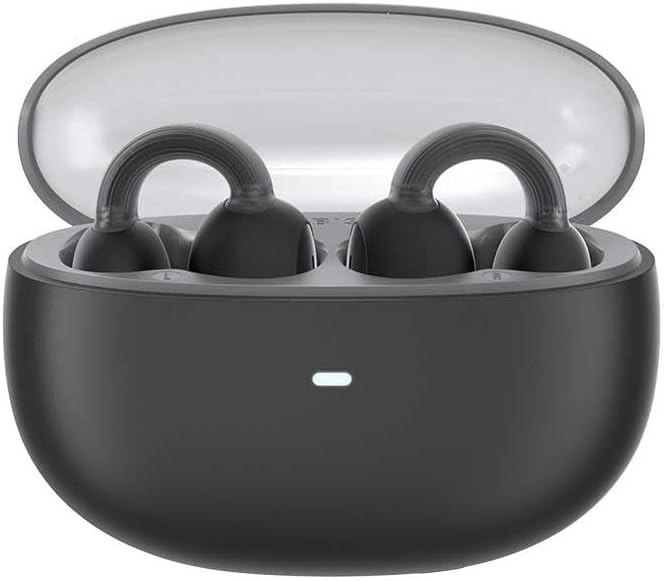
Image: The Baseus AirGo 1 Ring Open-Ear TWS Headphones, including the charging case, earbuds, and USB charging cable, displayed alongside their retail packaging.
Product Overview
Familiarize yourself with the components of your Baseus AirGo 1 Ring Open-Ear TWS Headphones.

Image: The Baseus AirGo 1 Ring Open-Ear TWS Headphones charging case, closed, with an indicator light on the front.

Image: A close-up view of the Baseus AirGo 1 Ring Open-Ear TWS Headphones earbuds, highlighting their unique open-ear design with a ring-shaped ear hook and the speaker component.

Image: Another detailed view of the Baseus AirGo 1 Ring Open-Ear TWS Headphones earbuds, showcasing the ergonomic design intended for comfortable open-ear wear.

Image: A pair of Baseus AirGo 1 Ring Open-Ear TWS Headphones earbuds, viewed from a different angle, emphasizing their compact and curved form factor.
Setup
1. Charging the Headphones and Case
Before first use, fully charge the headphones and the charging case.
- Place both earbuds into the charging case. Ensure they are correctly seated in their respective slots.
- Connect the USB charging cable to the charging port on the case and the other end to a USB power adapter (not included) or a computer's USB port.
- The indicator light on the charging case will illuminate to show charging status. Once fully charged, the light may change color or turn off.
- A full charge provides approximately 28 hours of total playback time with the charging case.

Image: The Baseus AirGo 1 Ring Open-Ear TWS Headphones earbuds placed inside their open charging case, with an illuminated indicator light on the case.
2. Pairing with Your Device
The headphones will automatically enter pairing mode when taken out of the charging case.
- Open the charging case and remove both earbuds. They will automatically power on and attempt to pair with each other.
- On your smartphone or Bluetooth-enabled device, go to the Bluetooth settings.
- Search for new devices and select "Baseus AirGo 1" (or similar name) from the list of available devices.
- Once connected, you will hear an audible confirmation, and the indicator light on the earbuds may change.
- If pairing fails, place the earbuds back into the case, close the lid, wait a few seconds, and then repeat the steps.
Operating Instructions
Wearing the Headphones
The Baseus AirGo 1 headphones are designed for open-ear wear, resting comfortably on your ear without entering the ear canal.

Image: A diagram illustrating how the Baseus AirGo 1 Ring Open-Ear TWS Headphones are worn, showing the earbud resting on the outer ear with sound directed towards the ear canal at a 20-degree angle.
- Gently place the earbud over your ear, ensuring the ring-shaped hook rests securely behind your ear.
- Adjust the earbud until the speaker is positioned comfortably near your ear canal, allowing for clear audio while maintaining awareness of your surroundings.
Touch Controls
The headphones feature touch-sensitive controls on each earbud. The specific functions may vary slightly based on your device and app settings.
| Action | Function |
|---|---|
| Single Tap (Left/Right) | Play/Pause Music, Answer/End Call |
| Double Tap (Left) | Previous Track |
| Double Tap (Right) | Next Track |
| Triple Tap (Left/Right) | Activate Voice Assistant |
| Long Press (2 seconds) | Reject Call |
Note: Volume control is typically managed via your connected device.
Maintenance
Proper care will extend the life of your Baseus AirGo 1 headphones.
- Cleaning: Use a soft, dry, lint-free cloth to clean the earbuds and charging case. Do not use abrasive cleaners, alcohol, or chemical solvents.
- Storage: When not in use, always store the earbuds in their charging case to protect them and keep them charged.
- Temperature: Avoid exposing the headphones to extreme temperatures (hot or cold) or high humidity.
- Water Resistance: These headphones are not waterproof. Avoid contact with liquids.
Troubleshooting
If you encounter any issues with your headphones, please refer to the following common solutions:
| Problem | Possible Solution |
|---|---|
| Headphones not powering on | Ensure the charging case and earbuds are fully charged. Place earbuds back in the case and remove them again. |
| Cannot pair with device | Make sure Bluetooth is enabled on your device. Place earbuds back in the case, close, then reopen and try pairing again. Ensure earbuds are close to the device. |
| Only one earbud working | Place both earbuds back into the charging case, close the lid, and then open it again. This often re-syncs them. Check battery levels of both earbuds. |
| Low volume or poor sound quality | Adjust the volume on your connected device. Ensure earbuds are clean and properly positioned on your ears. Check for obstructions. |
| Intermittent connection | Move closer to your connected device. Avoid environments with strong Wi-Fi or other wireless interference. Disconnect and reconnect Bluetooth. |
If the problem persists after trying these solutions, please contact customer support.
Specifications
| Feature | Detail |
|---|---|
| Model Name | AirGo 1 Ring Open-Ear TWS |
| Model Number | A00069201113-00 |
| Connectivity Technology | Wireless (Bluetooth) |
| Form Factor | True Wireless, Open-Ear |
| Color | Black |
| Frequency Response Range | 20Hz-20kHz |
| Music Playing Time (Earbuds) | About 6 hours (at 70% volume) |
| Total Playback Time (with Charging Case) | About 28 hours |
| Battery Type | Lithium Ion (included) |
| Item Weight | 200 Grams / 7.1 ounces |
| Manufacturer | Baseus |
Warranty and Support
Baseus products come with a standard warranty. Please refer to the warranty card included in your product packaging for specific terms and conditions, including the warranty period and coverage details.
Customer Support
For technical support, warranty claims, or any other inquiries, please contact Baseus customer service through the following channels:
- Website: Visit the official Baseus website for FAQs, support resources, and contact information.
- Email: Refer to your product packaging or the Baseus website for the customer support email address.
- Online Store: For purchases made on Amazon, you can also visit the Baseus Store on Amazon for product information and support options.
Please have your product model number (A00069201113-00) and proof of purchase ready when contacting support.
Related documentsA00069201113-00


Ask a question about this manual
Ask about setup, troubleshooting, compatibility, parts, safety, or missing instructions. Manuals+ will review the question and use this page’s manual context to help answer it.