
1. Introduction
The Fosi Audio HT4S is a versatile all-in-one amplifier designed to enhance your audio experience across various settings. This compact unit integrates a Digital-to-Analog Converter (DAC) and a powerful amplifier, supporting up to 5 channels of output. It offers flexible switching between 4.1 channel and 5.0 channel modes, making it suitable for diverse speaker configurations. With multiple input options including Bluetooth, AUX, and optical digital, along with Pre-Out and up to 5 speaker outputs, the HT4S provides comprehensive connectivity for your home audio, outdoor entertainment, or even immersive simulation setups.

Image 1.1: Front view of the Fosi Audio HT4S amplifier.
2. Product Overview
2.1 Package Contents
Before setup, please ensure all items are present in the package:
- Fosi Audio HT4S Amplifier Unit
- AC Power Cable
- Bluetooth Antenna
- 3.5mm Auxiliary Cable
- Remote Control
- User Manual (Japanese version included)

Image 2.1: All components included in the Fosi Audio HT4S package.
2.2 Front Panel Controls
- SUB VOL Knob: Adjusts the volume of the subwoofer output.
- Power/Volume Knob: Turns the unit on/off and controls the master volume.
- Bass Knob: Adjusts the bass level.
- Treble Knob: Adjusts the treble level.
- Mode Light Bar: Indicates the current input mode (Bluetooth, AUX, Optical).

Image 2.2: Close-up of the front panel controls, including volume, bass, and treble knobs.
2.3 Rear Panel Connections
- Bluetooth Antenna Terminal: Connect the included Bluetooth antenna here.
- Optical Input (OPT IN): For digital audio sources.
- AUX Input (AUX IN): For analog audio sources (e.g., CD player, TV).
- Pre-Out: For connecting to an external power amplifier or active subwoofer.
- Speaker Outputs (FL, FR, SL, SR, SUBGEN): Connect your passive speakers and bass shakers here.
- AC 110-240V Power Input: Connect the AC power cable.
- 5th Channel FLAT/SUB Mode Switch: Toggles the 5th channel output between full-range (FLAT) and subwoofer (SUB) modes.

Image 2.3: Detailed view of the rear panel with all input and output terminals.
3. Setup Instructions
3.1 Connecting Speakers and Audio Sources
- Connect Speakers: Connect your passive speakers to the FL, FR, SL, SR speaker outputs. Ensure correct polarity (+ to + and - to -).
- Connect Bass Shakers/Subwoofer: If using bass shakers or a passive subwoofer, connect them to the SUBGEN output. For active subwoofers or external amplifiers, use the Pre-Out connection.
- Attach Bluetooth Antenna: Screw the included Bluetooth antenna onto the Bluetooth antenna terminal on the rear panel.
- Connect Audio Source: Choose your desired input:
- Bluetooth: Pair your device wirelessly (see Operating Instructions).
- AUX: Connect an analog audio source (e.g., smartphone, tablet, PC, CD player) using the 3.5mm auxiliary cable to the AUX IN port.
- Optical: Connect a digital audio source (e.g., TV, projector) using an optical cable to the OPT IN port.
- Connect Power: Plug the AC power cable into the amplifier's power input and then into a wall outlet.

Image 3.1: Diagram illustrating various connection options for the Fosi Audio HT4S.
3.2 Initial Power On
After all connections are made, turn the Power/Volume knob clockwise to power on the unit. The LED mode light bar will illuminate, indicating the current input mode.
4. Operating Instructions
4.1 Power On/Off and Volume Control
- Power: Rotate the master volume knob to turn the amplifier on or off. Alternatively, use the power button on the remote control.
- Volume: Adjust the master volume by rotating the Power/Volume knob on the front panel or using the volume buttons on the remote control.
- Subwoofer Volume: Use the SUB VOL knob to adjust the output level of the subwoofer/bass shaker channel independently.
4.2 Input Mode Selection
The HT4S supports Bluetooth, AUX, and Optical inputs. You can switch between these modes using the remote control or the multi-function knob on the front panel. The LED mode light bar will change color to indicate the active input:
- Blue: Bluetooth Mode
- Green: AUX Mode
- Red: Optical Mode
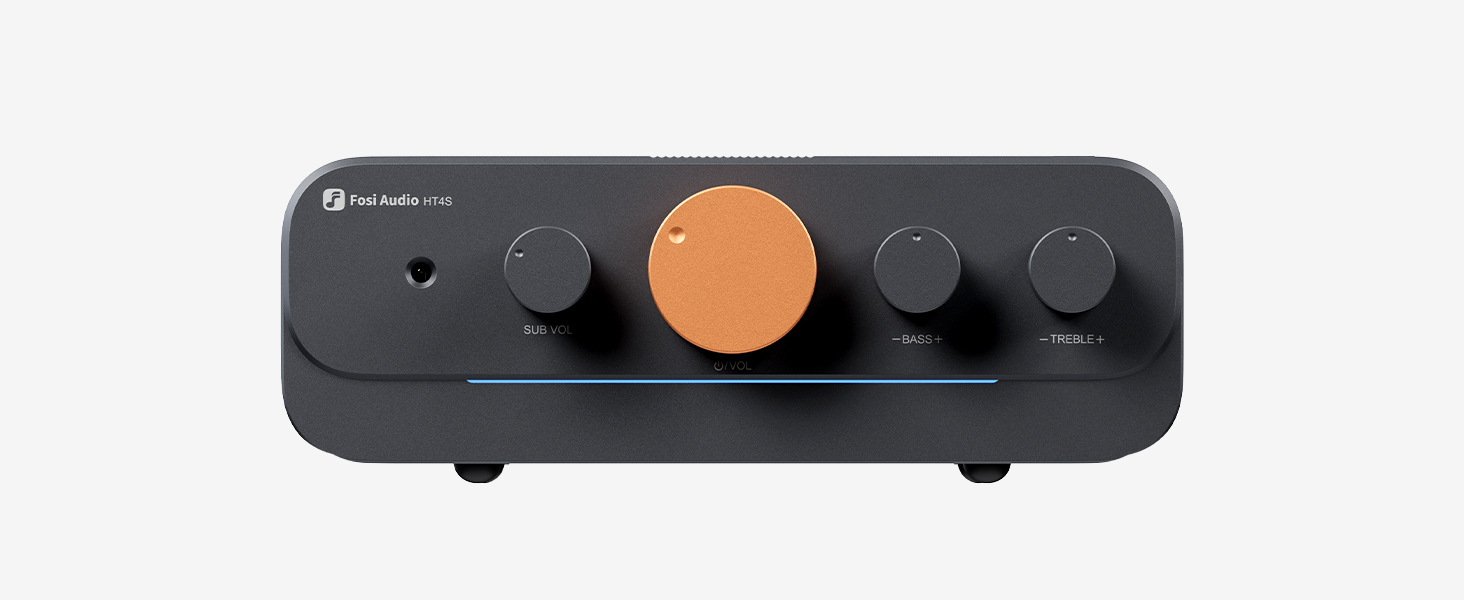
Image 4.1: The LED light bar indicates the current input mode.
4.3 Bluetooth Pairing
When in Bluetooth mode (blue LED), the amplifier will automatically enter pairing mode. Search for "Fosi Audio HT4S" on your device's Bluetooth settings and connect. If already paired, it will attempt to reconnect to the last device.
4.4 Tone Control
Use the Bass and Treble knobs on the front panel to adjust the low and high frequencies according to your preference. These adjustments allow you to fine-tune the sound output to match your speakers and listening environment.
4.5 5th Channel Mode Switch
The switch on the rear panel labeled "FLAT/SUB" allows you to configure the 5th channel output:
- FLAT: The 5th channel outputs a full-range signal, suitable for a standard speaker.
- SUB: The 5th channel outputs a low-frequency signal, ideal for a subwoofer or bass shaker.
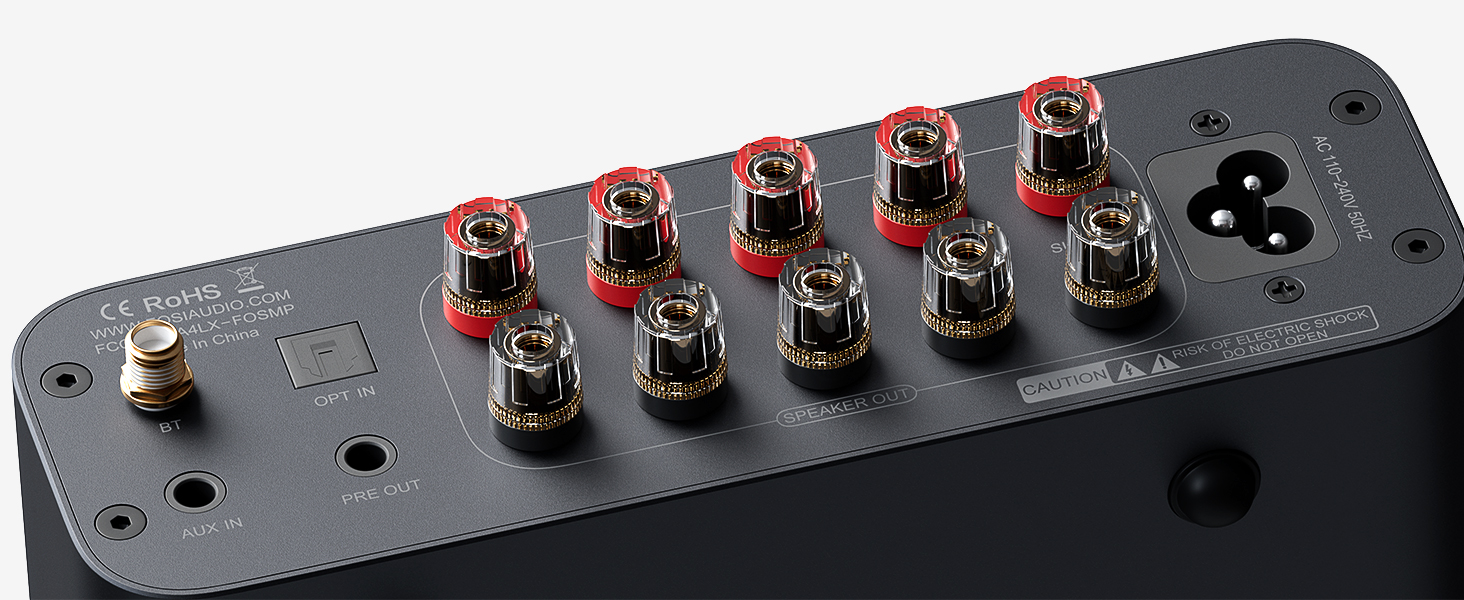
Image 4.2: The FLAT/SUB switch for the 5th channel output.
4.6 Remote Control Functions
The included remote control provides convenient access to various functions:
- Power On/Off
- Volume Up/Down
- Mute
- Input Mode Selection (Bluetooth, AUX, Optical)
- LED Light Bar Control
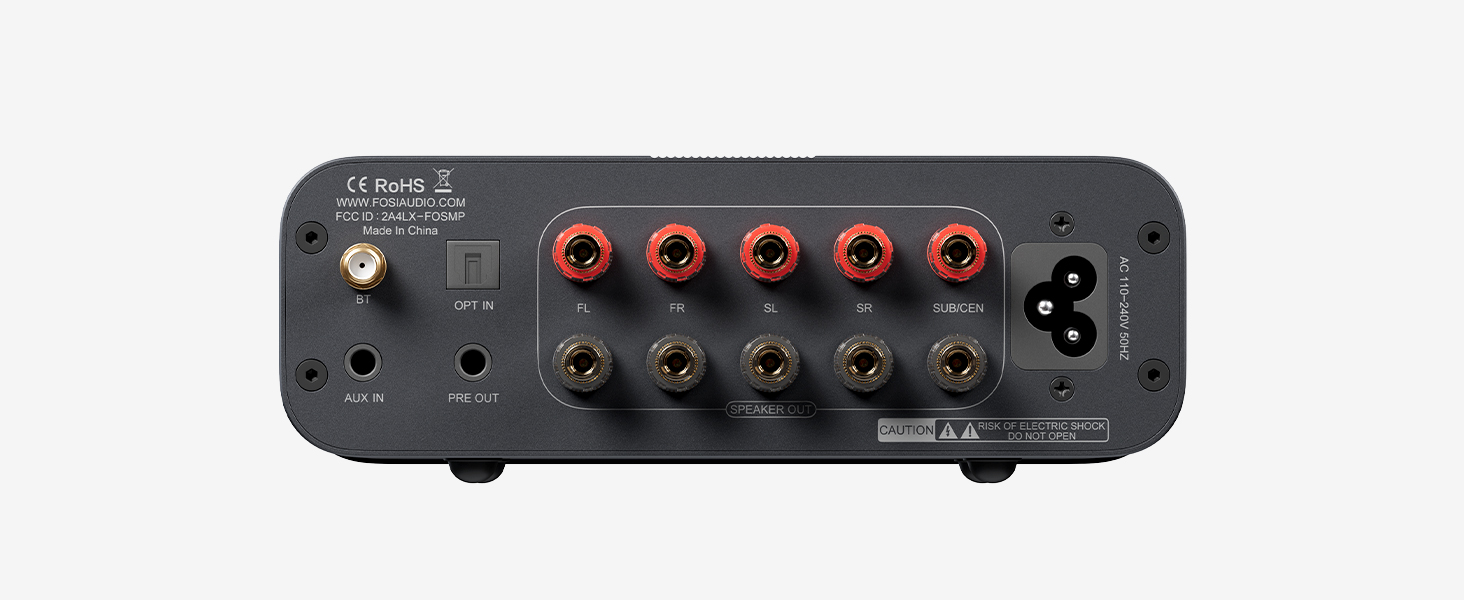
Image 4.3: The remote control for the Fosi Audio HT4S.
5. Maintenance
- Cleaning: Use a soft, dry cloth to clean the amplifier's surface. Avoid using harsh chemicals or abrasive materials.
- Ventilation: Ensure the amplifier is placed in a well-ventilated area to prevent overheating. Do not block the ventilation holes.
- Heat Dissipation: For optimal performance and longevity, especially during extended use or in warm environments, it is recommended to use Fosi Audio's cooling fan (sold separately) with the amplifier.
- Storage: When not in use for extended periods, store the amplifier in a cool, dry place away from direct sunlight and moisture.
6. Troubleshooting
| Problem | Possible Cause | Solution |
|---|---|---|
| No sound output |
|
|
| Bluetooth connection issues |
|
|
| Distorted sound |
|
|
| Remote control not working |
|
|
7. Specifications
| Feature | Detail |
|---|---|
| Brand | Fosi Audio |
| Model Number | HT4S |
| Number of Channels | 5 (switchable 4.1/5.0) |
| Material | Aluminum Alloy |
| Included Components | Cable, Japanese User Manual |
| Country of Origin | China |
| Customer Reviews | 4.4 out of 5 stars (9 ratings) |
8. Warranty and Support
All Fosi Audio products, including the HT4S, come with a 24-month warranty, ensuring durability and peace of mind. For technical support, troubleshooting assistance, or warranty claims, please contact Fosi Audio customer service through their official website or the retailer where the product was purchased.
9. Product Videos
9.1 Fosi Audio BT20APRO Power Amplifier Product Introduction
Video 9.1: An introductory video showcasing the features and design of a Fosi Audio power amplifier, providing general insights into the brand's product line.
9.2 Fosi Audio BT20A MAX Product Display
Video 9.2: A brief product display video highlighting the design and key aspects of a Fosi Audio amplifier, offering a visual overview.


