
Lamshaw IDW17, IDW20, IDW21, IDW23, IDW25, IDW26
Lamshaw Smart Watch Charger User Manual
Magnetic USB Replacement Charging Cable
1. Introduction
Thank you for choosing the Lamshaw Smart Watch Charger. This magnetic USB charging cable is designed to provide a convenient and efficient charging solution for your compatible smartwatches. Please read this manual carefully to ensure proper use and maintenance of your charging cable.
2. Compatibility
This charging cable is specifically designed for the following Smart Watch models:
- IDW17
- IDW20
- IDW21
- IDW23
- IDW25
- IDW26
Please verify your watch model before use to ensure compatibility.

3. Key Features
- Magnetic Connection: Ensures a secure and stable connection for efficient charging.
- Durable Construction: Made with ABS+PC materials for the probe and a flexible PVC cable for longevity and easy storage.
- Fast Charging: Designed for high-speed charging, capable of fully charging your device in approximately 2.5 hours with a 1A output current.
- Portable Design: Lightweight and compact, making it easy to carry in your bag for use at home, office, car, or during travel.


4. Setup: Charging Your Smartwatch
4.1 Connecting the Charger
- Ensure your smartwatch is clean and dry around the charging contacts.
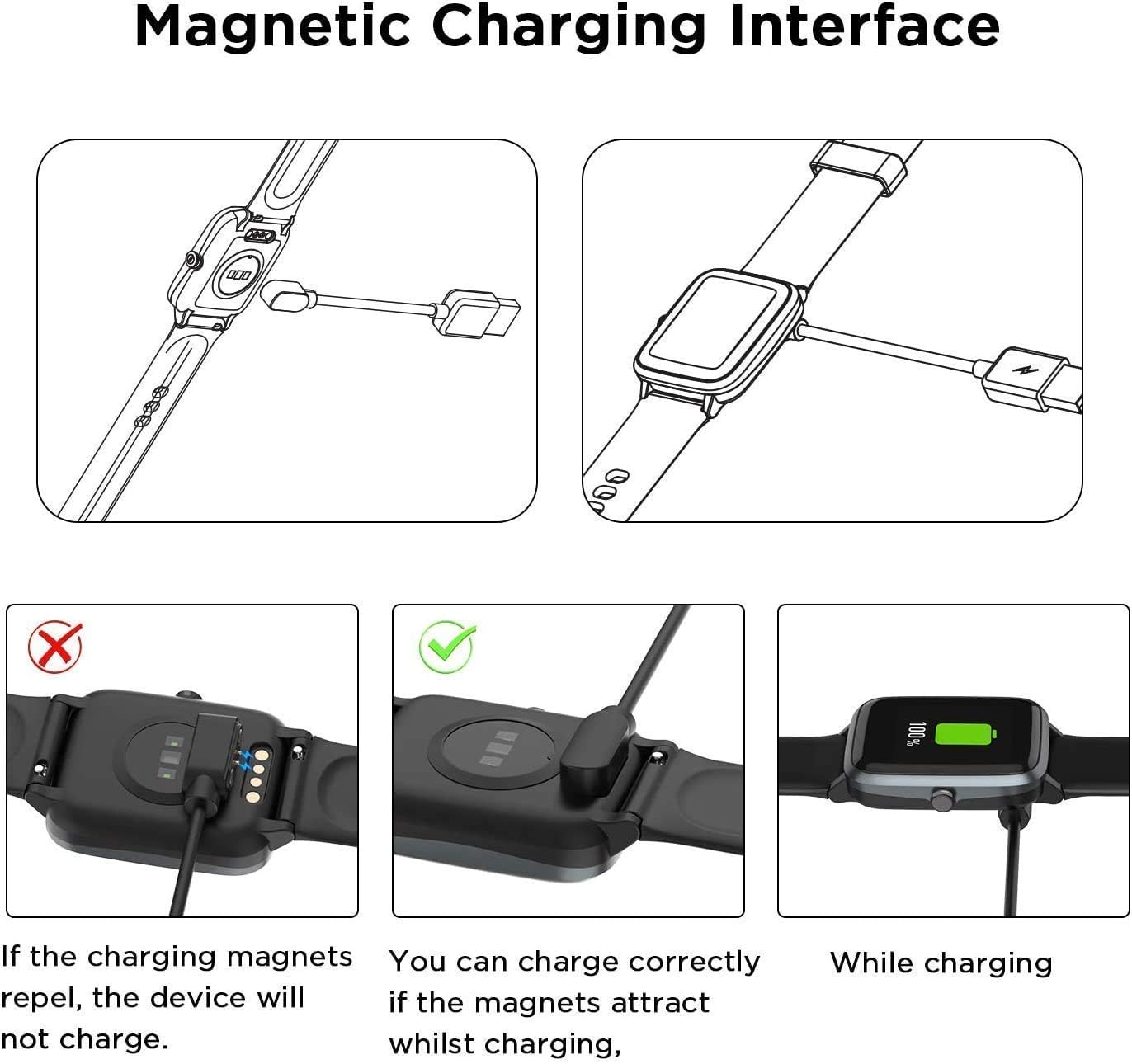
- Align the magnetic charging pins of the cable with the charging contacts on the back of your smartwatch. The magnets will automatically snap into place.
- Verify that the magnetic attraction is strong and the connection is secure. If the magnets repel, the device will not charge.
4.2 Charging Methods
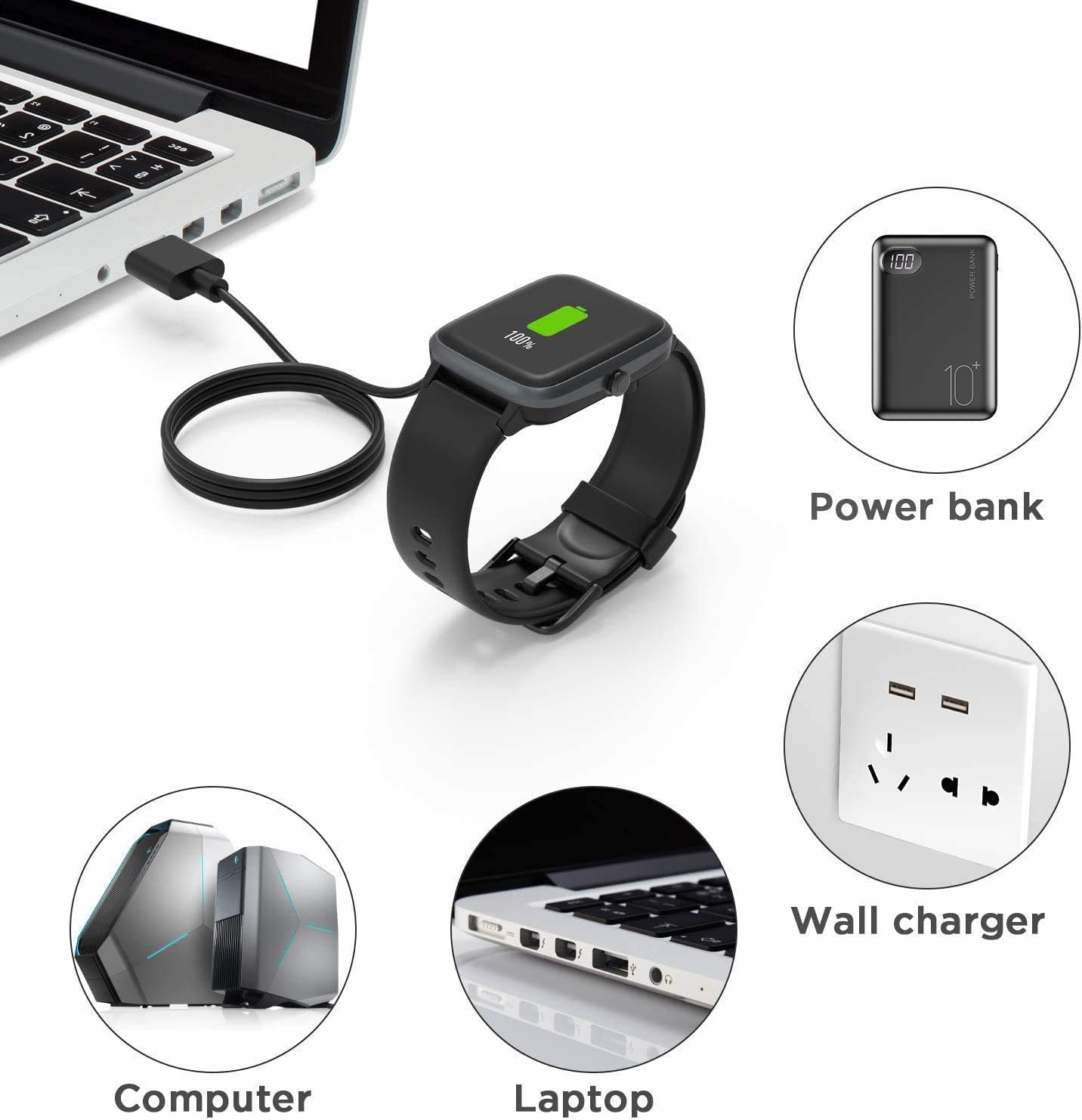
Once the charging cable is securely connected to your smartwatch, plug the USB-A end of the cable into a compatible power source:
- USB Wall Charger: Use a standard USB wall adapter (recommended 5V/1A output).
- Computer/Laptop USB Port: Connect to an available USB port on your computer or laptop.
- Power Bank: Use a portable power bank for on-the-go charging.

5. Operating
The Lamshaw Smart Watch Charger operates automatically once connected to a power source and your compatible smartwatch. The smartwatch display will typically indicate that it is charging (e.g., a battery icon with a lightning bolt or a charging percentage). Disconnect the charger once your smartwatch is fully charged.

6. Maintenance and Care
- Cleaning: Gently wipe the charging contacts on both the cable and your smartwatch with a dry, soft cloth to remove any dust or debris. Do not use liquid cleaners.
- Storage: When not in use, store the cable in a cool, dry place, away from direct sunlight and extreme temperatures. The flexible PVC cable is designed for easy rolling and convenient storage.
- Handling: Avoid bending the cable sharply or pulling it by the cord. Always grasp the plug when disconnecting from a power source or your smartwatch.
- Water Exposure: This charger is not waterproof. Avoid exposing it to water or other liquids.
7. Troubleshooting
| Issue | Possible Cause | Solution |
|---|---|---|
| Smartwatch not charging | Incorrect magnetic alignment | Ensure the magnetic pins are correctly aligned and attract strongly to the smartwatch contacts. Refer to Figure 4.1. |
| Smartwatch not charging | Dirty charging contacts | Clean the charging contacts on both the cable and smartwatch with a dry, soft cloth. |
| Smartwatch not charging | Faulty power source | Try plugging the USB cable into a different USB port or wall adapter. |
| Slow charging | Low power output from source | Use a power source with at least 1A output (e.g., a dedicated wall charger) for optimal charging speed. |
| Cable appears damaged | Physical stress or improper handling | Discontinue use and replace the cable. Avoid sharp bends or pulling the cable by the cord. |
8. Product Specifications
| Specification | Detail |
|---|---|
| Brand | Lamshaw |
| Model Compatibility | IDW17, IDW20, IDW21, IDW23, IDW25, IDW26 Smart Watches |
| Connector Type | Magnetic (Smartwatch end), USB-A (Power source end) |
| Cable Length | Approximately 3.3 feet (1 meter) |
| Material | Aluminum, Plastic (ABS+PC, PVC) |
| Color | Black |
| Power Output (Recommended) | 5V/1A |
| Charging Time | Approx. 2.5 hours (for full charge with 1A output) |
| Product Weight | 17 g |
9. Warranty and Support
For warranty information and customer support, please refer to the purchase platform or contact the seller directly. Keep your purchase receipt as proof of purchase.
If you encounter any issues not covered in this manual, please reach out to Lamshaw customer service for assistance.
Ask a question about this manual
Ask about setup, troubleshooting, compatibility, parts, safety, or missing instructions. Manuals+ will review the question and use this page’s manual context to help answer it.