
Introduction
This manual provides detailed instructions for the installation, operation, and maintenance of your GUPUP 16.4 FT COB RGB Smart IC LED Strip Lights. These lights feature advanced RGB+IC technology, allowing for multiple colors to be displayed on a single line simultaneously, creating dynamic and vibrant lighting effects. Please read this manual thoroughly before use to ensure proper functionality and safety.
Product Features
- Upgraded Smart RGB IC Lights: Display multiple colors on one line at a time, offering a strong visual impact compared to traditional RGB lights.
- IR Remote and App Control: Personalize lighting effects, adjust colors and brightness via the included IR remote or a dedicated smartphone application.
- Various Preset Scenes: Choose from a selection of pre-programmed scenes inspired by parties, holidays, festivals, movies, and more to match your mood.
- Music Sync Mode: The integrated high-sensitivity microphone allows the lights to synchronize with your favorite audio for an immersive experience.
- Segmented Color Control: Customize individual segments of the strip to display different colors simultaneously.

Figure 1: RGB+IC lighting effects with segmented color control.

Figure 2: Segmented color control via the mobile application.
Package Contents
Verify that all items are present in the package:
- 16.4 FT COB RGB Smart IC LED Strip Light
- Power Adapter
- IR Remote Control
- Controller Box with QR Code for App Download
- User Instruction Manual
Video 1: Unboxing and initial setup of the GUPUP LED Strip Lights, showing the components included in the package.
Setup Instructions
- Surface Preparation: Before installation, ensure the surface where the LED strip will be applied is clean, dry, and smooth. Dust, dirt, or moisture can affect the adhesive's performance.
- Connect the LED Strip: Carefully unroll the LED strip. Connect the end of the LED strip to the controller box. Ensure the pins align correctly and push firmly until it clicks into place. Incorrect insertion may prevent the lights from functioning or cause flickering.
- Connect Power Adapter: Plug the power adapter into the controller box, then plug the power adapter into a standard electrical outlet.
- Mounting: Peel off the adhesive backing from the LED strip and firmly press the strip onto the prepared surface. Apply even pressure along the entire length to ensure good adhesion.
- App Download (Optional): Scan the QR code on the controller box to download the companion mobile application for additional control features.
Note: Do not roll up the strip light during use to prevent overheating. The product is not recommended for outdoor use.
Operating Instructions
Using the IR Remote Control
The included IR remote control allows for basic and advanced functions:
- ON/OFF: Press the 'ON' button to turn the lights on, and 'OFF' to turn them off.
- Color Selection: Press any of the colored buttons (Red, Green, Blue, White, etc.) to change the static color of the strip.
- Brightness Adjustment: Use the brightness up/down buttons to increase or decrease the light intensity.
- Dynamic Modes: Select from 'Flash', 'Strobe', 'Fade', or 'Smooth' buttons for various dynamic lighting effects.
- Speed Adjustment: When a dynamic mode is active, use the speed up/down buttons to adjust the transition speed of the effects.
Video 2: Demonstration of remote control functions, including color changes and dynamic lighting modes.
Using the Mobile Application
For enhanced control and customization, download the dedicated mobile application by scanning the QR code on the controller box.
- Color Customization: Access a wider spectrum of colors and fine-tune shades.
- Preset Scenes: Explore and select from an expanded library of preset lighting scenes.
- Music Sync: Activate music synchronization mode, allowing the lights to react to ambient sounds or music played through your device.
- Timer Function: Set schedules for the lights to turn on/off automatically.
- DIY Modes: Create and save your own custom lighting patterns and color sequences.

Figure 3: Examples of vibrant scene effects available.
Maintenance
- Cleaning: Gently wipe the LED strip with a dry, soft cloth to remove dust. Do not use liquid cleaners or abrasive materials.
- Storage: If storing the lights, ensure they are clean and dry. Store in a cool, dry place away from direct sunlight.
- Power Disconnection: Always unplug the power adapter from the wall outlet when not in use for extended periods or during cleaning.
Troubleshooting
| Problem | Possible Cause | Solution |
|---|---|---|
| Lights do not turn on. | Power adapter not connected properly or not plugged in. LED strip not correctly connected to the controller. | Ensure the power adapter is securely plugged into both the controller and the wall outlet. Verify the LED strip's pins are fully and correctly inserted into the controller until a click is heard. |
| Remote control is not working. | Remote battery is dead or incorrectly inserted. Obstruction between remote and controller sensor. | Replace the remote battery or ensure it is inserted with correct polarity. Ensure a clear line of sight between the remote and the IR receiver on the controller. |
| Lights are flickering or dim. | Loose connection between LED strip and controller. Insufficient power supply. | Re-seat the LED strip connector firmly into the controller. Ensure the power adapter is the original one provided and is functioning correctly. |
| Settings are lost after unplugging. | The controller's memory resets when power is completely removed. | This is normal behavior for this model. Re-apply desired settings after plugging back in. |
Specifications
- Brand: GUPUP
- Model Number: TC80115020H-JH01-AUS-G1
- Item Length: 16.4 Feet
- Light Source Type: LED (COB RGB Smart IC)
- Light Color: Multicolor, RGB
- Indoor/Outdoor Usage: Indoor
- Power Source: Corded Electric
- Controller Type: Remote Control (IR) & App Control
- Number of Light Sources: 150
- Item Weight: 5.9 ounces
- Smart Home Compatibility: Smart Home Compatible (Note: Does not support Alexa)
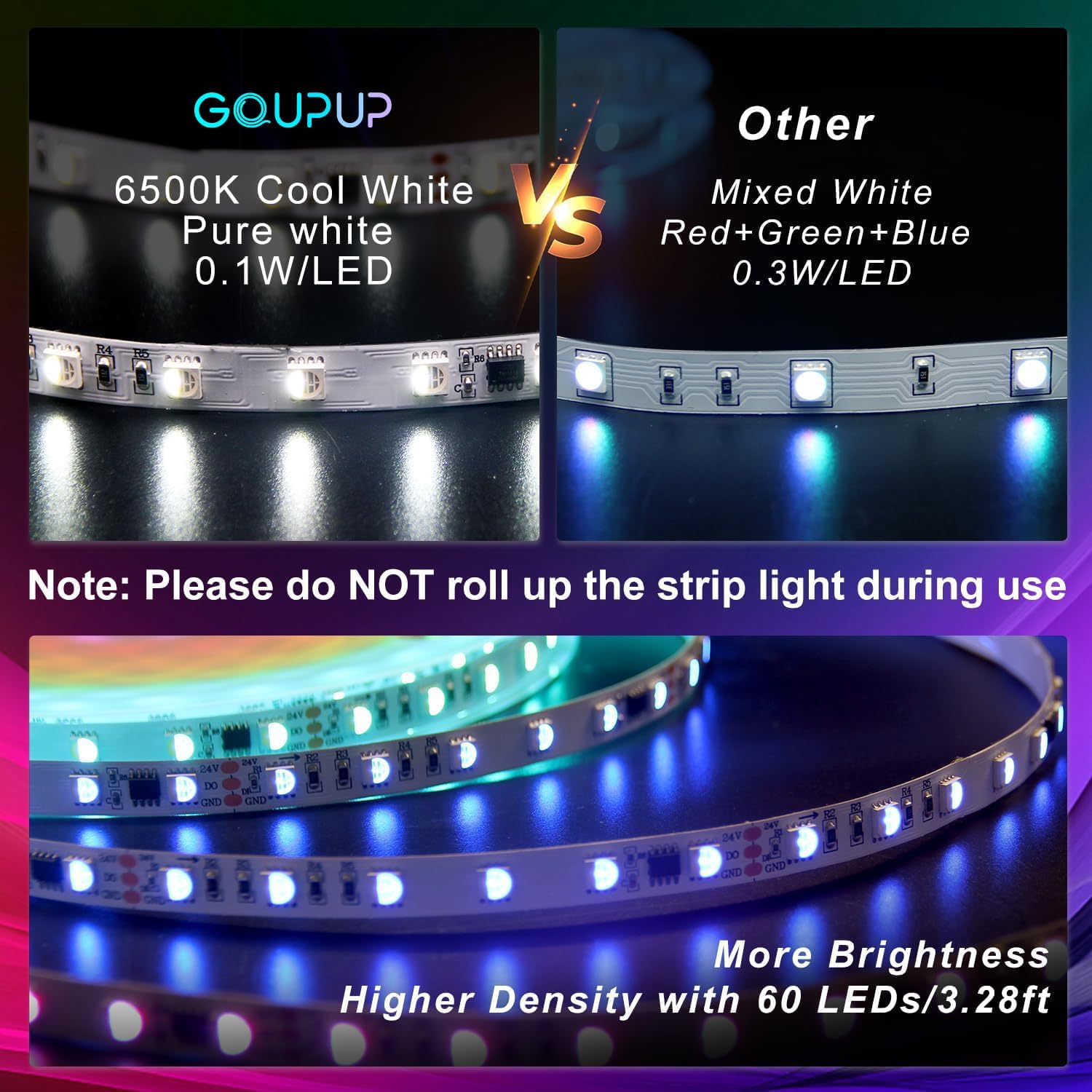
Figure 4: Detail of LED density and color temperature.
Warranty and Support
For any product-related inquiries, technical support, or warranty claims, please contact GUPUP customer service through the retailer's platform or the contact information provided in your product packaging. Please retain your proof of purchase for warranty validation.