
1. Introduction
Thank you for choosing the VITCOCO 1920P HD WiFi Ear Otoscope Camera. This device is designed to provide a clear, high-definition view of the ear canal, facilitating safe and effective ear inspection and cleaning. Equipped with a 1920P HD camera, 6 high-brightness LEDs, and intelligent gyroscopic stabilization, it offers precise real-time imaging directly to your smartphone. Please read this manual thoroughly before use to ensure proper operation and maintenance.
2. Product Overview and Components
The VITCOCO Ear Otoscope Camera comes with several components to enhance your experience:
- Otoscope Device: The main unit featuring the camera, LED lights, and power button.
- Protective Dust Cap: For covering the camera lens when not in use.
- Silicone Ear Spoon Tips (8 pieces): Soft, flexible tips with an integrated design for gentle ear wax removal.
- Metallic Ear Cleaning Accessories (7 pieces): Various tools for comprehensive ear cleaning.
- USB-C Charging Cable: For recharging the device's internal battery.
- User Manual: This document for detailed instructions.
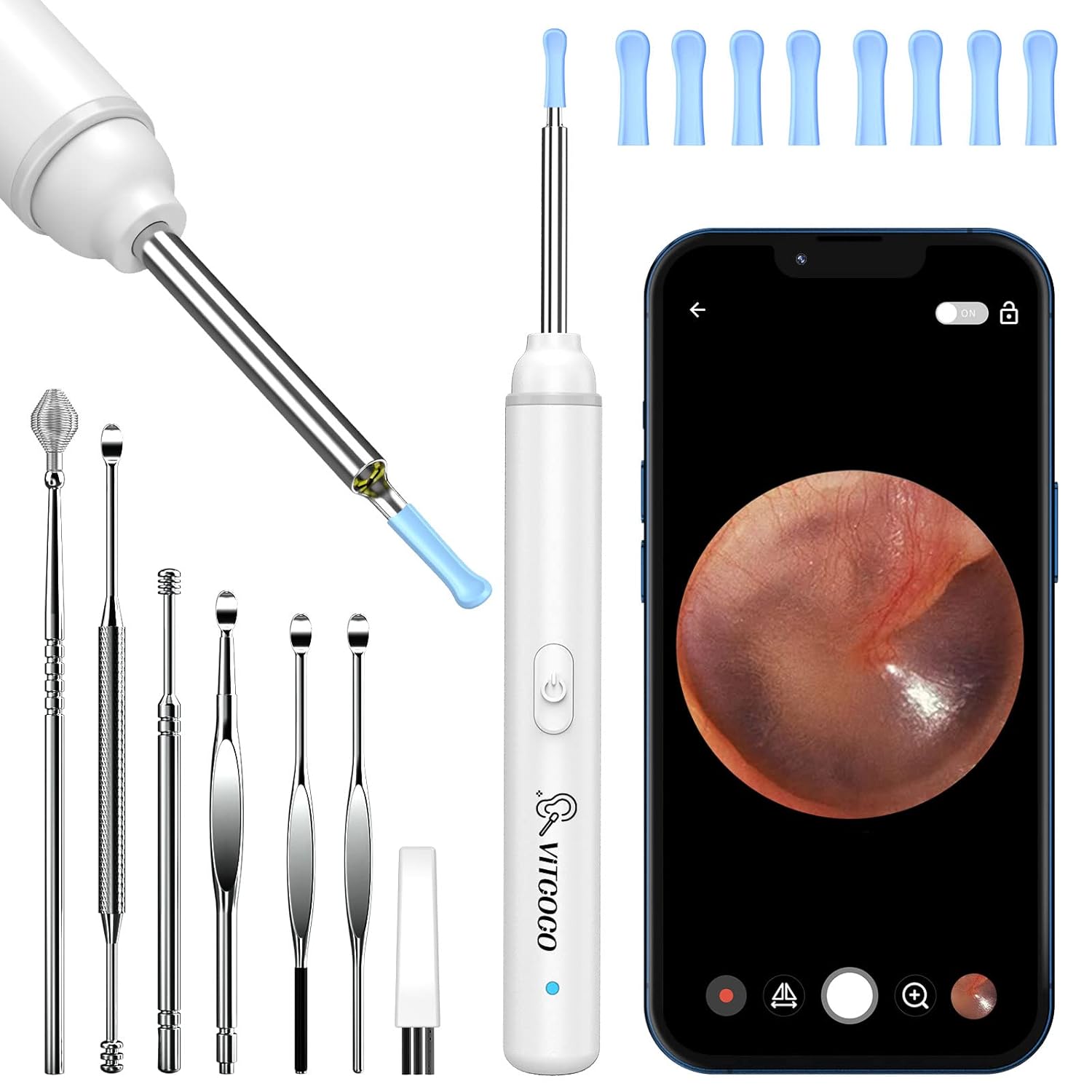
Image 2.1: The VITCOCO Otoscope Camera with its full set of accessories, including silicone tips and metallic cleaning tools.

Image 2.2: Key features of the otoscope, highlighting the 6 LED lights for illumination, the 3.0mm ultra-thin diameter for safe insertion, the intelligent thermostat maintaining a comfortable temperature (25-34°C), and the convenient Type-C charging port.
3. Setup Guide
Follow these steps to set up your VITCOCO Ear Otoscope Camera:
- Step 1: Download the Application
Scan the QR code provided in the packaging or visit http://download.wuyihang.com/app/download/#/ to download the "Endscopetool" application for your iOS or Android device. - Step 2: Power On the Otoscope
Press and hold the power button on the otoscope device to turn it on. A blue indicator light will illuminate. - Step 3: Connect to Wi-Fi
On your smartphone, go to your Wi-Fi settings. Locate and connect to the Wi-Fi network named "Softish--Xxxxx" (the exact name will be on the device or packaging). No password is required. - Step 4: Open the Application
Launch the "Endscopetool" application on your smartphone. The live view from the otoscope camera should now be displayed.

Image 3.1: Visual guide illustrating the four steps for connecting the otoscope to your smartphone via the "Endscopetool" application.

Image 3.2: An internal view of the otoscope, highlighting the smart WiFi chip responsible for smooth and lag-free image transmission to your connected device.
4. Operating Instructions
Once connected, you can begin using your otoscope:
- Real-time Viewing: The 1920P HD camera provides a clear, wide-angle view of the ear canal on your smartphone screen. The intelligent gyroscopic system ensures stable images with a 20 FPS transmission rate.
- Illumination: The 6 integrated LED lights illuminate the ear canal, ensuring optimal visibility even in dark areas.
- Comfortable Temperature: The intelligent thermostat maintains a comfortable temperature (20-25°C at the ear spoon tip and 25-34°C at the handle) to prevent discomfort during use.
- Ear Wax Removal: Carefully attach one of the silicone ear spoon tips to the otoscope. Gently insert the otoscope into the ear canal while observing the live feed on your phone. Use slow, controlled movements to remove earwax.
- Multi-purpose Use: The otoscope is not limited to ear inspection. It can also be used to examine the nasal cavity, throat, teeth, or even for pet inspections.
- Capturing Images/Videos: The "Endscopetool" application allows you to capture still images and record videos of your observations for later review or consultation.

Image 4.1: A user demonstrating the otoscope in action, showing the clear, real-time visual feedback on a smartphone screen during ear inspection.

Image 4.2: A visual comparison highlighting the superior clarity and detail of the 1920P HD image provided by the VITCOCO otoscope compared to a lower resolution 720P device.

Image 4.3: This image demonstrates the versatility of the otoscope, showing its application for examining ears, nose, mouth, and even for inspecting pets.
5. Safety Information
- Always use the soft silicone ear spoon tips for ear wax removal to prevent injury.
- Do not insert the otoscope too deeply into the ear canal. Observe the live feed carefully to avoid touching the eardrum.
- If you experience any discomfort or pain, stop using the device immediately.
- Keep the device out of reach of children. Adult supervision is required if used on children.
- Consult a medical professional if you have any ear conditions, infections, or persistent discomfort.
- Ensure the device is fully charged before use to avoid interruptions.
6. Maintenance
- Cleaning the Lens: The otoscope lens is IP67 waterproof. After each use, detach the silicone tip and clean the lens with a soft, damp cloth or alcohol wipe. Ensure the lens is dry before storing.
- Cleaning Accessories: Wash the silicone ear spoon tips and metallic accessories with soap and water, then sterilize with rubbing alcohol. Ensure they are completely dry before reuse or storage.
- Charging: Recharge the device using the provided USB-C cable. A full charge provides approximately 70 minutes of continuous use. The device has a standby time of 30 days.
- Storage: Store the otoscope and its accessories in a clean, dry place, away from direct sunlight and extreme temperatures.

Image 6.1: The otoscope lens being rinsed under running water, illustrating its IP67 waterproof rating for easy cleaning. Note: Only the lens is waterproof.
7. Troubleshooting
If you encounter issues with your VITCOCO Otoscope Camera, refer to the following common problems and solutions:
| Problem | Possible Cause | Solution |
|---|---|---|
| Cannot connect to Wi-Fi / App shows no image |
|
|
| Image is blurry or unclear |
|
|
| Device not charging |
|
|
8. Specifications
| Feature | Detail |
|---|---|
| Model Number | AX-IT-S3-W |
| Camera Resolution | 1920P HD |
| Lens Diameter | 3.0 mm |
| LED Lights | 6 |
| Connectivity | Wi-Fi (2.4GHz) |
| Image Transmission Rate | 20 FPS |
| Temperature Control | Intelligent Thermostat (20-25°C at ear spoon, 25-34°C at handle) |
| Battery Capacity | 230 mAh |
| Operating Time | Up to 70 minutes (continuous use) |
| Standby Time | Up to 30 days |
| Charging Port | USB Type-C |
| Waterproof Rating | IP67 (lens only) |
| Dimensions (Package) | 16.7 x 9.5 x 1.9 cm |
| Weight (Device) | 97 grams (approx.) |
| Manufacturer | VITCOCO |
9. Warranty and Support
The VITCOCO Ear Otoscope Camera comes with a 12-month manufacturer's warranty from the date of purchase. This warranty covers defects in materials and workmanship under normal use.
For technical support, warranty claims, or any questions regarding your device, please contact VITCOCO customer service through the retailer where you purchased the product or visit the official VITCOCO website for contact information.
