
1. Introduction
This manual provides detailed instructions for the installation, operation, maintenance, and troubleshooting of your Zyxel XMG1915-18EP 16-Port Smart Managed PoE++ Network Ethernet Switch. This device is designed to deliver high-speed network connectivity with advanced management features for small to medium businesses.
The Zyxel XMG1915-18EP features 16 multi-gigabit 2.5G ports, including 8 PoE++ ports with a 180W budget, and 2x 10G SFP+ uplinks. It supports NebulaFlex Cloud Management for unified control and offers enterprise-grade Layer 2 features such as 802.1Q VLAN, QoS, LACP link aggregation, IGMP snooping, and port mirroring.

Image: Zyxel XMG1915-18EP switch highlighting multi-gigabit 10G uplink, 802.3bt PoE++ (60W), near silent operation, and user-friendly web interface.
2. Package Contents
Upon opening the package, verify that all components are present and undamaged. The standard package for the Zyxel XMG1915-18EP typically includes:
- Zyxel XMG1915-18EP Switch Unit
- Power Adapter/Cord
- Rack Mount Kit
- Quick Start Guide
- Safety Warnings and Regulatory Notices
Note: Specific included components information was not available. Please refer to your product's packaging for exact contents.
3. Setup
3.1 Physical Installation
The Zyxel XMG1915-18EP is designed for rack-mounting in standard network racks. Ensure adequate ventilation around the unit to prevent overheating. The smart fan cooling system operates quietly, making it suitable for various environments.
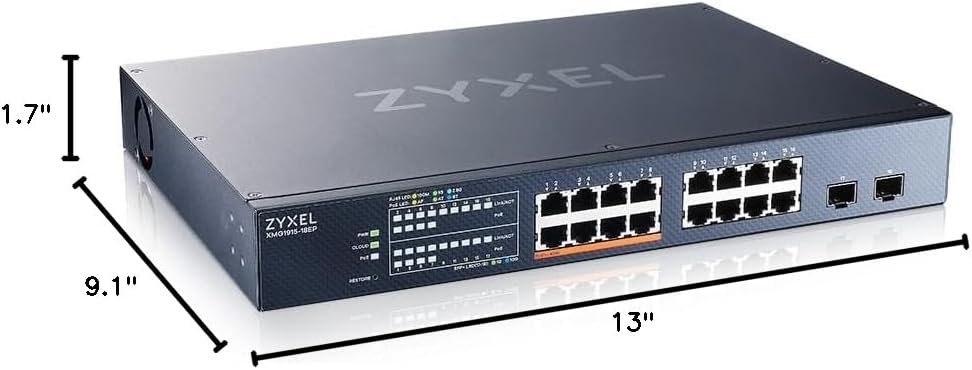
Image: Physical dimensions of the Zyxel XMG1915-18EP switch, measuring 9.1"L x 13"W x 1.7"H.
3.2 Power Connection
- Connect the power cord to the switch's power input.
- Plug the other end of the power cord into a suitable power outlet.
- Verify that the power indicator LED on the switch illuminates.
3.3 Network Connectivity
Connect your network devices (e.g., computers, servers, access points, IP cameras) to the 2.5G Ethernet ports using Cat5e/6 cabling. For high-speed uplinks to other switches or servers, use the 10G SFP+ ports with compatible SFP+ modules and fiber optic cables.
3.4 Initial Configuration (NebulaFlex Cloud Management)
The XMG1915-18EP supports Zyxel NebulaFlex Cloud Management, allowing for flexible configuration via a mobile app or web interface. This simplifies multi-site network deployment and management.
- Cloud Mode: For cloud-based management, register your device with the Zyxel Nebula platform. You can add devices by scanning a QR code on the unit using the Nebula mobile app.
- Standalone Mode: Alternatively, the switch can be managed directly via its local web GUI. Connect a computer to any Ethernet port on the switch and access the default IP address (refer to the Quick Start Guide for details).

Image: Zyxel Nebula mobile application interface demonstrating the QR code scanning feature for adding new devices to the network.
4. Operating the Switch
4.1 Power over Ethernet (PoE++)
The XMG1915-18EP features 8 PoE++ ports, each capable of delivering up to 60W of power, with a total power budget of 180W. This is ideal for powering devices such as WiFi 6/6E access points, PTZ cameras, VoIP phones, and IoT devices without requiring separate power adapters.
4.2 Managed Features
This is a smart managed switch offering a suite of Layer 2 features accessible via the web-based interface or Nebula cloud platform:
- 802.1Q VLAN Support: Segment your network for improved security and performance.
- Quality of Service (QoS): Prioritize network traffic for critical applications.
- Link Aggregation (LACP): Combine multiple physical links into a single logical link for increased bandwidth and redundancy.
- IGMP Snooping: Optimize multicast traffic delivery.
- Port Mirroring: Monitor network traffic by sending a copy of packets from one port to another.

Image: Screenshot of the Zyxel Nebula cloud management interface, showing various network monitoring and configuration options.
4.3 Web GUI Access
The local web GUI provides an intuitive interface for managing advanced features. It often includes a step-by-step wizard for quick setup. Ensure your connected computer is on the same subnet as the switch for initial access.
Video: Official Zyxel product presentation for the XMG1915-series, showcasing key features and benefits of the switch.
5. Maintenance
5.1 Firmware Updates
Regularly check the Zyxel support website for firmware updates. Keeping your switch's firmware up-to-date ensures optimal performance, security, and access to new features. Firmware updates can typically be performed via the Nebula cloud platform or the local web GUI.
5.2 Environmental Considerations
The switch features smart fan cooling, designed for quiet operation (19.71-42 dBA). Ensure the operating environment is within the specified temperature range (up to 40 °C) and free from excessive dust or moisture to maintain optimal performance and longevity.
6. Troubleshooting
6.1 No Power
If the switch does not power on, verify the power cord is securely connected to both the switch and a working power outlet. Check the power indicator LED on the unit.
6.2 No Network Connectivity
- Ensure Ethernet cables are properly connected to both the switch and the end devices.
- Check the link/activity LEDs on the switch ports for activity.
- Verify that the connected devices are configured correctly (e.g., IP addresses, subnet masks).
- If using SFP+ ports, ensure compatible SFP+ modules are correctly inserted and fiber optic cables are connected.
6.3 PoE Devices Not Receiving Power
- Confirm that the device connected is PoE compatible and meets the 802.3bt (PoE++) standard.
- Check the PoE status LEDs on the switch.
- Ensure the total power consumption of all connected PoE devices does not exceed the switch's 180W PoE budget.
6.4 Slow Network Speeds
- Verify that your cabling (Cat5e/6) supports 2.5G speeds.
- Check for network congestion or misconfigurations in QoS settings.
- Ensure connected devices are capable of 2.5G or 10G speeds to fully utilize the switch's capabilities.
6.5 Compatibility Note: 10Mb Ethernet Devices
Please note that this switch does not support 10Mb Ethernet devices. If you have older equipment that operates only at 10Mb, it will not function when directly connected to this switch. An intermediate switch that supports 10Mb speeds would be required for such devices.
7. Specifications
| Feature | Detail |
|---|---|
| Brand | ZYXEL |
| Model Number | XMG1915-18EP |
| Number of Ports | 16 (8x 2.5G PoE++, 8x 2.5G, 2x 10G SFP+ Uplink) |
| PoE++ Ports | 8 ports, up to 60W each |
| Total PoE Budget | 180W |
| Data Transfer Rate | 2.5 gigabits_per_second (Ethernet), 10 gigabits_per_second (SFP+) |
| Switch Type | Smart Managed |
| Management | NebulaFlex Cloud Management, Web-based GUI |
| Compatible Devices | Business, Camera, IP Phone, IoT Devices, Network, Printer, VoIP Phone, Wireless Access Point |
| Voltage | 120 volts |
| Maximum Power Consumption | 230.81 watts |
| Upper Temperature Rating | 40 °C |
| Case Material Type | Metal |
| Item Dimensions (L x W x H) | 9.1"L x 13"W x 1.7"H |
8. Warranty Information
The Zyxel XMG1915-18EP Network Ethernet Switch comes with a lifetime manufacturer warranty. Please retain your proof of purchase for warranty claims. For specific terms and conditions, refer to the warranty documentation included with your product or visit the official Zyxel website.
9. Support
For technical assistance, product documentation, or further inquiries, please visit the official Zyxel support website. You can find FAQs, driver downloads, and contact information for customer service.
Zyxel Official Website: www.zyxel.com


