
1. Introduction
Thank you for choosing the EXTEL XV250 Umii Connected Swing Gate Opener System. This system is designed to automate swing gates, offering convenience, security, and smart home integration. It is suitable for gates up to 2.5 meters in length and 250 kg in weight per wing. This manual provides essential information for the safe and efficient installation, operation, and maintenance of your gate opener.

Image 1.1: Main unit of the EXTEL XV250 Umii Swing Gate Opener.
2. Safety Information
Please read all safety warnings and instructions carefully before installation and operation. Failure to follow these instructions may result in serious injury or property damage. Keep this manual for future reference.
- Qualified Personnel: Installation and maintenance should only be performed by qualified personnel.
- Power Disconnection: Always disconnect power to the unit before performing any maintenance or adjustments.
- Obstacle Detection: Ensure the obstacle detection system is properly configured and tested to prevent accidents.
- Clearance: Keep the gate area clear of people, pets, and objects during operation.
- Emergency Release: Familiarize yourself with the manual release key for emergency situations.
- Environmental Conditions: The system is designed for outdoor use. Ensure all connections are waterproof and protected from extreme weather.
3. Package Contents
Verify that all components listed below are present in your package. If any items are missing or damaged, contact your retailer immediately.
- 2x Cylinder Motors for Swing Gates
- Control Unit
- 2x Remote Controls
- 1x Warning Light
- Mounting Brackets and Fasteners
- Installation Template
- Manual Release Key
- Instruction Manual
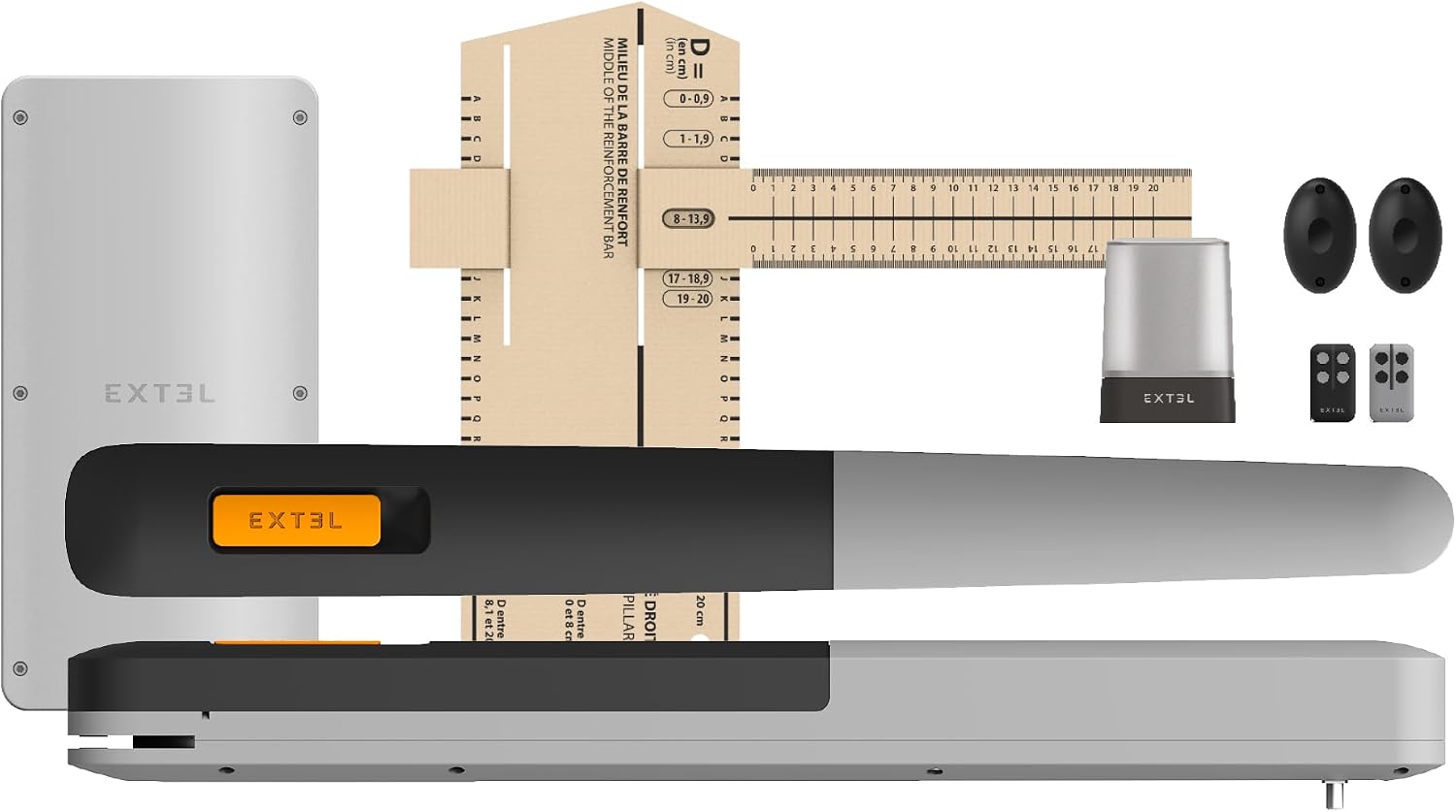
Image 3.1: Complete kit contents for the EXTEL XV250 Umii system.
4. Specifications
| Feature | Specification |
|---|---|
| Model | XV250 Umii - 761003 |
| Gate Type | Swing Gates |
| Max Gate Wing Length | 2.5 meters (per wing) |
| Max Gate Wing Weight | 250 kg (per wing) |
| Opening Angle | Up to 120° |
| Power Supply | 24 V |
| Connectivity | WLAN (UMI App), Google Home, Alexa |
| Material | Aluminium (100% recycled), Plastic (70% recycled) |
| Special Features | Soft start/stop, Obstacle detection, Manual release |
| Item Weight | 15 Kilograms |
5. Setup and Installation
The EXTEL XV250 Umii system is designed for simplified installation. Refer to the included mounting instructions and template for precise positioning and drilling.
5.1 Mounting the Motors
Use the provided installation template to mark the drilling points on your gate pillars and gate wings. Ensure the motors are level and securely fastened using the appropriate mounting brackets and hardware. The system supports an opening angle of up to 120 degrees.

Image 5.1: Installation template for accurate motor placement.

Image 5.2: The system allows for a 120-degree gate opening.
5.2 Electrical Connections
Connect the motors and other accessories (e.g., warning light, photocells if applicable) to the control unit according to the wiring diagram in the detailed installation guide. Ensure all electrical connections are secure and properly insulated. The system operates on 24V.

Image 5.3: Example of internal wiring connections.
5.3 App-Based Configuration
Download the UMI app to your smartphone. Follow the in-app instructions to connect the control unit to your WLAN network and configure the gate's opening and closing parameters. This includes setting limits, adjusting speeds, and testing safety features.

Image 5.4: The UMI app provides simplified installation and setup.
6. Operating Instructions
Your EXTEL XV250 Umii system offers multiple ways to operate your gate.
6.1 Remote Control Operation
Use the provided remote controls to open and close your gate. Press the designated button to initiate the gate movement. The gate will perform a soft start and idle at the end of its travel for smooth operation.

Image 6.1: Operating the gate with the remote control.
6.2 UMI App Control
The UMI app allows you to control your gate from your smartphone. You can open, close, or partially open the gate, and monitor its status. The app also enables automatic and semi-automatic operating modes.

Image 6.2: Convenient gate operation via the UMI app.
6.3 Smart Home Integration
The system is compatible with Google Home and Alexa, allowing for voice control of your gate. Follow the instructions in the UMI app to link your gate opener with your preferred smart home assistant.

Image 6.3: Integrate your gate with Google Home or Alexa for voice control.
6.4 Manual Release
In case of power failure or system malfunction, you can manually open the gate using the provided manual release key. Insert the key into the designated lock on the motor unit and turn it to disengage the motor, allowing you to move the gate by hand.

Image 6.4: Manual release mechanism for emergency gate operation.
7. Maintenance
Regular maintenance ensures the longevity and reliable operation of your EXTEL gate opener system.
- Monthly Inspection: Check for any loose fasteners, worn parts, or signs of damage on the motors, brackets, and gate.
- Cleaning: Keep the motor units and photocells (if installed) clean and free from debris, leaves, and insects.
- Lubrication: Periodically lubricate moving parts of the gate hinges and motor arms as recommended in the detailed installation guide.
- Safety Feature Test: Regularly test the obstacle detection system to ensure it functions correctly.
8. Troubleshooting
If you encounter issues with your gate opener, refer to the following common troubleshooting steps:
- Gate Not Responding: Check if the power supply is connected and active. Ensure remote control batteries are not depleted. Verify the UMI app connection.
- Gate Stops Mid-Operation: This could indicate obstacle detection. Check the gate path for obstructions. Inspect photocells for dirt or misalignment.
- Gate Opens/Closes Partially: Re-calibrate the gate limits using the UMI app. Ensure no physical obstructions are preventing full travel.
- Unusual Noises: Inspect the gate hinges and motor arms for wear or damage. Lubricate moving parts if necessary.
- App Connectivity Issues: Ensure your Wi-Fi network is active and the control unit is within range. Restart your router and the control unit if necessary.
For persistent issues, consult the detailed troubleshooting section in the full product manual or contact EXTEL customer support.
9. Warranty and Support
EXTEL products are manufactured to high-quality standards. For information regarding warranty coverage, please refer to the warranty card included with your product or visit the official EXTEL website. For technical support, spare parts, or service inquiries, please contact EXTEL customer service through their official channels. When contacting support, please have your product model (XV250 Umii) and serial number available.