
Introduction
This manual provides detailed instructions for the installation, operation, and maintenance of your DELLA 6000 BTU Window Air Conditioner. Please read this manual thoroughly before using the appliance and retain it for future reference.
Safety Information
Always follow basic safety precautions when using electrical appliances to reduce the risk of fire, electric shock, and injury to persons.
- Ensure the unit is properly grounded.
- Do not operate the unit with a damaged cord or plug.
- Do not insert fingers or foreign objects into the air inlet/outlet.
- Unplug the unit before cleaning or performing any maintenance.
- Keep flammable materials away from the unit.
Product Overview
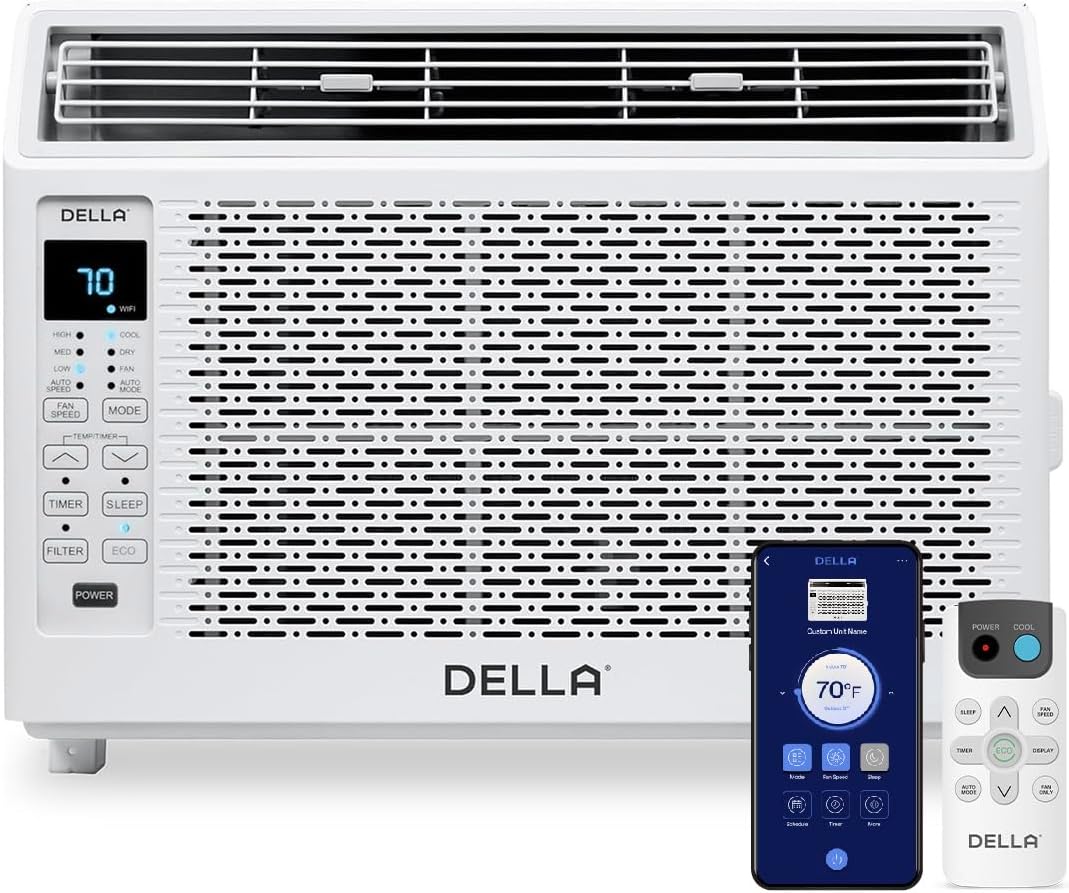
Figure 1: DELLA 6000 BTU Window Air Conditioner Unit, Remote Control, and Smartphone App Interface.
Control Panel
The unit features an intuitive control panel with various buttons and indicator lights for easy operation.
- Power Button: Turns the unit on or off.
- Mode Button: Cycles through Cool, Dry (Dehumidifier), Fan, Auto Mode, and ECO Mode.
- Fan Speed Button: Adjusts fan speed (High, Med, Low, Auto Speed).
- Temp/Timer Buttons: Adjusts temperature settings or sets timer.
- Sleep Button: Activates sleep mode for quiet, energy-efficient operation overnight.
- Filter Button: Indicates when the filter needs cleaning.
- WiFi Indicator: Shows Wi-Fi connectivity status.
Remote Control

Figure 2: Remote Control for the DELLA Air Conditioner.
The remote control allows for convenient operation of all unit functions from a distance. Ensure batteries are correctly installed.
Installation
The DELLA 6000 BTU Window Air Conditioner features a T-design for simplified installation.
Installation Steps

Figure 3: T-design installation allows for flexible window opening.

Figure 4: Simplified 3-step installation process.
- Step 1: Secure into window frame. Place the unit into the window opening, ensuring it is securely seated.
- Step 2: Mount with four screws. Fasten the unit to the window frame using the provided screws for stability.
- Step 3: Extend side panels into wall. Extend the accordion side panels to fill the gap between the unit and the window frame, providing insulation and reducing air leaks.
Installation Kit Components

Figure 5: Included installation kit components.
The installation kit includes filler panels, insulation strips, lock frame & sash lock, screws, window sash seal, and a top mounting rail to ensure a secure and efficient installation.
Product Dimensions

Figure 6: Unit dimensions and recommended window opening.
The unit dimensions are approximately 15.94"D x 16.02"W x 12.05"H. It is designed for window widths between 23"-34" and requires at least 14.5" vertical clearance.
Operating Instructions
Modes and Fan Speeds

Figure 7: Available operating modes and fan speeds.
The unit offers 5 operating modes (Cool, Auto, Dehumidify, Fan Only, ECO Mode) and 4 fan speeds (Auto, Low, Mid, High) to suit various comfort needs. Use the 'Mode' and 'Fan Speed' buttons on the control panel or remote to select your desired settings.
Temperature Control
Use the up and down arrow buttons on the control panel or remote to set your desired temperature. The digital display will show the current setting.
Smart Features (Wi-Fi Control)

Figure 8: Control your unit wirelessly with the Della+ APP.

Figure 9: Della+ app supports Google Assistant and Alexa for voice control.
Download the free Della+ app to control your unit from anywhere. The app allows for remote control, scheduling, and integration with smart home systems like Google Assistant and Alexa.
Geo Location Function

Figure 10: Smart Geo Location feature for automatic operation.
The Geo Location feature allows the unit to automatically turn on or off based on your proximity to your home. This feature can be configured via the Della+ app.
Video 1: Demonstration of the Geo Location Function setup and customization within the Della+ app.
Sleep Mode

Figure 11: Intelligent sleep mode adjusts temperature for optimal comfort.
Intelligent sleep mode automatically adjusts the temperature overnight to maintain comfort and save energy. Activate it using the 'Sleep' button.
Timer Function
The 24-hour auto on/off timer allows you to program the unit to turn on or off at specific times, enhancing convenience and energy efficiency.
Maintenance
Reusable Filter Cleaning

Figure 12: The unit features a washable and reusable filter.
The unit is equipped with a washable and reusable filter. A clean filter helps maintain optimal cooling performance and air quality. When the 'Filter' indicator light illuminates, it's time to clean the filter.
- Turn off and unplug the air conditioner.
- Remove the front panel and slide out the air filter.
- Wash the filter with warm, soapy water. Rinse thoroughly.
- Allow the filter to dry completely before reinserting it.
- Replace the front panel.
General Care
- Clean the exterior of the unit with a soft, damp cloth.
- Do not use harsh chemicals or abrasive cleaners.
- Ensure the drainage area is clear of obstructions.
Troubleshooting
If you experience issues with your air conditioner, refer to the following common problems and solutions:
| Problem | Possible Cause | Solution |
|---|---|---|
| Unit does not turn on | No power; circuit breaker tripped; unit unplugged. | Check power supply; reset circuit breaker; ensure plug is fully inserted. |
| Unit not cooling effectively | Dirty air filter; blocked air intake/outlet; room too large; windows/doors open. | Clean air filter; clear obstructions; ensure unit is sized correctly for room; close windows/doors. |
| Noisy operation | Loose parts; unit not level; fan obstruction. | Check for loose components; ensure unit is level; remove any fan obstructions. |
| Water dripping outside | Normal operation (condensation). | This is normal during cooling. Ensure proper drainage. |
Specifications
| Feature | Detail |
|---|---|
| Brand Name | Della |
| Model Info | 048-TL-W6KWD |
| Product Dimensions | 15.94 x 16.02 x 12.05 inches |
| Item model number | 048-TL-W6KWD |
| Efficiency | Energy Efficient |
| Capacity | 0.5 Tons |
| Noise | 51 dB |
| Installation Type | Window |
| Part Number | 048-TL-W6KW_2 |
| Form Factor | Window Air Conditioner |
| Special Features | Remote control |
| Voltage | 115 Volts (AC) |
| Wattage | 517.5 watts |
| Batteries Included? | No |
| Floor Area | 250 Square Feet |
| Cooling Power | 6000 British Thermal Units |
| BEE Star Rating | Yes |
| Seasonal Energy Efficiency Ratio (SEER) | 11 |
| Power Source | Corded Electric |
Warranty and Support
Your DELLA 6000 BTU Window Air Conditioner comes with a 1 Year Warranty. For any inquiries or technical assistance, Della provides 24/7 Customer Support.
Please visit the Della Store on Amazon for more information or to contact support.