
Introduction
This manual provides essential information for the safe and efficient operation, installation, and maintenance of your CEMELI AW5000-06 Air Oil Water Separator Controller. This unit functions as a pneumatic pressure regulator and compressor filter, designed to remove moisture and particulate matter from compressed air lines, ensuring clean and regulated air supply for your pneumatic tools and systems. Please read this manual thoroughly before use and retain it for future reference.
Product Overview
The CEMELI AW5000-06 integrates a filter and a pressure regulator into a single compact unit. Key components are illustrated below:
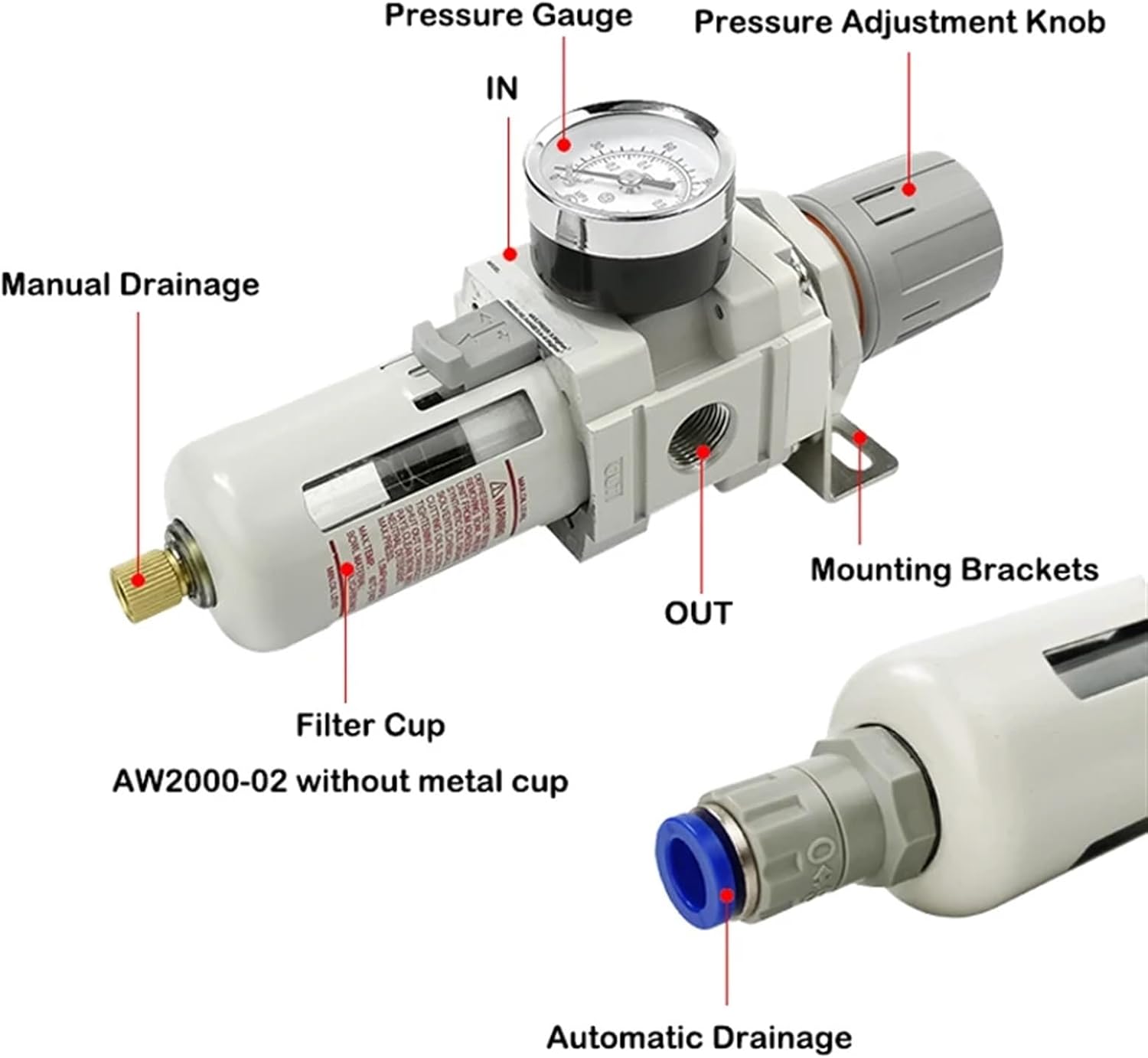
Figure 1: Labeled components of the CEMELI AW5000-06 unit. This image shows the Pressure Gauge, Pressure Adjustment Knob, IN port, OUT port, Mounting Brackets, Filter Cup, and Manual Drainage valve.
- Pressure Gauge: Displays the regulated output pressure.
- Pressure Adjustment Knob: Used to set the desired output pressure.
- IN Port: Inlet for unregulated compressed air.
- OUT Port: Outlet for filtered and regulated compressed air.
- Mounting Brackets: For secure installation of the unit.
- Filter Cup: Collects condensed water and particulate matter.
- Manual Drainage: Valve for manually draining accumulated water from the filter cup.
Specifications
| Feature | Detail |
|---|---|
| Model Number | AW5000-06 (Fible filter, Manual Drainage) |
| Brand | CEMELI |
| Item Weight | 50 g |
| Drainage Type | Manual Drainage |
| Filter Type | Fiber Filter |
| Port Size | G3/4 (as indicated in product images for AW5000-06) |
| Max. Operating Temperature | 60°C (140°F) (as indicated on warning label in images) |
| Max. Operating Pressure | Refer to unit markings (typically 1.0 MPa / 145 PSI) |
Note: Specifications are subject to change without notice. Always refer to the markings on the actual product for precise details.
Setup
- Unpacking: Carefully remove the unit from its packaging. Inspect for any damage during transit.
- Mounting:
Use the provided mounting brackets to securely attach the unit to a stable surface. Ensure the unit is installed vertically with the filter cup facing downwards for proper drainage.

Figure 2: Side view illustrating the mounting bracket attachment points.
- Air Line Connection:
- Connect the unregulated compressed air supply to the IN port.
- Connect the pneumatic tool or system requiring regulated, filtered air to the OUT port.
- Ensure all connections are tight and leak-free. Use appropriate thread sealant if necessary.

Figure 3: The AW5000-06 unit showing the G3/4 port size, indicating connection points for air lines.
- Initial Pressure Setting: Before applying air pressure, ensure the pressure adjustment knob is turned counter-clockwise to its lowest setting.
Operating Instructions
- Apply Air Pressure: Slowly open the main air supply valve to introduce compressed air to the unit.
- Adjusting Output Pressure:
- Pull the pressure adjustment knob upwards to unlock it.
- Rotate the knob clockwise to increase the output pressure, and counter-clockwise to decrease it.
- Monitor the pressure gauge to set the desired working pressure.
- Once the desired pressure is set, push the knob downwards to lock it in place. This prevents accidental pressure changes.

Figure 4: Instructions for adjusting the pressure using the adjustment knob: Upward Unlock, Rotate Left and Right to Adjust Pressure, Push to Lock.
- Monitoring: Regularly check the pressure gauge to ensure the system is operating at the correct pressure.
Maintenance
Regular maintenance ensures optimal performance and extends the lifespan of your CEMELI AW5000-06 unit.
- Manual Drainage:
The filter cup collects condensed water. This water must be drained regularly to prevent it from re-entering the air system. Turn the manual drainage valve at the bottom of the filter cup to release the accumulated water. Close the valve once drainage is complete. The frequency of drainage depends on the humidity and air consumption.

Figure 5: The manual drainage valve located at the bottom of the filter cup.
- Filter Element Cleaning/Replacement:
- Periodically inspect the filter element for excessive contamination.
- To access the filter element, first depressurize the system.
- Unscrew the filter cup from the main body.
- Clean the filter element with compressed air or replace it if heavily soiled or damaged.
- Reassemble the unit, ensuring the filter cup is securely tightened.
- General Inspection:
- Check for air leaks around connections and seals.
- Ensure the pressure gauge is functioning correctly.
- Inspect the unit for any physical damage.
Caution: Always depressurize the air system before performing any maintenance or disassembly.
Troubleshooting
| Problem | Possible Cause | Solution |
|---|---|---|
| No output pressure or low pressure |
|
|
| Water in output air |
|
|
| Pressure fluctuates |
|
|
Warranty and Support
CEMELI products are manufactured to high-quality standards. For specific warranty information, please refer to the documentation provided with your purchase or contact your retailer. If you encounter any issues not covered in this troubleshooting guide, or require technical assistance, please contact CEMELI customer support through their official website or the retailer from whom you purchased the product.
Please have your model number (AW5000-06) and purchase details ready when contacting support.