
1. Product Overview
The iCam365 1080P HD WiFi IP Camera is designed for indoor security surveillance, offering high-definition video, smart motion detection, and two-way audio communication. This camera provides comprehensive monitoring with its pan and tilt capabilities, ensuring a wide coverage area for your home or office.
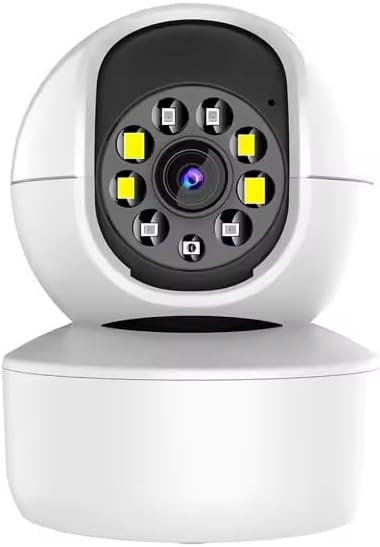
Figure 1: Front view of the iCam365 1080P HD WiFi IP Camera, showcasing its dome design and lens array.
2. Package Contents
Before proceeding with installation, please verify that all items listed below are present in your package:
- 1 x iCam365 1080P HD WiFi IP Camera (No TF Card included)
- 1 x User Manual
- 1 x DC 5V 1.5A Power Adapter
- 1 x Screw Bag (for mounting)
- 1 x 1-meter Power Cord
- 1 x Mounting Bracket
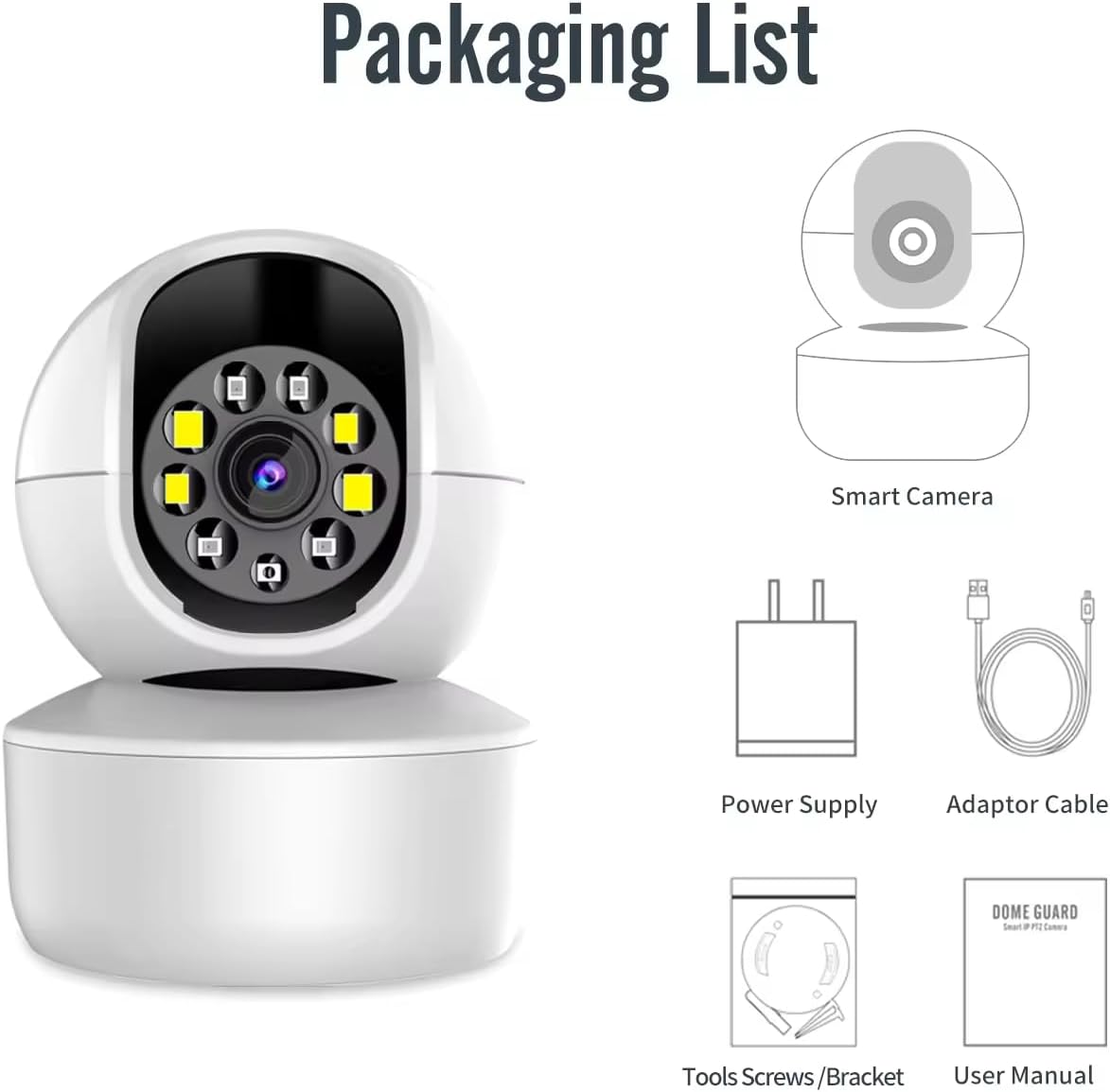
Figure 2: Visual representation of the items included in the product packaging.
3. Key Features
- 1080P Full HD Video: Captures clear and detailed video footage.
- Enhanced Night Vision: Provides visibility up to 30 feet in low-light conditions, automatically switching between day and night modes.
- Smart Motion Detection & Tracking: Detects movement and automatically tracks moving targets, sending instant notifications to your device.
- Two-Way Audio: Equipped with a built-in microphone and speaker with noise-resistant technology, enabling clear communication.
- Pan & Tilt Functionality: Offers a 355° horizontal rotation and 100° vertical rotation for 360° panoramic viewing without blind spots.
- Flexible Storage Options: Supports local storage via Micro SD card (up to 128GB, not included) and cloud storage services.
- 2.4G WiFi Connectivity: Connects to your home network via 2.4GHz Wi-Fi (5G networks are not supported).
- Multi-User Access: Allows sharing of surveillance camera access with multiple accounts for family and friends.

Figure 3: Overview of the smart features integrated into the camera system.
4. Setup and Installation
4.1 App Download and Account Registration
- Search for "iCam365" (or the specified companion app name in your product documentation) in your smartphone's app store (Google Play Store for Android or Apple App Store for iOS).
- Download and install the application.
- Open the app and follow the on-screen instructions to register a new account.
4.2 Powering On the Camera
Connect the provided DC 5V 1.5A power adapter to the camera's power input port and then plug it into a standard electrical outlet. The camera will power on and initiate its self-test sequence. Wait for the indicator light to flash, indicating it is ready for connection.
4.3 Connecting to Wi-Fi
- Ensure your smartphone is connected to a 2.4GHz Wi-Fi network. Note: This camera does not support 5GHz Wi-Fi networks.
- In the iCam365 app, tap "Add Device" or the "+" icon.
- Select your camera model or choose "Smart Camera" from the list.
- Follow the app's instructions to connect the camera to your Wi-Fi network. This typically involves scanning a QR code generated by the app with the camera's lens or entering Wi-Fi credentials manually.
- Once connected, the camera's indicator light will turn solid, and you will receive a confirmation in the app.
4.4 Mounting Options
The camera can be placed on a desktop, mounted on a wall, or inverted on a ceiling using the included bracket and screws. Choose a location that provides optimal viewing coverage and is within range of your 2.4GHz Wi-Fi signal.

Figure 4: Different installation methods for the camera, including ceiling, wall, and desktop placement.
- Desktop Placement: Simply place the camera on a flat, stable surface.
- Wall Mount: Use the provided bracket and screws to secure the camera to a wall. Ensure the camera is oriented correctly for the desired viewing angle.
- Ceiling Mount: Attach the bracket to the ceiling and then secure the camera. The app typically has an option to invert the video feed if mounted upside down.
5. Operating Instructions
5.1 Live View and Pan/Tilt Control
Once connected, open the iCam365 app and select your camera from the device list to access the live video feed. You can control the camera's pan (horizontal) and tilt (vertical) movements directly from the app interface by swiping on the screen or using the directional controls. The camera offers 355° horizontal and 100° vertical rotation.
5.2 Two-Way Audio Communication
To use the two-way audio feature, tap the microphone icon within the live view interface of the app. Speak into your phone's microphone to transmit your voice through the camera's speaker. To listen, ensure the speaker icon in the app is enabled. This allows for real-time communication with individuals near the camera.

Figure 5: Representation of the camera's two-way audio and recording functionalities.
5.3 Motion Detection and Tracking
The camera features smart motion detection and automatic tracking. To configure these settings:
- Navigate to the camera settings within the iCam365 app.
- Locate the "Motion Detection" or "Alarm Settings" section.
- Enable motion detection and adjust sensitivity levels as needed.
- Activate "Motion Tracking" to allow the camera to follow detected movement.
- Set up notification preferences to receive alerts on your smartphone when motion is detected.
5.4 Night Vision
The camera automatically switches to night vision mode in low-light conditions, utilizing infrared LEDs to provide clear black-and-white video. No manual intervention is typically required for this feature.
5.5 Video Recording and Playback
The camera supports continuous recording or event-triggered recording (e.g., by motion detection) to a Micro SD card (not included) or to cloud storage (subscription may be required).
- Micro SD Card Recording: Insert a Micro SD card (up to 128GB) into the camera's designated slot. The camera will automatically begin recording based on your settings.
- Cloud Storage: Access the cloud storage options within the app to subscribe and enable cloud recording.
- Playback: To view recorded footage, go to the "Playback" section in the app, select the date and time, and choose the desired recording.
6. Maintenance
- Cleaning: Use a soft, dry cloth to clean the camera lens and body. Avoid using harsh chemicals or abrasive materials.
- Firmware Updates: Periodically check the iCam365 app for available firmware updates. Keeping the firmware updated ensures optimal performance and security.
- Placement: Ensure the camera is placed in a stable indoor environment, away from direct sunlight, extreme temperatures, and high humidity.
7. Troubleshooting
| Problem | Possible Cause | Solution |
|---|---|---|
| Camera offline/Cannot connect to Wi-Fi | Incorrect Wi-Fi password; Camera too far from router; 5GHz Wi-Fi network used; Router firewall settings. | Verify Wi-Fi password; Move camera closer to router; Ensure you are connecting to a 2.4GHz network; Check router settings or temporarily disable firewall. |
| No video feed | Camera not powered on; Network connectivity issues; App malfunction. | Check power connection; Verify Wi-Fi connection; Restart the app or camera. |
| Motion detection not working | Motion detection disabled in settings; Sensitivity too low; Obstructions in view. | Enable motion detection in app settings; Increase sensitivity; Clear any obstructions from the camera's view. |
| Two-way audio unclear | Environmental noise; Microphone/speaker obstruction; Network latency. | Reduce background noise; Ensure microphone/speaker are not covered; Check network stability. |
| SD card not recording | SD card full or corrupted; Incorrect recording settings; SD card not inserted correctly. | Format or replace SD card; Verify recording settings in the app; Reinsert SD card. |
8. Specifications
| Feature | Detail |
|---|---|
| Model Name | indoor camera Y08 |
| Video Capture Resolution | 1080p (Full HD) |
| Effective Video Resolution | 1080 |
| Connectivity Technology | Wireless (Wi-Fi) |
| Wi-Fi Frequency | 2.4GHz (5G not supported) |
| Indoor/Outdoor Usage | Indoor |
| Power Source | DC 5V 1.5A Power Adapter (Note: "Battery Powered" listed in some specs may refer to internal backup or mislabeling; primary power is adapter) |
| Pan Rotation | 355 Degrees Horizontal |
| Tilt Rotation | 100 Degrees Vertical |
| Viewing Angle | 90 Degrees (Lens) |
| Night Vision Range | Up to 15 Meters (approx. 30 feet) |
| Storage Options | Micro SD Card (Max 128GB), Cloud Storage |
| Special Feature | 2-Way Audio, Motion Detection, Night Vision, Pan/Tilt |
| Compatible Devices | Smartphone (Android, iOS) |
| Mounting Type | Wall Mount, Freestanding |
| Product Dimensions | 0.64 x 0.35 x 0.45 inches |
| Color | White |
9. Warranty and Support
For warranty information, technical support, or any inquiries regarding your iCam365 camera, please refer to the contact details provided by your retailer or the manufacturer, Generic. Keep your purchase receipt as proof of purchase for warranty claims.
For further assistance, you may also visit the official product support page or contact the seller directly through the platform where the product was purchased.