
1. Introduction
Thank you for choosing the VECELO Vintage Drawing Drafting Table. This manual provides essential information for the safe assembly, operation, and maintenance of your new drafting table. Please read these instructions thoroughly before use and retain them for future reference.
This versatile table is designed for various creative and professional tasks, including drawing, sketching, painting, reading, and writing. Its adjustable tilting top and mobile design offer flexibility for different activities and environments.
2. Safety Information
Please observe the following safety guidelines to prevent injury or damage to the product:
- This drafting table is intended for home and office use only.
- For safety reasons, children should not climb on or play with the product.
- Do not exceed the product's weight limit. The tabletop can support up to 55 lbs (25 kg), and the side tray up to 11 lbs (5 kg).
- Ensure all screws and fasteners are securely tightened before use. Periodically check and re-tighten as necessary.
- Avoid placing hot items directly on the tabletop surface to prevent damage.
- Use caution when adjusting the tabletop angle to prevent fingers from being pinched.
3. Package Contents
Verify that all components are present before beginning assembly. If any parts are missing or damaged, please contact VECELO customer support.
- Drafting table components (frame, tabletop, side tray, pencil ledge)
- Assembly hardware (screws, bolts, nuts, Allen wrench)
- 4 sliding wheels (2 with brakes)
- Instruction manual (this document)

Image: Overview of the VECELO Vintage Drawing Drafting Table with its integrated side tray and pencil ledge.
4. Setup and Assembly
Assembly is required for this product. Please follow the detailed assembly instructions provided in the separate assembly guide included in your package. Ensure you have adequate space and the necessary tools (usually an Allen wrench is provided) before starting.
Key Assembly Steps:
- Unpack all components and verify against the parts list.
- Attach the main frame components using the provided hardware.
- Secure the tabletop to the frame, ensuring the tilting mechanism is correctly aligned.
- Install the 4 sliding wheels onto the base, ensuring the 2 lockable wheels are positioned for easy access.
- Attach the removable side tray and pencil ledge.
- Tighten all fasteners securely.
Video: General assembly guide for the VECELO Drafting Table. This video demonstrates the process of putting together the table components.
Video: Detailed assembly steps for the VECELO Drafting Table. This video provides a closer look at specific connections and hardware installation.
Video: Assembly overview for the VECELO Drafting Table, highlighting key features and construction.
5. Operating Instructions
5.1 Adjustable Desktop Angle
The tabletop can be adjusted from 0° (flat) to 65° to suit various activities. This tiltable design enhances usability for different tasks.
- 0°-10°: Ideal for writing and general desk use.
- 10°-30°: Suitable for reading or using a laptop.
- 30°-65°: Optimal for drawing, sketching, and painting.
To adjust the angle, loosen the locking knobs on both sides of the table frame, carefully lift or lower the tabletop to the desired position, and then securely tighten the knobs. The integrated pencil ledge helps hold materials in place when the top is tilted.
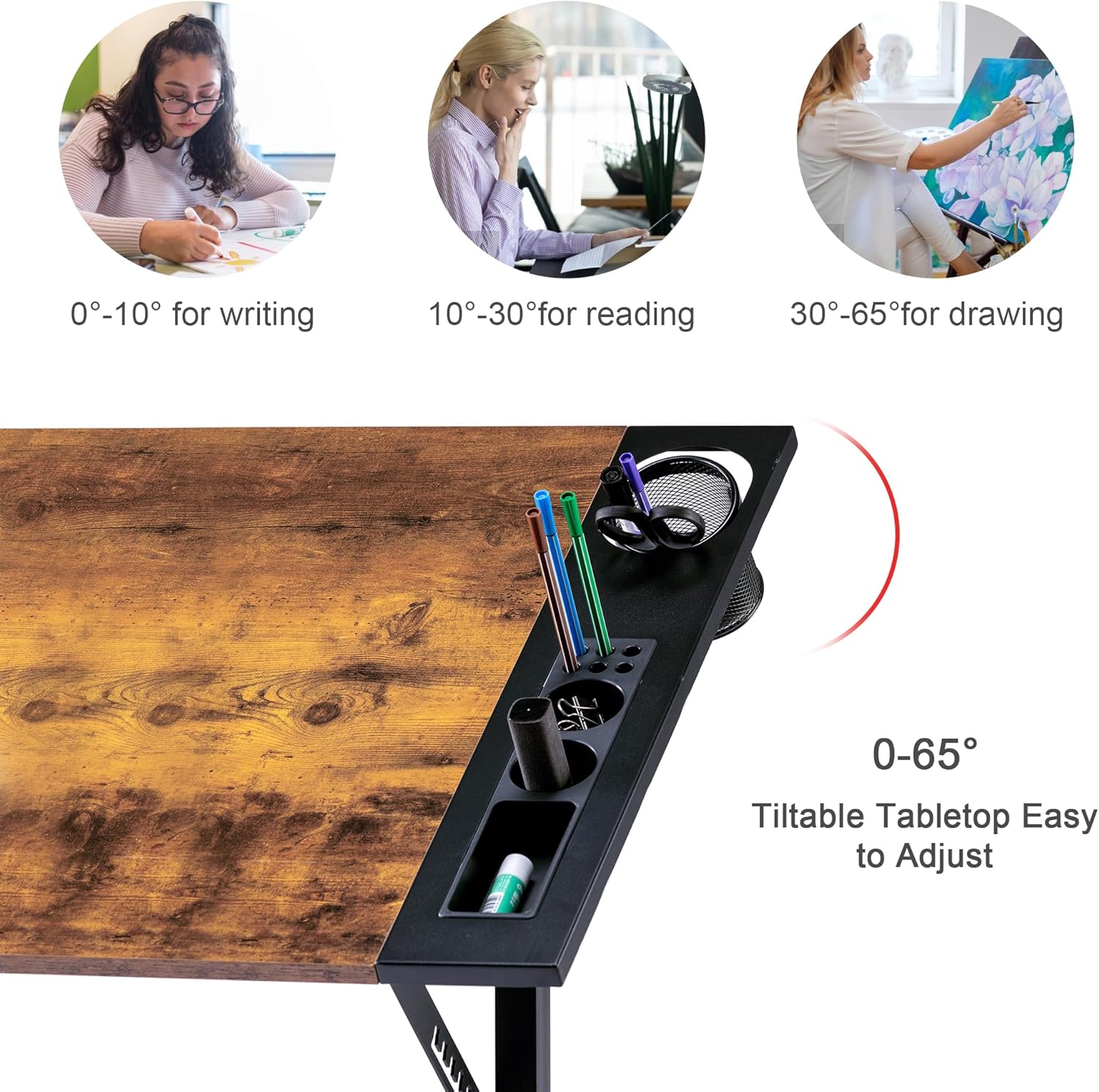
Image: Illustration showing recommended tilt angles for different activities: 0-10° for writing, 10-30° for reading, and 30-65° for drawing.

Image: Visual representation of the table's 0-65 degree tilt angle range and its suitability for working, reading, painting, and technical drawing.

Image: A detailed view of the table's tilting mechanism, showing the locking levers and support brackets.
5.2 Lockable Slide Rolling Wheels
The table is equipped with four sliding wheels, two of which are lockable. This allows for easy movement and stable positioning.
- To move the table, ensure both lockable wheels are in the unlocked position.
- To secure the table in place, push down the levers on the two lockable wheels until they click into the locked position.

Image: A close-up view of the table's base, highlighting the four rolling wheels, two of which feature locking mechanisms.
5.3 Storage Features
The table includes a removable side tray with multiple compartments and pen holes for organizing art or office supplies. A pencil ledge is also integrated into the tabletop to prevent items from sliding off when tilted.

Image: A detailed view of the removable side tray, showing various slots and pen holders for organizing supplies.
6. Maintenance
To ensure the longevity and optimal performance of your VECELO Drafting Table, follow these maintenance tips:
- Cleaning: Wipe the tabletop and frame with a soft, damp cloth. Avoid abrasive cleaners or harsh chemicals that could damage the finish.
- Hardware Check: Periodically inspect all screws, bolts, and connections to ensure they are tight. Re-tighten if necessary to maintain stability.
- Moving Parts: Keep the tilting mechanism and wheels free from dust and debris to ensure smooth operation.
- Weight Distribution: Distribute weight evenly on the tabletop and avoid placing excessively heavy items on one side.
7. Troubleshooting
If you encounter any issues with your drafting table, refer to the following common solutions:
| Problem | Possible Cause | Solution |
|---|---|---|
| Table is wobbly or unstable. | Loose fasteners; uneven floor. | Check and tighten all screws and bolts. Ensure the table is on a flat, level surface. |
| Tabletop does not tilt smoothly or hold position. | Locking knobs are not fully tightened; mechanism is obstructed. | Ensure locking knobs are securely tightened after adjusting the angle. Check for any debris in the tilting mechanism. |
| Wheels do not roll freely or lock properly. | Debris in wheels; locking mechanism stuck. | Clean any hair or debris from the wheel casters. Ensure the locking levers are fully engaged or disengaged. |
| Missing parts during assembly. | Packaging error. | Contact VECELO customer support immediately with your purchase details. |
If the problem persists after attempting these solutions, please contact VECELO customer support for further assistance.
8. Specifications
| Product Name | Drawing Drafting Table |
| Model Number | B0CYL53ZPW |
| Brand | VECELO |
| Desktop Material | MDF (Medium-Density Fiberboard) |
| Base Material | Metal |
| Product Dimensions (L x W x H) | 40.2" x 23.6" x 29.5" (102W x 60D x 75H Centimetres) |
| Adjustable Tilt Angle | 0° to 65° |
| Wheels | 4 sliding wheels (2 with brakes) |
| Item Weight | 20.59 Pounds (approx. 9.34 kg) |
| Assembly Required | Yes |
| Color | Rustic Brown |

Image: Diagram illustrating the key dimensions of the VECELO Drafting Table, including width, depth, height, and tabletop measurements.
9. Warranty and Support
For warranty information and customer support, please refer to the documentation included with your product or visit the official VECELO website. If you have any questions or require assistance, please contact VECELO customer service directly.