
Introduction
This manual provides comprehensive instructions for the safe and efficient use of your BolaButty Wireless Outdoor Rock Bluetooth Speaker (Model S311). Please read this manual thoroughly before operating the device and retain it for future reference.
Safety Information
- Do not expose the speaker to extreme temperatures or direct sunlight for prolonged periods beyond its operational limits.
- Ensure the charging port cover is securely closed when not charging to maintain IPX7 waterproof rating.
- Do not attempt to disassemble, repair, or modify the speaker. This will void the warranty and may cause damage or injury.
- Keep the speaker away from open flames or heat sources.
- Use only the provided charging cable and adapter.
- Dispose of the product responsibly according to local regulations.
Package Contents
Verify that all items are present in the package:
- 1 x BolaButty Wireless Outdoor Rock Bluetooth Speaker
- 1 x Charging Cord
- 1 x Quick Start Guide
Product Overview
The BolaButty Wireless Outdoor Rock Bluetooth Speaker is designed to blend seamlessly into outdoor environments while delivering high-quality audio. It features a durable, weather-resistant construction and a solar charging panel for extended use.

Figure 1: Front view of the BolaButty Wireless Outdoor Rock Bluetooth Speaker, showcasing its rock-like appearance and speaker grille.
Key Features:
- Powerful Audio: Delivers 30W of sound output, with the ability to combine two units for 60W stereo sound.
- Solar-Powered: Integrated solar panel for convenient recharging, extending battery life.
- IPX7 Waterproof: Designed to withstand immersion in water up to 1 meter for 30 minutes, making it suitable for various weather conditions.
- Bluetooth 5.3 Connectivity: Ensures stable and long-range wireless connection up to 33 feet (10 meters).
- Long Battery Life: Up to 36 hours of playback at 50% volume on a single charge.
- Durable Design: Constructed from Acrylonitrile Butadiene Styrene (ABS), Aluminum, and Thermoplastic Polyurethane (TPU) for outdoor resilience.

Figure 2: An exploded view illustrating the internal speaker components and the powerful sound projection capability of the device.
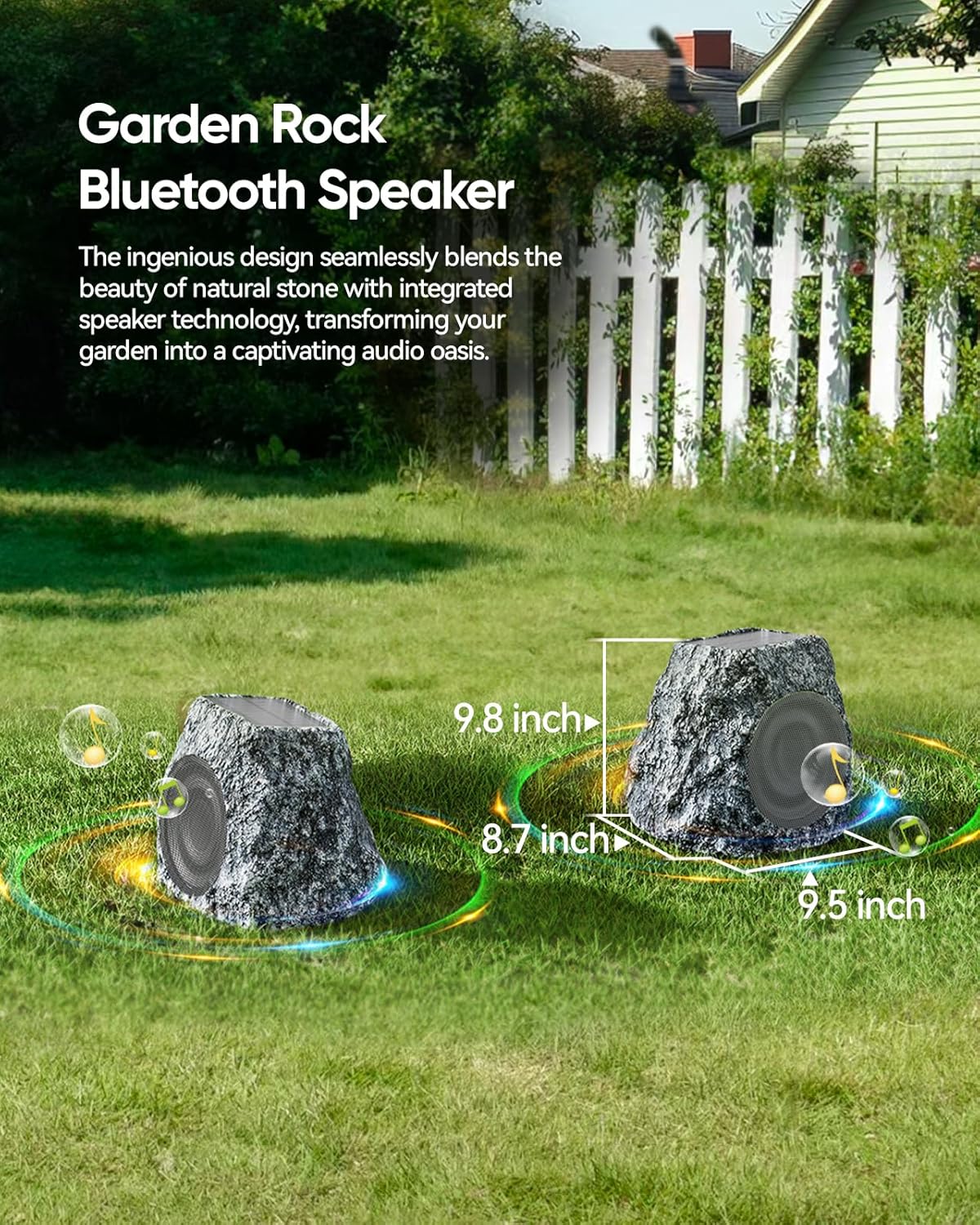
Figure 3: Two rock speakers seamlessly integrated into a garden landscape, highlighting their compact dimensions (approximately 12.4"D x 10.9"W x 11.4"H).

Figure 4: Detailed view of the solar panel on top of the speaker, indicating its high energy conversion efficiency.
Setup
Initial Charging
Before first use, it is recommended to fully charge the speaker using the provided charging cord. The speaker can also be charged via its integrated solar panel when exposed to direct sunlight. A full charge typically takes approximately 2 hours via cable.
Bluetooth Pairing
- Ensure the speaker is powered on and in Bluetooth pairing mode. A voice prompt "Bluetooth mode" will confirm this.
- On your mobile device (smartphone, tablet, etc.), enable Bluetooth and search for available devices.
- Select "Rock Stone" from the list of devices.
- Once connected, you will hear a "connected" voice prompt.
Syncing Two Rock Stone Bluetooth Speakers (Stereo Pairing)
To achieve a 60W stereo sound experience, you can pair two BolaButty Rock Stone speakers together. Follow these steps:
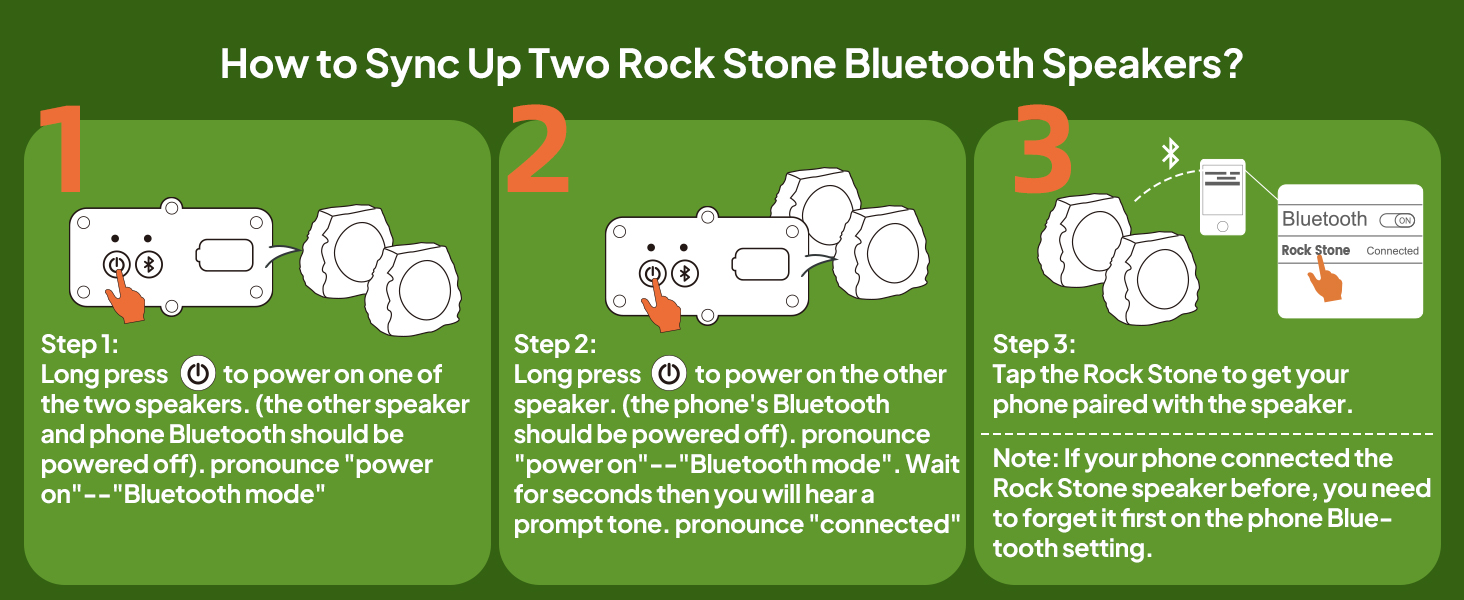
Figure 5: Step-by-step visual guide for pairing two Rock Stone Bluetooth speakers for stereo sound.
- Step 1: Long press the power button on one of the two speakers. Ensure the other speaker and your phone's Bluetooth are powered off. You will hear "power on" followed by "Bluetooth mode".
- Step 2: Long press the power button on the second speaker. Ensure your phone's Bluetooth is still powered off. Wait a few seconds until you hear a prompt tone, then "connected".
- Step 3: Now, enable Bluetooth on your phone and tap "Rock Stone" to pair with the combined speaker system.
Note: If your phone was previously connected to a single Rock Stone speaker, you need to "forget" or unpair it from your phone's Bluetooth settings before attempting to sync two speakers.
Operating Instructions
Power On/Off
- Power On: Long press the power button until you hear "power on".
- Power Off: Long press the power button until the speaker powers down.
Volume Control
Adjust the volume directly from your connected Bluetooth device (smartphone, tablet, etc.).
Music Playback
Once connected via Bluetooth, simply play audio from your device. The speaker will output the sound. Control playback (play/pause, skip tracks) from your connected device.
Solar Charging Operation
The integrated solar panel charges the speaker's internal battery when exposed to direct sunlight. For optimal charging, place the speaker in an area with maximum sun exposure. The solar charging feature helps maintain battery levels during outdoor use, extending playback time.

Figure 6: A close-up view of the solar panel, demonstrating its function in charging the speaker's battery.
Maintenance
- Cleaning: Wipe the speaker with a soft, damp cloth. Do not use abrasive cleaners or solvents.
- Storage: When not in use for extended periods, store the speaker in a cool, dry place. Ensure it is fully charged before storing to preserve battery health.
- Weather Resistance: While IPX7 waterproof, it is recommended to avoid leaving the speaker submerged for prolonged periods or exposing it to extremely harsh weather conditions (e.g., blizzards, severe hailstorms) to maximize its lifespan. Ensure the charging port cover is always sealed when not charging.
Troubleshooting
| Problem | Possible Cause | Solution |
|---|---|---|
| Speaker does not power on. | Low battery. | Charge the speaker using the provided charging cable or place it in direct sunlight. |
| Cannot pair with Bluetooth device. | Bluetooth not enabled on device; speaker not in pairing mode; device too far; previously paired. | Ensure Bluetooth is on and speaker is in pairing mode. Move device closer. If previously paired, "forget" the device in your phone's Bluetooth settings and try again. |
| No sound from speaker. | Volume too low; speaker not connected; audio source issue. | Increase volume on both speaker and connected device. Ensure speaker is properly connected via Bluetooth. Check audio source on your device. |
| Solar charging not working effectively. | Insufficient sunlight; dirty solar panel. | Place the speaker in direct, unobstructed sunlight. Clean the solar panel surface with a soft, damp cloth. |
Specifications
| Feature | Detail |
|---|---|
| Model Name | S311 |
| Speaker Type | Outdoor |
| Connectivity Technology | Bluetooth 5.3 |
| Speaker Maximum Output Power | 30 Watts (per unit) |
| Audio Output Mode | Stereo (when two units are paired) |
| Frequency Response | 10000 Hz |
| Water Resistance Level | IPX7 Waterproof |
| Power Source | Battery Powered, Solar-Powered |
| Battery Type | 1 D battery (included) |
| Maximum Range | 20 Meters (65 feet) |
| Product Dimensions (LxWxH) | 12.4"D x 10.9"W x 11.4"H |
| Item Weight | 8.88 pounds |
| Material | Acrylonitrile Butadiene Styrene (ABS), Aluminum, Thermoplastic Polyurethane (TPU) |
| Color | 1pc-Grey |
| Indoor/Outdoor Usage | Indoor, Outdoor |
Warranty and Support
This BolaButty product comes with a Limited Warranty. For specific warranty terms and conditions, please refer to the quick start guide included in your package or contact BolaButty customer support.
For technical support, troubleshooting assistance, or warranty claims, please visit the official BolaButty website or contact their customer service department. Contact information can typically be found on the product packaging or the brand's official online presence.
Online Support: Visit the BolaButty Store on Amazon


