1. Product Overview
The WISCENT WTB-978 is a versatile Full HD 1080p Blu-Ray and DVD player designed for an immersive home theater experience. It supports a wide range of disc formats and offers multiple connectivity options for seamless integration with your television, projector, and home audio system.
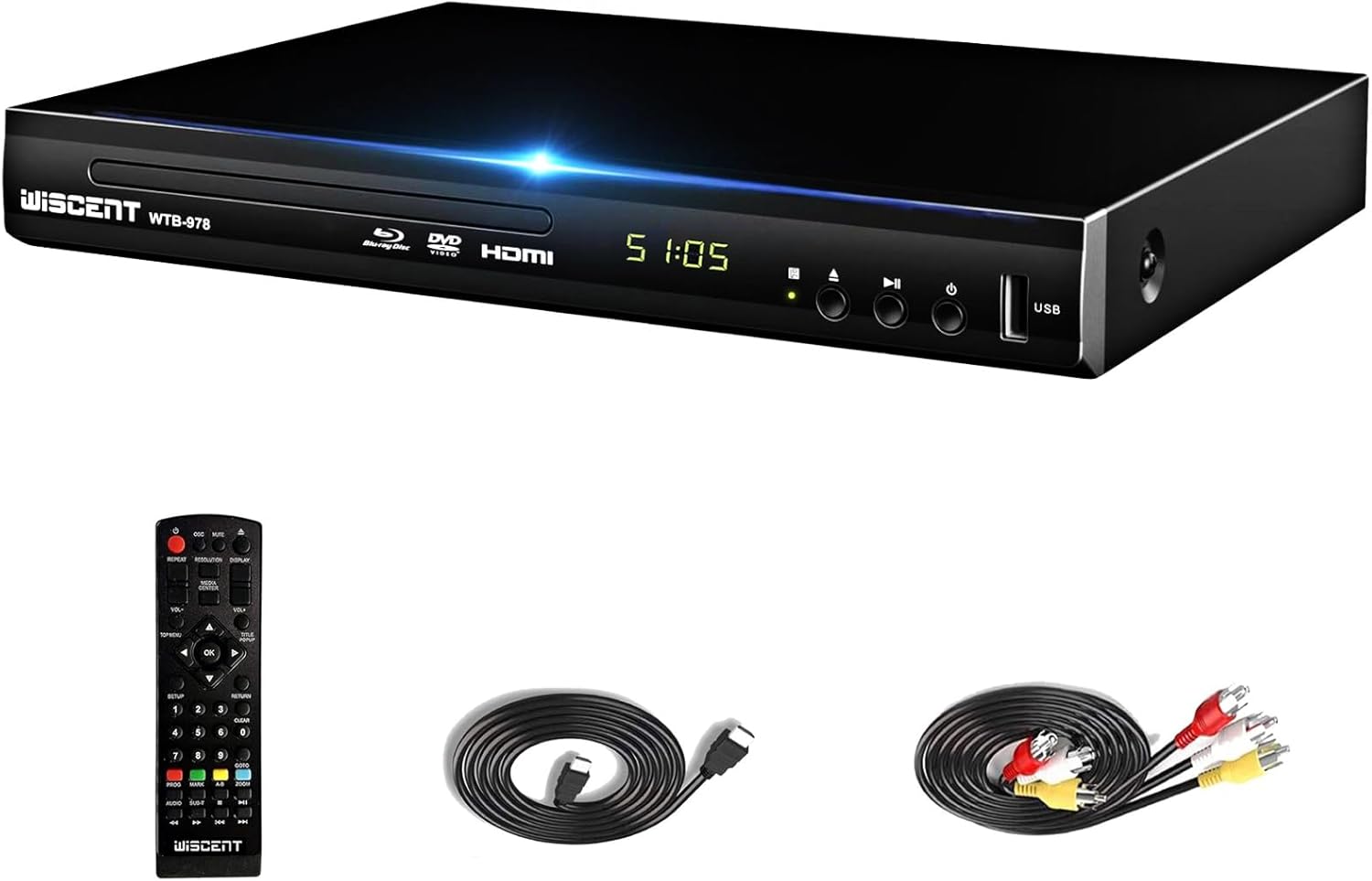
Image 1.1: The WISCENT WTB-978 Blu-Ray DVD Player, showcasing its sleek design, along with the included remote control, HDMI cable, and AV cable.
2. Package Contents
Please check the box for the following items:
- 1 x WISCENT WTB-978 Blu-Ray DVD Player
- 1 x Remote Control (Batteries not included)
- 1 x HDMI Cable
- 1 x AV Cable
- 1 x User Manual

Image 2.1: All items included in the WISCENT WTB-978 package: the player unit, remote control, HDMI cable, RCA (AV) cable, and the user manual.
3. Setup Guide
3.1 Unpacking and Placement
Carefully remove the player and all accessories from the packaging. Place the player on a stable, flat surface with adequate ventilation. Avoid placing it near heat sources or in direct sunlight.
3.2 Connecting to Your TV or Audio System
The WISCENT WTB-978 offers multiple output options to connect to your display and audio system. Choose the connection method that best suits your equipment.

Image 3.1: Rear panel connections and front panel controls of the WISCENT WTB-978, illustrating HDMI, AV, Coaxial, and USB ports, along with power and disc tray buttons.
HDMI Connection (Recommended for HD)
- Connect one end of the included HDMI cable to the HDMI OUT port on the player.
- Connect the other end of the HDMI cable to an HDMI IN port on your TV or projector.
- Select the corresponding HDMI input on your TV/projector using its remote control.
AV (RCA) Connection (Standard Definition)
- Connect the included AV cable to the AV OUT ports (Yellow for Video, White for Left Audio, Red for Right Audio) on the player.
- Connect the other end of the AV cable to the corresponding AV IN ports on your TV.
- Select the corresponding AV input on your TV using its remote control.
Coaxial Digital Audio Connection (for Home Audio System)
- Connect a coaxial digital audio cable (not included) from the COAXIAL OUT port on the player to the coaxial digital audio input on your home audio receiver or soundbar.
- Ensure your audio system is set to the correct input for digital audio.
3.3 Powering On
- Plug the power cord into the player's power input and then into a standard AC power outlet (AC 100-240V, 50/60Hz).
- Press the POWER button on the front panel of the player or on the remote control to turn on the unit.
4. Operating Instructions
4.1 Basic Disc Playback
- Ensure the player is powered on and connected to your display.
- Press the OPEN/CLOSE button on the front panel or remote control to open the disc tray.
- Place a disc gently onto the disc tray with the label side facing up.
- Press the OPEN/CLOSE button again to close the tray.
- The player will automatically begin playback if the disc is recognized. If not, navigate the on-screen menu using the remote control.
- Use the PLAY/PAUSE, STOP, SKIP, and FAST FORWARD/REWIND buttons on the remote for playback control.
4.2 Disc Compatibility and Region Codes
The WISCENT WTB-978 supports a wide array of disc formats:
- Blu-ray Discs: BD, BD-R, BD-RE (Region A/1 only)
- Standard Discs: DVD-R/RW, DVD+R/RW, DVD-Video, VCD, CD, CD-R/RW (Region Free)
Please note that Blu-ray discs are region-locked. This player is compatible with Region A/1 Blu-ray discs. Standard DVDs are region-free, allowing playback of DVDs from any region.

Image 4.1: The WISCENT WTB-978's disc compatibility, highlighting its support for Blu-ray discs from Region A/1 and standard DVDs from all regions.
4.3 USB Playback
The player features a USB 2.0 input for playing media files from a USB flash drive or external hard drive (up to 1TB). It supports FAT and NTFS formats.
- Insert your USB device into the USB port on the front of the player.
- Use the remote control to navigate to the USB input mode (refer to your remote control's specific button for source selection).
- Browse and select your desired media files (e.g., video, audio, images) for playback.
4.4 Remote Control Functions
The included remote control provides full functionality for operating the player. Familiarize yourself with the buttons for power, disc tray, playback controls, menu navigation, volume, and source selection.
Note: Install two AAA batteries (not included) into the remote control before first use.
5. Key Features
The WISCENT WTB-978 is equipped with advanced features for an enhanced viewing and listening experience:
- Full HD 1080p Playback: Enjoy Blu-ray movies and upscaled DVDs in crisp 1080p resolution.
- Dolby Digital & DTS Support: Experience rich, immersive surround sound with support for Dolby Digital, Dolby Digital Plus, Dolby TrueHD, DTS, and DTS-HD Master Audio.
- Progressive Scan: Delivers a smooth, flicker-free image by processing the entire image at once.
- Noise Reduction Technology: Minimizes visual noise for a clearer picture.
- Anti-Shock System: Ensures stable disc playback, reducing interruptions from minor vibrations.
- Fast Reading & Error Correction: Optimized disc reading for quick loading and reliable playback.
- PAL/NTSC Compatibility: Supports both video standards for broader compatibility.

Image 5.1: Visual comparison demonstrating the superior color and detail achieved with WISCENT Blu-ray 1080p playback compared to standard 720p resolution.

Image 5.2: Key performance features of the player, including fast disc reading, error correction, anti-shock protection, and noise cancellation for quiet operation.
6. Maintenance
Proper maintenance ensures the longevity and optimal performance of your player.
- Cleaning the Unit: Wipe the exterior of the player with a soft, dry cloth. Do not use liquid cleaners or abrasive chemicals.
- Disc Care: Handle discs by their edges. Keep them clean and free of dust, fingerprints, and scratches. Use a soft, lint-free cloth to wipe discs from the center outwards.
- Ventilation: Ensure the player has adequate airflow around it. Do not block ventilation openings.
- Storage: When not in use for extended periods, unplug the player and store it in a cool, dry place.
7. Troubleshooting
If you encounter issues with your player, please refer to the following common problems and solutions:
| Problem | Possible Cause | Solution |
|---|---|---|
| No power | Power cord not connected; Power outlet faulty. | Ensure power cord is securely plugged in. Try a different power outlet. |
| No picture on TV | Incorrect input selected on TV; Loose HDMI/AV cable connection. | Select the correct HDMI or AV input on your TV. Check and secure all cable connections. |
| No sound | TV/audio system volume too low or muted; Incorrect audio output settings. | Increase volume on TV/audio system. Check player's audio settings and ensure correct audio output is selected. |
| Disc not playing or recognized | Disc is dirty, scratched, or inserted incorrectly; Incorrect disc format; Region code mismatch for Blu-ray. | Clean the disc. Ensure disc is inserted correctly. Verify disc format is supported. For Blu-ray, ensure it's Region A/1. |
| Remote control not working | Batteries are dead or inserted incorrectly; Obstruction between remote and player. | Replace batteries, ensuring correct polarity. Remove any obstructions and point remote directly at the player's sensor. |
8. Specifications
| Feature | Description |
|---|---|
| Model Number | WTB-978 |
| Brand | WISCENT |
| Color | Black |
| Resolution | 1920x1080 (Full HD 1080p) |
| Disc Compatibility | BD, BD-R, BD-RE (Region A/1); DVD-R/RW, DVD+R/RW, DVD-Video, VCD, CD, CD-R/RW (Region Free) |
| Supported File Formats (USB) | Blu-Ray Disc, CD, SVCD, DVD, VCD (and other common media formats via USB) |
| Audio Support | Dolby Digital, Dolby Digital Plus, Dolby TrueHD, DTS, DTS-HD Master Audio |
| Connectivity | HDMI Output, AV (RCA) Output, Coaxial Digital Audio Output, USB 2.0 Input |
| Compatible Devices | Television, Projector, Home Audio System |
| Special Features | Progressive Scan, Noise Reduction Technology, Compact Design, Anti-shock, Surround Sound |
| Dimensions (L x W x H) | 26 cm x 19.2 cm x 4 cm (10.24 in x 7.56 in x 1.57 in) |
| Power Supply | AC 100-240V, 50/60Hz |
9. Warranty and Support
WISCENT is committed to providing high-quality products and customer satisfaction.
- Return Policy: The product is covered by an 18-month return policy.
- Customer Service: 24-hour customer service is available for assistance.
- Lifetime Support: WISCENT offers lifetime support for this product.
For any inquiries or technical assistance, please contact WISCENT customer support through the platform where you purchased the product or refer to the contact information provided in your purchase documentation.


