
1. Introduction
Thank you for choosing the LDNIO A4405 4-Port USB Wall Charger. This device is designed to provide efficient and safe charging for multiple electronic devices simultaneously. It features four USB ports with intelligent AUTO-ID technology and an integrated LED touch lamp for added convenience. Please read this manual carefully before use to ensure optimal performance and safety.
2. Safety Information
- Do not expose the charger to liquids, moisture, or extreme temperatures.
- Avoid dropping or subjecting the charger to strong impacts.
- Do not disassemble, modify, or attempt to repair the charger. This will void the warranty and may cause electric shock or fire.
- Ensure the wall outlet voltage is compatible with the charger's input specifications (AC100-240V).
- Keep out of reach of children.
- Unplug the charger from the wall outlet when not in use or during electrical storms.
- Do not use if the charger or cable is damaged.
3. Package Contents
- LDNIO A4405 4-Port USB Wall Charger
- USB to Lightning Cable
4. Product Overview
The LDNIO A4405 is a compact and versatile wall charger featuring four USB output ports and an integrated LED touch lamp. Its AUTO-ID technology automatically detects and delivers the optimal charging current for connected devices.
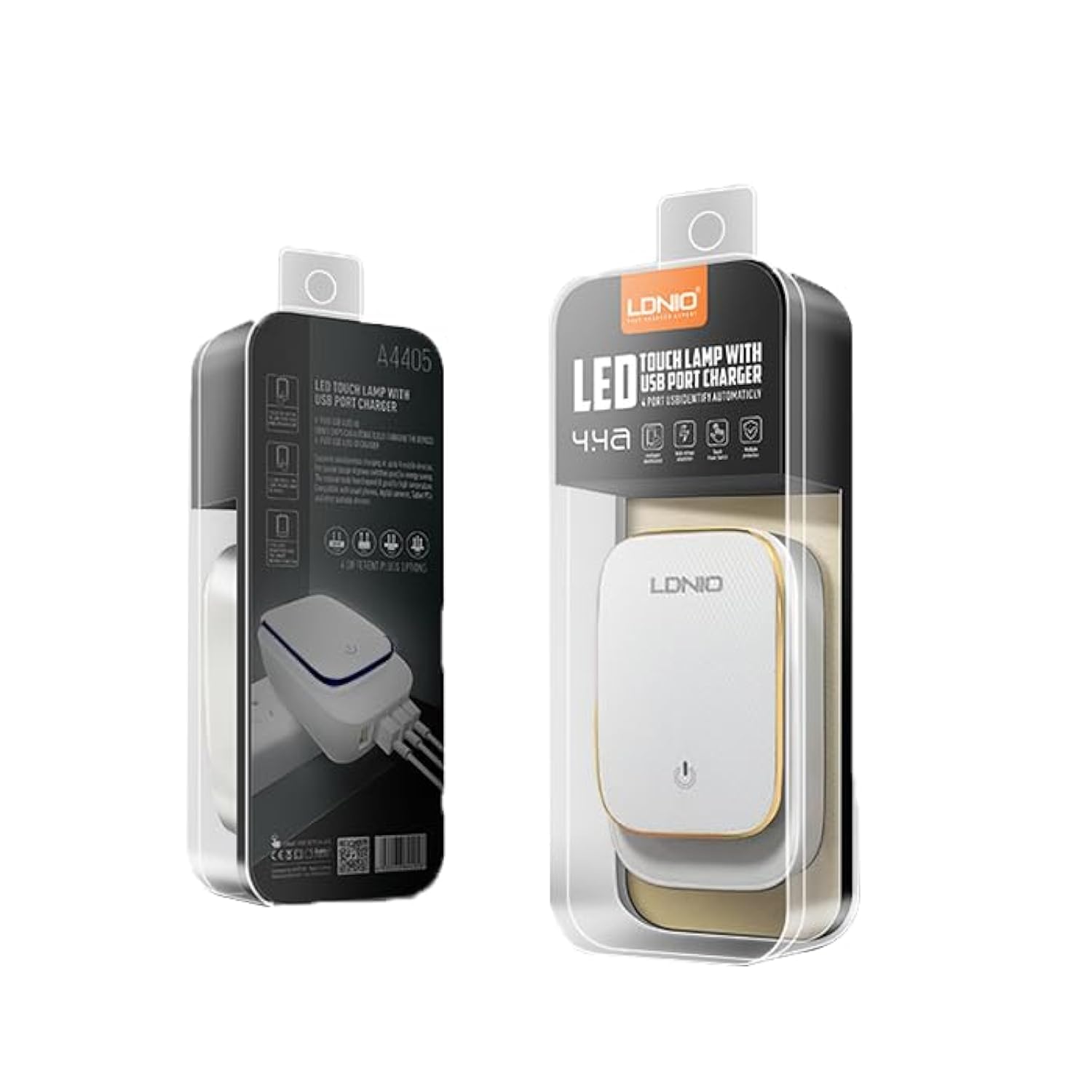
Figure 4.1: LDNIO A4405 4-Port USB Wall Charger in its retail packaging, showcasing the product and its features.

Figure 4.2: Front view of the LDNIO A4405 charger, featuring four green USB ports labeled 'AUTO-ID' and an integrated UK-style power plug.

Figure 4.3: Front view of the LDNIO A4405 charger, featuring four green USB ports labeled 'AUTO-ID' and an integrated EU-style power plug.

Figure 4.4: Top view of the LDNIO A4405 charger, showing the LDNIO logo and the touch-sensitive area for the LED lamp.
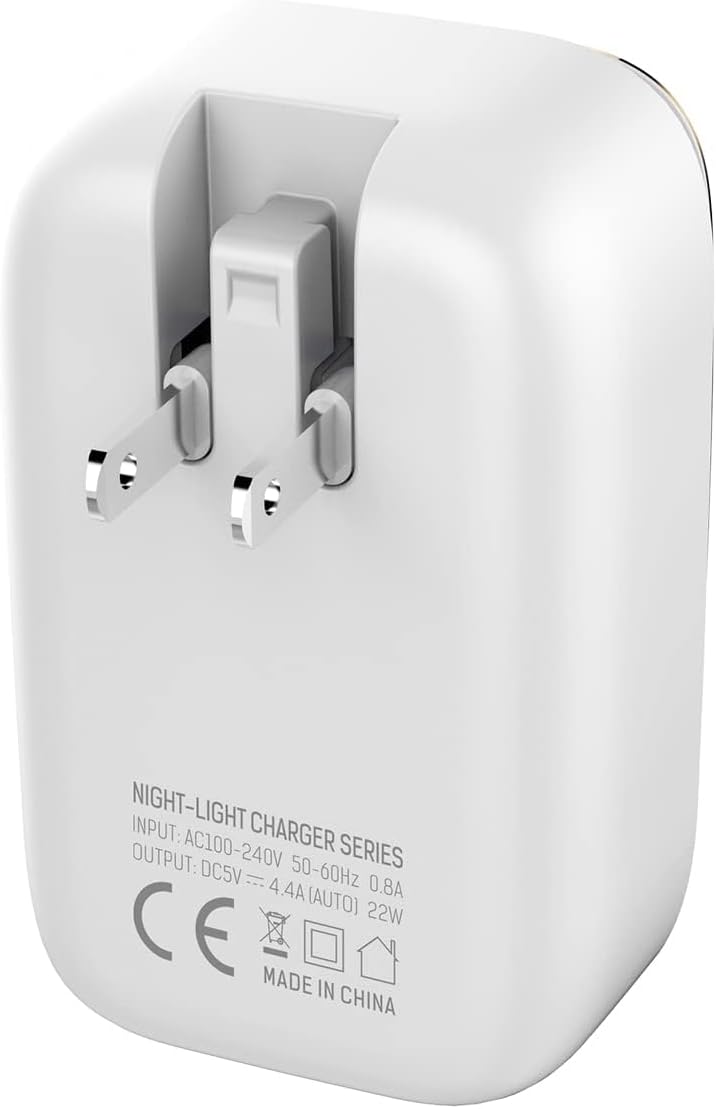
Figure 4.5: Back view of the LDNIO A4405 charger, displaying detailed input (AC100-240V, 50-60Hz, 0.8A) and output (DC5V, 4.4A AUTO, 22W) specifications, along with CE certification.
5. Setup Instructions
- Unpack: Carefully remove the LDNIO A4405 charger and included cable from its packaging.
- Inspect: Check the charger and cable for any visible damage. Do not use if damaged.
- Plug In: Insert the charger's integrated power plug into a standard wall electrical outlet. Ensure it is securely seated.
- Connect Devices: Use the provided USB to Lightning cable or your own compatible USB charging cables to connect your devices to any of the four USB ports on the charger.
6. Operating Instructions
6.1 Charging Devices
- Once plugged into a power outlet, the charger is ready for use.
- Connect your device's charging cable to one of the four USB ports. The charger's AUTO-ID technology will automatically detect your device and deliver the optimal charging current up to 2.4A per port, with a total output of 4.4A (22W) across all ports.
- Your device should indicate that it is charging.
- Disconnect your device once fully charged.
6.2 LED Touch Lamp Operation
- The top surface of the charger features an integrated LED touch lamp.
- To turn on/off: Lightly touch the power icon on the top surface of the charger.
- To adjust brightness: Press and hold the power icon to cycle through different brightness levels. Release when the desired brightness is reached.
7. Maintenance
- Cleaning: Disconnect the charger from the power outlet before cleaning. Use a soft, dry cloth to wipe the surface. Do not use liquid cleaners or aerosols.
- Storage: Store the charger in a cool, dry place away from direct sunlight and extreme temperatures when not in use.
- Cable Care: Avoid bending or twisting the charging cables excessively, as this can damage them.
8. Troubleshooting
| Problem | Possible Cause | Solution |
|---|---|---|
| Device not charging | Charger not plugged in correctly Damaged cable Device issue | Ensure charger is firmly plugged into the wall outlet. Try a different USB cable. Test the device with another charger to confirm it's not a device problem. |
| Slow charging | Cable quality Device drawing too much power Multiple devices connected | Use a high-quality USB cable. Ensure the device is compatible with the charger's output. Disconnect other devices to see if charging speed improves. |
| LED lamp not working | No power Touch sensor issue | Ensure the charger is plugged into a live power outlet. Try touching the sensor firmly or for a longer duration. |
9. Specifications
| Feature | Specification |
|---|---|
| Brand Name | LDNIO |
| Model Number | A4405 (Internal ID: ELC ldnio-045) |
| Product Type | Wall Charger |
| Color | White |
| Total USB Ports | 4 |
| Input Voltage | AC 100-240V, 50-60Hz, 0.8A |
| Output | DC 5V / 4.4A (AUTO-ID, 22W Total) |
| Output Current (per port) | Up to 2.4A |
| Connectivity Technology | USB |
| Mounting Type | Wall Mount |
| Power Source | Corded Electric (Integrated Plug) |
| Compatible Devices | Multiple (Smartphones, Tablets, etc.) |
| Included Components | Charger, USB to Lightning Cable |
| Item Weight | 50 grams |
| Compliance | CE |
10. Warranty and Support
LDNIO products are manufactured to high-quality standards. For warranty information, technical support, or customer service inquiries, please refer to the contact details provided on the product packaging or visit the official LDNIO website. Please retain your proof of purchase for warranty claims.