
1. Introduction
Thank you for purchasing the FlyLily Astronaut Galaxy Projector. This innovative 4-in-1 device combines a galaxy projector, night light, white noise machine, and Bluetooth speaker to create a serene and engaging atmosphere in any room. Please read this manual carefully to ensure proper setup and operation.

The FlyLily Astronaut Galaxy Projector creating a vibrant nebula and star display on a ceiling.
2. Safety Instructions
- Do not look directly into the laser light.
- Keep the device away from water and moisture.
- Use only the provided Type-C USB cable for power. Ensure the power adapter (not included) meets safety standards.
- Do not disassemble or attempt to repair the device.
- Keep out of reach of infants and young children to prevent accidental ingestion of small parts or direct eye exposure to the laser.
- Ensure proper ventilation; do not cover the device during operation.
3. Package Contents
Verify that all items are present in your package:
- Galaxy Projector (Astronaut unit) x1
- Remote Control (batteries not included) x1
- Type-C USB Cable x1
- User Manual x1
4. Product Overview
The FlyLily Astronaut Galaxy Projector features a unique design with an astronaut figure standing on a rocket base. The astronaut's head is magnetically connected and can rotate 360 degrees to adjust the projection angle. Controls are available via physical buttons on the astronaut's backpack, an included remote control, or a dedicated mobile application.
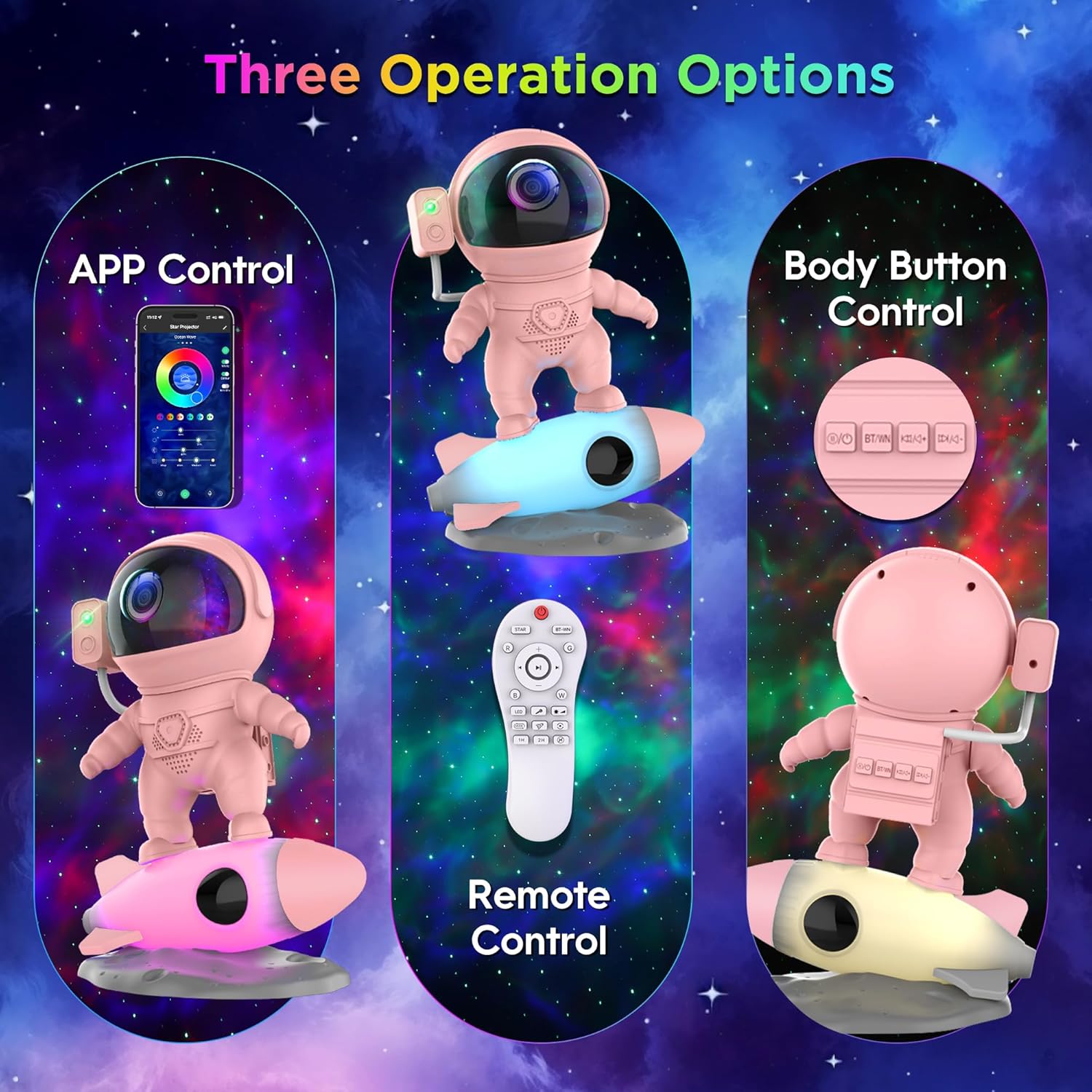
The projector offers three convenient control options: App, Remote, and Body Buttons.
5. Setup
- Assembly: Gently attach the astronaut's head to its body. The magnetic connection will secure it.
- Power Connection: Connect the Type-C USB cable to the port on the astronaut's backpack. Plug the other end into a compatible USB power adapter (5V/2A recommended, not included) and then into a power outlet.
- Remote Control Batteries: Insert 2 AAA batteries (not included) into the remote control.
- Placement: Place the projector on a stable, flat surface. Adjust the astronaut's head to direct the projection onto your desired surface (ceiling, wall).
6. Operating Instructions
6.1. Power On/Off
- Press the power button on the astronaut's backpack or the remote control to turn the device on or off.
6.2. Galaxy/Nebula Projection
The projector features 10 stunning nebula effects with 9 color options. You can adjust the flow speed and brightness.
- Use the remote or app to cycle through nebula colors, adjust brightness (4 levels), and change flow speed (4 levels).

Experience a variety of multicolor nebula effects to set the perfect mood.
6.3. Star Projection
Twinkling green stars can be projected independently or combined with nebula effects.
- Use the 'STAR' button on the remote or app to toggle the stars on/off.
6.4. White Noise & Bluetooth Speaker
The projector includes 15 soothing white noises and a Bluetooth 5.1 HIFI speaker.
- White Noise: Press the 'BT/WN' button on the remote or app to cycle through the 15 built-in white noises (e.g., summer night, ocean waves, forest birds, twinkle star, rivulet, rain, lullaby, campfire).
- Bluetooth Speaker: Connect your device via Bluetooth (look for 'BL-HJ07' or similar) to play your own music. The projector also features a sound-activated rhythm mode where lights dance to the music.

Enjoy your favorite music or soothing white noises through the built-in Bluetooth speaker.
6.5. Timer Function
Set an automatic shut-off timer for convenience.
- Use the '1H', '2H', or '4H' buttons on the remote or app to set the timer for 1, 2, or 4 hours respectively. The device will automatically turn off after the set time.

The timer function allows for automatic shut-off after 1, 2, or 4 hours.
6.6. Rocket Night Light
The rocket base functions as a separate dimmable night light.
- Touch the rocket base to change its color or dimming level. This can be used independently of the galaxy projection.
6.7. Adjusting Projection Angle
- The astronaut's head is magnetically attached and can be rotated 360 degrees to project the galaxy onto walls, ceilings, or any desired surface.
- The astronaut's arms are also poseable for decorative purposes.
6.8. App Control
For advanced control and customization, download the dedicated mobile application.
- Scan the QR code in the included user manual or search for the app name (usually indicated in the manual) in your device's app store.
- Follow the in-app instructions to pair your device and access additional features like custom color scenes, precise brightness/speed control, and more.
Official product video demonstrating the FlyLily Astronaut Galaxy Projector's features and effects.
7. Maintenance
- Wipe the device with a soft, dry cloth. Do not use abrasive cleaners or solvents.
- Keep the projection lens clean for optimal clarity.
- Store in a cool, dry place when not in use.
8. Troubleshooting
| Problem | Possible Cause | Solution |
|---|---|---|
| Device does not power on. | No power or loose connection. | Ensure the USB cable is securely connected and the power adapter is plugged into a working outlet. |
| Remote control not working. | Batteries are dead or incorrectly inserted. | Replace with new AAA batteries, ensuring correct polarity. |
| Projection is blurry. | Lens is dirty or focus is off. | Clean the projection lens with a soft cloth. Adjust the focus ring on the astronaut's head if available. |
| Bluetooth connection issues. | Device not in pairing mode or too far from source. | Ensure Bluetooth is enabled on your device and the projector is in pairing mode. Move closer to the projector. |
| Stars not appearing. | Star projection is turned off. | Press the 'STAR' button on the remote or app to activate star projection. |
9. Specifications
- Model Name: Rocket Astronaut Projector
- Model Number: BL-HJ07
- Brand: FlyLily
- Material: Acrylonitrile Butadiene Styrene
- Light Source Type: LED
- Product Dimensions: 5.08"D x 6.42"W x 9.02"H
- Item Weight: 1.5 Pounds
- Power Source: Corded Electric (Type-C USB)
- Control Method: App, Remote, Touch
- Special Features: Bluetooth Speaker, Color Changing, Night Light, Timer, White Noises
- Certifications: FCC, RoHS, CE
10. Warranty and Support
FlyLily values its customers and strives to ensure quality, safety, and service. If you encounter any problems or have questions regarding your Astronaut Galaxy Projector, please contact our customer support team for assistance. Refer to your purchase documentation for specific warranty details.
For further assistance, please visit the FlyLily Store on Amazon.