
JVC LT-32VF5355
JVC LT-32VF5355 32-inch TiVo Smart TV User Manual
Model: LT-32VF5355
Introduction
The JVC LT-32VF5355 TiVo Smart TV offers a comprehensive entertainment experience with its elegant design and advanced features. This 32-inch Full HD television supports HDR10, including HLG, Super Resolution, and Micro Dimming, delivering high-contrast images with natural colors and impressive detail sharpness. Equipped with an integrated triple tuner (DVB-C/T2/S2), it allows direct reception of TV programs via satellite, cable, or antenna without the need for an additional receiver. The TiVo operating system provides a versatile and user-friendly Smart TV experience with access to a wide range of applications such as Netflix, Prime Video, Disney+, YouTube, and more.

Figure 1: JVC LT-32VF5355 32-inch TiVo Smart TV. This image showcases the television's front view, emphasizing its Full HD resolution, HDR10 compatibility, and Super Resolution technology for enhanced picture quality.
What's in the Box
Please check that all the following items are included in your package:
- JVC LT-32VF5355 Television
- Instruction Manual
- Remote Control with 2 AAA batteries
- TV Stand Feet
Setup
1. Attaching the TV Stand Feet
Carefully place the TV screen-down on a soft, clean surface to prevent scratches. Align the stand feet with the designated slots on the bottom of the TV and secure them using the provided screws. Ensure the feet are firmly attached for stability.
2. Connecting External Devices
The JVC LT-32VF5355 offers multiple connectivity options. Refer to the image below for a visual guide to the available ports:

Figure 2: Rear Panel Connections. This image illustrates the various input and output ports on the back of the JVC TV, including two HDMI ports, one USB port, digital audio output, antenna input, headphone jack, Bluetooth, CI slot, and LAN port.
- HDMI: Connect Blu-ray players, game consoles, or set-top boxes to the HDMI ports. The TV has 2 HDMI ports (CEC + ARC).
- USB: Use the USB port for media playback from a USB drive.
- Antenna (RF/F): Connect your antenna or cable TV signal.
- LAN: For a wired internet connection.
- Headphones: Connect headphones for private listening.
- Digital Audio Output: For connecting to external audio systems.
- CI Slot: For Conditional Access Modules (CAM) to decrypt encrypted channels.
3. Power On and Initial Setup
After connecting all necessary cables, plug the power cord into an electrical outlet. Press the power button on the remote control or on the TV. The TV will guide you through the initial setup process, including language selection, network connection (Wi-Fi or LAN), and channel scanning.
Operating the TV
Remote Control Functions
The included remote control provides full functionality for navigating your JVC Smart TV. It features dedicated buttons for popular streaming services, allowing quick access to your favorite content.

Figure 3: Remote Control. This image displays the remote control for the JVC Smart TV, highlighting its quick access buttons for streaming applications like YouTube, Netflix, Prime Video, and Disney+.
- Power Button: Turns the TV on or off.
- Navigation Buttons (Up/Down/Left/Right/OK): Navigate menus and select options.
- Volume Up/Down: Adjust the sound level.
- Channel Up/Down: Change TV channels.
- App Buttons: Direct access to Netflix, Prime Video, Disney+, YouTube, and other pre-installed applications.
- Voice Control: Use the voice control feature to intuitively change stations, adjust volume, or open applications.
TiVo Smart TV Interface
The TiVo operating system provides a user-friendly interface for accessing live TV, streaming services, and other smart features. The home screen offers personalized recommendations and easy navigation to your favorite content.

Figure 4: TiVo Smart TV Interface. This image shows the main screen of the JVC Smart TV, featuring the TiVo operating system with various streaming applications like Netflix, Prime Video, Disney+, and YouTube readily accessible.
Picture and Sound Settings
The JVC LT-32VF5355 offers advanced picture and sound technologies to enhance your viewing experience.
Picture Quality Enhancements
- HDR10 (High Dynamic Range): Provides a wider range of colors and contrasts, resulting in more realistic and vibrant images.
- Super Resolution: Enhances the clarity and detail of images by upscaling lower-resolution content.
- Micro Dimming: Optimizes contrast by analyzing and adjusting brightness in different zones of the screen.
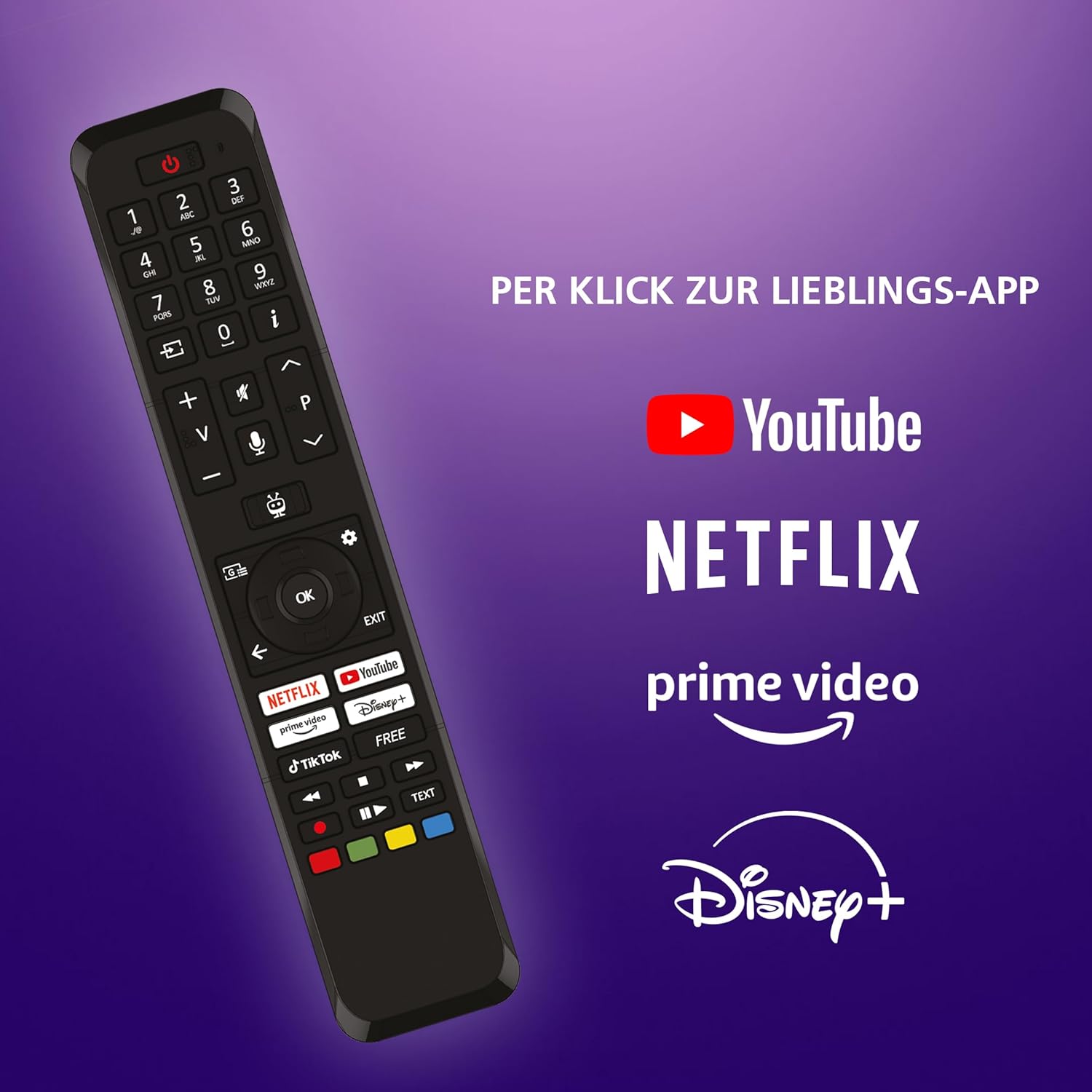
Figure 5: High Dynamic Range (HDR10). This image demonstrates the enhanced color and contrast provided by HDR10 technology on the JVC TV.

Figure 6: Super Resolution and Micro Dimming. This image highlights the improved sharpness and contrast achieved through Super Resolution and Micro Dimming technologies.
Picture Modes
Select from various pre-set picture modes to optimize your viewing experience for different content types:

Figure 7: Picture Modes. This image illustrates the different viewing modes available on the JVC TV, including Cinema, Sport, Gaming, and Dynamic, each optimized for specific content.
- Cinema: Optimized for movies, providing a warm and natural color tone.
- Sport: Enhances motion clarity and vibrant colors for sports broadcasts.
- Gaming: Reduces input lag for a more responsive gaming experience.
- Dynamic: Provides a bright and vivid picture, suitable for well-lit environments.
Audio Settings
The TV features 12 Watt speakers with Stereo audio output and supports 2.0 or 2.1 surround configurations. You can adjust audio settings through the TV menu to suit your preferences.
Maintenance
Cleaning the TV
- Screen: Gently wipe the screen with a soft, dry, lint-free cloth. For stubborn marks, use a screen cleaning solution specifically designed for electronics, applied to the cloth, not directly to the screen.
- Cabinet: Wipe the TV cabinet with a soft, dry cloth. Do not use abrasive cleaners or solvents.
Software Updates
To ensure optimal performance and access to the latest features, it is recommended to keep your TV's software updated. The TiVo Smart TV typically receives updates automatically when connected to the internet. You can also manually check for updates in the TV's settings menu.
Troubleshooting
This section addresses common issues you might encounter with your JVC Smart TV.
| Problem | Possible Cause | Solution |
|---|---|---|
| No Power | Power cord unplugged; no power from outlet. | Ensure power cord is securely plugged into TV and outlet. Check if the outlet is working. |
| No Picture / No Sound | Incorrect input source selected; external device not powered on or connected properly. | Press the Source/Input button on the remote to select the correct input. Check all cable connections and ensure external devices are powered on. |
| Poor Picture Quality | Antenna/cable signal issue; picture settings incorrect. | Check antenna/cable connection. Adjust picture settings (brightness, contrast, sharpness) or reset to default. |
| No Internet Connection | Wi-Fi signal weak; incorrect network password; router issue. | Ensure Wi-Fi password is correct. Move router closer or use a wired LAN connection. Restart your router. |
| Bluetooth Disconnects Frequently | Interference; device out of range; device battery low. | Ensure Bluetooth device is within range and charged. Re-pair the Bluetooth device. Minimize interference from other wireless devices. |
| Smart TV Apps Not Working (e.g., Media Library) | Internet connectivity issues; app specific problem; software glitch. | Verify internet connection. Try restarting the TV. Check for app updates or reinstall the app if possible. If persistent, a factory reset might be necessary (note: this will erase all settings). |
Specifications
Detailed technical specifications for the JVC LT-32VF5355 TV:
| Feature | Detail |
|---|---|
| Model Name | LT-32VF5355 |
| Screen Size | 32 Inches (80 cm) |
| Display Technology | LED-LCD |
| Resolution | 1080p Full HD (1920 x 1080 pixels) |
| Refresh Rate | 50 Hz |
| Aspect Ratio | 16:9 |
| Viewing Angle | 178 Degrees |
| Operating System | TiVo Smart TV |
| Tuner Technology | DVB-T2/-S2/-C (Triple Tuner) |
| Additional Features | HDR10, HLG, Super Resolution, Micro Dimming |
| Connectivity | 2x HDMI (CEC + ARC), 1x USB, Ethernet, Bluetooth, Wi-Fi |
| Audio Output Power | 12 Watts |
| Product Dimensions (W x H x D with stand) | 72.6 x 47.4 x 18.4 cm |
| Weight | 4.51 Kilograms |
| Energy Efficiency Class | E |
| Power Consumption (SDR) | 26.0 W / 26 kWh/1000h |
| Power Consumption (HDR) | 45.0 W / 45 kWh/1000h |
| Batteries Required | 2 AAA batteries (included for remote) |

Figure 8: Product Dimensions. This diagram provides detailed measurements of the JVC 32-inch TV, including its width, height with stand, depth with stand, and VESA mounting specifications.

Figure 9: Optimal Viewing Distance. This table provides recommended viewing distances for various screen sizes and resolutions, including Full HD for the 32-inch model.

Figure 10: EU Energy Label. This label indicates the energy efficiency class (E) and power consumption of the JVC LT-32VF5355 TV for both SDR and HDR content.
For more detailed energy information, scan the QR code on the energy label or visit the EPREL database (Product ID: 1880372).
Warranty and Support
JVC products are manufactured with high quality standards. In the unlikely event of a defect, please refer to your purchase documentation for specific warranty terms and conditions provided by the seller. Typically, consumer electronics in the EU come with a minimum 2-year legal warranty.
For technical support or service inquiries, please contact JVC customer service or the retailer from whom you purchased the product. Have your model number (LT-32VF5355) and purchase date ready when contacting support.
Related documentsLT-32VF5355


Ask a question about this manual
Ask about setup, troubleshooting, compatibility, parts, safety, or missing instructions. Manuals+ will review the question and use this page’s manual context to help answer it.