
1. Introduction
The Paul C. Buff AlienBees B800 Flash Unit is a powerful, fast, accurate, and versatile self-contained studio flash unit. Designed with easy-to-use analog controls, it is suitable for a wide range of users, from students and hobbyists to seasoned professionals. Its compact design makes it excellent for both on-location work and various studio spaces. The B800 model offers 6 f-stop power variability, allowing for precise light control from 10 Ws to 320 Ws with stepless slider adjustment.
2. What's in the Box
Your AlienBees B800 Monolight package includes the following components:
- AlienBees B800 Monolight Strobe Flash Unit
- 7-inch Silver Field Reflector
- Protective Shipping Cover
- 150W Modeling Lamp
- Flashtube
- Down-Angle 15 ft. Power Cord
- Standard 15 ft. Sync Cord (1/8" to PC)
- Light Stand Mounting Block
- AlienBees Product Manual
Video: What's in the box? This video demonstrates the unboxing and initial components of a similar studio flash unit, providing a visual guide to what you can expect in your package.
3. Setup Instructions
Follow these steps to set up your AlienBees B800 Monolight:
- Mounting: Attach the AlienBees B800 unit to a compatible light stand using the provided Light Stand Mounting Block. Ensure it is securely fastened.
- Remove Protective Cover: Before operation, always remove the protective shipping cover from the front of the flash unit. Failure to do so can cause the cover to melt due to heat from the modeling lamp and flashtube.
- Attach Reflector: Secure the 7-inch silver field reflector to the front of the unit.
- Power Connection: Connect the Down-Angle 15 ft. Power Cord to the unit and then to a standard 120 VAC, 50-60 Hz grounded outlet.
- Sync Cord (Optional): For wired camera synchronization, connect the Standard 15 ft. Sync Cord (1/8" to PC) to the unit's sync port and your camera's PC sync terminal. If your camera lacks a PC sync terminal, a hot shoe adapter may be required (sold separately).

Image: Side view of the AlienBees B800 Monolight with the 7-inch silver field reflector attached, ready for use.
Video: How to install a softbox. This video demonstrates the general process of assembling and attaching a softbox to a studio light, which can be helpful for accessory setup.
4. Operating Instructions
The AlienBees B800 features intuitive controls for adjusting flash output and modeling lamp settings.
4.1 Power On/Off
Locate the Power ON/OFF switch on the back control panel of the unit. Flip the switch to the 'ON' position to power up the monolight.
4.2 Flash Power Adjustment
The B800 offers 6 f-stop power variability (10 Ws to 320 Ws). Use the stepless slider adjustment on the control panel to set the desired flash output from full power down to 1/32 power. The digital display will show the current power setting.
4.3 Modeling Lamp Operation
The unit includes a 150W modeling lamp with WYSIWYG (What You See Is What You Get) previews. This lamp can also be used for continuous lighting or video work. Adjust the modeling lamp intensity using its dedicated control on the panel.
4.4 Sync Options
The AlienBees B800 can be triggered via the sync cord connected to your camera's PC terminal or wirelessly using compatible triggers (e.g., Paul C. Buff CyberSync system, sold separately). Ensure your trigger and flash unit are set to the same channel and frequency for wireless operation.
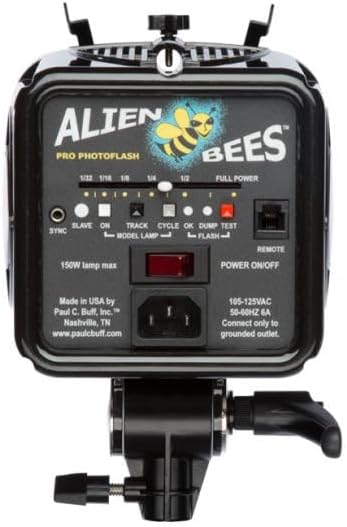
Image: Rear view of the AlienBees B800 Monolight, showing the control panel with power switch, power adjustment slider, and various buttons for settings.
Video: Paul C. Buff DigiBee Walkthrough. This video provides a detailed walkthrough of a similar Paul C. Buff flash unit, demonstrating its features and controls, which are largely applicable to the AlienBees B800.
Video: SK300IIV/SK400IIV Studio Flash operation video. This video illustrates the operational aspects of a studio flash, including modeling lamp adjustment, wireless transmission settings, flash brightness control, memory function, and flash sync features, which are relevant to the AlienBees B800.
5. Key Features
- Power Variability: 6 f-stop power range (10 Ws to 320 Ws) with stepless slider adjustment for precise control.
- Modeling Lamp: Integrated 150W modeling lamp with WYSIWYG previews, also suitable for continuous lighting and video.
- Cooling Fan: Internal cooling fan for heavy-duty use, ensuring consistent performance and longevity.
- Compact Design: Small and compact, ideal for both studio and on-location photography.
- Sync Options: Compatible with 15 ft. sync cord and Paul C. Buff CyberSync wireless system (transceiver sold separately).
6. Maintenance
To ensure the longevity and optimal performance of your AlienBees B800 Monolight, follow these maintenance guidelines:
- Cleaning: Use a soft, dry cloth to clean the exterior of the unit. For the flashtube and modeling lamp, use a lint-free cloth and avoid touching them directly with bare hands, as oils can reduce their lifespan.
- Storage: Store the unit in a cool, dry place away from direct sunlight and excessive humidity. Always reattach the protective shipping cover when storing or transporting the unit to protect the flashtube and modeling lamp.
- Ventilation: Ensure the internal cooling fan vents are clear of obstructions during operation to prevent overheating.
- Flashtube/Modeling Lamp Replacement: If the flashtube or modeling lamp burns out, replace them with genuine Paul C. Buff replacement parts. Refer to the detailed product manual for specific replacement instructions.
7. Troubleshooting
If you encounter issues with your AlienBees B800, consider the following common troubleshooting steps:
- Unit Not Powering On: Check the power cord connection to both the unit and the wall outlet. Ensure the outlet is functional and the power switch is in the 'ON' position.
- Flash Not Firing: Verify that the sync cord is securely connected to both the unit and the camera. If using a wireless trigger, ensure both the trigger and the flash unit are on the same channel and frequency, and the trigger is properly mounted on your camera's hot shoe. Check the flash power setting; if it's too low, it might not register a visible flash.
- Modeling Lamp Not Working: Check if the modeling lamp is securely screwed in and not burnt out. Ensure the modeling lamp control is set to an active mode (not 'OFF').
- Overheating: If the unit feels excessively hot or shuts down unexpectedly, ensure the cooling fan vents are not blocked. Allow the unit to cool down before resuming operation.
For further assistance, please refer to the full AlienBees Product Manual or contact Paul C. Buff, Inc. customer support.
8. Specifications
| Model Number | B800 |
| Power Output | 320 Ws |
| Power Variability | 6 f-stops (10 Ws to 320 Ws) |
| Modeling Lamp | 150W |
| Flash Sync Speed | 1/250 second |
| Compatible Mountings | Hot Shoe Mount |
| Product Dimensions | 7 x 7 x 7 inches |
| Manufacturer | Paul C. Buff, Inc. |
9. Warranty and Support
The Buff AlienBees B800 Monolight Strobe Flash Unit comes with a 2-Year Factory Warranty. For warranty claims, technical support, or any inquiries regarding your product, please contact Paul C. Buff, Inc. directly. Refer to the official AlienBees Product Manual for detailed warranty terms and contact information.


