
Product Overview
The TopMade Wireless Charger Desk Organizer is a multi-functional device designed to streamline your workspace. It combines a pen holder, a fast wireless charging station, a digital thermometer, an indoor hygrometer, and a clock into a single, compact unit. This organizer helps maintain a tidy desk while providing essential information and charging capabilities.

Image: The TopMade Wireless Charger Desk Organizer in black, showcasing its various features including the pen holder, digital display, and wireless charging pad.
Setup Instructions
- Install Battery: Locate the battery compartment, typically on the underside or back of the unit. Insert one AAA battery (included) ensuring correct polarity. This battery powers the clock, thermometer, and hygrometer display.
- Connect Power: Use the provided Type-C to C cable to connect the organizer to a suitable power adapter (not included). The wireless charging function requires a power connection.
- Set Time and Date:
- Press the "MODE" button to cycle through settings (Time, Year, Month, Day).
- Use the "ADJ" button to adjust the values for each setting.
- Press "MODE" again to confirm each setting and move to the next.
- Set Temperature Unit: Press the "C/F" button to switch between Celsius (°C) and Fahrenheit (°F) display for the thermometer.
Video: Demonstrates the setup process, including battery installation and setting the time, date, and temperature unit on the TopMade Wireless Charger Desk Organizer.

Image: Detailed view of the organizer's digital display and its labeled components, including the clock, thermometer, and humidity gauge.
Operating Instructions
Wireless Charging
- Placement: Place your Qi-compatible smartphone on the designated wireless charging pad. Ensure the phone is centered for optimal charging.
- Case Compatibility: The charger is designed to work with phone cases up to 5mm (0.2 inches) thick. For best performance, avoid cases with metal, magnets, or credit cards, as these can interfere with charging.
- Charging Indicator: A small LED indicator on the charging pad will illuminate to confirm that your device is charging.

Image: Visual guide for case-friendly charging, highlighting compatible case thickness and items to avoid for effective wireless charging.
Pen Holder and Storage
Utilize the integrated pen holder compartment to store pens, pencils, scissors, remote controls, and other small office supplies, keeping your desk organized and clutter-free.

Image: A "Before and After" scene demonstrating how the organizer helps declutter a desk by consolidating various items.
Digital Display (Clock, Thermometer, Hygrometer)
- The digital display continuously shows the current time, indoor temperature, and humidity levels.
- The temperature and humidity readings provide real-time environmental monitoring.
- The display also features a "smiley" or "sad" face indicator based on humidity levels, offering a quick visual cue for indoor comfort.

Image: Detailed explanation of the digital display, including the time, temperature, humidity, and the comfort indicator (smiley/sad face).
Maintenance
- Cleaning: The organizer is made of PU leather and velvet lining, which are easy to clean. Wipe the exterior with a soft, damp cloth. Avoid abrasive cleaners or harsh chemicals.
- Battery Replacement: When the digital display dims or stops functioning, replace the AAA battery in the compartment.
- General Care: Keep the device away from excessive moisture and direct sunlight to prolong its lifespan.

Image: Close-up view of the organizer's materials, including PU leather and velvet lining, which contribute to its durability and ease of cleaning.
Troubleshooting
| Problem | Possible Cause | Solution |
|---|---|---|
| Device not charging wirelessly. |
|
|
| Digital display is blank or dim. |
|
|
| Time/Date/Temperature incorrect. |
|
|
Specifications
| Feature | Detail |
|---|---|
| Model Number | HB20B |
| Material | Faux Leather |
| Product Dimensions | 4.13"D x 6.77"W x 4.37"H (10.5cm D x 17.2cm W x 11.1cm H) |
| Item Weight | 15.5 ounces (0.44 kg) |
| Number of Compartments | 2 (Pen Holder, Wireless Charging Stand) |
| Power Input | Type-C (cable included, adapter not included) |
| Wireless Charging Output | 15W Fast Wireless Charging (compatible with Qi-enabled devices) |
| Display Functions | Digital Clock, Thermometer (°C/°F), Humidity Gauge |
| Display Battery | 1 AAA battery (included) |
| Case Compatibility | Works with phone cases up to 5mm thick (avoid metal/magnets) |
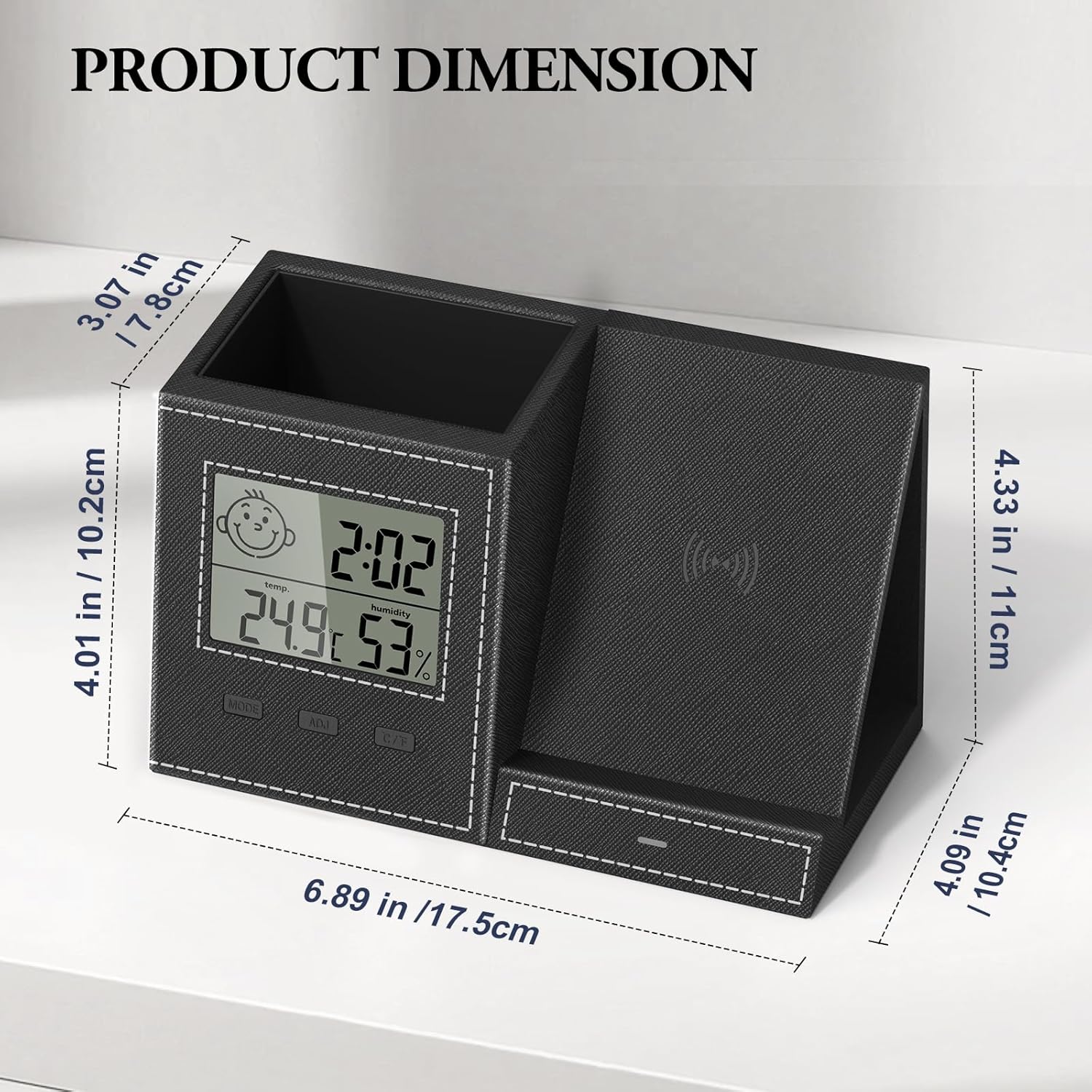
Image: Diagram illustrating the precise dimensions of the TopMade Wireless Charger Desk Organizer.
Warranty and Support
For warranty information or technical support, please refer to the contact details provided in the packaging or visit the official TopMade website. Keep your purchase receipt for warranty claims.