
DAJUNGUO T220HS
DAJUNGUO T220HS Power Amplifier Board User Manual
Model: T220HS
1. Introduction
This manual provides detailed instructions for the DAJUNGUO T220HS Power Amplifier Board. The T220HS is a 2.0 channel audio power amplifier module designed with a TDA7498E Hi-Fi chip, offering 220W x 2 output power. It features treble and bass control, multiple input modes (Bluetooth, AUX, USB), and various protection mechanisms for safe operation. Please read this manual thoroughly before use to ensure proper installation and optimal performance.
2. Key Features
- TDA7498E Hi-Fi Chip: Dual channel stereo output for continuous high-power operation, with a maximum output power of 220W x 2.
- Treble & Bass Control: Adjustable high and low frequency knobs to customize sound layering and bass impact.
- Wide Voltage Input: Supports DC 15-36V power input.
- High Compatibility: Compatible with standard DC adapters (5.5mm x 2.1mm plug specification).
- Multiple Input Modes: Supports Bluetooth 5.2, 3.5mm AUX, and USB input.
- Protection Functions: Includes short-circuit, over-current, overheating, and anti-reverse protection for enhanced safety.
- High-Quality Components: Features high-quality ELNA audiophile capacitors, low-loss calibration capacitors, high-quality solid capacitors, and gold-plated sockets.
3. Technical Specifications
| Specification | Value |
|---|---|
| Model Number | T220HS |
| Chip | Dual TPA3251 (TDA7498E equivalent for this model) |
| Audio Output | Stereo / 2.0 Channel |
| Output Power | 220 Watts x 2 (at 3Ω, 36V) / 160 Watts x 2 (at 4Ω, 36V) |
| Power Supply | DC 15-36V / 8A or above |
| Audio Input | Bluetooth, 3.5mm AUX, USB |
| Bluetooth Version | 5.2 |
| Frequency Range | 20Hz - 20KHz |
| Decoding Format | WAV, FLAC, APE, MP3 |
| Protection Mechanisms | Overvoltage, Undervoltage, Clipping, Short Circuit, Overheating, Anti-reverse |
| Product Dimensions | 13.3 x 8 x 2.8 cm (5.51 x 3.54 x 1.41 inches) |
| Item Weight | 257 g |
For detailed output power at different voltages and impedances, refer to the table below:
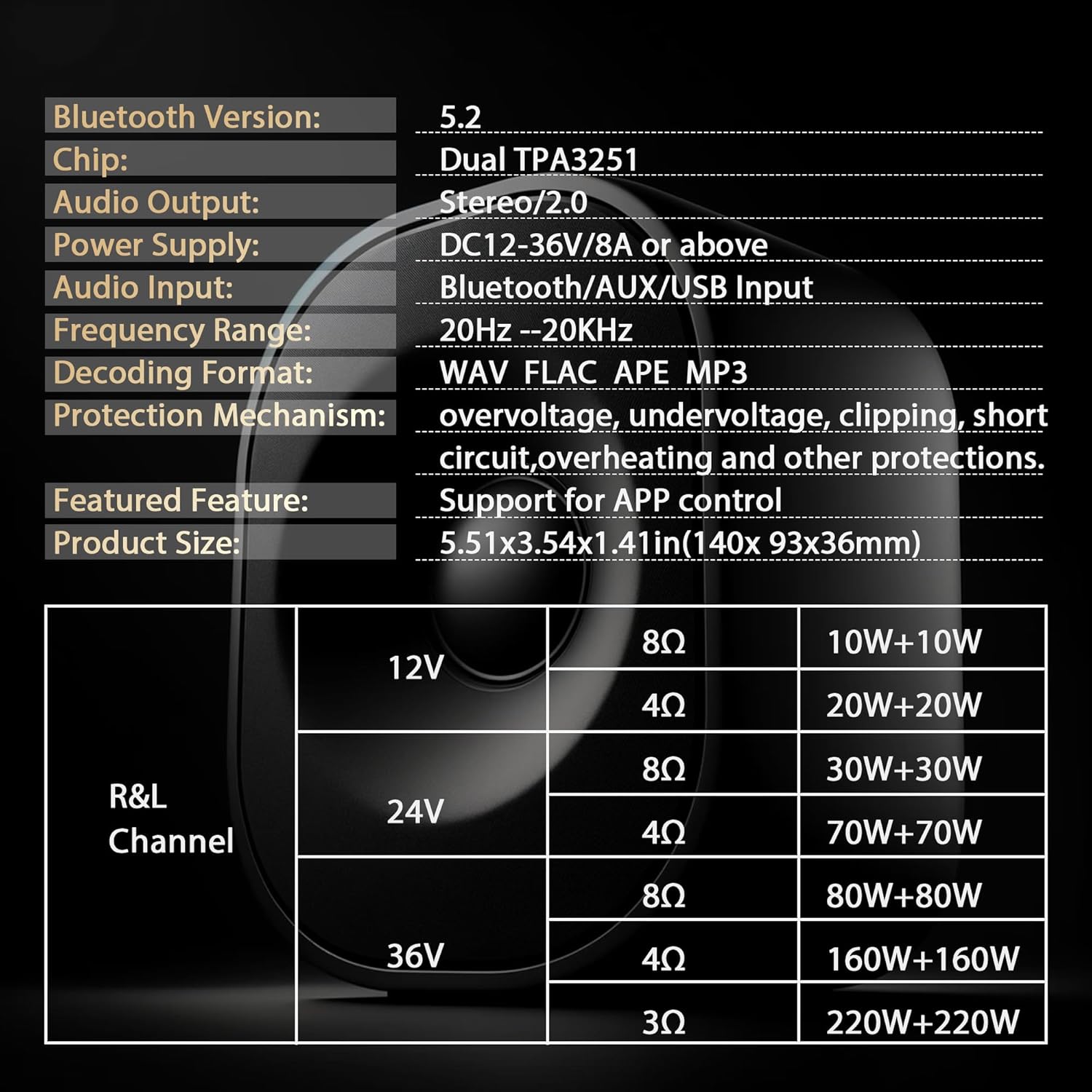
Image: Detailed power output specifications for the DAJUNGUO T220HS amplifier board, showing R&L Channel output in Watts for 12V, 24V, and 36V at 8Ω, 4Ω, and 3Ω impedances.
4. Package Contents
- 1 x DAJUNGUO T220HS Power Amplifier Board
Note: Additional accessories such as power adapter, speakers, and audio cables are sold separately.
5. Setup Instructions
Follow these steps to set up your DAJUNGUO T220HS Power Amplifier Board:
- Connect Speakers: Use a screwdriver to loosen the terminal screws for the Left and Right speaker outputs. Insert the speaker wires (positive and negative) into the corresponding terminals and tighten the screws securely. Ensure correct polarity.
- Connect Bluetooth Antenna: Attach the IPEX(MHF1) Bluetooth antenna to the designated Bluetooth Antenna Base (IPEX1) on the board. Ensure it is securely connected for optimal Bluetooth range.
- Connect Power: Connect a DC 15-36V power adapter (not included) to the Power Input (5.5-2.5DC female base or 2P wiring terminal). Ensure the power supply meets the specified voltage and current requirements (8A or above).
- Connect Audio Input (Optional):
- 3.5mm AUX Input: Connect your audio source (e.g., smartphone, MP3 player) to the 3.5mm AUX Input jack using an audio cable.
- USB Input: Connect a USB flash drive (FAT32, ≤32GB) or use it as a USB sound card by connecting to a computer.

Image: Top-down view of the DAJUNGUO T220HS amplifier board, highlighting the Bluetooth antenna base, 3.5mm AUX input, USB input, Left and Right speaker outputs, Power input, and the multifunctional knob with treble and bass controls.

Image: Illustration showing the correct IPEX(MHF1) antenna connector (3.22mm/0.127inch) compatible with the amplifier board, and an incompatible MHF4 connector.
6. Operating Instructions
Once the amplifier board is connected, you can begin operation:
- Power On/Off: Use the power switch or long press the multifunctional knob to power on or put the device into standby mode.
- Select Input Mode: The amplifier supports Bluetooth, 3.5mm AUX, and USB inputs. Use the multifunctional knob (four-click) to switch between input modes. The Input Mode Indicator Light will show the active input.
- Bluetooth Pairing: If using Bluetooth input, ensure your device's Bluetooth is enabled and search for the amplifier (default name can be customized). Pair with the amplifier. You can also set a Bluetooth password for security.
- Adjust Volume: Rotate the main volume knob to adjust the overall sound level.
- Adjust Treble and Bass: Use the dedicated Treble and Bass control knobs to fine-tune the high and low frequencies to your preference.
- Multifunctional Knob Controls:
- Click: Pause/Play audio.
- Double-click: Next Track.
- Triple-click: Previous Track.
- Four-click: Switch Modes (Input).
- Five-click: Restore Factory Settings.
- Long press: Power on/Standby.

Image: Top view of the DAJUNGUO T220HS amplifier board, highlighting Bluetooth 5.2 capabilities, custom Bluetooth name, and password setting options.

Image: Side view of the DAJUNGUO T220HS amplifier board, illustrating the Bluetooth, 3.5mm AUX, and USB input options, along with an upgraded DC socket for reliable power connection.
7. Maintenance
- Keep the amplifier board clean and free from dust. Use a soft, dry cloth for cleaning.
- Avoid exposing the device to moisture, extreme temperatures, or direct sunlight.
- Ensure proper ventilation around the board to prevent overheating. The integrated cooling fan and large heat dissipation plate assist in thermal management.
- Do not attempt to disassemble or repair the unit yourself. Refer to qualified personnel for service.
8. Troubleshooting
| Problem | Possible Cause | Solution |
|---|---|---|
| No sound output | Incorrect speaker connection, wrong input mode, low volume, no audio source. | Check speaker wiring polarity. Ensure correct input mode is selected. Increase volume. Verify audio source is playing. |
| Bluetooth connection issues | Amplifier not in Bluetooth mode, device too far, interference. | Ensure amplifier is in Bluetooth mode. Move device closer. Avoid sources of interference. Try re-pairing. |
| Distorted sound | Volume too high, improper treble/bass settings, poor audio source quality. | Reduce volume. Adjust treble and bass knobs. Use a high-quality audio source. |
| Power indicator off | No power, incorrect power adapter. | Check power connection. Ensure power adapter meets 15-36V DC requirements. |
9. Warranty and Support
The DAJUNGUO T220HS Power Amplifier Board comes with a standard manufacturer's warranty. For specific warranty details, please refer to the product packaging or contact your retailer.
If you encounter any issues or have questions regarding the product, please contact DAJUNGUO customer support. Our team is available to assist you with technical support and troubleshooting.
Contact Information: Please refer to the contact details provided with your purchase or on the official DAJUNGUO website.
Ask a question about this manual
Ask about setup, troubleshooting, compatibility, parts, safety, or missing instructions. Manuals+ will review the question and use this page’s manual context to help answer it.