
1. Introduction
This manual provides detailed instructions for the setup, operation, and maintenance of your KAMRUI AMR5-5800U Mini PC. Please read this manual thoroughly before using the device to ensure proper functionality and to maximize its lifespan. The KAMRUI AMR5-5800U is a compact and powerful mini PC designed for various applications, from home office tasks to multimedia and light gaming.
2. Product Overview
2.1 Key Features
- Processor: AMD Ryzen 7 5800U (8 Cores, 16 Threads, up to 4.4 GHz max boost clock, 16 MB L3 cache)
- Graphics: Integrated AMD Radeon Graphics
- Memory: 24GB DDR4 3200MHz RAM (upgradable)
- Storage: 1TB M.2 NVMe Solid State Drive (upgradable)
- Operating System: Windows 10 Pro
- Connectivity: WiFi 6 (2x2), Bluetooth 5.2, Gigabit Ethernet
- Adjustable Modes: Silent, Auto, and Performance modes for optimized operation.
- RGB Lighting: Customizable lighting effects.
- Security: Fingerprint unlock technology.
- Design: Ultra-compact all-metal case with magnetic design for easy upgrades.
2.2 Ports and Connectors
Familiarize yourself with the various ports and connectors on your Mini PC:

Image: Front and rear view of the KAMRUI Mini PC, highlighting all available ports.
- Front Ports:
- 2 x USB 3.2 Gen 1 Type-A
- 1 x USB 3.2 Gen 1 Type-C (supports Power Delivery and DisplayPort)
- 1 x Audio 3.5mm jack (Audio in & out)
- Rear Ports:
- 2 x USB 3.2 Gen 1 Type-A
- 1 x HDMI 2.0 (4K 60Hz)
- 1 x DisplayPort (4K 60Hz)
- 1 x RJ45 Gigabit Ethernet
- 1 x DC Power Input
2.3 Performance Modes
The Mini PC features three adjustable performance modes to suit different usage scenarios:

Image: Illustration of the three performance modes: Silent ECO, Auto, and Performance.
- Silent ECO Mode: Optimized for low power consumption and quiet operation, ideal for light office work or home theater use.
- Auto Mode: Balances performance and power efficiency, suitable for medium office tasks and multi-tasking.
- Performance Mode: Maximizes CPU and graphics card performance, best for gaming or demanding office applications.
3. Setup Guide
Follow these steps to set up your KAMRUI AMR5-5800U Mini PC:
- Connect Display: Connect your monitor(s) to the Mini PC using an HDMI or DisplayPort cable. The USB-C port also supports DisplayPort output.
- Connect Peripherals: Plug in your keyboard, mouse, and any other USB devices into the available USB ports.
- Connect Network: For a wired connection, connect an Ethernet cable to the RJ45 port. For wireless, ensure your WiFi network is available.
- Connect Power: Plug the power adapter into the DC Power input port on the Mini PC, then connect the adapter to a power outlet.
- Power On: Press the power button located on the front of the Mini PC. The system will boot up.
- Initial Windows Setup: Follow the on-screen instructions to complete the Windows 10 Pro initial setup, including language, region, and user account creation.
4. Operating Instructions
4.1 Switching Performance Modes
You can switch between Silent, Auto, and Performance modes using the dedicated control on the Mini PC. This control typically involves a physical button or dial that cycles through the modes, indicated by a change in LED color or a display on the unit.

Image: Close-up of the Mini PC's control knob, illustrating the ability to switch between multiple modes.
4.2 RGB Lighting Control
The Mini PC features customizable RGB lighting effects. To control these effects:
- Download Software: Visit the ACEMAGICIAN website or scan the QR code provided in your product packaging to download the AMR5 RGB Control Software.
- Adjust Settings: Use the software to select your preferred lighting mode (e.g., Breathe, Cycle, Rainbow) and customize colors.

Image: The Mini PC showcasing its RGB lighting effects.
4.3 Fingerprint Unlock
The TK11-A0 Series (which includes the AMR5-5800U) supports fingerprint unlock for enhanced security and convenient access. Configure your fingerprint in Windows Settings under "Sign-in options" to utilize this feature.
5. Maintenance & Upgrades
5.1 Cleaning
To maintain optimal performance, regularly clean the exterior of the Mini PC with a soft, dry cloth. Ensure ventilation openings are free from dust accumulation. Do not use liquid cleaners directly on the device.
5.2 RAM and SSD Upgrades
The KAMRUI AMR5-5800U features a magnetic design for easy access to internal components, simplifying RAM and SSD upgrades.
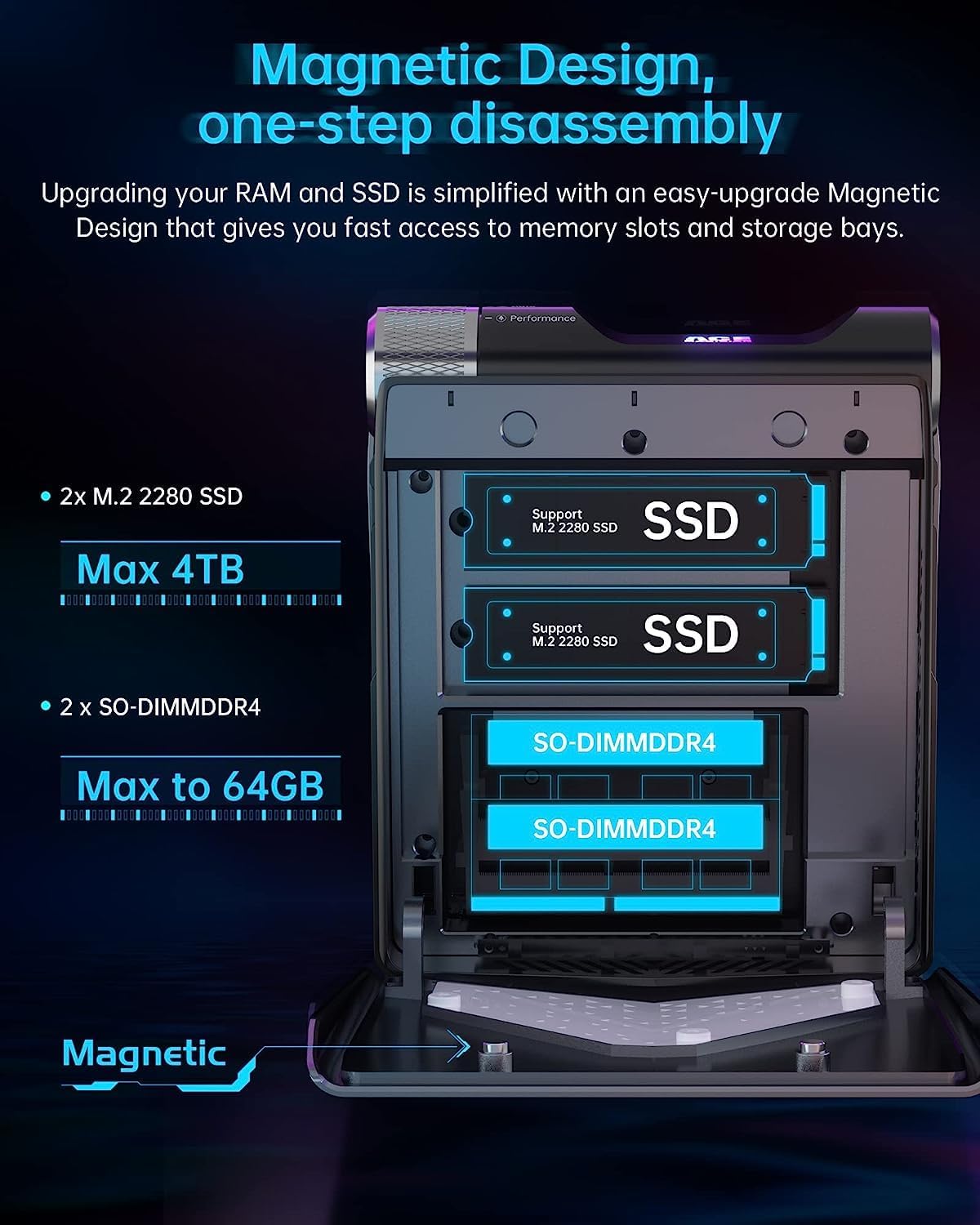
Image: Diagram showing the magnetic design for easy disassembly to access SSD and SO-DIMM DDR4 slots.
- Disassembly: Gently open the magnetic cover to reveal the internal slots.
- SSD Upgrade: The device supports 2x M.2 2280 SSDs, up to a maximum of 4TB total storage.
- RAM Upgrade: The device supports 2x SO-DIMM DDR4 modules, up to a maximum of 64GB total RAM.
- Caution: Ensure the device is powered off and unplugged before performing any internal upgrades. Refer to the detailed upgrade guide on the manufacturer's website for specific instructions.
6. Troubleshooting
| Problem | Possible Cause | Solution |
|---|---|---|
| No power | Power cable disconnected; Power adapter faulty; Power outlet issue. | Check power cable connections. Try a different power outlet. Ensure the power adapter is functioning correctly. |
| No display output | Monitor cable loose; Incorrect input source on monitor; Faulty cable/monitor. | Ensure display cables (HDMI/DP/USB-C) are securely connected. Select the correct input source on your monitor. Test with a different cable or monitor if possible. |
| No internet connection (Wi-Fi) | Wi-Fi disabled; Incorrect password; Router issue; Driver issue. | Check if Wi-Fi is enabled in Windows settings. Verify Wi-Fi password. Restart your router. Update Wi-Fi drivers if necessary. |
| Slow performance | Running in Silent ECO Mode; Too many background applications; Insufficient RAM/SSD space. | Switch to Auto or Performance mode. Close unnecessary applications. Check available storage and RAM usage. Consider upgrading RAM/SSD if frequently encountering issues. |
If you encounter issues not listed here, please refer to the "Warranty & Support" section for further assistance.
7. Technical Specifications
| Feature | Detail |
|---|---|
| Model | AMR5-5800U |
| Processor | AMD Ryzen 7 5800U (8 Cores, 16 Threads, 2.0 GHz base, up to 4.4 GHz max boost) |
| Graphics | AMD Radeon Graphics (Integrated) |
| RAM | 24 GB DDR4 3200MHz (2x SO-DIMM DDR4 slots, Max 64GB) |
| Storage | 1 TB NVMe SSD (2x M.2 2280 SSD slots, Max 4TB) |
| Operating System | Windows 10 Pro |
| Wireless Connectivity | WiFi 6 (802.11ax), Bluetooth 5.2 |
| Wired Connectivity | Gigabit Ethernet (RJ45) |
| USB Ports | 4 x USB 3.2 Gen 1 Type-A, 1 x USB 3.2 Gen 1 Type-C (with PD & DP) |
| Video Output | 1 x HDMI 2.0, 1 x DisplayPort, 1 x USB-C (DisplayPort Alt Mode) |
| Audio | 1 x 3.5mm Audio Jack |
| Dimensions (LxWxH) | 6.15 x 5.22 x 2.83 inches (156.1 x 132.6 x 71.8 mm) |
| Weight | 4 pounds (approx. 1.8 kg) |
| Power Source | AC Adapter |
8. Warranty & Support
Your KAMRUI AMR5-5800U Mini PC comes with a standard manufacturer's warranty. Please refer to the warranty card included in your product packaging for specific terms and conditions.
For technical support, troubleshooting assistance, or warranty claims, please contact KAMRUI customer service through their official website or the contact information provided in your product documentation. When contacting support, please have your product model number (AMR5-5800U) and purchase details ready.
Online Resources: For additional resources, FAQs, and driver downloads, visit the official KAMRUI support page.


