
1. Introduction
The Antec A30 NEO is a compact and efficient CPU air cooler designed to provide optimal thermal performance for your computer's processor. Featuring a 92mm fan with a unique wave-like texture and 4-pin PWM control, it balances effective cooling with quiet operation. This cooler is compatible with a wide range of Intel and AMD sockets, supporting CPUs with a Thermal Design Power (TDP) of up to 125W.
This manual provides detailed instructions for the installation, operation, and maintenance of your Antec A30 NEO CPU Air Cooler. Please read this manual thoroughly before installation to ensure correct setup and safe operation.
2. Safety Information
- Always disconnect power from your computer before installing or removing any components.
- Handle the CPU cooler and other components with care to avoid damage.
- Wear an anti-static wrist strap to prevent electrostatic discharge (ESD) damage to sensitive components.
- Keep small parts and packaging materials away from children.
- Ensure proper ventilation within your computer case for optimal cooling performance.
- Do not attempt to modify the cooler or its components. Unauthorized modifications may void your warranty and pose safety risks.
3. Package Contents
Verify that all items listed below are present in your package. If any items are missing or damaged, please contact your retailer or Antec support.
- Antec A30 NEO CPU Air Cooler (with pre-attached 92mm fan)
- Mounting Hardware Kit (for Intel and AMD sockets)
- Thermal Paste (pre-applied or in a small tube)
- User Manual (this document)
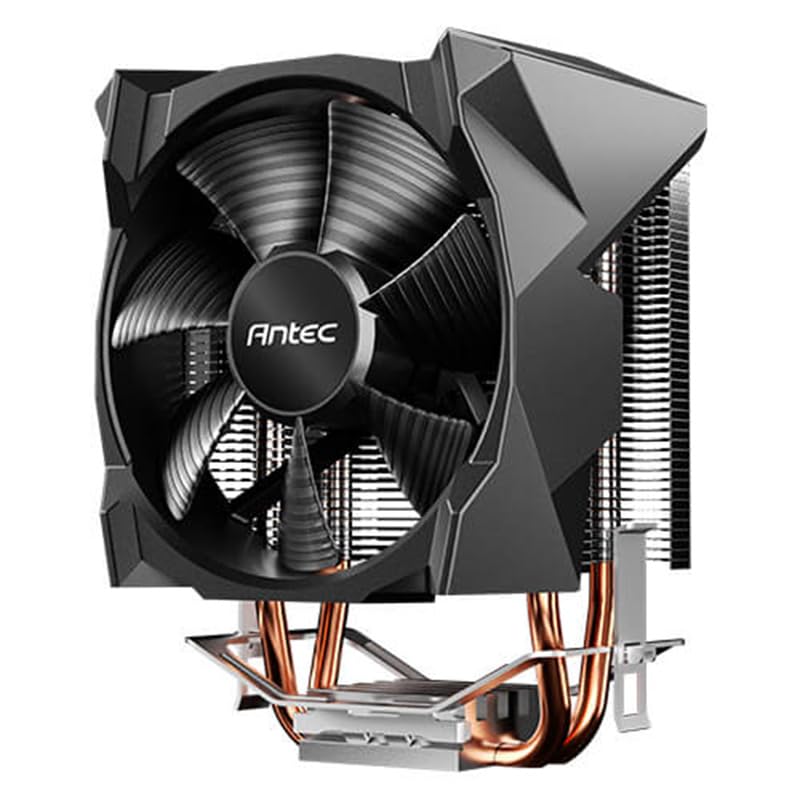
Image: The Antec A30 NEO CPU Air Cooler with its fan and heat sink assembly. This image illustrates the main cooler unit.
4. Setup and Installation
Follow these steps carefully to install your Antec A30 NEO CPU Air Cooler. The installation process may vary slightly depending on your CPU socket type (Intel or AMD).
4.1 Preparation
- Power off your computer and disconnect all cables.
- Open your computer case.
- If replacing an existing cooler, carefully remove it and clean any old thermal paste from the CPU surface and the cooler's base using isopropyl alcohol and a lint-free cloth.
- Identify your CPU socket type (e.g., Intel LGA1200, AMD AM4) and select the appropriate mounting hardware from the kit.
4.2 Applying Thermal Paste
Thermal paste is crucial for efficient heat transfer between the CPU and the cooler. If your cooler has pre-applied thermal paste, skip this step. If not, apply a small, pea-sized amount of thermal paste to the center of the CPU's Integrated Heat Spreader (IHS).

Image: A small amount of thermal paste applied to the center of a CPU's heat spreader. This demonstrates the recommended application method.
4.3 Cooler Installation (General Steps)
- Position the cooler over the CPU, aligning the mounting clips or screws with the corresponding points on the motherboard or backplate.
- For clip-based systems (common for AMD), hook one side of the cooler's retention clip onto the motherboard's retention bracket, then press down on the other side until it latches securely.
- For screw-based systems (common for Intel), gently place the cooler onto the CPU, ensuring the mounting holes align. Then, alternately tighten the screws in a diagonal pattern until snug. Do not overtighten.
- Ensure the cooler is firmly seated and does not wobble.

Image: The Antec A30 NEO CPU cooler securely mounted on a motherboard, showing its position relative to the CPU socket and RAM slots.
4.4 Connecting the Fan
Locate the 4-pin PWM fan connector on your motherboard, typically labeled "CPU_FAN" or similar. Connect the cooler's 4-pin fan cable to this header. Ensure the connector is fully seated.

Image: A close-up view of the 4-pin fan connector being plugged into the "CPU_FAN" header on a motherboard.
4.5 Post-Installation
Once the cooler is installed and the fan is connected, close your computer case, reconnect all cables, and power on your system. Monitor CPU temperatures using software utilities to ensure proper cooling.
5. Operating Instructions
The Antec A30 NEO CPU Air Cooler features a 4-pin PWM (Pulse Width Modulation) fan. This allows your motherboard to dynamically control the fan speed based on CPU temperature, providing an optimal balance between cooling performance and noise levels.
- Automatic Control: By default, your motherboard's BIOS/UEFI will manage the fan speed automatically. This is the recommended mode for most users.
- Manual Control: Advanced users can adjust fan curves and speeds through their motherboard's BIOS/UEFI settings or dedicated software provided by the motherboard manufacturer. Refer to your motherboard manual for specific instructions.
The fan operates within a speed range of 800 to 2000 RPM, delivering a maximum airflow of 43.82 CFM and a noise level of 23.2 dB(A) at maximum speed.
6. Maintenance
Regular maintenance helps ensure the longevity and optimal performance of your CPU cooler.
- Dust Removal: Periodically (e.g., every 3-6 months), power off your computer and use compressed air to gently blow dust out of the cooler's fins and fan blades. Hold the fan blades to prevent them from spinning rapidly during cleaning, which can damage the fan motor.
- Thermal Paste: While not typically required frequently, if you notice a significant increase in CPU temperatures over time, or if you remove the cooler for any reason, it is recommended to clean off the old thermal paste and apply fresh thermal paste before reinstallation.
- Fan Inspection: Check the fan for any signs of damage, excessive noise, or obstruction. Ensure the fan cable is securely connected.
7. Troubleshooting
If you encounter issues with your Antec A30 NEO CPU Air Cooler, refer to the following common troubleshooting steps:
| Problem | Possible Cause | Solution |
|---|---|---|
| Fan not spinning or spinning slowly |
|
|
| High CPU temperatures |
|
|
| Excessive fan noise |
|
|
8. Specifications
| Feature | Specification |
|---|---|
| Model | CFA-A30-NEO |
| Brand | Antec |
| Cooling Method | Air Cooling (Fan) |
| Fan Size | 92 mm |
| Fan Speed | 800 - 2000 RPM (PWM controlled) |
| Air Flow Capacity | 43.82 CFM (max) |
| Noise Level | 23.2 dB(A) (max) |
| Power Connector | 4-Pin PWM |
| TDP Support | Up to 125W |
| Compatible Devices | Desktop, Laptop (CPU) |
| Material | Plastic (Fan), Aluminum (Heatsink - inferred) |
| Item Weight | 0.4 Kilograms |
9. Warranty and Support
Antec products are designed and manufactured to the highest quality standards. For information regarding your product's warranty, please refer to the warranty card included with your purchase or visit the official Antec website.
For technical support, troubleshooting assistance, or to inquire about replacement parts, please visit the Antec support page:
Please have your product model (CFA-A30-NEO) and proof of purchase ready when contacting support.

