
1. Introduction
Thank you for choosing the KEJOG Mini Portable Projector. This manual provides essential information for setting up, operating, and maintaining your projector to ensure optimal performance and longevity. Please read this manual thoroughly before use and retain it for future reference.
2. Package Contents
Verify that all items are present in your package:
- 1x KEJOG Mini Portable Projector
- 1x Remote Control
- 1x Power Cord
- 1x HDMI Cable
- 1x User Manual
Note: Additional accessories such as an HDMI adapter for smartphones may be required and are not included.
3. Product Overview
Familiarize yourself with the components of your KEJOG Mini Portable Projector.

Image: Front view of the KEJOG Mini Portable Projector, showing the lens, control panel, and included remote control and mini tripod.
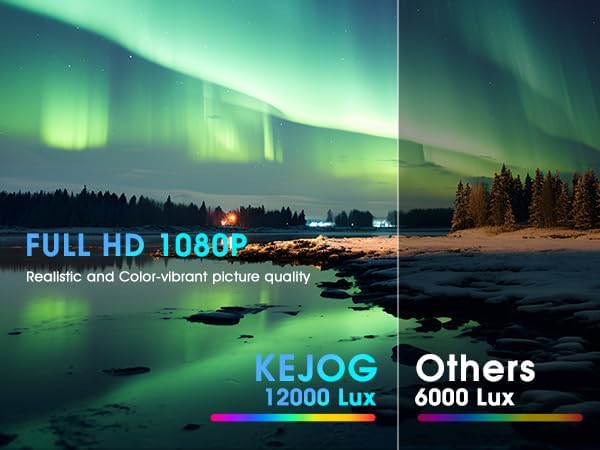
Image: Side view of the projector highlighting various input/output ports such as HDMI, USB, and audio jack.
Key Components:
- Projection Lens: Emits the image onto the screen.
- Focus Ring: Adjusts image clarity.
- Control Panel: Manual buttons for basic operations.
- Input Ports: HDMI, USB, AV, 3.5mm Audio Out.
- Built-in Speaker: Provides audio output.
- Power Input: Connects to the power adapter.
4. Setup
4.1 Placement
Position the projector on a stable, flat surface. The projector supports various placements:
- Desktop Placement: Place on a table in front of the projection surface.
- Overhead Ceiling Mount: Mount to the ceiling (mounting hardware not included).
- Tripod Installation: Use the included mini tripod or a compatible tripod for flexible positioning.

Image: Illustration demonstrating ceiling mount, table placement, and tripod installation options for the projector.
The optimal projection distance ranges from 4.9 feet to 18.4 feet, allowing for screen sizes from 40 inches to 200 inches. Adjust the distance to achieve your desired screen size.

Image: Visual representation of how projection distance affects screen size, from 2.6ft to 12.5ft.
4.2 Power Connection
- Connect the power cord to the projector's power input port.
- Plug the other end of the power cord into a power outlet.
4.3 Focus Adjustment
After powering on the projector, rotate the focus ring located near the lens until the projected image appears clear and sharp.
5. Operating Instructions
5.1 Power On/Off
- Power On: Press the power button on the projector or the remote control.
- Power Off: Press the power button again.
5.2 Source Selection
Use the 'Source' button on the remote control or projector to cycle through available input sources (HDMI, USB, AV).
5.3 Connecting Devices
The projector offers multiple connectivity options:
- HDMI: Connect devices like laptops, PCs, TV boxes, Fire TV Stick, Roku, Chromecast, or gaming consoles (e.g., PS5) using an HDMI cable.
- USB: Insert a USB drive to play media files directly.
- AV: Connect older devices using an AV cable.
- Smartphone/Tablet: To connect smartphones or tablets, an HDMI adapter (not included) is required. Connect your smartphone to the adapter, then the adapter to the projector's HDMI port.

Image: Visual guide for connecting Apple and Android phones to the projector using a data cable or HDMI adapter (adapter not included).
Important Note on Streaming Services:
Due to copyright restrictions, direct mirroring from certain streaming services like Netflix, Amazon Prime Video, and Hulu is not supported. To watch content from these platforms, use an external device such as an Amazon Fire Stick or Roku Stick connected via HDMI.
5.4 Bluetooth Audio
The projector features a built-in Bluetooth 5.2 chip and speakers. You can connect external Bluetooth audio devices for enhanced sound.
- Ensure your Bluetooth speaker or headphones are in pairing mode.
- Navigate to the Bluetooth settings on the projector's menu.
- Select your device from the list to pair.

Image: A KEJOG projector wirelessly connected to an external Bluetooth speaker, projecting a movie scene.
Note: Bluetooth does not support direct connection with smartphones for audio output from the projector.
6. Maintenance
6.1 Cleaning the Lens
Use a soft, lint-free cloth or lens cleaning paper to gently wipe the projector lens. Avoid using abrasive materials or harsh chemicals, which can damage the lens coating.
6.2 Lamp Life
The projector lamp is designed for extended use, with a lifespan of up to 70,000 hours, which is significantly longer than conventional lamps. This reduces the need for frequent lamp replacement.

Image: Graphic indicating a projector lamp lifespan of up to 100,000 hours, emphasizing durability.
6.3 Storage
When not in use, store the projector in a cool, dry place, away from direct sunlight and extreme temperatures. Use the original packaging or a protective case to prevent dust accumulation and physical damage.
7. Troubleshooting
If you encounter issues with your projector, refer to the following common problems and solutions:
| Problem | Possible Cause | Solution |
|---|---|---|
| No picture | Loose cable connection, incorrect input source, projector off. | Check all cable connections. Select the correct input source. Ensure the projector is powered on. |
| Blurry image | Out of focus, incorrect projection distance. | Adjust the focus ring. Ensure the projector is within the recommended projection distance. |
| No sound | Volume too low, external audio device not connected, incorrect audio settings. | Increase volume. Check external audio device connection or Bluetooth pairing. Verify audio output settings. |
| Bluetooth not connecting to smartphone | Feature limitation. | The projector's Bluetooth is for connecting to external speakers/headphones, not for receiving audio from smartphones. Use an HDMI adapter for smartphone video/audio output. |
| Cannot play Netflix/Hulu/Prime Video | Copyright restrictions. | Use an external streaming device (e.g., Fire Stick, Roku) connected via HDMI. |
If the problem persists after trying these solutions, please contact customer support.
8. Specifications
| Feature | Detail |
|---|---|
| Brand | KEJOG |
| Model Number | Mini Portable Projector |
| Display Resolution | Native 1920 x 1080 (Full HD), 4K Supported |
| Brightness | 12,000 Lumens |
| Contrast Ratio | 10,000:1 |
| Connectivity Technology | 3.5mm Jack, Bluetooth 5.2, HDMI, USB |
| Special Features | Built-In Speaker, Lightweight, Portable |
| Recommended Uses | Business, Education, Gaming, Home Cinema |
| Item Weight | 2.42 pounds |
| Product Dimensions | 8.15 x 7.2 x 3.94 inches |
| Visible Screen Diagonal | 150" / 381 cm |
9. Warranty and Support
KEJOG provides reliable after-sales service and lifelong technical support for this product. If you have any questions, require assistance, or encounter any issues not covered in this manual, please do not hesitate to contact our customer support team.
For support, please refer to the contact information provided with your purchase or visit the official KEJOG website.
