
1. Introduction
This manual provides detailed instructions for the installation, operation, and maintenance of your YUHANUS 86x86mm Push to Exit Button. This device is designed for use in door access control systems, offering a reliable and durable solution for exiting secured areas.
2. Safety Information
- Ensure power is disconnected from the access control system before installation or maintenance.
- Installation should be performed by qualified personnel to prevent electrical hazards or damage to the system.
- Verify all wiring connections are secure and correct according to the wiring diagram.
- Do not expose the device to extreme temperatures or corrosive environments beyond its specified operating conditions.
3. Product Overview
The YUHANUS Push to Exit Button is constructed from high-quality stainless steel, ensuring durability and resistance to wear. It features a clear "PRESS TO EXIT" label and is suitable for both indoor and outdoor applications due to its waterproof design. The button provides four contact outputs for flexible integration into various access control systems.

Figure 3.1: Front view of the YUHANUS Push to Exit Button, showing the illuminated button and 'PRESS TO EXIT' text.

Figure 3.2: Front view of the YUHANUS Push to Exit Button, showing the button in its unactivated state.
4. Specifications
| Feature | Detail |
|---|---|
| Brand | YUHANUS |
| Model | 86x86mm |
| Material | High Quality Stainless Steel |
| Operation Mode | Push button |
| Current Rating | 0.3 Amps |
| Operating Voltage | 12 Volts (DC) |
| Contact Type | Normally Open (NO) |
| Connector Type | Plug In |
| Output Contacts | NO/COM/NC/COM (4 contacts) |
| Dimensions (L x W x H) | 86mm x 86mm x 40mm (3.39 x 3.39 x 1.57 inches) |
| Mounting Type | Wall Mount |
| Actuator Type | Push Button |
| Waterproof | Yes (for outdoor & indoor use) |
| Item Weight | 5.6 ounces |
| UPC | 769894490921 |

Figure 4.1: Dimensional drawing of the Push to Exit Button.
5. Setup and Installation
Follow these steps for proper installation of the Push to Exit Button into your access control system.
5.1 Package Contents
- 1 x YUHANUS Push to Exit Button (86x86mm)
- Mounting Screws (Note: Verify screw material for outdoor use to prevent corrosion.)
5.2 Wiring Connections
The button provides four contact outputs: Normally Open (NO), Common (COM), Normally Closed (NC), and a second Common (COM). Refer to the wiring diagram below for integration with your access control keypad, power supply, and magnetic lock.

Figure 5.1: Back view of the button showing wire connections and terminal labels.
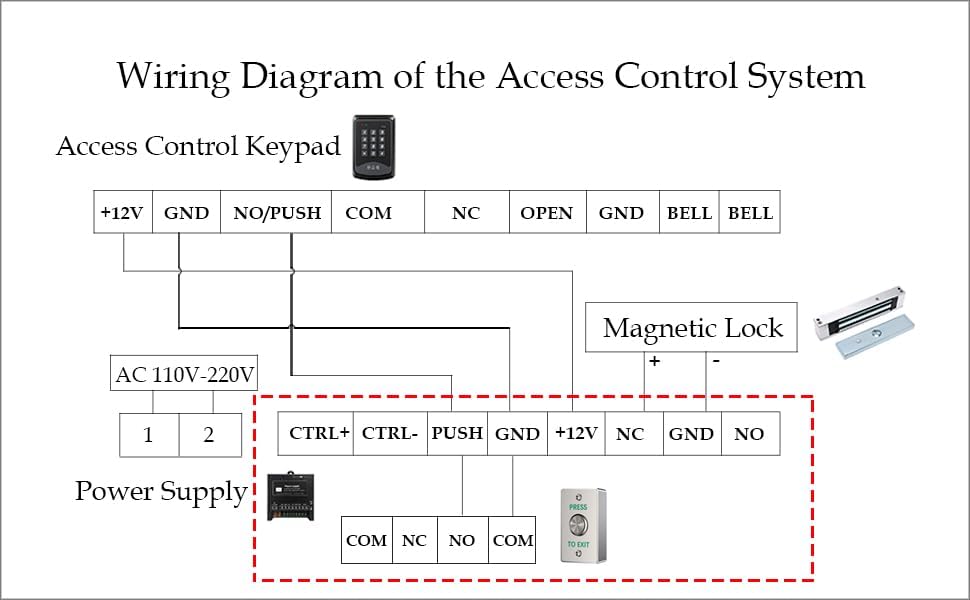
Figure 5.2: Comprehensive wiring diagram for typical access control system integration.
- Identify Terminals: The button has terminals for NO (Normally Open), NC (Normally Closed), and COM (Common). Typically, the NO and COM contacts are used for exit buttons to momentarily break or make a circuit, releasing the lock.
- Connect to Access Control Panel: Connect the appropriate NO/COM or NC/COM terminals from the exit button to the corresponding 'Exit' or 'Push' input on your access control panel.
- Power Supply: Ensure the access control system and associated components are powered by a stable 12V DC supply.
- Mounting: Securely mount the button to a wall or door frame using the provided screws. Ensure the mounting surface is flat and stable.
6. Operating Instructions
The YUHANUS Push to Exit Button operates as a momentary switch within your access control system.
- To exit a secured area, simply press the button firmly.
- Upon pressing, the button will momentarily activate the connected access control mechanism, typically unlocking the door for a preset duration.
- Release the button after activation.
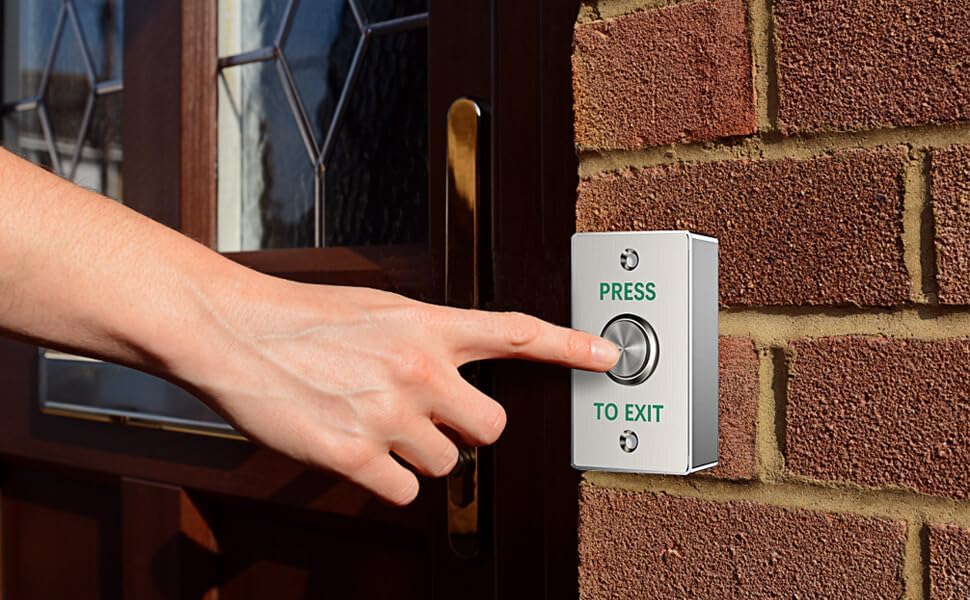
Figure 6.1: Example of the Push to Exit Button in use.
7. Maintenance
The YUHANUS Push to Exit Button requires minimal maintenance due to its durable stainless steel construction and waterproof design.
- Cleaning: Periodically wipe the button surface with a soft, damp cloth to remove dust and grime. Avoid abrasive cleaners or solvents.
- Inspection: Regularly check the mounting screws for tightness and inspect the wiring connections for any signs of wear or corrosion, especially in outdoor installations.
- Environmental Protection: While waterproof, prolonged exposure to direct heavy rain or extreme weather conditions may reduce lifespan. Consider additional protective measures if installed in highly exposed areas.
8. Troubleshooting
| Problem | Possible Cause | Solution |
|---|---|---|
| Button does not activate the lock. | Incorrect wiring; loose connections; insufficient power; faulty access control panel input. |
|
| Button feels loose or unresponsive. | Internal mechanism wear; damage from impact. |
|
| Mounting screws show corrosion. | Screws not suitable for outdoor or humid environments. |
|
9. Warranty and Support
For warranty information, technical support, or service inquiries regarding your YUHANUS Push to Exit Button, please contact the manufacturer or your point of purchase. Keep your purchase receipt as proof of purchase.
Manufacturer: YUHAN