
Loboo Rearview Mirror Edition
Loboo Motorcycle Phone Mount Instruction Manual
Model: Rearview Mirror Edition
Brand: Loboo
Product Overview
The Loboo Motorcycle Phone Mount (Rearview Mirror Edition) is designed to provide stable and secure phone support for motorcycle riders, especially on unpaved roads. It features a magnetic damping structure to reduce vibration, a one-click locking mechanism for quick and secure phone attachment, and an adjustable rotation angle for optimal viewing. This model also supports both wired fast charging and wireless charging, offering versatile power options for your device. Constructed from durable aluminum alloy, it ensures reliability and a long service life.

Image: Loboo Motorcycle Phone Mount, Rearview Mirror Edition.
What's in the Box
Please verify that all components are present before beginning installation.
- Mobile phone holder body
- Screw adhesive
- Anti loosening nut, rearview mirror fixing assembly
- 5mm hex wrench with matching screws

Image: Components included in the standard package (without charging version shown).

Image: Components included in the package with charging capabilities.
Setup and Installation
The Rearview Mirror Edition is designed for mounting on the motorcycle's rearview mirror stem. Ensure the mirror bracket connection pipe diameter is ≤ 10.2mm for proper fit.
- Attach the Rearview Mirror Fixing Assembly: Secure the rearview mirror fixing assembly to the motorcycle's rearview mirror stem using the provided screws and anti-loosening nut. Apply screw adhesive as directed for a secure fit.
- Mount the Phone Holder Body: Connect the mobile phone holder body to the rearview mirror fixing assembly. Ensure it is firmly attached and stable.
- Adjust for Optimal Viewing: Utilize the mechanical structure rotation angle design to adjust the phone holder to your preferred viewing angle.
- (For Charging Version) Connect Power: If you have the charging version, connect the power cables according to your motorcycle's electrical system. The system supports DC 12-16V input. Ensure proper polarity (Positive, ACC, Negative) as indicated in the packing list image.

Image: Overview of different mounting options, highlighting the Rearview Mirror Edition.

Image: Close-up of the Rearview Mirror fixed position model, suitable for pipe diameter ≤ 10.2mm.
Operating Instructions
Attaching and Detaching Your Phone
The phone mount features a one-click locking clamping structure for quick and secure phone attachment and detachment.
- To Attach: Place your phone into the holder. The one-click mechanism will automatically lock the phone securely in place.
- To Detach: Press the release button (one-key unlock) to quickly release your phone.
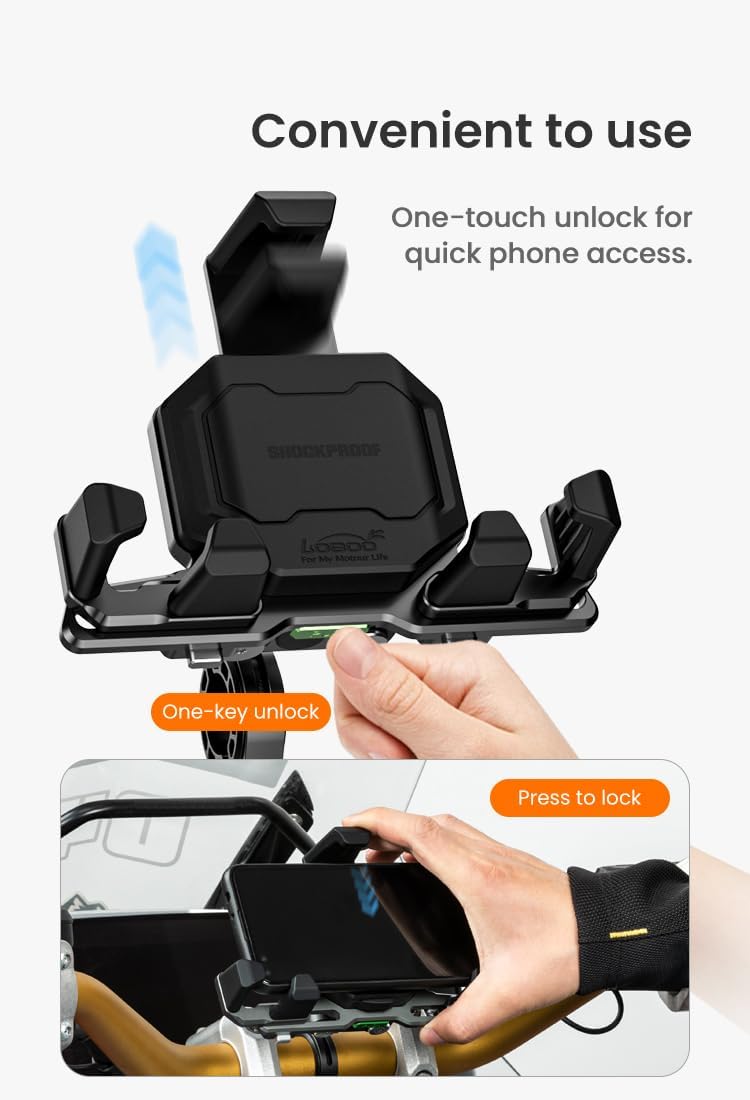
Image: Demonstrating the one-touch unlock and press-to-lock functionality.

Image: Illustrating the tool-less fastening and one-key adjustment of clamping range.
Vibration Dampening
The magnetic damping structure is designed to reduce vibration intensity, providing stable support for your mobile phone, especially during long rides on uneven terrain.
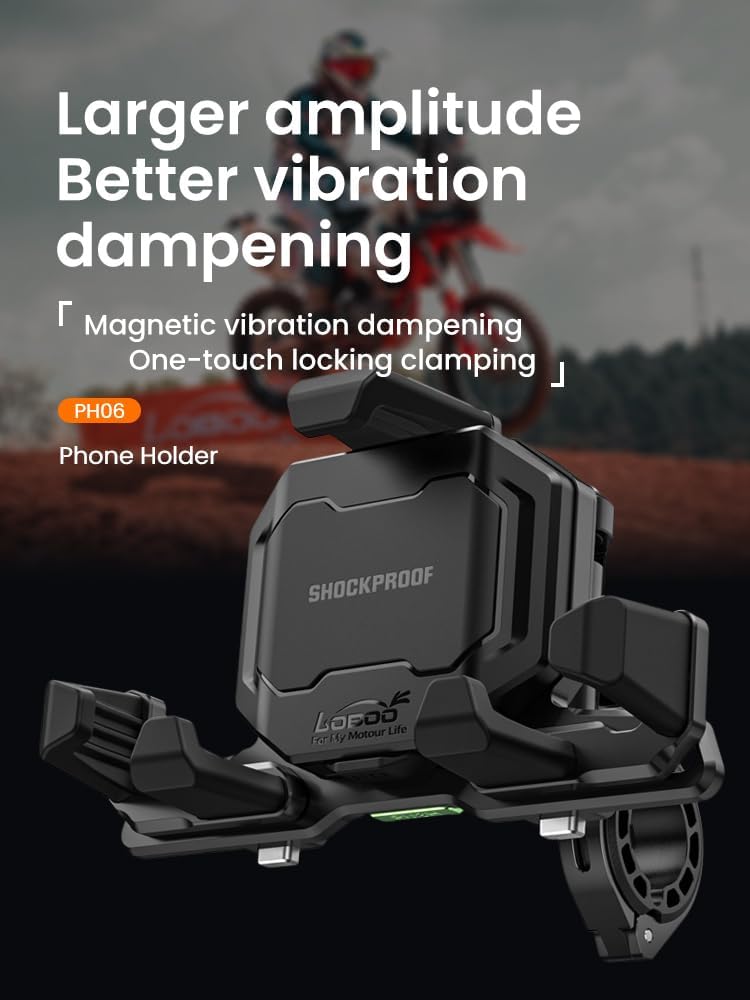
Image: Highlighting the magnetic vibration dampening and one-touch locking clamping.
Video: Demonstration of the PH06 Phone Holder's shock absorption capabilities during a test ride over speed bumps.
Charging Your Device (If Applicable)
The integrated design supports both wired fast charging and wireless charging.
- Wired Charging: Connect your device using a compatible Type-C elbow fast charging cable for PD wired charging.
- Wireless Charging: Place your compatible device on the wireless charging pad of the holder.

Image: Illustration of the integrated wired and wireless charging features.

Image: Details of the Type-C elbow fast charging cable, showing Type-C to Type-C and Type-C to Lightning options.
Maintenance
To ensure the longevity and optimal performance of your Loboo Motorcycle Phone Mount, follow these simple maintenance guidelines:
- Regular Cleaning: Wipe down the mount with a soft, damp cloth to remove dust and grime. Avoid harsh chemicals or abrasive cleaners.
- Check Fasteners: Periodically inspect all screws and connections to ensure they remain tight. Re-tighten if necessary, applying screw adhesive if previously used.
- Inspect Moving Parts: Check the clamping mechanism and rotational joints for smooth operation. Ensure no debris is obstructing their movement.
- Cable Inspection (Charging Version): For models with charging, regularly inspect the charging cables for any signs of wear, fraying, or damage. Replace if necessary to prevent electrical issues.

Image: Close-up of the aluminum alloy construction, emphasizing its sturdy and durable nature.
Troubleshooting
If you encounter any issues with your phone mount, refer to the following common problems and solutions:
- Phone Not Holding Securely:
- Ensure your phone's dimensions (including case) are within the compatible range: Width 65-92 mm (2.56-3.62 in), Length 119-183 mm (4.7-7.2 in), Thickness ≤ 12.5 mm (0.49 in).
- Check that the one-click locking mechanism is fully engaged.
- Inspect for any debris or obstruction in the clamping arms.
- Mount Feels Loose:
- Verify that the rearview mirror fixing assembly is securely tightened to the motorcycle stem.
- Ensure the phone holder body is firmly attached to the fixing assembly.
- Charging Not Working (Charging Version):
- Confirm that the power cables are correctly connected to your motorcycle's electrical system and that the motorcycle's power is on.
- Check the fuse (if applicable) in the power line.
- Ensure your phone is properly aligned on the wireless charging pad or that the wired charging cable is fully inserted and not damaged.
- Verify your phone supports wireless charging or the specific wired charging protocol (PD).
- Excessive Vibration:
- While the mount has magnetic damping, extreme road conditions can still cause some vibration. Ensure the mount is installed as securely as possible.

Image: Diagram showing compatible phone dimensions (length, width, thickness).
Specifications
| Feature | Detail |
|---|---|
| Brand | Loboo |
| Model Number | Rearview Mirror Edition (PH06) |
| Main Material | Aluminum alloy |
| Color | Black |
| Mounting Type | Motorcycle rearview mirror stem (≤ 10.2mm pipe diameter) |
| Compatible Phone Width | 65-92 mm (2.56-3.62 in) |
| Compatible Phone Length | 119-183 mm (4.7-7.2 in) |
| Compatible Phone Thickness | ≤ 12.5 mm (0.49 in) |
| Input Voltage (Charging Version) | DC 12-16V |
| Wired Charging Output (Max) | 36W (5V=3A, 9V=3A, 12V=3A) |
| Wireless Charging Output (Max) | 15W (5V=1A, 9V=1.1A, 12V=1.3A) |
| Special Features | Adjustable, Rotatable, Magnetic Damping, One-Click Auto Lock, Wired/Wireless Charging |

Image: Detailed product parameters including dimensions and charging specifications.

Image: Another view of the product specifications, including material and charging details.
Warranty and Support
Loboo products are manufactured to high-quality standards. For warranty information, technical support, or any inquiries regarding your product, please refer to the official Loboo website or contact their customer service directly. Keep your purchase receipt as proof of purchase for warranty claims.
You can visit the official Loboo store on Amazon for more information: Loboo Store
Related documentsRearview Mirror Edition

Ask a question about this manual
Ask about setup, troubleshooting, compatibility, parts, safety, or missing instructions. Manuals+ will review the question and use this page’s manual context to help answer it.