
Jetson JMAKO-MGR
Jetson Mako Kids Electric Motor Assist Push Car User Manual
Model: JMAKO-MGR | Brand: Jetson
Introduction
The Jetson Mako Kids Electric Motor Assist Push Car offers a versatile 3-in-1 functionality designed to adapt as your child grows. It can be used as a parent-pushed stroller, controlled remotely by an adult, or driven independently by the child. This rechargeable electric ride-on car features an accelerator pedal, steering wheel, forward/reverse switch, and high/low speed settings (up to 3 mph). Safety features include an adjustable seatbelt and parental override remote control. The car also includes interactive elements such as car sounds with volume adjustment, LED headlights, and functional doors. Recommended for children ages 2 to 4 years.
What's in the Box
- Jetson Mako Push Car
- Rechargeable Battery
- Charging Cable
- User Manual

Image: The Jetson Mako Push Car, showcasing its main features.
Setup and Assembly
Before first use, ensure all components are present and undamaged. Assembly is required. Follow these general steps:
- Unpack Components: Carefully remove all parts from the packaging. Verify against the 'What's in the Box' section.
- Install Wheels: Attach the wheels securely to the axles. Ensure all locking mechanisms are engaged.
- Connect Battery: Locate the battery compartment, typically under the seat. Connect the battery terminals as indicated in the detailed assembly instructions provided with your product.
- First Charge: Charge the battery for a full 12 hours before the first use. Refer to the charging section for details.
- Attach Steering Wheel: Secure the steering wheel to the steering column. Ensure it is firmly in place and functions correctly.
- Install Push Handle: If using the push car mode, attach the parental push handle to the rear of the vehicle.
- Secure Seat: Install the seat and ensure the seatbelt is accessible and functional.
Important Safety Note: This product contains small parts. Keep small parts away from children during assembly. Some users have reported the steering wheel may require firm pressure to align during installation.
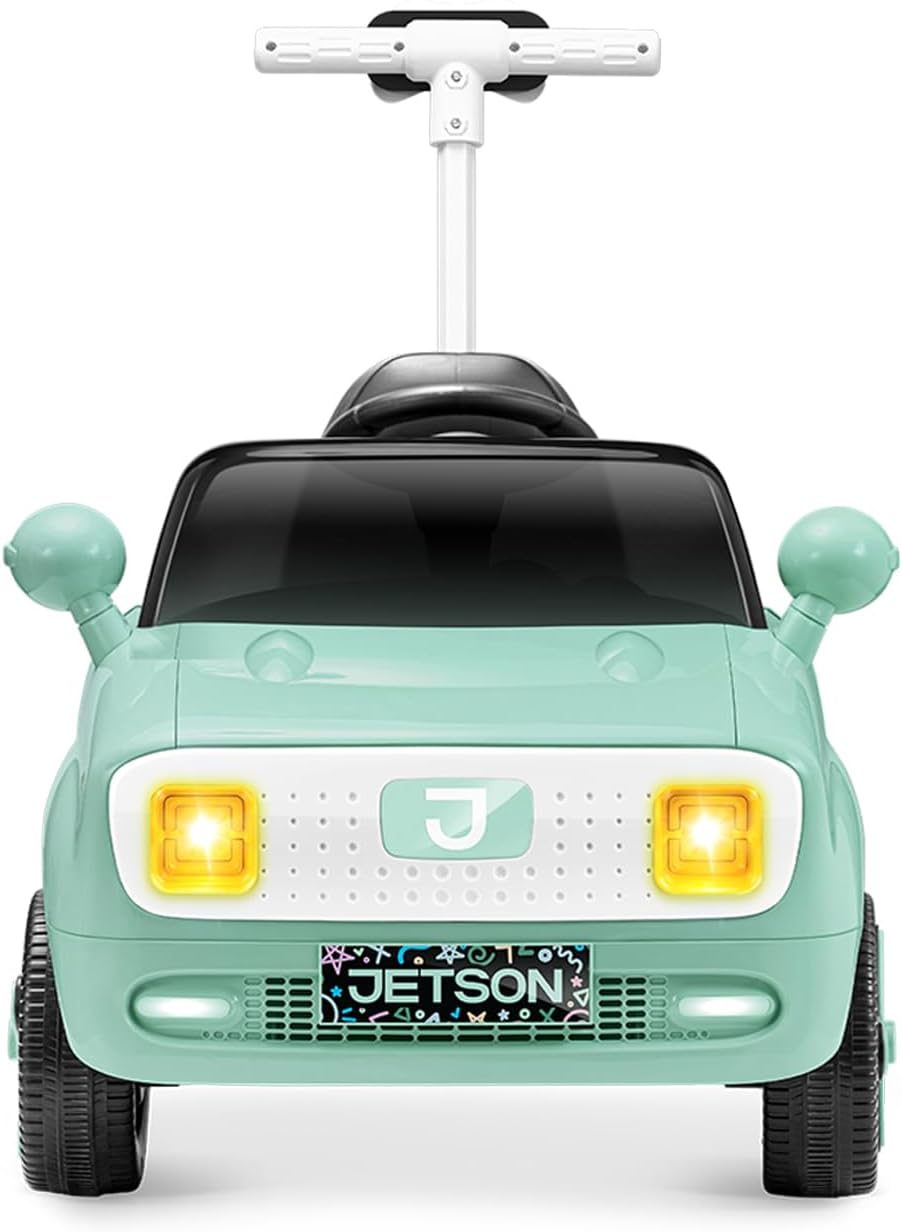

Images: Front and side views of the Jetson Mako Push Car, illustrating its design for assembly reference.
Operating Instructions
Powering On/Off
To power on the vehicle, press the red power button located on the dashboard. You will hear an engine sound, and the LED headlights will illuminate. To power off, press the button again.

Image: Close-up of the car's dashboard, showing the power button and battery indicator lights.
Driving Modes
The Jetson Mako offers three distinct operating modes:
- Manual Push Mode: For younger children or when the battery is depleted, parents can use the attached rear handle to push and steer the car.
- Parental Remote Control Mode: An adult can control the car's movement and steering using the included remote control. This mode allows parents to override child control for safety. The remote can be stored in a special holder on the push handle.
- Child Drive Mode: Children can operate the car independently using the steering wheel, accelerator pedal, and forward/reverse direction switch. The car has a high speed of 3 mph and a low speed of 2 mph.


Images: Demonstrations of the manual push mode and child drive mode.
Safety Features
- Adjustable Seatbelt: Always ensure the child is securely fastened with the adjustable seatbelt before operation.
- Parental Override Remote Control: Adults can take immediate control of the vehicle's movement at any time using the remote.
- LED Headlights: Bright LED headlights enhance visibility during operation.

Image: Detail of the adjustable seatbelt for child safety.
Interactive Features
- Horn and Engine Sounds: Activate realistic car sounds and horn via buttons on the steering wheel. Volume is adjustable.
- Functional Doors: The car features doors that can be opened and closed, adding to the realistic play experience.
Maintenance
- Charging:
The battery charge indicator lights on the dashboard will show the current battery level. Recharge the battery when the indicator shows low power. For optimal battery life, avoid completely draining the battery before recharging. Always use the provided charging cable.
Battery Care: This product uses Lithium-Ion batteries. Do not expose the vehicle to extreme temperatures (hot or cold) or moisture. Store indoors in a dry place at normal room temperature to prevent battery damage and potential hazards.
- Cleaning: Wipe down the car with a damp cloth. Do not use harsh chemicals or abrasive cleaners. Avoid direct water spray.
- Storage: Store the vehicle in a dry, cool place away from direct sunlight and moisture when not in use.
- Regular Checks: Periodically inspect the wheels, steering mechanism, seatbelt, and electrical connections for any signs of wear or damage.
Troubleshooting
| Problem | Possible Cause | Solution |
|---|---|---|
| Car does not move or power on. | Battery is low or not connected. | Ensure battery is fully charged (12 hours for first charge) and properly connected. Check power button is pressed. |
| Remote control not working. | Remote batteries are dead or not installed. Remote not paired. | Replace AAA batteries in the remote control. Refer to the full manual for remote pairing instructions. |
| Car moves slowly or intermittently. | Low battery charge. Overload. | Recharge the battery. Ensure the car is not overloaded beyond its weight limit (check specifications). |
| Steering is difficult or unresponsive. | Steering wheel not properly installed or damaged. | Check steering wheel installation. Ensure no obstructions. If problem persists, contact customer support. |
Specifications
| Feature | Detail |
|---|---|
| Model Number | JMAKO-MGR |
| Product Dimensions | 38.6 x 22.6 x 36.4 inches |
| Item Weight | 25.2 pounds |
| Recommended Age | 36 months - 8 years |
| Battery Type | 1 9V batteries (included) |
| Max Speed | 3 mph (high setting), 2 mph (low setting) |
| Manufacturer | Jetson |
| Release Date | February 1, 2025 |
Related documentsJMAKO-MGR


Ask a question about this manual
Ask about setup, troubleshooting, compatibility, parts, safety, or missing instructions. Manuals+ will review the question and use this page’s manual context to help answer it.