
OMMO GC-1030
OMMO Metal Detector User Manual
Model: GC-1030 | Brand: OMMO
1. Introduction
Thank you for choosing the OMMO Professional Wireless Metal Detector. This device is designed for efficient and accurate detection of various metals, suitable for both beginners and experienced users. Its foldable design, multiple detection modes, and waterproof coil make it versatile for different environments, from gardens to beaches.

Figure 1.1: The OMMO Metal Detector along with its complete set of accessories, including headphones, a digging shovel, and 9V batteries.
Video 1.1: An official overview of the OMMO Foldable Metal Detector, demonstrating its key features, assembly, and various operational modes.
2. What's Included
Your OMMO Metal Detector package includes the following items:
- 1x OMMO Metal Detector
- 1x Headphone
- 2x 9V Batteries
- 1x Shovel
- 1x Carry Bag
3. Setup
3.1 Assembly
The OMMO Metal Detector features a foldable design for easy transport and quick assembly. Follow these steps to set up your detector:
- Open the cam lock to connect the stem sections.
- Press the round lock to unfold the control box into its operational position.
- Press the latch to adjust the position of the arm support for comfortable use.
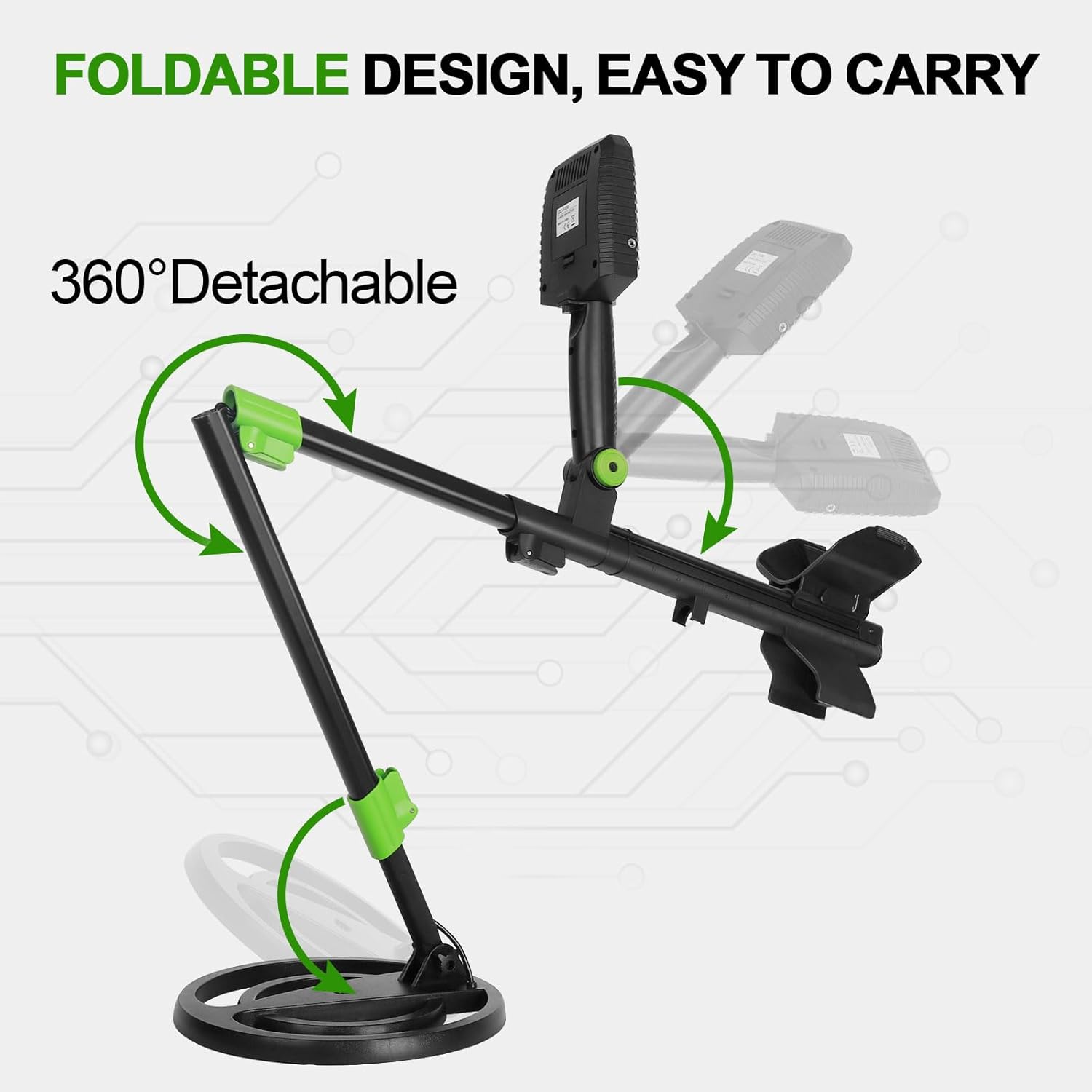
Figure 3.1: The detector's foldable design allows for compact storage and easy setup. The image illustrates the folding mechanism.
3.2 Battery Installation
The detector requires two 9V batteries for operation. Insert them into the battery compartment located on the control box, ensuring correct polarity.
3.3 Adjustable Stem
The detector's stem is adjustable, accommodating users of various heights, including teens and adults. The adjustable length ranges from 58cm (22.8 inches) to 135cm (53 inches).

Figure 3.2: The adjustable stem ensures comfortable use for a wide range of user heights, from teens to adults.
4. Components Overview
Familiarize yourself with the main components of your OMMO Metal Detector:

Figure 4.1: Detailed diagram showing all functional parts of the metal detector for easy identification and understanding.
- Arm Support: Provides stability and comfort during use.
- Armrest Stem: Connects the arm support to the main shaft.
- Control Box: Houses the LCD display and control buttons.
- Handle Grip: Ergonomic grip for comfortable handling.
- Upper Stem: Top section of the adjustable stem.
- Middle Stem: Mid-section of the adjustable stem.
- Lower Stem: Bottom section of the adjustable stem, connecting to the search coil.
- Search Coil: The primary component for detecting metal objects.
- Cam Lock: Used to secure stem sections.
- Round Lock: Used for unfolding the control box.
- Latch: Used to adjust the arm support position.
5. Operating Modes
The OMMO Metal Detector offers 5 distinct detection modes to optimize your search for various metal types and conditions:

Figure 5.1: Visual representation of the five distinct operating modes, each designed for specific detection scenarios.
- All METAL Mode: Detects all types of metals including steel, zinc, aluminum, gold, copper, and silver. This mode offers the highest sensitivity and is ideal for general searching.
- DISC Mode: Allows you to reject unwanted trash items. This mode helps in filtering out specific metal types you do not wish to detect.
- NOTCH Mode: Enables elimination of unwanted metals by selecting the target on the screen. This provides precise control over what the detector responds to.
- PP (Pinpoint) Mode: Used to precisely locate the target by pressing and holding the PP button. This helps in narrowing down the exact location of a detected item before digging.
- Memory Mode: Remembers the last mode you set, allowing for quick resumption of your preferred detection settings.
6. Operation Guidelines
6.1 LCD Display and Controls
The large backlit LCD display provides clear information on detected metals, depth, and current settings. The control box features intuitive buttons for easy navigation and adjustment.

Figure 6.1: Detailed view of the LCD screen and control buttons, highlighting their functions for easy operation.
- Power On/Off: Long press the power button for 3 seconds.
- Mode Button: Cycles through the 5 detection modes (All Metal, DISC, NOTCH, MEMORY).
- SENS Button: Adjusts the sensitivity level of the detector.
- BRI/VOL Button: Controls screen brightness and volume. Adjustable brightness allows clear viewing in strong or low light conditions.
- PP Button: Activates Pinpoint mode for precise target location.
- +/- Buttons: Used for adjusting sensitivity, volume, brightness, and selecting targets in NOTCH mode.
6.2 Detection Depth
The detector offers high sensitivity, capable of detecting small coins and metal objects up to 8 inches deep, and larger objects up to 12 inches deep. The detection depth changes with the size of the search target.

Figure 6.2: Visual guide to the detector's depth capabilities, indicating how detection depth varies with target size.
6.3 Waterproof Search Coil
The 10-inch IP68 waterproof search coil allows for underwater detection in shallow water, making it suitable for use in gardens, parks, beaches, and forests. NOTE: The control box is NOT waterproof.

Figure 6.3: The waterproof search coil in action, demonstrating its capability for detection in shallow water environments.
6.4 Proper Usage
For optimal detection, always keep the search coil parallel to the ground. If the coil is not parallel, the detector may not accurately detect objects or may detect nothing at all.
7. Specifications
| Feature | Specification |
|---|---|
| Brand | OMMO |
| Model Number | GC-1030 |
| Color | Blue |
| Material | Metal |
| Power Source | Battery Powered (2x 9V Batteries) |
| Item Weight | 4 Pounds (1.81 kg) |
| Product Dimensions | 15"L x 8"W x 5"H (38.1cm x 20.3cm x 12.7cm) |
| Extended Length | 53 Inches (135 cm) |
| Adjustable Length | Yes (22.8" - 53") |
| International Protection Rating | IP65 (Control Box), IP68 (Search Coil) |
| Recommended Uses | Metal Detection |
| Display Type | LCD |
| Number of Programs (Modes) | 5 |
| Search Coil Size | 10 Inches |
8. Troubleshooting
If you encounter issues with your OMMO Metal Detector, please refer to the following common problems and solutions:
- No Power: Ensure batteries are correctly installed with proper polarity and are not depleted. Replace with fresh 9V batteries if necessary.
- No Detection/Weak Signal:
- Check sensitivity settings; increase if too low.
- Ensure the search coil is parallel to the ground during sweeping.
- Verify that the correct detection mode is selected for the target metal.
- Avoid areas with high electromagnetic interference.
- False Signals:
- Reduce sensitivity if experiencing frequent false signals.
- Use DISC or NOTCH mode to eliminate unwanted metal types.
- Ensure the search coil is not hitting obstacles or dense vegetation.
- LCD Display Issues: If the display is dim or unreadable, adjust the brightness setting using the BRI/VOL button.
If problems persist, please contact OMMO customer support.
9. Maintenance
Proper maintenance will ensure the longevity and optimal performance of your metal detector:
- Cleaning: After each use, especially in sandy or muddy conditions, wipe down the search coil and stem with a damp cloth. Avoid using abrasive cleaners or solvents.
- Storage: Store the detector in a cool, dry place. If storing for an extended period, remove the batteries to prevent leakage. Utilize the included carry bag for protection.
- Coil Protection: While the search coil is waterproof, avoid unnecessary impacts or dragging it over sharp objects.
- Control Box: Keep the control box dry at all times as it is not waterproof.
10. Warranty and Support
For information regarding product warranty, returns, or technical support, please refer to the warranty card included with your product or visit the official OMMO website. Keep your purchase receipt as proof of purchase.
Related documentsGC-1030


Ask a question about this manual
Ask about setup, troubleshooting, compatibility, parts, safety, or missing instructions. Manuals+ will review the question and use this page’s manual context to help answer it.