
1. Introduction
The Dura Auto-Batch System (ABS) is an advanced automated fluid transfer system designed for efficient and precise dispensing of liquids, particularly herbicides. This system simplifies the process of transferring fluids by allowing users to input a desired volume, after which the system automatically dispenses the specified amount and shuts off. It features an intuitive interface for both manual and automatic operation, a high-flow Dura-Pump™, and a robust Dura-Meter™ with moisture-sealed circuitry for reliable performance in various conditions.

Figure 1: Dura Auto-Batch System mounted on an Intermediate Bulk Container (IBC) tote. This image illustrates the system's compact design and how it integrates with a fluid storage container for automated dispensing.
2. Safety Information
- Always wear appropriate personal protective equipment (PPE) when handling fluids, especially hazardous chemicals.
- Ensure the system is securely mounted and all connections are tight before operation to prevent leaks.
- Do not operate the system with damaged components or wiring. Inspect all parts regularly.
- Verify the compatibility of the system's materials (EPDM seals) with the fluids being transferred.
- Keep the operating area well-ventilated.
- Disconnect power before performing any maintenance or cleaning.
3. Product Overview
3.1 Key Features
- Intuitive interface for manual or automatic operation.
- High-flow Dura-Pump™ with up to 18 GPM (68 LPM) flow rate.
- Optimized for repeatable batching; system returns to the last volume dispensed.
- Dura-Meter™ with 100% moisture-sealed circuitry, impact-resistant Lexan faceplate, and illuminated display.
- Measures in gallons, liters, and ounces.
- Suction port with 2" Male NPT and 1" Female NPT.
- 12 Volt operation.
- EPDM seal type.
3.2 Components
The Dura ABS system includes the following primary components:
- Dura-Pump™: The high-flow pump responsible for fluid transfer.
- Dura-Meter™: The control unit with an illuminated display for setting and monitoring dispensed volumes.
- Hoses and Fittings: Necessary connections for fluid intake and output.
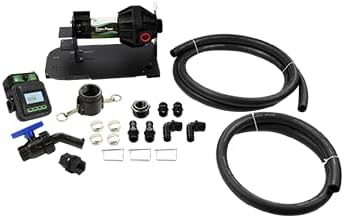
Figure 2: Individual components of the Dura Auto-Batch System kit. This image displays the Dura-Pump, Dura-Meter, hoses, and various fittings included in the package, ready for assembly.

Figure 3: Detailed view of the Dura-Meter. This image highlights the illuminated display, control buttons, and the manual/auto selector switch, demonstrating the user interface.

Figure 4: Dura-Meter with its power cable attached. This view shows the electrical connection point for the 12V power supply, essential for the meter's operation.
4. Setup
- Unpacking: Carefully unpack all components and verify against the packing list.
- Mounting: Securely mount the Dura ABS system to a stable surface or directly onto your tank, tote, or drum. Ensure the mounting location is appropriate for the weight and vibrations during operation.
- Hose Connections:
- Connect the suction hose to the system's suction port (2" Male NPT or 1" Female NPT) and immerse the other end into the fluid source.
- Connect the discharge hose to the pump's outlet and direct it to the receiving container.
- Power Connection: Connect the 12 Volt power supply to the system. Ensure the power source is stable and provides the correct voltage.
- Initial Inspection: Before first use, double-check all connections for tightness and ensure there are no kinks in the hoses.
Note: Tanks, totes, and drums are NOT included with the Dura ABS kit.
5. Operating Instructions
5.1 Power On
Once connected to power, the Dura-Meter™ display will illuminate.
5.2 Selecting Operation Mode
The Dura-Meter™ features a switch to select between Manual and Automatic operation:
- Manual Mode: In this mode, the pump will run continuously as long as the "Start" button is pressed or until manually stopped. This is suitable for continuous transfer or topping off.
- Automatic Mode: This mode allows for precise, pre-set batch dispensing. The pump will dispense the exact amount entered and then automatically shut off.
5.3 Automatic Batch Dispensing
- Switch the operation mode to "Auto" on the Dura-Meter™.
- Use the control buttons on the Dura-Meter™ to enter the desired volume to be dispensed (e.g., 10.00 gallons). The display will show the entered amount.
- Press the "Start" button. The pump will begin dispensing the fluid.
- The display will show the progress of the dispense. Once the pre-set volume is reached, the pump will automatically shut off.
- The system is optimized for repeatable batching and will return to the last volume amount dispensed upon completion of a cycle, making repeated operations efficient.
5.4 Unit Selection
The Dura-Meter™ can measure in gallons, liters, and ounces. Refer to the meter's specific instructions (usually accessible via a "Units" or "Menu" button) to change the displayed unit of measurement.

Figure 5: Multiple Dura Auto-Batch Systems configured for simultaneous operation. This demonstrates the scalability and efficiency of using several units for larger-scale fluid management.
6. Maintenance
- Cleaning: Regularly clean the exterior of the Dura-Meter™ and pump with a damp cloth. Avoid harsh chemicals that could damage the Lexan faceplate or other components.
- Hose Inspection: Periodically inspect hoses for cracks, leaks, or signs of wear. Replace damaged hoses immediately.
- Connection Check: Ensure all fittings and connections remain tight to prevent leaks.
- Storage: When not in use for extended periods, store the system in a clean, dry environment, protected from extreme temperatures.
- Moisture Protection: The Dura-Meter™ features 100% moisture-sealed circuitry, which helps prevent fogging and water damage. However, avoid submerging the meter or exposing it to excessive direct water spray.
7. Troubleshooting
| Problem | Possible Cause | Solution |
|---|---|---|
| Pump does not turn on. | No power, loose connection, faulty switch. | Check power supply and connections. Ensure the power switch is in the correct position. |
| Inaccurate dispensing. | Air in the line, meter calibration needed, fluid viscosity change. | Bleed air from the system. Refer to Dura-Meter™ manual for calibration instructions. Ensure consistent fluid properties. |
| Low flow rate. | Clogged filter/hose, pump wear, insufficient power. | Check and clear any obstructions in hoses or filters. Inspect pump for wear. Verify power supply. |
| Dura-Meter™ display is blank or unreadable. | No power to meter, internal fault. | Ensure power is connected. If problem persists, contact support. |
| Leaks from connections. | Loose fittings, damaged seals. | Tighten all connections. Inspect and replace any damaged EPDM seals or O-rings. |
8. Specifications
- Model: DPABS-6318E-12
- Brand: Dura
- Voltage: 12 Volt
- Seal Type: EPDM
- Maximum Flow Rate: 18 Gallons Per Minute (68 Liters Per Minute)
- Material: Acrylonitrile Butadiene Styrene (ABS)
- Suction Port: 2" Male NPT and 1" Female NPT
- Measurement Units: Gallons, Liters, Ounces
- ASIN: B0CY3SB8M8
- UPC: 784300194811
9. Warranty and Support
9.1 Warranty Information
The Dura ABS system is backed by a 2-year warranty from Dura Products. This warranty covers defects in materials and workmanship under normal use. Please retain your proof of purchase for warranty claims.
9.2 Customer Support
For technical assistance, troubleshooting beyond this manual, or warranty inquiries, please contact Dura Products customer support. Refer to the product packaging or the official Dura Products website for the most current contact information.

