
Introduction
This manual provides comprehensive instructions for the installation, operation, and maintenance of the Aruba AP-503 Dual Band IEEE 802.11ax Wireless Access Point. The AP-503 is designed to deliver high-performance, cost-effective connectivity for environments with increasing device density, cloud adoption, and IoT integration.
Key Features
- High-Speed Connectivity: Provides a maximum real-world aggregate data rate of 1.49 Gbps (HE80/HE20) for reliable and fast wireless performance.
- Optimized User Experience: Features like Orthogonal Frequency-Division Multiple Access (OFDMA) and cellular optimization reduce airtime contention and improve efficiency.
- Aruba Air Slice™: Ensures application assurance by optimizing radio resources for specific traffic types, providing SLA-grade performance.
- Wi-Fi 6 Aware Client Optimization: Utilizes Aruba's AI-powered ClientMatch technology to steer Wi-Fi 6 capable devices to the best available access point.
- Automated RF Optimization: AirMatch uses machine learning to adapt the network to changing RF conditions, including noise, radar, and density.
- Advanced Cellular Coexistence (ACC): Minimizes interference from cellular networks and other external sources.
- Gigabit Ethernet Port: For ultra-fast wired network speeds.
- Built-in Power Supply: Ensures accurate voltage supply to all components.
- Ceiling Mountable: Designed for convenient and discreet installation.
Product Overview

Figure 1: Top view of the Aruba AP-503, highlighting its sleek, circular design and the Aruba branding.
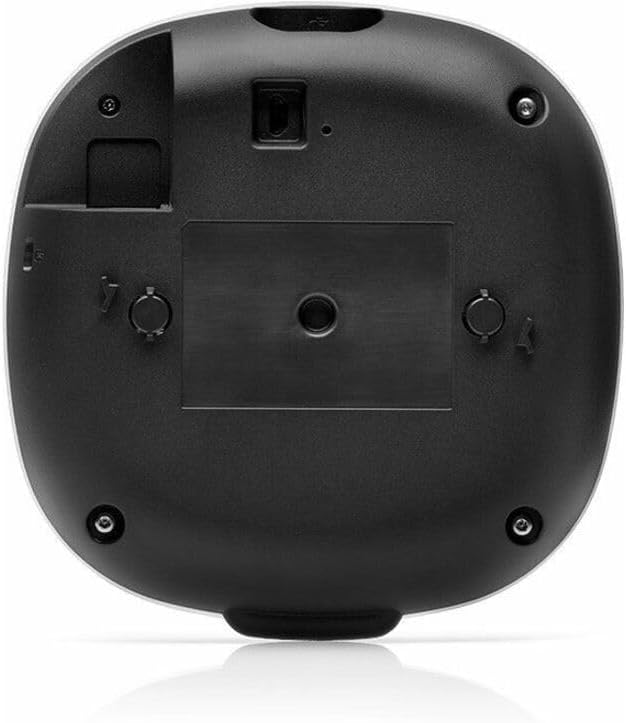
Figure 2: Bottom view of the Aruba AP-503, illustrating the mounting mechanism and port locations for connectivity.
Setup and Installation
The Aruba AP-503 is designed for easy deployment, typically ceiling-mounted. Ensure you have the necessary mounting hardware and network cables before beginning installation.
- Site Survey: Conduct a site survey to determine optimal placement for wireless coverage and minimize interference.
- Mounting: Securely attach the access point to the ceiling or wall using the appropriate mounting bracket (sold separately or included depending on kit). Refer to the mounting guide for detailed instructions.
- Power Connection: Connect the access point to a power source. The AP-503 supports Power over Ethernet (PoE) or an optional external power adapter.
- Network Connection: Connect the Gigabit Ethernet port of the AP-503 to your network switch or router.
- Initial Configuration: Access the access point's management interface via a web browser or dedicated Aruba management software to perform initial setup, including network settings, SSID configuration, and security protocols.
Operating Instructions
Once installed and configured, the Aruba AP-503 operates automatically to provide wireless connectivity. Users can connect to the configured Wi-Fi networks using their devices.
- Connecting Devices: Search for the configured Wi-Fi network (SSID) on your wireless devices (laptops, smartphones, tablets) and enter the password if required.
- Monitoring Performance: Use the Aruba management interface (e.g., Aruba Central or Instant GUI) to monitor network performance, connected clients, and troubleshoot any issues.
- Firmware Updates: Regularly check for and apply firmware updates to ensure optimal performance, security, and access to new features.
Maintenance
Regular maintenance ensures the longevity and optimal performance of your Aruba AP-503.
- Cleaning: Gently wipe the exterior of the access point with a soft, dry cloth. Do not use liquid cleaners or aerosols.
- Firmware Management: Keep the device firmware updated to the latest stable version. This often includes security patches and performance enhancements.
- Environmental Conditions: Ensure the access point is operating within its specified temperature and humidity ranges to prevent overheating or damage.
- Network Monitoring: Periodically review network logs and performance metrics through the management interface to identify and address potential issues proactively.
Troubleshooting
| Problem | Possible Cause | Solution |
|---|---|---|
| No Power/LEDs Off | Power cable disconnected; PoE not active; faulty power adapter. | Check power connections. Ensure PoE switch port is active or use a functional power adapter. |
| Cannot Connect to Wi-Fi | Incorrect Wi-Fi password; out of range; SSID hidden; AP not broadcasting. | Verify password. Move closer to AP. Check AP configuration for SSID broadcast. Restart AP. |
| Slow Wi-Fi Speed | Network congestion; interference; outdated firmware; poor AP placement. | Reduce number of connected devices. Check for interference sources. Update firmware. Re-evaluate AP placement. |
| Access Point Not Visible on Network | Network cable issue; IP address conflict; management interface misconfiguration. | Check Ethernet cable connection. Verify IP address settings. Ensure management interface is accessible. |
Specifications
| Attribute | Detail |
|---|---|
| Brand | Aruba |
| Model Number | AP-503 |
| Wireless Standard | IEEE 802.11ax (Wi-Fi 6) |
| Frequency Band Class | Dual-Band (2.4 GHz, 5 GHz) |
| Max Data Rate | 1.49 Gbit/s (aggregate) |
| Connectivity Technology | Wi-Fi, Ethernet |
| Ethernet Ports | Gigabit Ethernet |
| Antenna Form Factor | Internal |
| Mounting Type | Ceiling Mountable |
| Product Dimensions | 5.7 x 5.7 x 1.4 inches |
| Item Weight | 9 ounces |
| Manufacturer | HPE - ARUBA NON-INSTANT |
Warranty and Support
For detailed warranty information and technical support, please refer to the official Aruba website or contact Aruba customer service. Keep your purchase receipt for warranty claims.
Official Aruba Website: www.arubanetworks.com


