
1. Introduction
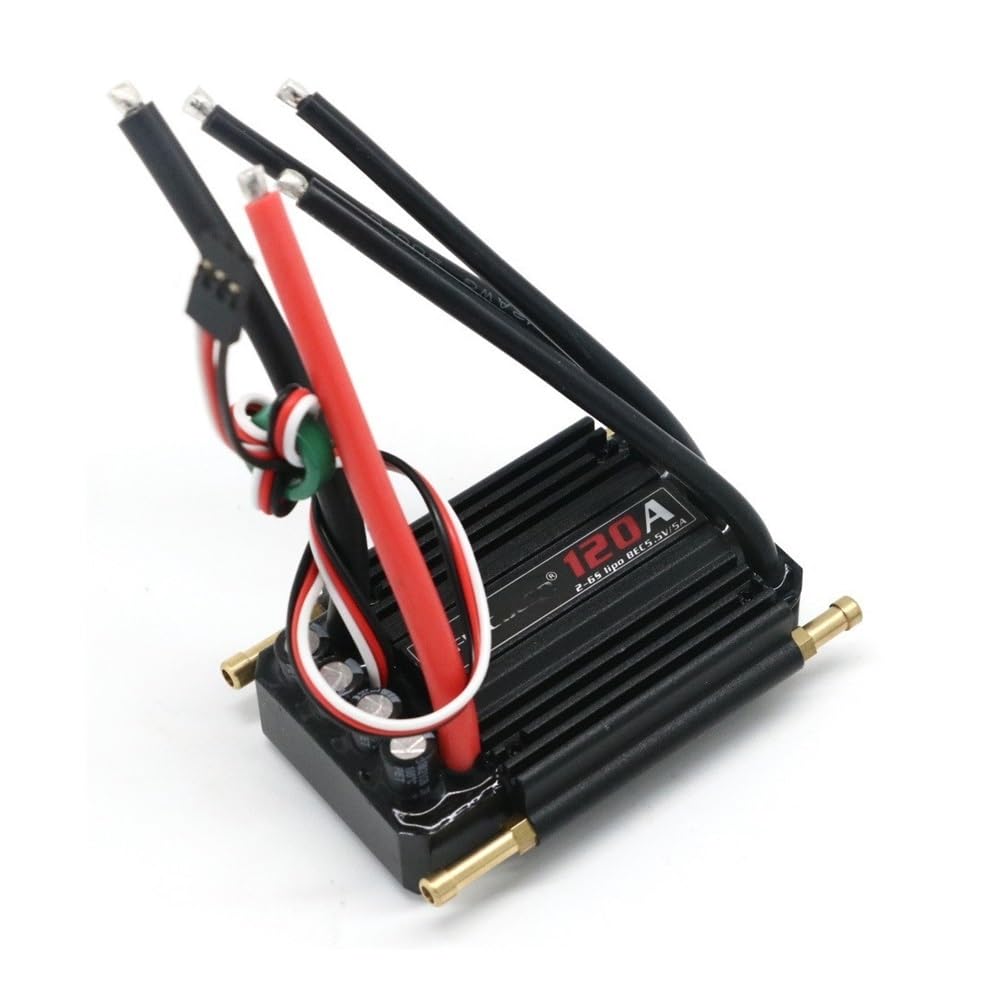
Thank you for choosing the Flycolor 120A (2-6S) Brushless Electronic Speed Controller (ESC). This ESC is designed for RC boats, offering reliable performance and advanced features. Please read this manual thoroughly before installation and operation to ensure proper use and maximize the lifespan of your product.
2. Safety Information
Operating RC equipment requires careful attention to safety. Failure to follow these instructions may result in damage to the product, property, or serious injury.
- Always disconnect the battery from the ESC when not in use.
- Ensure all connections are secure and properly insulated to prevent short circuits.
- Never operate the ESC with damaged wires or connectors.
- Keep the ESC away from water and moisture. If water enters the ESC, dry the connector parts thoroughly before reuse.
- The motor will not start immediately regardless of the throttle lever position when power is applied, enhancing safety.
- Always use batteries that match the voltage range specified for this ESC (2-6S LiPo).
- Ensure adequate ventilation for the ESC during operation to prevent overheating.
3. Product Features
- High Performance MCU: Utilizes a powerful and high-performance Microcontroller Unit (MCU) for intelligent control.
- Waterproof Design: Designed to be waterproof for marine applications. (Note: If water enters the ESC, ensure all connector parts are thoroughly dried before next use).
- Built-in SBEC: Integrated Switch-Mode BEC (5.5V/5A) provides stable power to your receiver and servos.
- Multiple Protection Functions: Includes input voltage abnormal protection, low voltage cut-off protection, overheat protection, and throttle signal loss protection for enhanced reliability.
- Smooth Operation: Offers fast throttle response and very smooth speed control linearity.
- Programmable: Parameters can be set via a program card or transmitter.
- Anti-interference: Unique circuit design ensures strong anti-interference capabilities.
- Overheat Protection: If the ESC temperature exceeds 100°C, output power automatically reduces. Power returns to normal when temperature drops below 80°C.
4. Setup
Follow these steps to properly set up your Flycolor 120A ESC:
- Mounting the ESC: Securely mount the ESC in your RC boat, ensuring good airflow for cooling. Use double-sided tape or zip ties.
- Motor Connection: Connect the three motor wires to the three output wires of the ESC. The order of connection may affect motor rotation direction. If the motor rotates in the wrong direction, swap any two of the motor wires.
- Battery Connection: Connect the battery connector to the input power wires of the ESC. Ensure correct polarity (red to positive, black to negative).
- Receiver Connection: Plug the BEC output cable from the ESC into the throttle channel (usually channel 2) of your RC receiver.
- Transmitter Setup: Ensure your transmitter's throttle trim is at neutral and the throttle range is set to 100% for both high and low endpoints.
5. Operating Instructions
To operate your RC boat with the Flycolor 120A ESC:
- Power On: Turn on your RC transmitter first. Then, connect the battery to the ESC. The ESC will emit a series of tones indicating successful initialization.
- Throttle Calibration (if needed): If the motor does not respond correctly or the throttle range is off, you may need to calibrate the throttle. Refer to the programming section for details.
- Operation: Slowly advance the throttle stick on your transmitter. The motor should respond smoothly. Increase throttle for more speed.
- Reverse: If reverse is enabled, moving the throttle stick to the reverse position will engage the motor in reverse.
- Power Off: Always disconnect the battery from the ESC first, then turn off your transmitter.
6. Programming
The Flycolor 120A ESC supports parameter adjustment using a dedicated program card (sold separately) or through your transmitter. Refer to the program card manual for detailed instructions on its use. Basic programming via transmitter typically involves:
- Enter Programming Mode: With the transmitter on and throttle at full, connect the battery to the ESC. The ESC will emit a specific tone sequence.
- Select Parameter: Move the throttle stick to select different parameters as indicated by the ESC's beeps.
- Change Value: Move the throttle stick to change the value of the selected parameter.
- Save and Exit: Follow the ESC's beep sequence to save your settings and exit programming mode.
Commonly Adjustable Parameters:
- Start Mode (Soft/Normal/Hard)
- Low Voltage Cut-off Threshold
- Brake Type
- Timing
- Direction of Rotation
7. Maintenance
Proper maintenance ensures the longevity and optimal performance of your ESC:
- Cleaning: After each use, especially in marine environments, gently clean the ESC to remove any dirt, salt, or debris. Use a soft brush or compressed air.
- Drying: If the ESC gets wet, ensure it is completely dry before storing or next use. Pay special attention to connectors.
- Inspection: Regularly inspect all wires, connectors, and the ESC casing for any signs of damage, fraying, or corrosion. Replace damaged components immediately.
- Storage: Store the ESC in a cool, dry place away from direct sunlight and extreme temperatures.
8. Troubleshooting
If you encounter issues with your Flycolor 120A ESC, refer to the following common problems and solutions:
| Problem | Possible Cause | Solution |
|---|---|---|
| Motor does not start or stutters | Incorrect throttle calibration, loose connections, motor/ESC damage, low battery voltage. | Recalibrate throttle. Check all wiring. Inspect motor and ESC for damage. Charge or replace battery. |
| ESC overheats | Insufficient cooling, excessive load, incorrect motor timing. | Ensure adequate airflow. Reduce load. Adjust motor timing (if programmable). |
| Motor runs in wrong direction | Incorrect motor wire connection. | Swap any two of the three motor wires. |
| No power to receiver/servos | BEC failure, loose BEC connection. | Check BEC wire connection to receiver. Test with another BEC or ESC. |
9. Specifications
Detailed specifications for the Flycolor 120A (2-6S) Brushless ESC:
- Continuous Output: 120A
- Burst Output: 720A (for 10 seconds)
- Input Voltage: 2-6S LiPo
- BEC Output: 5.5V/5A (Switch Mode)
- Dimensions: 76mm x 56mm x 25mm
- Weight: 155g
- Application: RC Boats up to 120cm in length
- Waterproof: Yes (Note: Dry connectors if water enters)
- Protection Features: Input Voltage Abnormal, Low Voltage Cut-off, Overheat, Throttle Signal Loss
Note: Specifications for other amperage models (50A, 70A, 90A, 150A) will vary in continuous/burst output, dimensions, weight, and applicable boat size. This manual focuses on the 120A model.
10. Warranty and Support
Warranty: This product comes with no explicit warranty as per manufacturer specifications. Please inspect the product upon receipt for any manufacturing defects.
Support: For technical assistance or inquiries, please contact your retailer or the manufacturer directly. Ensure you have your product model and purchase details available when seeking support.


