
ETA ETA918090000
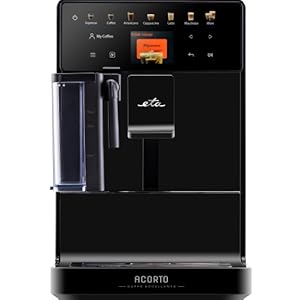
ETA Acorto Fully Automatic Coffee Machine
Model: ETA918090000
Brand: ETA
1. Introduction and Overview
The ETA Acorto fully automatic coffee machine is designed to prepare a wide variety of coffee specialties and milk-based beverages at the touch of a button. Its slim design and intuitive operation make it a versatile addition to any kitchen. This manual provides essential information for safe and efficient use, from initial setup to daily maintenance.

The ETA Acorto coffee machine in operation, brewing a layered latte into a glass cup.
2. Safety Instructions
Please read all safety instructions carefully before operating the appliance. Keep this manual for future reference.
- Always connect the appliance to a grounded power outlet.
- Do not immerse the appliance, power cord, or plug in water or other liquids.
- Keep the appliance out of reach of children.
- Unplug the appliance before cleaning and when not in use.
- Do not operate the appliance if it has a damaged cord or plug, or if it malfunctions.
- Only use original accessories and spare parts.
3. What's in the Box
Upon unpacking your ETA Acorto coffee machine, please ensure all components are present:
- ETA Acorto Fully Automatic Coffee Machine
- Measuring cup for ground coffee
- Milk container
- Drip tray and coffee grounds container
- User Manual (this document)
An exploded view showing the main components of the ETA Acorto coffee machine, including the water tank, bean hopper, milk container, and drip tray.
4. Setup
- Placement: Place the coffee machine on a stable, level, and heat-resistant surface. Ensure adequate ventilation around the appliance.
- Water Tank: Fill the removable water tank with fresh, cold drinking water. Do not exceed the MAX fill line.
- Bean Hopper: Open the lid of the bean hopper and fill it with fresh coffee beans. The integrated stainless steel grinder will process these.
- Ground Coffee Option: If using pre-ground coffee, use the dedicated compartment and the provided measuring cup. Do not add ground coffee to the bean hopper.
- Milk Container: If preparing milk-based beverages, fill the milk container with fresh milk and attach it to the designated port.
- Power Connection: Plug the power cord into a suitable electrical outlet.

A hand pouring fresh coffee beans into the bean hopper of the ETA Acorto coffee machine.

A hand using a scoop to add pre-ground coffee into the dedicated compartment of the ETA Acorto coffee machine.
5. Operating Instructions
The control panel with its display and touch buttons provides an easy-to-use interface for selecting and customizing your beverages.
5.1. Making Coffee
- Power On: Press the power button to turn on the machine. It will perform an automatic rinse cycle.
- Select Beverage: Use the touch display to select your desired coffee specialty (e.g., Espresso, Coffee, Americano, Cappuccino, Latte, Macchiato, Flat White).
- Adjust Settings (Optional): For many beverages, you can adjust parameters such as coffee strength, volume, and milk foam quantity using the display options. The height-adjustable spout allows for various cup sizes.
- Start Brewing: Place a cup under the spout and press the start button. The machine will begin the brewing process.

A hand selecting a beverage option on the touch display of the ETA Acorto coffee machine while it brews a latte.
5.2. Milk Frothing
The integrated milk frother allows for creamy milk foam for your favorite milk-based drinks.
- Ensure the milk container is filled with fresh, cold milk and properly attached.
- Select a milk-based beverage (e.g., Cappuccino, Latte, Macchiato).
- The machine will automatically froth the milk and dispense it, followed by the coffee.

The ETA Acorto coffee machine dispensing frothed milk into a glass cup, preparing a milk-based coffee drink.
6. Maintenance
Regular cleaning and maintenance are crucial for the longevity and optimal performance of your coffee machine. The machine features automatic cleaning functions.
6.1. Daily Cleaning
- Drip Tray and Coffee Grounds Container: Empty and rinse daily.
- Milk System: After each milk-based beverage, perform the automatic milk system cleaning cycle. The milk container can be easily rinsed under running water.
- Brew Group: The brew group is removable for manual cleaning. Rinse it under lukewarm water.

A visual representation highlighting the easy and quick cleaning process for the milk container, which can be rinsed under running water.
6.2. Descaling
The machine will prompt you when descaling is necessary. Follow the instructions on the display and use a suitable descaling solution recommended by the manufacturer.
7. Troubleshooting
This section addresses common issues you might encounter.
| Problem | Possible Cause | Solution |
|---|---|---|
| No coffee dispenses | Water tank empty, bean hopper empty, brew group clogged. | Refill water/beans, clean brew group. |
| Coffee is too weak/strong | Grind setting, coffee strength setting. | Adjust grind fineness or coffee strength on the display. |
| Milk not frothing properly | Milk container not clean, milk type/temperature, milk system clogged. | Clean milk container and system, use cold fresh milk. |
| Machine displays error message | Specific internal issue. | Refer to the specific error code in the full manual or contact customer support. |
8. Specifications
- Brand: ETA
- Model Number: ETA918090000
- Color: Black
- Product Dimensions (L x W x H): 45.2 x 21.5 x 34.2 cm
- Item Weight: 9.6 Kilograms
- Power: 1400W (implied from title)
- Features: Milk frother, Automatic shutdown, Integrated coffee grinder, Removable water tank, Automatic cleaning.
9. Warranty and Support
For warranty information, technical support, or service requests, please refer to the warranty card included with your product or visit the official ETA website. Keep your proof of purchase for warranty claims.
ETA Official Website: www.eta.cz/en/
Related documentsETA918090000


Ask a question about this manual
Ask about setup, troubleshooting, compatibility, parts, safety, or missing instructions. Manuals+ will review the question and use this page’s manual context to help answer it.